
oracle修改用户密码的方法
Oracle用户名及默认密码
修改oracle用户的密码有以下方法:
普通用户
(1)通过alter user语法来进行修改 ,这也是最常见的方式:
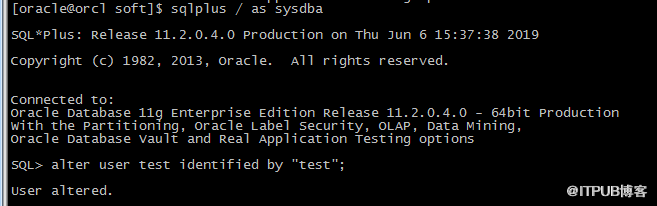
(2) 第二种方式,是通过password命令来修改:

从安全性角度来说 ,推荐大家通过第二种方式来修改用户密码,这样可防止明文密码泄露。
sys用户
另外关于sys用户密码,不要使用password以及alter user 方式去修改,原因主要如下:
(1) 当REMOTE_LOGIN_PASSWORDFILE参数设置为shared时,我们使用alter user 修改sys密码时,会报
ORA-28046: Password change for SYS disallowed error.
测试如下:

(2) 大多数内部递归SQL都使用SYS用户。因此,如果您试图在数据库打开时使用ALTER USER语句更改此密码,则可能会导致死锁。
因此,对于sys用户我们需要使用orapwd来进行修改:
[oracle@orcl dbs]$ orapwd file='orapworcl' entries=5 force=y 这里注意等号左右不能有空格;
关于orapwd说明引用官网,如下:
| Argument | Description |
|---|---|
|
Name to assign to the password file. You must supply a complete path. If you supply only a file name, the file is written to the current directory. |
|
(Optional) Maximum number of entries (user accounts) to permit in the file. |
|
(Optional) If , permits overwriting an existing password file. |
|
(Optional) If , passwords are treated as case-insensitive. |
- FILE
-
This argument sets the name of the password file being created. You must
specify the full path name for the file. This argument is mandatory.The file name required for the password file is operating system
specific. Some operating systems require the password file to adhere to a
specific format and be located in a specific directory. Other operating
systems allow the use of environment variables to specify the name and
location of the password file.lists the required name and location for the password file on the UNIX,
Linux, and Windows platforms. For other platforms, consult your
platform-specific documentation.Table 1-1 Required Password File Name and Location on UNIX, Linux, and Windows
Platform Required Name Required Location) UNIX and Linux
orapw
ORACLE_SID
ORACLE_HOME
/dbs
Windows
PWD
ORACLE_SID
.ora
ORACLE_HOME
\database
For example, for a database instance with the SID
orcldw
, the password file must be named
orapworcldw
on Linux and
PWDorcldw.ora
on Windows.In an Oracle Real Application Clusters environment on a platform that
requires an environment variable to be set to the path of the password
file, the environment variable for each instance must point to the same
password file.Caution:
It is critically important to the security of your system that you
protect your password file and the environment variables that identify
the location of the password file. Any user with access to these could
potentially compromise the security of the connection. - ENTRIES
-
This argument specifies the number of entries that you require the
password file to accept. This number corresponds to the number of
distinct users allowed to connect to the database as
SYSDBA
or
SYSOPER
. The actual number of allowable entries can be higher than the number of users, because the
ORAPWD
utility continues to assign password entries until an operating system
block is filled. For example, if your operating system block size is 512
bytes, it holds four password entries. The number of password entries
allocated is always a multiple of four.Entries can be reused as users are added to and removed from the password file. If you intend to specify
REMOTE_LOGIN_PASSWORDFILE=EXCLUSIVE
, and to allow the granting of
SYSDBA
and
SYSOPER
privileges to users, this argument is required.Caution:
When you exceed the allocated number of password entries, you must
create a new password file. To avoid this necessity, allocate more
entries than you think you will ever need. - FORCE
-
This argument, if set to
Y
, enables you to overwrite an existing password file. An error is
returned if a password file of the same name already exists and this
argument is omitted or set to
N
. - IGNORECASE
-
If this argument is set to
y
, passwords are case-insensitive. That is, case is ignored when
comparing the password that the user supplies during login with the
password in the password file.
oracle修改用户密码的方法的更多相关文章
- vcenter修改用户密码的方法
https://192.168.x.x:9443登录,必须用administrator@vsphere.local登录,不能用root用户登录. 主页-系统设置- Single Sing-On-用户和 ...
- 德邦总管 修改oracle数据库用户密码的方法
WIN+R打开运行窗口,输入cmd进入命令行: 输入sqlplus ,输入用户名,输入口令(如果是超级管理员SYS的话需在口令之后加上as sysdba)进入sql命令行: 连接成功后,输入“s ...
- 修改oracle数据库用户密码的方法
WIN+R打开运行窗口,输入cmd进入命令行: 输入sqlplus ,输入用户名,输入口令(如果是超级管理员SYS的话需在口令之后加上as sysdba)进入sql命令行: 连接成功后,输入“s ...
- oracle修改用户密码过期时间
Oracle默认在default概要文件中设置了“PASSWORD_LIFE_TIME=180天”,导致密码过期,程序无法使用,业务进程会提示无法连接数据库等字样. --查询默认密码过期时间 SELE ...
- oracle修改用户密码
1.使用oracle用户登录,连接数据库 [oracle@wuzj ~]$ sqlplus /nolog SQL*Plus: Release 10.2.0.1.0 - Production on Th ...
- Sqlserver 命令行方式修改 用户密码的方法
1. 之前写了一个 可以使用 ssms 的方式修改密码的情况 2. 还有办法是执行命令 exec sp_password null,'newpassword','sa' # sa 是用户名 newp ...
- oracle 修改用户密码
SYS用户是Oracle中权限最高的用户,而SYSTEM是一个用于数据库管理的用户.在数据库安装完之后,应立即修改SYS,SYSTEM这两个用户的密码,以保证数据库的安全. 安装完之后修改密码方法 c ...
- Oracle修改用户密码错误次数及解锁用户
ORACLE11g错误密码登录默认是10次,10次错误后用户将被锁定,如下: SQL> conn test/123456 ERROR: ORA-28000: the account is loc ...
- mysql修改用户密码的方法及命令
方法1: 用SET PASSWORD命令 首先登录MySQL. 格式:mysql> set password for 用户名@localhost = password('新密码'); 例子:my ...
- oracle修改用户密码操作
打开命令提示框输入以下内容: 1.输入:sqlplus /nolog //进入oralce控制台2.输入:conn /as sysdba //以管理员权限登录3.输入:alter user apps ...
随机推荐
- 长连接网关技术专题(十):百度基于Go的千万级统一长连接服务架构实践
本文由百度技术团队分享,引用自百度Geek说,原题"千万级高性能长连接Go服务架构实践",为了阅读便利,本文进行了排版优化等. 1.引言 移动互联网时代,长连接服务成为了提升应用实 ...
- 得物自研客服IM中收发聊天消息背后的技术逻辑和思考实现
本文由得物技术WWQ分享,原题"客服发送一条消息背后的技术和思",本文有修订和改动. 1.引言 在企业IM客服场景中,客服发送一条消息的背后,需要考虑网络通信.前端展示.后端存储以 ...
- springboot~多节点应用里的雪花算法唯一性
雪花算法的唯一性,在单个节点中是可以保证的,对应kubernetes中的应用,如果是横向扩展后,进行多副本的情况下,可能出现重复的ID,这需要我们按着pod_name进行一个workId的生成,我还是 ...
- [LC1302] 层数最深叶子节点的和
题目概述 给你一棵二叉树的根节点 root ,请你返回 层数最深的叶子节点的和 . 基本思路 这是一个简单的树的遍历的问题,可以用bfs或者dfs来解题.这里采用dfs来解,在遍历的过程中,只需要用全 ...
- Solution -「POI 2013」LAB-Maze
\(\mathscr{Description}\) Link. 构造一个边平行与坐标轴, 顶点是整点, 相邻边互相垂直, 且逆时针遍历顶点时转向 (向左或向右) 符合给定字符串的不自交多边形. ...
- Note - 两类容斥
\(\S1.\) 等价容斥 (乱取的名字.) 题目将组合对象构成的 "等价类" 进行了定义和限定. 我们往往无法计数 "等价类真的长这样" 的方案, 而 ...
- Java经典面试36题和答案
1."static"关键字是什么意思?Java中是否可以覆盖(override)一个private或者是static的方法? "static"关键字表明一个成员 ...
- The Communication Complexity of Threshold Private Set Intersection-2019:解读
记录阅读论文的笔记. 什么是阈值PSI? Alice和Bob当两者的交集大小不小于\(n-t\)时(两者的不同元素的数量不大于阈值\(2t\)时),才会求交集. 所以阈值PSI会分为两步: 1.检测 ...
- Confusion pg walkthrough Intermediate
namp ┌──(root㉿kali)-[~] └─# nmap -p- -A 192.168.188.99 Starting Nmap 7.94SVN ( https://nmap.org ) at ...
- RocketMQ原理—4.消息读写的性能优化
大纲 1.Producer基于队列的消息分发机制 2.Producer基于Hash的有序消息分发 3.Broker如何实现高并发消息数据写入 4.RocketMQ读写队列的运作原理分析 5.Consu ...