
python--爬虫入门(八)体验HTMLParser解析网页,网页抓取解析整合练习
python系列均基于python3.4环境
- 基本概念
html.parser的核心是HTMLParser类。工作的流程是:当你feed给它一个类似HTML格式的字符串时,它会调用goahead方法向前迭代各个标签,并调用对应的parse_xxxx方法提取start_tag,tag,data,comment和end_tag等等标签信息和数据,然后调用对应的方法对这些抽取出来的内容进行处理。
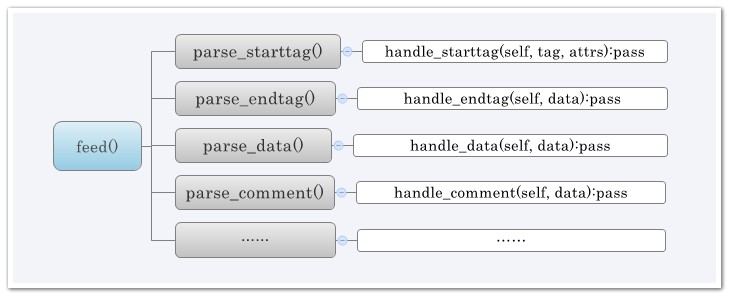
- 几个比较常用的:
handle_startendtag #处理开始标签和结束标签
handle_starttag #处理开始标签,比如<xx>
handle_endtag #处理结束标签,比如</xx>或者<……/>
handle_charref #处理特殊字符串,就是以&#开头的,一般是内码表示的字符
handle_entityref #处理一些特殊字符,以&开头的,比如
handle_data #处理<xx>data</xx>中间的那些数据
handle_comment #处理注释
handle_decl #处理<!开头的,比如<!DOCTYPE html PUBLIC "-//W3C//DTD HTML 4.01 Transitional//EN"
handle_pi #处理形如<?instruction>的
@_@) 接下来,我们来体验下html.parser!!!
- 下面这一段将是用来做测试数据的html代码段:
<head>

    <meta charset="utf-8"/>

    <title>找找看 - 博客园</title>

    <link rel="shortcut icon" href="/Content/Images/favicon.ico" type="image/x-icon"/>

    <meta content="技术搜索,IT搜索,程序搜索,代码搜索,程序员搜索引擎" name="keywords" />

    <meta content="面向程序员的专业搜索引擎。遇到技术问题怎么办,到博客园找找看..." name="description" />

    <link type="text/css" href="/Content/Style.css" rel="stylesheet" />

    <script src="http://common.cnblogs.com/script/jquery.js" type="text/javascript"></script>

    <script src="/Scripts/Common.js" type="text/javascript"></script>

    <script src="/Scripts/Home.js" type="text/javascript"></script>

</head>
- 体验三个基本函数:
def handle_starttag(self, tag, attrs)  #处理开始标签,比如<xx>

def handle_data(self, data)            #处理<xx>data</xx>中间的那些数据

def handle_endtag(self, tag)           #处理结束标签,比如</xx>或者<……/>
- 代码示例:(python3.4)
import html.parser as h

class MyHTMLParser(h.HTMLParser):

    a_t=False

    #处理开始标签,比如<xx>

    def handle_starttag(self, tag, attrs):

        print("开始一个标签:",tag)

        if str(tag).startswith("title"):

            self.a_t=True

        for attr in attrs:

            print("属性值:",attr)

       # print()

    #处理<xx>data</xx>中间的那些数据

    def handle_data(self, data):

        if self.a_t is True:

            print("得到的数据: ",data)

    #处理结束标签,比如</xx>或者<……/>

    def handle_endtag(self, tag):

        self.a_t=False

        print("结束一个标签:",tag)

        print()

p=MyHTMLParser()

mystr = '''<head>

    <meta charset="utf-8"/>

    <title>找找看 - 博客园</title>

    <link rel="shortcut icon" href="/Content/Images/favicon.ico" type="image/x-icon"/>

    <meta content="技术搜索,IT搜索,程序搜索,代码搜索,程序员搜索引擎" name="keywords" />

    <meta content="面向程序员的专业搜索引擎。遇到技术问题怎么办,到博客园找找看..." name="description" />

    <link type="text/css" href="/Content/Style.css" rel="stylesheet" />

    <script src="http://common.cnblogs.com/script/jquery.js" type="text/javascript"></script>

    <script src="/Scripts/Common.js" type="text/javascript"></script>

    <script src="/Scripts/Home.js" type="text/javascript"></script>

</head>'''

p.feed(mystr)

p.close()
- 运行结果:
C:\Python34\python.exe E:/pythone_workspace/mydemo/spider/h2.py

开始一个标签: head

开始一个标签: meta

属性值: ('charset', 'utf-8')

结束一个标签: meta

开始一个标签: title

得到的数据:  找找看 - 博客园

结束一个标签: title

开始一个标签: link

属性值: ('rel', 'shortcut icon')

属性值: ('href', '/Content/Images/favicon.ico')

属性值: ('type', 'image/x-icon')

结束一个标签: link

开始一个标签: meta

属性值: ('content', '技术搜索,IT搜索,程序搜索,代码搜索,程序员搜索引擎')

属性值: ('name', 'keywords')

结束一个标签: meta

开始一个标签: meta

属性值: ('content', '面向程序员的专业搜索引擎。遇到技术问题怎么办,到博客园找找看...')

属性值: ('name', 'description')

结束一个标签: meta

开始一个标签: link

属性值: ('type', 'text/css')

属性值: ('href', '/Content/Style.css')

属性值: ('rel', 'stylesheet')

结束一个标签: link

开始一个标签: script

属性值: ('src', 'http://common.cnblogs.com/script/jquery.js')

属性值: ('type', 'text/javascript')

结束一个标签: script

开始一个标签: script

属性值: ('src', '/Scripts/Common.js')

属性值: ('type', 'text/javascript')

结束一个标签: script

开始一个标签: script

属性值: ('src', '/Scripts/Home.js')

属性值: ('type', 'text/javascript')

结束一个标签: script

结束一个标签: head

Process finished with exit code
View Result
-------@_@? html.parser------------------------------------------------------------
提问:除了上面列出的比较常用的功能之外?还有什么别的功能呢?
--------------------------------------------------------------------------------------
了解下html.parser还有什么功能!!!
- 代码如下:
import html.parser

help(html.parser)
- 运行结果:
C:\Python34\python.exe E:/pythone_workspace/mydemo/test.py

Help on module html.parser in html:

NAME

    html.parser - A parser for HTML and XHTML.

CLASSES

    _markupbase.ParserBase(builtins.object)

        HTMLParser

    class HTMLParser(_markupbase.ParserBase)

     |  Find tags and other markup and call handler functions.

     |

     |  Usage:

     |      p = HTMLParser()

     |      p.feed(data)

     |      ...

     |      p.close()

     |

     |  Start tags are handled by calling self.handle_starttag() or

     |  self.handle_startendtag(); end tags by self.handle_endtag().  The

     |  data between tags is passed from the parser to the derived class

     |  by calling self.handle_data() with the data as argument (the data

     |  may be split up in arbitrary chunks).  If convert_charrefs is

     |  True the character references are converted automatically to the

     |  corresponding Unicode character (and self.handle_data() is no

     |  longer split in chunks), otherwise they are passed by calling

     |  self.handle_entityref() or self.handle_charref() with the string

     |  containing respectively the named or numeric reference as the

     |  argument.

     |

     |  Method resolution order:

     |      HTMLParser

     |      _markupbase.ParserBase

     |      builtins.object

     |

     |  Methods defined here:

     |

     |  __init__(self, strict=<object object at 0x00A50488>, *, convert_charrefs=<object object at 0x00A50488>)

     |      Initialize and reset this instance.

     |

     |      If convert_charrefs is True (default: False), all character references

     |      are automatically converted to the corresponding Unicode characters.

     |      If strict is set to False (the default) the parser will parse invalid

     |      markup, otherwise it will raise an error.  Note that the strict mode

     |      and argument are deprecated.

     |

     |  check_for_whole_start_tag(self, i)

     |      # Internal -- check to see if we have a complete starttag; return end

     |      # or - if incomplete.

     |

     |  clear_cdata_mode(self)

     |

     |  close(self)

     |      Handle any buffered data.

     |

     |  error(self, message)

     |

     |  feed(self, data)

     |      Feed data to the parser.

     |

     |      Call this as often as you want, with as little or as much text

     |      as you want (may include '\n').

     |

     |  get_starttag_text(self)

     |      Return full source of start tag: '<...>'.

     |

     |  goahead(self, end)

     |      # Internal -- handle data as far as reasonable.  May leave state

     |      # and data to be processed by a subsequent call.  If 'end' is

     |      # true, force handling all data as if followed by EOF marker.

     |

     |  handle_charref(self, name)

     |      # Overridable -- handle character reference

     |

     |  handle_comment(self, data)

     |      # Overridable -- handle comment

     |

     |  handle_data(self, data)

     |      # Overridable -- handle data

     |

     |  handle_decl(self, decl)

     |      # Overridable -- handle declaration

     |

     |  handle_endtag(self, tag)

     |      # Overridable -- handle end tag

     |

     |  handle_entityref(self, name)

     |      # Overridable -- handle entity reference

     |

     |  handle_pi(self, data)

     |      # Overridable -- handle processing instruction

     |

     |  handle_startendtag(self, tag, attrs)

     |      # Overridable -- finish processing of start+end tag: <tag.../>

     |

     |  handle_starttag(self, tag, attrs)

     |      # Overridable -- handle start tag

     |

     |  parse_bogus_comment(self, i, report=)

     |      # Internal -- parse bogus comment, return length or - if not terminated

     |      # see http://www.w3.org/TR/html5/tokenization.html#bogus-comment-state

     |

     |  parse_endtag(self, i)

     |      # Internal -- parse endtag, return end or - if incomplete

     |

     |  parse_html_declaration(self, i)

     |      # Internal -- parse html declarations, return length or - if not terminated

     |      # See w3.org/TR/html5/tokenization.html#markup-declaration-open-state

     |      # See also parse_declaration in _markupbase

     |

     |  parse_pi(self, i)

     |      # Internal -- parse processing instr, return end or - if not terminated

     |

     |  parse_starttag(self, i)

     |      # Internal -- handle starttag, return end or - if not terminated

     |

     |  reset(self)

     |      Reset this instance.  Loses all unprocessed data.

     |

     |  set_cdata_mode(self, elem)

     |

     |  unescape(self, s)

     |      # Internal -- helper to remove special character quoting

     |

     |  unknown_decl(self, data)

     |

     |  ----------------------------------------------------------------------

     |  Data and other attributes defined here:

     |

     |  CDATA_CONTENT_ELEMENTS = ('script', 'style')

     |

     |  ----------------------------------------------------------------------

     |  Methods inherited from _markupbase.ParserBase:

     |

     |  getpos(self)

     |      Return current line number and offset.

     |

     |  parse_comment(self, i, report=)

     |      # Internal -- parse comment, return length or - if not terminated

     |

     |  parse_declaration(self, i)

     |      # Internal -- parse declaration (for use by subclasses).

     |

     |  parse_marked_section(self, i, report=)

     |      # Internal -- parse a marked section

     |      # Override this to handle MS-word extension syntax <![if word]>content<![endif]>

     |

     |  updatepos(self, i, j)

     |      # Internal -- update line number and offset.  This should be

     |      # called for each piece of data exactly once, in order -- in other

     |      # words the concatenation of all the input strings to this

     |      # function should be exactly the entire input.

     |

     |  ----------------------------------------------------------------------

     |  Data descriptors inherited from _markupbase.ParserBase:

     |

     |  __dict__

     |      dictionary for instance variables (if defined)

     |

     |  __weakref__

     |      list of weak references to the object (if defined)

DATA

    __all__ = ['HTMLParser']

FILE

    c:\python34\lib\html\parser.py

Process finished with exit code
View Result
---------@_@! 整合练习--------------------------------------------------------------
上一篇python--爬虫入门(七)urllib库初体验以及中文编码问题的探讨,提到抓取网页!
那么,我们将前面内容和上篇整合一下,练习练习
----------------------------------------------------------------------------------------
开始整合练习!!!
- 新建package,命名为spider,新建两个.py文件。

(1)HtmlParser.py代码如下:
import html.parser as h

class MyHTMLParser(h.HTMLParser):

    a_t=False

    #处理开始标签,比如<xx>

    def handle_starttag(self, tag, attrs):

        print("开始一个标签:",tag)

        if str(tag).startswith("title"):

            self.a_t=True

        for attr in attrs:

            print("属性值:",attr)

       # print()

    #处理<xx>data</xx>中间的那些数据

    def handle_data(self, data):

        if self.a_t is True:

            print("得到的数据: ",data)

    #处理结束标签,比如</xx>或者<……/>

    def handle_endtag(self, tag):

        self.a_t=False

        print("结束一个标签:",tag)

        print()
(2)Demo.py代码如下:
import urllib.request

import urllib.parse

import spider.HtmlParser

response=urllib.request.urlopen("http://zzk.cnblogs.com/b")

myStr=response.read().decode('UTF-8')

print("-----------网页源码-----------------")

print(myStr)

print("-----------开始解析网页-------------")

p=spider.HtmlParser.MyHTMLParser()

p.feed(myStr)

p.close()
- 运行Demo.py,结果显示:
C:\Python34\python.exe E:/pythone_workspace/mydemo/spider/Demo.py
-----------网页源码----------------- <!DOCTYPE html>
<html>
<head>
<meta charset="utf-8"/>
<title>找找看 - 博客园</title>
<link rel="shortcut icon" href="/Content/Images/favicon.ico" type="image/x-icon"/>
<meta content="技术搜索,IT搜索,程序搜索,代码搜索,程序员搜索引擎" name="keywords" />
<meta content="面向程序员的专业搜索引擎。遇到技术问题怎么办,到博客园找找看..." name="description" />
<link type="text/css" href="/Content/Style.css" rel="stylesheet" />
<script src="http://common.cnblogs.com/script/jquery.js" type="text/javascript"></script>
<script src="/Scripts/Common.js" type="text/javascript"></script>
<script src="/Scripts/Home.js" type="text/javascript"></script>
</head>
<body>
<div class="top"> <div class="top_tabs">
<a href="http://www.cnblogs.com">« 博客园首页 </a>
</div>
<div id="span_userinfo" class="top_links">
</div>
</div>
<div style="clear: both">
</div>
<center>
<div id="main">
<div class="logo_index">
<a href="http://zzk.cnblogs.com">
<img alt="找找看logo" src="/images/logo.gif" /></a>
</div>
<div class="index_sozone">
<div class="index_tab">
<a href="/n" onclick="return channelSwitch('n');">新闻</a>
<a class="tab_selected" href="/b" onclick="return channelSwitch('b');">博客</a> <a href="/k" onclick="return channelSwitch('k');">知识库</a>
<a href="/q" onclick="return channelSwitch('q');">博问</a>
</div>
<div class="search_block">
<div class="index_btn">
<input type="button" class="btn_so_index" onclick="Search();" value=" 找一下 " />
<span class="help_link"><a target="_blank" href="/help">帮助</a></span>
</div>
<input type="text" onkeydown="searchEnter(event);" class="input_index" name="w" id="w" />
</div>
</div>
</div>
<div class="footer">
©- <a href="http://www.cnblogs.com">博客园</a>
</div>
</center>
</body>
</html> -----------开始解析网页-------------
开始一个标签: html
开始一个标签: head
开始一个标签: meta
属性值: ('charset', 'utf-8')
结束一个标签: meta 开始一个标签: title
得到的数据: 找找看 - 博客园
结束一个标签: title 开始一个标签: link
属性值: ('rel', 'shortcut icon')
属性值: ('href', '/Content/Images/favicon.ico')
属性值: ('type', 'image/x-icon')
结束一个标签: link 开始一个标签: meta
属性值: ('content', '技术搜索,IT搜索,程序搜索,代码搜索,程序员搜索引擎')
属性值: ('name', 'keywords')
结束一个标签: meta 开始一个标签: meta
属性值: ('content', '面向程序员的专业搜索引擎。遇到技术问题怎么办,到博客园找找看...')
属性值: ('name', 'description')
结束一个标签: meta 开始一个标签: link
属性值: ('type', 'text/css')
属性值: ('href', '/Content/Style.css')
属性值: ('rel', 'stylesheet')
结束一个标签: link 开始一个标签: script
属性值: ('src', 'http://common.cnblogs.com/script/jquery.js')
属性值: ('type', 'text/javascript')
结束一个标签: script 开始一个标签: script
属性值: ('src', '/Scripts/Common.js')
属性值: ('type', 'text/javascript')
结束一个标签: script 开始一个标签: script
属性值: ('src', '/Scripts/Home.js')
属性值: ('type', 'text/javascript')
结束一个标签: script 结束一个标签: head 开始一个标签: body
开始一个标签: div
属性值: ('class', 'top')
开始一个标签: div
属性值: ('class', 'top_tabs')
开始一个标签: a
属性值: ('href', 'http://www.cnblogs.com')
结束一个标签: a 结束一个标签: div 开始一个标签: div
属性值: ('id', 'span_userinfo')
属性值: ('class', 'top_links')
结束一个标签: div 结束一个标签: div 开始一个标签: div
属性值: ('style', 'clear: both')
结束一个标签: div 开始一个标签: center
开始一个标签: div
属性值: ('id', 'main')
开始一个标签: div
属性值: ('class', 'logo_index')
开始一个标签: a
属性值: ('href', 'http://zzk.cnblogs.com')
开始一个标签: img
属性值: ('alt', '找找看logo')
属性值: ('src', '/images/logo.gif')
结束一个标签: img 结束一个标签: a 结束一个标签: div 开始一个标签: div
属性值: ('class', 'index_sozone')
开始一个标签: div
属性值: ('class', 'index_tab')
开始一个标签: a
属性值: ('href', '/n')
属性值: ('onclick', "return channelSwitch('n');")
结束一个标签: a 开始一个标签: a
属性值: ('class', 'tab_selected')
属性值: ('href', '/b')
属性值: ('onclick', "return channelSwitch('b');")
结束一个标签: a 开始一个标签: a
属性值: ('href', '/k')
属性值: ('onclick', "return channelSwitch('k');")
结束一个标签: a 开始一个标签: a
属性值: ('href', '/q')
属性值: ('onclick', "return channelSwitch('q');")
结束一个标签: a 结束一个标签: div 开始一个标签: div
属性值: ('class', 'search_block')
开始一个标签: div
属性值: ('class', 'index_btn')
开始一个标签: input
属性值: ('type', 'button')
属性值: ('class', 'btn_so_index')
属性值: ('onclick', 'Search();')
属性值: ('value', '\xa0找一下\xa0')
结束一个标签: input 开始一个标签: span
属性值: ('class', 'help_link')
开始一个标签: a
属性值: ('target', '_blank')
属性值: ('href', '/help')
结束一个标签: a 结束一个标签: span 结束一个标签: div 开始一个标签: input
属性值: ('type', 'text')
属性值: ('onkeydown', 'searchEnter(event);')
属性值: ('class', 'input_index')
属性值: ('name', 'w')
属性值: ('id', 'w')
结束一个标签: input 结束一个标签: div 结束一个标签: div 结束一个标签: div 开始一个标签: div
属性值: ('class', 'footer')
开始一个标签: a
属性值: ('href', 'http://www.cnblogs.com')
结束一个标签: a 结束一个标签: div 结束一个标签: center 结束一个标签: body 结束一个标签: html Process finished with exit code
View Result
(@_@)Y,本篇分享到这里!待续~
python--爬虫入门(八)体验HTMLParser解析网页,网页抓取解析整合练习的更多相关文章
- Python爬虫入门教程 30-100 高考派大学数据抓取 scrapy
1. 高考派大学数据----写在前面 终于写到了scrapy爬虫框架了,这个框架可以说是python爬虫框架里面出镜率最高的一个了,我们接下来重点研究一下它的使用规则. 安装过程自己百度一下,就能找到 ...
- Python爬虫入门教程 20-100 慕课网免费课程抓取
写在前面 美好的一天又开始了,今天咱继续爬取IT在线教育类网站,慕课网,这个平台的数据量并不是很多,所以爬取起来还是比较简单的 准备爬取 打开我们要爬取的页面,寻找分页点和查看是否是异步加载的数据. ...
- Python爬虫入门教程 31-100 36氪(36kr)数据抓取 scrapy
1. 36氪(36kr)数据----写在前面 今天抓取一个新闻媒体,36kr的文章内容,也是为后面的数据分析做相应的准备的,预计在12月底,爬虫大概写到50篇案例的时刻,将会迎来一个新的内容,系统的数 ...
- Python爬虫入门教程 22-100 CSDN学院课程数据抓取
1. CSDN学院课程数据-写在前面 今天又要抓取一个网站了,选择恐惧症使得我不知道该拿谁下手,找来找去,算了,还是抓取CSDN学院吧,CSDN学院的网站为 https://edu.csdn.net/ ...
- Python爬虫入门教程石家庄链家租房数据抓取
1. 写在前面 这篇博客爬取了链家网的租房信息,爬取到的数据在后面的博客中可以作为一些数据分析的素材.我们需要爬取的网址为:https://sjz.lianjia.com/zufang/ 2. 分析网 ...
- Python爬虫入门教程 12-100 半次元COS图爬取
半次元COS图爬取-写在前面 今天在浏览网站的时候,忽然一个莫名的链接指引着我跳转到了半次元网站 https://bcy.net/ 打开之后,发现也没有什么有意思的内容,职业的敏感让我瞬间联想到了 c ...
- Python爬虫入门教程: 半次元COS图爬取
半次元COS图爬取-写在前面 今天在浏览网站的时候,忽然一个莫名的链接指引着我跳转到了半次元网站 https://bcy.net/ 打开之后,发现也没有什么有意思的内容,职业的敏感让我瞬间联想到了 c ...
- Python爬虫入门教程 3-100 美空网数据爬取
美空网数据----简介 从今天开始,我们尝试用2篇博客的内容量,搞定一个网站叫做"美空网"网址为:http://www.moko.cc/, 这个网站我分析了一下,我们要爬取的图片在 ...
- Python爬虫入门教程 10-100 图虫网多线程爬取
图虫网-写在前面 经历了一顿噼里啪啦的操作之后,终于我把博客写到了第10篇,后面,慢慢的会涉及到更多的爬虫模块,有人问scrapy 啥时候开始用,这个我预计要在30篇以后了吧,后面的套路依旧慢节奏的, ...
- Python爬虫入门教程: All IT eBooks多线程爬取
All IT eBooks多线程爬取-写在前面 对一个爬虫爱好者来说,或多或少都有这么一点点的收集癖 ~ 发现好的图片,发现好的书籍,发现各种能存放在电脑上的东西,都喜欢把它批量的爬取下来. 然后放着 ...
随机推荐
- HashMap LinkedHashMap源码分析笔记
MapClassDiagram
- 原创 Datareader 导出为csv文件方法
DataReader 是游标只读数据, 如果是大数据导出,用Datatable 将耗费巨大内存资源.因为Datatable 其实就是内存中的一个数据表 代码如下 /// <summary> ...
- swift语言特性
最近苹果推出了他们新的开发语言,swift,他们自己的说法是,swift语言将会更快捷,更安全等等.但是具体的性能,还需要在后面的实践过程中去观察,但是就目前来说swift语言除了将大部分21世纪静态 ...
- pivotx的entry和page内容里的日期格式修改
欢迎转载opendevkit文章, 文章原始地址: http://www.opendevkit.com/?e=63 1. 文章发布时间的确定 如果服务器空间在国内还好说, 如果在国外的话, 文章编辑时 ...
- Android前端人员与后台开发的撕逼(一)
首先表明一下身份,本人是Android前端开发人员,本篇只做合理性探讨,不进行人身攻击: 其次希望各位大神进行点评!点评!点评! 我们讨论一下接口的两种返回方式,直接举例说明一下,假设书籍信息表有30 ...
- Elasticsearch笔记
资料 官网: http://www.elasticsearch.org 中文资料:http://www.learnes.net/ .Net驱动: http://nest.azurewebsites.n ...
- Demystifying ASP.NET MVC 5 Error Pages and Error Logging
出处:http://dusted.codes/demystifying-aspnet-mvc-5-error-pages-and-error-logging Error pages and error ...
- Unsafe与CAS
Unsafe 简单讲一下这个类.Java无法直接访问底层操作系统,而是通过本地(native)方法来访问.不过尽管如此,JVM还是开了一个后门,JDK中有一个类Unsafe,它提供了硬件级别的原子操作 ...
- Java IO6:字符流进阶及BufferedWriter、BufferedReader
字符流和字节流的区别 拿一下上一篇文章的例子: public static void main(String[] args) throws Exception { File file = new Fi ...
- Java多线程6:synchronized锁定类方法、volatile关键字及其他
同步静态方法 synchronized还可以应用在静态方法上,如果这么写,则代表的是对当前.java文件对应的Class类加锁.看一下例子,注意一下printC()并不是一个静态方法: public ...