
ios学习-控制按钮图片的走动和变换
一.项目要求:制作一个界面,通过点击按钮来控制头像(按钮)向上,向下,向左,向右移动,可以左旋转,右旋转,以及放大和缩小。


3.点击main.storyboard,在右下角拖9个Button控件到storyboard的相应位置

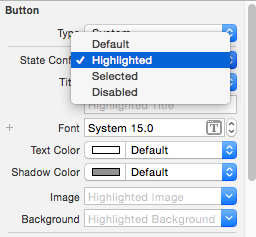
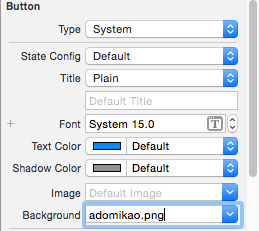
四.代码:
ViewController.h文件:
//
//  ViewController.h
//  控制按钮
//
//  Created by yongjianyu on 15/11/25.
//  Copyright (c) 2015年 yongjianyu. All rights reserved.
//

#import <UIKit/UIKit.h>

@interface ViewController : UIViewController
@property (weak, nonatomic) IBOutlet UIButton *btn;

- (IBAction)up:(id)sender;
- (IBAction)down:(id)sender;
- (IBAction)left:(id)sender;
- (IBAction)right:(id)sender;

- (IBAction)leftRotate:(id)sender;
- (IBAction)rightRotate:(id)sender;

- (IBAction)bigger:(id)sender;
- (IBAction)smaller:(id)sender;

@end
ViewController.m文件:
//
//  ViewController.m
//  控制按钮
//
//  Created by yongjianyu on 15/11/25.
//  Copyright (c) 2015年 yongjianyu. All rights reserved.
//

#import "ViewController.h"

@interface ViewController ()

@end

@implementation ViewController

- (void)viewDidLoad {
    [super viewDidLoad];
    // Do any additional setup after loading the view, typically from a nib.
}

- (void)didReceiveMemoryWarning {
    [super didReceiveMemoryWarning];
    // Dispose of any resources that can be recreated.
}

//向上移动按钮
- (IBAction)up:(id)sender {
    //动画(头部)
    [UIView beginAnimations:nil context:nil];
    //设置动画的时间
    [UIView setAnimationDuration:1.0];
    //OC语法规定,不允许直接修改某个对象中结构体属性的成员
    //先取出frame的值,赋值给中间变量
    CGRect tempFrame = _btn.frame;
    //修改y值
    tempFrame.origin.y -= 50;
    //重新给按钮的frame赋值
    _btn.frame = tempFrame;
    //动画(尾部)
    [UIView commitAnimations];
}
//向下移动按钮
- (IBAction)down:(id)sender {
    [UIView beginAnimations:nil context:nil];
    //设置动画持续时间为1.0秒
    [UIView setAnimationDuration:1.0];
    CGRect tempFrame = _btn.frame;
    tempFrame.origin.y += 50;
    _btn.frame = tempFrame;
    [UIView commitAnimations];

}
//向左移动按钮
- (IBAction)left:(id)sender {
    [UIView beginAnimations:nil context:nil];
    [UIView setAnimationDuration:1.0];
    CGRect tempFrame = _btn.frame;
    tempFrame.origin.x -= 50;
    _btn.frame = tempFrame;
    [UIView commitAnimations];

}
//向右移动按钮
- (IBAction)right:(id)sender {
    [UIView beginAnimations:nil context:nil];
    [UIView setAnimationDuration:1.0];
    CGRect tempFrame = _btn.frame;
    tempFrame.origin.x += 50;
    _btn.frame = tempFrame;
    [UIView commitAnimations];

}

//向左旋转按钮
- (IBAction)leftRotate:(id)sender {
    [UIView beginAnimations:nil context:nil];
    [UIView setAnimationDuration:1.0];
    //向左旋转PI/4
    _btn.transform = CGAffineTransformRotate(_btn.transform, - M_PI_4);
    [UIView commitAnimations];
}

//向右旋转按钮
- (IBAction)rightRotate:(id)sender {
    [UIView beginAnimations:nil context:nil];
    [UIView setAnimationDuration:1.0];
    _btn.transform = CGAffineTransformRotate(_btn.transform, + M_PI_4);
    [UIView commitAnimations];
}

//边长放大到原来的1.2倍
- (IBAction)bigger:(id)sender {
    [UIView beginAnimations:nil context:nil];
    [UIView setAnimationDuration:1.0];
    _btn.transform = CGAffineTransformScale(_btn.transform, 1.2, 1.2);
    [UIView commitAnimations];
}

//边长变为原来的0.8
- (IBAction)smaller:(id)sender {
    [UIView beginAnimations:nil context:nil];
    [UIView setAnimationDuration:1.0];
    _btn.transform = CGAffineTransformScale(_btn.transform, 0.8, 0.8);
    [UIView commitAnimations];
}

@end
五.代码重构
ViewController.h文件
#import <UIKit/UIKit.h>

@interface ViewController : UIViewController

- (IBAction)reset:(id)sender;

@property (weak, nonatomic) IBOutlet UIButton *btn;
- (IBAction)run:(id)sender;

- (IBAction)rotate:(id)sender;

- (IBAction)scale:(id)sender;
@end
ViewController.m文件
//
//  ViewController.m
//  Button
//
//  Created by yongjianyu on 15/11/22.
//  Copyright (c) 2015年 yongjianyu. All rights reserved.
//

#import "ViewController.h"
#define KDelta 50

@interface ViewController ()

@end

@implementation ViewController

- (void)viewDidLoad {
    [super viewDidLoad];
    // Do any additional setup after loading the view, typically from a nib.
}

- (void)didReceiveMemoryWarning {
    [super didReceiveMemoryWarning];
    // Dispose of any resources that can be recreated.
}

- (IBAction)run:(id)sender {
    //
    [UIView beginAnimations:nil context:nil];
    //
    [UIView setAnimationDuration:1.0];
    //
//    CGRect tempFrame = _btn.frame;
    CGPoint tempCenter= _btn.center;
    //
    NSInteger tag = [sender tag];
    //
    switch (tag) {
        case 1:
            //
//            tempFrame.origin.y -= KDelta;
            tempCenter.y -= KDelta;
            break;
        case 3:
            //
//            tempFrame.origin.y += KDelta;
            tempCenter.y += KDelta;
            break;
            //
        case 2:
//            tempFrame.origin.x += KDelta;
            tempCenter.x += KDelta;
            break;
            //
        case 4:
//            tempFrame.origin.x -= KDelta;
            tempCenter.x -= KDelta;
            break;

        default:
            break;
    }

    //
//    _btn.frame = tempFrame;
    _btn.center = tempCenter;
    //
    [UIView commitAnimations];

}

- (IBAction)rotate:(id)sender {
    [UIView beginAnimations:nil context:nil];
    [UIView setAnimationDuration:1.0];
    NSInteger tag = [sender tag];
    if (5==tag) {
        _btn.transform = CGAffineTransformRotate(_btn.transform, - M_PI_4);
    }else
          (_btn.transform = CGAffineTransformRotate(_btn.transform,+ M_PI_4));
    [UIView commitAnimations];
}

- (IBAction)scale:(id)sender {
    [UIView beginAnimations:nil context:nil];
    [UIView setAnimationDuration:1.0];
    NSInteger tag = [sender tag];
    if (7==tag) {
     _btn.transform = CGAffineTransformScale(_btn.transform, 1.2, 1.2);
    [UIView commitAnimations];
    }else{
        _btn.transform = CGAffineTransformScale(_btn.transform, 0.8, 0.8);
    }

}

- (IBAction)reset:(id)sender {
    [UIView beginAnimations:nil context:nil];
    [UIView setAnimationDuration:1.0];
    _btn.transform = CGAffineTransformIdentity;
    [UIView commitAnimations];
}
@end
六.用纯代码创建Button,创建UI界面
//
//  ViewController.m
//  02-通过代码创建按钮
//
//  Created by yongjianyu on 15/11/25.
//  Copyright (c) 2015年 yongjianyu. All rights reserved.
//

#import "ViewController.h"

@interface ViewController ()

@end

@implementation ViewController

- (void)viewDidLoad {
    [super viewDidLoad];
    // Do any additional setup after loading the view, typically from a nib.

    //头像
    UIButton *btn = [[UIButton alloc]init];
    btn.frame = CGRectMake(0, 0, 100, 100);
    CGFloat centerX = self.view.frame.size.width * 0.5;
    CGFloat centerY = self.view.frame.size.height * 0.25;
    btn.center = CGPointMake(centerX, centerY);
    UIImage *nomal = [UIImage imageNamed:@"adomikao.png"];
    [btn setBackgroundImage:nomal forState:UIControlStateNormal];
    [btn setTitle:@"Adomikao" forState:UIControlStateNormal];
    [btn setTitleColor:[UIColor whiteColor] forState:UIControlStateNormal];

    UIImage *hightlight = [UIImage imageNamed:@"adomikao1.png"];
    [btn setBackgroundImage:hightlight forState:UIControlStateHighlighted];
    [btn setTitle:@"yuyongjian" forState:UIControlStateHighlighted];
    [btn setTitleColor:[UIColor redColor] forState:UIControlStateHighlighted];

//    [btn addTarget:self action:@selector(btnClick:) forControlEvents:UIControlEventTouchUpInside];

    [self.view addSubview:btn];

    //向上
    UIButton *up = [[UIButton alloc]init];
    up.frame = CGRectMake(0, 0, 25, 25);
    CGFloat upCenterX = self.view.frame.size.width * 0.25;
    CGFloat upCenterY = self.view.frame.size.height * 0.625;
    up.center = CGPointMake(upCenterX, upCenterY);
    UIImage *upNomal = [UIImage imageNamed:@"up.png"];
    [up setBackgroundImage:upNomal forState:UIControlStateNormal];
    UIImage *upHightlight = [UIImage imageNamed:@"up1.jpg"];
    [up setBackgroundImage:upHightlight forState:UIControlStateHighlighted];
    [self.view addSubview:up];
    [up addTarget:self action:@selector(upClick:) forControlEvents:UIControlEventTouchUpInside];

    //向下
    UIButton *down = [[UIButton alloc]init];
    down.frame = CGRectMake(0, 0, 25, 25);
    CGFloat downCenterX = self.view.frame.size.width * 0.25;
    CGFloat downCenterY = self.view.frame .size.height * 0.875;
    down.center = CGPointMake(downCenterX, downCenterY);
    UIImage *downNormal = [UIImage imageNamed:@"down.png"];
    [down setBackgroundImage:downNormal forState:UIControlStateNormal];
    UIImage *downheight = [UIImage imageNamed:@"sown1.jpg"];
    [down setBackgroundImage:downheight forState:UIControlStateHighlighted];
    [self.view addSubview:down];

    //向左
    UIButton *left = [[UIButton alloc]init];
    left.frame = CGRectMake(0, 0, 25, 25);
    CGFloat leftCenterX = self.view.frame.size.width * 0.125;
    CGFloat leftCenterY = self.view.frame.size.height * 0.75;
    left.center = CGPointMake(leftCenterX, leftCenterY);
    UIImage *leftNormal = [UIImage imageNamed:@"left.png"];
    [left setBackgroundImage:leftNormal forState:UIControlStateNormal];
    UIImage *leftHighlight = [UIImage imageNamed:@"left1.jpg"];
    [left setBackgroundImage:leftHighlight forState:UIControlStateHighlighted];
    [self.view addSubview:left];

    //向右
    UIButton *right = [[UIButton alloc]init];
    right.frame = CGRectMake(0, 0, 25, 25);
    CGFloat rightCenterX = self.view.frame.size.width * 0.375;
    CGFloat rightcenterY = self.view.frame.size.height * 0.75;
    right.center = CGPointMake(rightCenterX, rightcenterY);
    UIImage *rightNormal = [UIImage imageNamed:@"right.png"];
    [right setBackgroundImage:rightNormal forState:UIControlStateNormal];
    UIImage *rightHighlight = [UIImage imageNamed:@"right1.jpg"];
    [right setBackgroundImage:rightHighlight forState:UIControlStateHighlighted];
    [self.view addSubview:right];

    //放大
    UIButton *big = [[UIButton alloc]init];
    big.frame = CGRectMake(0, 0, 25, 25);
    CGFloat bigCenterX = self.view.frame.size.width * 0.625;
    CGFloat bigCenterY = self.view.frame.size.height * 0.625;
    big.center = CGPointMake(bigCenterX, bigCenterY);
    UIImage *bigNormal = [UIImage imageNamed:@"plus.jpg"];
    [big setBackgroundImage:bigNormal forState:UIControlStateNormal];
    UIImage *bighighlight = [UIImage imageNamed:@"plus1.png"];
    [big setBackgroundImage:bighighlight forState:UIControlStateHighlighted];
    [self.view addSubview:big];

    //缩小
    UIButton *small = [[UIButton alloc]init];
    small.frame = CGRectMake(0, 0, 25, 25);
    CGFloat smallCenterX = self.view.frame.size.width * 0.875;
    CGFloat smallCenterY = self.view.frame.size.height * 0.625;
    small.center = CGPointMake(smallCenterX, smallCenterY);
    UIImage *smallNormal = [UIImage imageNamed:@"minus.png"];
    [small setBackgroundImage:smallNormal forState:UIControlStateNormal];
    UIImage *smallHighlight = [UIImage imageNamed:@"minus1.png"];
    [small setBackgroundImage:smallHighlight forState:UIControlStateHighlighted];
    [self.view addSubview:small];

    //向左旋转
    UIButton *leftRotate = [[UIButton alloc]init];
    leftRotate.frame = CGRectMake(0, 0, 25, 25);
    CGFloat leftRotateCenterX = self.view.frame.size.width * 0.625;
    CGFloat leftRotateCenterY = self.view.frame.size.height * 0.875;
    leftRotate.center = CGPointMake(leftRotateCenterX, leftRotateCenterY);
    UIImage *leftRotateNormal = [UIImage imageNamed:@"anticlockwise.jpg"];
    [leftRotate setBackgroundImage:leftRotateNormal forState:UIControlStateNormal];
    UIImage *leftRotateHighlight = [UIImage imageNamed:@"anticlokwise1.png"];
    [leftRotate setBackgroundImage:leftRotateHighlight forState:UIControlStateHighlighted];
    [self.view addSubview:leftRotate];

    //向右旋转
    UIButton *rightRotate = [[UIButton alloc]init];
    rightRotate.frame = CGRectMake(0, 0, 25, 25);
    CGFloat rightRotateCenterX = self.view.frame.size.width * 0.875;
    CGFloat rightRotateCenterY = self.view.frame.size.height * 0.875;
    rightRotate.center = CGPointMake(rightRotateCenterX, rightRotateCenterY);
    UIImage *rightRotateNormal = [UIImage imageNamed:@"clockwise.png"];
    [rightRotate setBackgroundImage:rightRotateNormal forState:UIControlStateNormal];
    UIImage *rightRotateHighlight = [UIImage imageNamed:@"clockwise1.png"];
    [rightRotate setBackgroundImage:rightRotateHighlight forState:UIControlStateHighlighted];
    [self.view addSubview:rightRotate];

}

-(void)upClick:(UIButton *)up{
    NSLog(@"------up");
    CGRect tempFrame = _btn.frame;
    tempFrame.origin.y -= 10;
    _btn.frame = tempFrame;

}

@end
ios学习-控制按钮图片的走动和变换的更多相关文章
- iOS学习-压缩图片(改变图片的宽高)
压缩图片,图片的大小与我们期望的宽高不一致时,我们可以将其处理为我们想要的宽高. 传入想要修改的图片,以及新的尺寸 -(UIImage*)imageWithImage:(UIImage*)image ...
- ios学习笔记图片+图片解释(c语言 oc语言 ios控件 ios小项目 ios小功能 swift都有而且笔记完整喔)
下面是目录其中ios文件夹包括了大部分ios控件的介绍和演示,swift的时完整版,可以学习完swift(这个看的是swift刚出来一周的视频截图,可能有点赶,但是完整),c语言和oc语言的也可以完整 ...
- 【原】iOS学习之图片拉伸处理(类似qq的气泡)
原理是拉伸里面的内容,将边保护起来 方法1: ①[image resizableImageWithCapInsets:UIEdgeInsetsMake(, , , )]; ②[image resiza ...
- ios 学习 广告图片轮播器
// // ViewController.m // 图片轮播器 // // Created by zjj on 15/5/23. // Copyright (c) 2015年 zjj. All rig ...
- [置顶] iOS学习笔记47——图片异步加载之EGOImageLoading
上次在<iOS学习笔记46——图片异步加载之SDWebImage>中介绍过一个开源的图片异步加载库,今天来介绍另外一个功能类似的EGOImageLoading,看名字知道,之前的一篇学习笔 ...
- iOS学习笔记31-从图册获取图片和视频
一.从图册中获取本地图片和视频 从图册中获取文件,我们使用的是UIImagePickerController,这个类我们在之前的摄像头中使用过,这里是链接:iOS学习笔记27-摄像头,这里我们使用的是 ...
- ios 学习线路(图片)(摘录)
iOS学习路线
- iOS学习——UIView的研究
在iOS开发中,我们知道有一个共同的基类——NSObject,但是对于界面视图而言,UIView是非常重要的一个类,UIView是很多视图控件的基类,因此,对于UIView的学习闲的非常有必要.在iO ...
- iOS学习——核心动画之Layer基础
iOS学习——核心动画之Layer基础 1.CALayer是什么? CALayer我们又称它叫做层.在每个UIView内部都有一个layer这样一个属性,UIView之所以能够显示,就是因为它里面有这 ...
随机推荐
- java面向对象_抽象类和接口
一.抽象类 1.抽象方法:由abstract修饰.只有定义没有方法体.用一个分号结尾. 2.抽象类: 1)包含抽象方法的类必须是抽象类 2)由abstract修饰 3)不能被实例化 4)抽象类如果不被 ...
- C#中的简单工厂和单例
下面首先来说说简单工厂 举个例子: 首先是父类 public abstract class Pizza { public abstract string Info(); } } 子类 public c ...
- php操作数据库的简单示例
放假期间自己又写了几个简单的网页,但在服务器中打开时和在网站上打开时不一样,在服务器中打开的出现了错误,字体比一般的腰大好多,页面也相应地变大了,一些块即使用了浮动和clear浮动还是被遮住了,我只好 ...
- ADO.Net读取器获取数据库数据
string str = Configuration.ConfigurationManager.AppSettings[str].ToString(); string sql = "sele ...
- 初识Java泛型以及桥接方法
泛型的由来 在编写程序时,可能会有这样的需求:容器类,比如java中常见的list等.为了使容器可以保存多种类型的数据,需要编写多种容器类,每一个容器类中规定好了可以操作的数据类型.此时可能会有Int ...
- lvs源代码分析
以linux-2.6.21为例. 数据结构介绍: ip_vs_conn 对于某个连接记录其N元组, (client, vserver, rserver) & (address, port) Q ...
- C/C++语言,自学资源,滚动更新中……
首先要说<一本通>是一个很好的学习C/C++语言的自学教材. 以下教学视频中,缺少对"字符串"技术的讨论,大家注意看书. 一维数组,及其举例:(第四版) ...
- 浅谈Json和jsonp
定义: JSON:是一种数据交换格式, JSONP是一种依靠开发人员的聪明才智创造出的一种非官方跨域数据交互协议 曾经看到一个有意思的例子:JSON是地下党们用来书写和交换情报的“暗号”的话, 而JS ...
- SQL2014 error 40 ( Microsoft SQL Server, 错误2)
可能是安装了SQL EXPRESS版 尝试使用(local)\SQLEXPRESS 作为服务器名称登陆. 用 计算机名\实例名 作为用户名登录.
- Web测试的常用测试用例与知识
1. Web测试中关于登录的测试 2. 搜索功能测试用例设计 3. 翻页功能测试用例 4. 输入框的测试 5. Web测试的常用的检查点 6. 用户及权限管理功能常规测试方法 7. Web测试之兼容性 ...