
Spring Boot实践——三种拦截器的创建
引用:https://blog.csdn.net/hongxingxiaonan/article/details/48090075
Spring中的拦截器
在web开发中,拦截器是经常用到的功能。它可以帮我们验证是否登陆、权限认证、数据校验、预先设置数据以及统计方法的执行效率等等。今天就来详细的谈一下spring中的拦截器。spring中拦截器主要分种,一个是HandlerInterceptor,一个是MethodInterceptor。
一、HandlerInterceptor拦截器
HandlerInterceptor是springMVC项目中的拦截器,它拦截的目标是请求的地址,比MethodInterceptor先执行。实现一个HandlerInterceptor拦截器可以直接实现HandlerInterceptor接口,也可以继承HandlerInterceptorAdapter类。这两种方法殊途同归,其实HandlerInterceptorAdapter也就是声明了HandlerInterceptor接口中所有方法的默认实现,而我们在继承他之后只需要重写必要的方法。下面就是HandlerInterceptorAdapter的代码,可以看到一个方法只是默认返回true,另外两个是空方法:
/**

 * 自定义拦截器-基于springmvc

 * @ClassName: CustomInterceptor

 * @Description: springMVC项目中的拦截器,它拦截的目标是请求的地址,比MethodInterceptor先执行。

 *                 该拦截器只能过滤action请求,SPring允许多个拦截器同时存在,通过拦截器链管理。

 *                 当preHandle return true时,执行下一个拦截器,直到所有拦截器执行完,再运行被拦截的请求。

 *                 当preHandle return false时, 不再执行后续的拦截器链及被拦截的请求。

 * @author OnlyMate

 * @Date 2018年8月28日 下午2:30:22

 *

 */

public class CustomInterceptor implements HandlerInterceptor  {

    @Override

    public boolean preHandle(HttpServletRequest request, HttpServletResponse response, Object handler)

            throws Exception {

        // TODO Auto-generated method stub

        return HandlerInterceptor.super.preHandle(request, response, handler);

    }

    @Override

    public void postHandle(HttpServletRequest request, HttpServletResponse response, Object handler,

            ModelAndView modelAndView) throws Exception {

        // TODO Auto-generated method stub

        HandlerInterceptor.super.postHandle(request, response, handler, modelAndView);

    }

    @Override

    public void afterCompletion(HttpServletRequest request, HttpServletResponse response, Object handler, Exception ex)

            throws Exception {

        // TODO Auto-generated method stub

        HandlerInterceptor.super.afterCompletion(request, response, handler, ex);

    }

}
这三个方法都是干什么的,有什么作用,什么时候调用,不同的拦截器之间是怎样的调用顺序呢?这还得参考一下DispatcherServlet的doDispatch方法
protected void doDispatch(HttpServletRequest request, HttpServletResponse response) throws Exception {

        HttpServletRequest processedRequest = request;

        HandlerExecutionChain mappedHandler = null;

        boolean multipartRequestParsed = false;

        WebAsyncManager asyncManager = WebAsyncUtils.getAsyncManager(request);

        try {

            ModelAndView mv = null;

            Exception dispatchException = null;

            try {

                processedRequest = checkMultipart(request);

                multipartRequestParsed = (processedRequest != request);

                // Determine handler for the current request.

                mappedHandler = getHandler(processedRequest);

                if (mappedHandler == null) {

                    noHandlerFound(processedRequest, response);

                    return;

                }

                // Determine handler adapter for the current request.

                HandlerAdapter ha = getHandlerAdapter(mappedHandler.getHandler());

                // Process last-modified header, if supported by the handler.

                String method = request.getMethod();

                boolean isGet = "GET".equals(method);

                if (isGet || "HEAD".equals(method)) {

                    long lastModified = ha.getLastModified(request, mappedHandler.getHandler());

                    if (logger.isDebugEnabled()) {

                        logger.debug("Last-Modified value for [" + getRequestUri(request) + "] is: " + lastModified);

                    }

                    if (new ServletWebRequest(request, response).checkNotModified(lastModified) && isGet) {

                        return;

                    }

                }

                if (!mappedHandler.applyPreHandle(processedRequest, response)) {

                    return;

                }

                // Actually invoke the handler.

                mv = ha.handle(processedRequest, response, mappedHandler.getHandler());

                if (asyncManager.isConcurrentHandlingStarted()) {

                    return;

                }

                applyDefaultViewName(processedRequest, mv);

                mappedHandler.applyPostHandle(processedRequest, response, mv);

            }

            catch (Exception ex) {

                dispatchException = ex;

            }

            catch (Throwable err) {

                // As of 4.3, we're processing Errors thrown from handler methods as well,

                // making them available for @ExceptionHandler methods and other scenarios.

                dispatchException = new NestedServletException("Handler dispatch failed", err);

            }

            processDispatchResult(processedRequest, response, mappedHandler, mv, dispatchException);

        }

        catch (Exception ex) {

            triggerAfterCompletion(processedRequest, response, mappedHandler, ex);

        }

        catch (Throwable err) {

            triggerAfterCompletion(processedRequest, response, mappedHandler,

                    new NestedServletException("Handler processing failed", err));

        }

        finally {

            if (asyncManager.isConcurrentHandlingStarted()) {

                // Instead of postHandle and afterCompletion

                if (mappedHandler != null) {

                    mappedHandler.applyAfterConcurrentHandlingStarted(processedRequest, response);

                }

            }

            else {

                // Clean up any resources used by a multipart request.

                if (multipartRequestParsed) {

                    cleanupMultipart(processedRequest);

                }

            }

        }

    }
代码有点长,但是它封装了springMVC处理请求的整个过程。首先根据请求找到对应的HandlerExecutionChain,它包含了处理请求的handler和所有的HandlerInterceptor拦截器;然后在调用hander之前分别调用每个HandlerInterceptor拦截器的preHandle方法,若有一个拦截器返回false,则会调用triggerAfterCompletion方法,并且立即返回不再往下执行;若所有的拦截器全部返回true并且没有出现异常,则调用handler返回ModelAndView对象;再然后分别调用每个拦截器的postHandle方法;最后,即使是之前的步骤抛出了异常,也会执行triggerAfterCompletion方法。关于拦截器的处理到此为止,接下来看看triggerAfterCompletion做了什么
private void triggerAfterCompletion(HttpServletRequest request, HttpServletResponse response,

            @Nullable HandlerExecutionChain mappedHandler, Exception ex) throws Exception {

        if (mappedHandler != null) {

            mappedHandler.triggerAfterCompletion(request, response, ex);

        }

        throw ex;

    }
根据以上的代码,分析一下不同拦截器及其方法的执行顺序。假设有5个拦截器编号分别为12345,若一切正常则方法的执行顺序是12345的preHandle,54321的postHandle,54321的afterCompletion。若编号3的拦截器的preHandle方法返回false或者抛出了异常,接下来会执行的是21的afterCompletion方法。这里要注意的地方是,我们在写一个拦截器的时候要谨慎的处理preHandle中的异常,因为这里一旦有异常抛出就不会再受到这个拦截器的控制。12345的preHandle的方法执行过之后,若handler出现了异常或者某个拦截器的postHandle方法出现了异常,则接下来都会执行54321的afterCompletion方法,因为只要12345的preHandle方法执行完,当前拦截器的拦截器就会记录成编号5的拦截器,而afterCompletion总是从当前的拦截器逆向的向前执行。
另外,实现HandlerInterceptor拦截器还有一个方法,就是实现WebRequestInterceptor接口。其实它和刚才的两种方法也是殊途同归,最终还是被spring适配成HandlerInterceptor。有一点不同,它的preHandle方法最终只会返回true。
这里可以根据自己的需求在对应方法中写自己业务处理逻辑
/**

 * 自定义拦截器-基于springmvc

 * @ClassName: CustomInterceptor

 * @Description: springMVC项目中的拦截器,它拦截的目标是请求的地址,比MethodInterceptor先执行。

 *                 该拦截器只能过滤action请求,SPring允许多个拦截器同时存在,通过拦截器链管理。

 *                 当preHandle return true时,执行下一个拦截器,直到所有拦截器执行完,再运行被拦截的请求。

 *                 当preHandle return false时, 不再执行后续的拦截器链及被拦截的请求。

 * @author OnlyMate

 * @Date 2018年8月28日 下午2:30:22

 *

 */

public class CustomInterceptor implements HandlerInterceptor  {

    private Logger logger = LoggerFactory.getLogger(CustomInterceptor.class);

    /**

     * 在请求处理之前执行,主要用于权限验证、参数过滤等

     */

    @Override

    public boolean preHandle(HttpServletRequest request, HttpServletResponse response, Object handler)

            throws Exception {

        logger.info("CustomInterceptor ==> preHandle method: do request before");

        return true;

    }

    /**

     * 当前请求进行处理之后执行,主要用于日志记录、权限检查、性能监控、通用行为等

     */

    @Override

    public void postHandle(HttpServletRequest request, HttpServletResponse response, Object handler,

            ModelAndView modelAndView) throws Exception {

        logger.info("CustomInterceptor ==> postHandle method: do request after");

    }

    /**

     * 当前对应的interceptor的perHandle方法的返回值为true时,postHandle执行完成并渲染页面后执行,主要用于资源清理工作

     */

    @Override

    public void afterCompletion(HttpServletRequest request, HttpServletResponse response, Object handler, Exception ex)

            throws Exception {

        logger.info("CustomInterceptor ==> afterCompletion method: do request finshed");

    }

}
配置如下:
/**

 * Web MVC 配置适配器

 * @ClassName: WebAppConfigurer

 * @Description:

 * @author OnlyMate

 * @Date 2018年8月28日 下午2:39:31

 *

 * WebAppConfigurer extends WebMvcConfigurerAdapter 在Spring Boot2.0版本已过时了,用官网说的新的类替换

 *

 */

@Configuration

public class WebAppConfigurer implements WebMvcConfigurer {

    /**

     * 注入自定义拦截器

     * @Title: addInterceptors

     * @Description: 先add的拦截器会越靠外,即越靠近浏览器

     * @Date 2018年8月28日 下午2:47:28

     * @author OnlyMate

     * @param registry

     */

    @Override

    public void addInterceptors(InterceptorRegistry registry) {

        WebMvcConfigurer.super.addInterceptors(registry);

        registry.addInterceptor(new CustomInterceptor()).addPathPatterns("/**");//拦截所有请求

    }

}
二、MethodInterceptor拦截器
MethodInterceptor是AOP项目中的拦截器,它拦截的目标是方法,即使不是controller中的方法。实现MethodInterceptor拦截器大致也分为两种,一种是实现MethodInterceptor接口,另一种利用AspectJ的注解或配置。
1、实现MethodInterceptor接口
/**

 * 自定义拦截器-方法拦截器,基于spring aop

 * @ClassName: CustomMethodInterceptor

 * @Description: AOP项目中的拦截器,它拦截的目标是方法

 *                 配置在applicationContext.xml中

 * @author OnlyMate

 * @Date 2018年8月29日 下午3:35:24

 *

 */

public class CustomMethodInterceptor implements MethodInterceptor {

    private Logger logger = LoggerFactory.getLogger(CustomMethodInterceptor.class);

    @Override

    public Object invoke(MethodInvocation invocation) throws Throwable {

        logger.info("CustomMethodInterceptor ==> invoke method: process method name is {}", invocation.getMethod().getName());

        //TODO 处理操作

        return invocation.proceed();

    }

}
配置说明
    <bean id="customMethodInterceptor" class="com.onlymate.springboot.interceptor.CustomMethodInterceptor" />

    <aop:config proxy-target-class="false">

        <!-- 方法拦截器,基于spring aop 实现配置 -->

        <!-- 扫描使用了注解的方法进行拦截 -->

        <aop:advisor pointcut="@annotation(com.onlymate.springboot.annotation.CustomAnnotation)" advice-ref="customMethodInterceptor" />

        <!-- 指定包路径下的方法 -->

        <aop:advisor pointcut="execution(* com.onlymate.springboot.controller.*.*(..))" advice-ref="customMethodInterceptor" />

    </aop:config>
CustomAnnotation自定义注解
/**

 * 自定义注解对象

 * @ClassName: TableSplit

 * @Description: TODO

 * @author OnlyMate

 * @Date 2018年5月22日 上午11:43:57

 *

 */

@Target(ElementType.METHOD)

@Retention(RetentionPolicy.RUNTIME)

public @interface CustomAnnotation {

    /** 需拦截方法名描述 */

    String name() default "";

    /** 加密 */

    String[] encrypt() default {};

    /** 解密 */

    String[] decrypt() default {};

}
2、利用AspectJ的注解或配置
a、基于AspectJ注解
/**

 * 自定义拦截器-方法拦截器,基于注解的AspectJ方式

 * @ClassName: CustomAutoAspectJInterceptor

 * @Description: 配置在applicationContext.xml中

 * @author OnlyMate

 * @Date 2018年8月29日 下午4:03:49

 *

 */

@Component

@Aspect

public class CustomAutoAspectJInterceptor {

    private Logger logger = LoggerFactory.getLogger(CustomAutoAspectJInterceptor.class);

    @Around("execution (* com.onlymate.springboot.controller.*.*(..))")

    public Object around(ProceedingJoinPoint point) throws Throwable{

        logger.info("CustomAutoAspectJInterceptor ==> invoke method: process method class is {}", point.getTarget().getClass());

        //TODO 处理操作

        return point.proceed();

    }

}
b、基于AspectJ配置
/**

 * 自定义拦截器-方法拦截器,基于AspectJ方式

 * @ClassName: CustomAspectJInterceptor

 * @Description: 配置在applicationContext.xml中

 * @author OnlyMate

 * @Date 2018年8月29日 下午4:03:49

 *

 */

public class CustomAspectJInterceptor {

    private Logger logger = LoggerFactory.getLogger(CustomAspectJInterceptor.class);

    public Object around(ProceedingJoinPoint point) throws Throwable{

        logger.info("CustomAspectJInterceptor ==> invoke method: process method class is {}", point.getTarget().getClass());

        //TODO 处理操作

        return point.proceed();

    }

}
c、配置说明
    <bean id="customAspectJInterceptor" class="com.onlymate.springboot.interceptor.CustomAspectJInterceptor"/>

    <aop:config proxy-target-class="false">

        <!-- 方法拦截器,基于AspectJ实现方式一 -->

        <aop:aspect ref="customAspectJInterceptor">

            <aop:around method="around" pointcut="execution(* com.onlymate.springboot.controller.*.*(..))"/>

        </aop:aspect>

    </aop:config>

    <!-- 方法拦截器,基于AspectJ实现方式二 -->

    <!-- 自动扫描使用了aspectj注解的类 -->

    <aop:aspectj-autoproxy/>
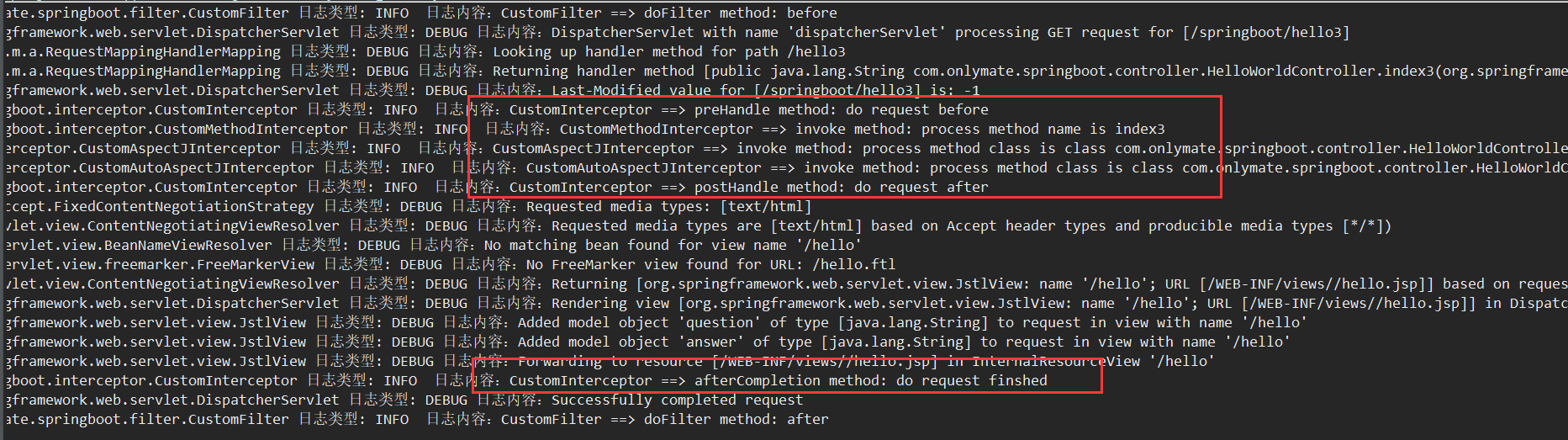
三、效果图
四、谈一谈区别
上面的两种拦截器都能起到拦截的效果,但是他们拦截的目标不一样,实现的机制不同,所以有的时候适用不同的场景。HandlerInterceptoer拦截的是请求地址,所以针对请求地址做一些验证、预处理等操作比较合适。当你需要统计请求的响应时间时MethodInterceptor将不太容易做到,因为它可能跨越很多方法或者只涉及到已经定义好的方法中一部分代码。MethodInterceptor利用的是AOP的实现机制,在本文中只说明了使用方式,关于原理和机制方面介绍的比较少,因为要说清楚这些需要讲出AOP的相当一部分内容。在对一些普通的方法上的拦截HandlerInterceptoer就无能为力了,这时候只能利用AOP的MethodInterceptor。利用MethodInterceptor就可以很容易的实现一个日志拦截处理。
Spring Boot实践——三种拦截器的创建的更多相关文章
- Spring boot 集成三种拦截方式
三种拦截方式分别为: javax.servlet.Filter org.springframework.web.servlet.HandlerInterceptor org.aspectj.lang. ...
- Spring Boot使用过滤器和拦截器分别实现REST接口简易安全认证
本文通过一个简易安全认证示例的开发实践,理解过滤器和拦截器的工作原理. 很多文章都将过滤器(Filter).拦截器(Interceptor)和监听器(Listener)这三者和Spring关联起来讲解 ...
- Springboot 系列(六)Spring Boot web 开发之拦截器和三大组件
1. 拦截器 Springboot 中的 Interceptor 拦截器也就是 mvc 中的拦截器,只是省去了 xml 配置部分.并没有本质的不同,都是通过实现 HandlerInterceptor ...
- Spring Boot 优雅的配置拦截器方式
https://my.oschina.net/bianxin/blog/2876640 https://cs.xieyonghui.com/java/55.html 其实spring boot拦截器的 ...
- Spring boot 配置自己的拦截器
框架使用的是spring boot 2.0 首先,自定义拦截器实现HandlerInterceptor接口,preHandler是在执行controller方法前执行的 此外还有两个方法,具体作用最 ...
- Spring boot 集成三种定时任务方式
三种定时任务方式分别为 org.springframework.scheduling.annotation.Scheduled java.util.concurrent.ScheduledExecut ...
- spring boot 学习(十二)拦截器实现IP黑名单
拦截器实现IP黑名单 前言 最近一直在搞 Hexo+GithubPage 搭建个人博客,所以没怎么进行 SpringBoot 的学习.所以今天就将上次的”?秒防刷新”进行了一番修改.上次是采用注解加拦 ...
- 【spring boot】在自定义拦截器中从request中获取json字符串
又这样的需求,需要在自定义的拦截器中获取request中的数据,想获取到的是JSON字符串 那需要在拦截器中写这样一个方法 public static String getOpenApiRequest ...
- Spring Boot实践——AOP实现
借鉴:http://www.cnblogs.com/xrq730/p/4919025.html https://blog.csdn.net/zhaokejin521/article/detai ...
随机推荐
- PHP 读取和导出 CSV文件
PHP 读取和导出 CSV文件,速度比phpexcel快80%,而phpexcel 占内存,在数据大的情况下,5万条只需几秒不到,几乎感觉不出来 如果遇到数字是科学计算法,可以在前面加一个 ' 单引号 ...
- 20165212 预备作业3 Linux安装及学习
20165212 预备作业3Linux安装及学习 Linux虚拟机的安装过程 我像大部分同学一样,通过助教学姐给的Ubuntu下载地址下载映像文件.VB,但是屡次出现问题,不停的闪出一下错误提示窗口: ...
- scrapy模拟浏览器爬取验证码页面
使用selenium模块爬取验证码页面,selenium模块需要另外安装这里不讲环境的配置,我有一篇博客有专门讲ubuntn下安装和配置模拟浏览器的开发 spider的代码 # -*- coding: ...
- callback回调函数-python
链接:http://www.zhihu.com/question/19801131/answer/27459821来源:知乎著作权归作者所有.商业转载请联系作者获得授权,非商业转载请注明出处. 编程分 ...
- 借助CustomBehaviorsLibrary.dll写出水印效果(转)
在项目中载入这个dll 之后引用 使用方法具体如下图: 在这里需要注意到是项目中对interactivity的引用 : 好文要顶 关注我 收藏该文
- 搭建一个IntelliJ的Spark项目
之前发现创建一个新项目之后,无法添加scala class 创建新项目 选择maven项目,然后选择simple或者quickstart: 进入项目后,在Project Structure里面,在gl ...
- webdriver常用API
本章涉及Selenium WebDriver的所有接口. Recommended Import Style 推荐的导入风格如下: from selenium import webdriver 然后,你 ...
- 软RAID 0的技术概要及实现
1 什么是RAID,RAID的级别和特点 : 什么是RAID呢?全称是 “A Case for Redundant Arrays of Inexpensive Disks (RAID)”,在1987年 ...
- 将socket程序从linux移植到windows上
今天突然想试下纯socket编程在两个系统上代码重合量有多大,只要不使用VC自定义的宏(比如SOCKET.SOCKADDR等等)感觉代码重合量挺大的. 比如最简单的TCP客户端和服务端对话,在VC中用 ...
- Liveqrcode活码系统设计
活码是一种二维码,可以通过后台配置让用户扫码时跳转到不同的网址.除了二维码生成接口,本站还实现了多租户的活码配置接口,以及活码后台jar包,详见二维码接口. 二维码生成使用了zxing三方包实现,活码 ...