
mybatis-generator命令行生成代码
目录文件如下:
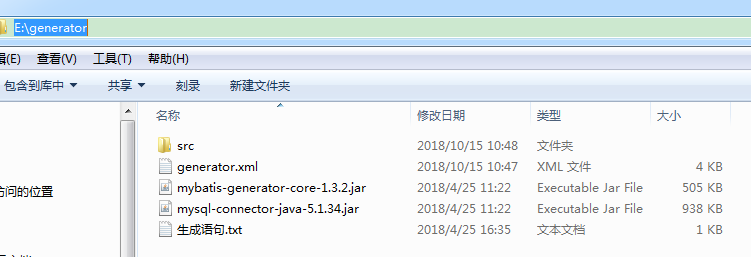
generator.xml文件如下:
 <?xml version="1.0" encoding="UTF-8"?>
 <!DOCTYPE generatorConfiguration PUBLIC "-//mybatis.org//DTD MyBatis Generator Configuration 1.0//EN" "http://mybatis.org/dtd/mybatis-generator-config_1_0.dtd">
 <generatorConfiguration>
     <!-- 数据库驱动包位置 -->
     <classPathEntry location="E:\generator\mysql-connector-java-5.1.34.jar" />
     <!-- <classPathEntry location="C:\oracle\product\10.2.0\db_1\jdbc\lib\ojdbc14.jar" />-->
     <context id="DB2Tables" targetRuntime="MyBatis3">
         <commentGenerator>
             <property name="suppressAllComments" value="true" />
         </commentGenerator>
         <!-- 数据库链接URL、用户名、密码 -->
          <jdbcConnection driverClass="com.mysql.jdbc.Driver" connectionURL="jdbc:mysql://127.0.0.1:3306/new_taozugong" userId="root" password="root">
         <!--<jdbcConnection driverClass="oracle.jdbc.driver.OracleDriver" connectionURL="jdbc:oracle:thin:@localhost:1521:orcl" userId="msa" password="msa">-->
         </jdbcConnection>
         <javaTypeResolver>
             <property name="forceBigDecimals" value="false" />
         </javaTypeResolver>
         <!-- 生成模型的包名和位置 -->
         <javaModelGenerator targetPackage="com.taozugong.admin.common.entity" targetProject="E:\generator\src">
             <property name="enableSubPackages" value="true" />
             <property name="trimStrings" value="true" />
         </javaModelGenerator>
         <!-- 生成的映射文件包名和位置 -->
         <sqlMapGenerator targetPackage="mybatis.mapper" targetProject="E:\generator\src">
             <property name="enableSubPackages" value="true" />
         </sqlMapGenerator>
         <!-- 生成DAO的包名和位置 -->
         <javaClientGenerator type="XMLMAPPER" targetPackage="com.taozugong.admin.dao.mapper" targetProject="E:\generator\src">
             <property name="enableSubPackages" value="true" />
         </javaClientGenerator>
         <!-- 要生成那些表(更改tableName和domainObjectName就可以) -->

         <table tableName="activity" domainObjectName="Activity" enableCountByExample="false" enableUpdateByExample="false" enableDeleteByExample="false" enableSelectByExample="false" selectByExampleQueryId="false" />
         <table tableName="activity_help_record" domainObjectName="activityHelpRecord" enableCountByExample="false" enableUpdateByExample="false" enableDeleteByExample="false" enableSelectByExample="false" selectByExampleQueryId="false" />
         <table tableName="activity_product_setting" domainObjectName="activityProductSetting" enableCountByExample="false" enableUpdateByExample="false" enableDeleteByExample="false" enableSelectByExample="false" selectByExampleQueryId="false" />
         <table tableName="activity_product_template" domainObjectName="activityProductTemplate" enableCountByExample="false" enableUpdateByExample="false" enableDeleteByExample="false" enableSelectByExample="false" selectByExampleQueryId="false" />
         <table tableName="activity_record" domainObjectName="activityRecord" enableCountByExample="false" enableUpdateByExample="false" enableDeleteByExample="false" enableSelectByExample="false" selectByExampleQueryId="false" />
     </context>

 </generatorConfiguration>
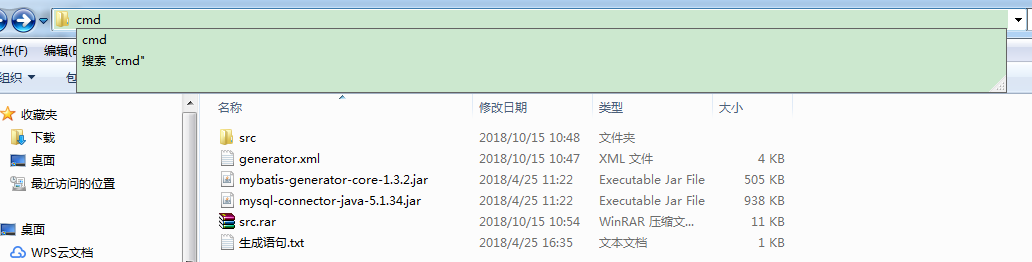
直接cmd输入如下命令即可生成
java -jar mybatis-generator-core-1.3.2.jar -configfile generator.xml -overwrite
mybatis-generator命令行生成代码的更多相关文章
- Eclipse 使用mybatis generator插件自动生成代码
Eclipse 使用mybatis generator插件自动生成代码 标签: mybatis 2016-12-07 15:10 5247人阅读 评论(0) 收藏 举报 .embody{ paddin ...
- springboot(十三):springboot结合mybatis generator逆向工程自动生成代码
错信息generate failed: Exception getting JDBC Driver: com.mysql.jdbc.Driver 上网查了一下,发现原来是generator这个插件在运 ...
- mybatis使用generator自己主动生成代码时的类型转换
使用mybatis的generator自己主动生成代码,可是oracle数据库中number(6,2)总是自己主动转成BigDecimal.我想要转成的是float类型 这样就写了一个类型转换器,须要 ...
- Mybatis Generator的model生成中文注释,支持oracle和mysql(通过实现CommentGenerator接口的方法来实现)
自己手动实现的前提,对maven项目有基本的了解,在本地成功搭建了maven环境,可以参考我之前的文章:maven环境搭建 项目里新建表时model,mapper以及mapper.xml基本都是用My ...
- FreeSql.Generator命令行代码生成器是如何实现的
目录 FreeSql介绍 FreeSql.Generator RazorEngine.NetCore 源码解析 FreeSql.Tools FreeSql FreeSql 是功能强大的对象关系映射技术 ...
- 《Entity Framework 6 Recipes》中文翻译系列 (40) ------ 第七章 使用对象服务之从跟踪器中获取实体与从命令行生成模型(想解决EF第一次查询慢的,请阅读)
翻译的初衷以及为什么选择<Entity Framework 6 Recipes>来学习,请看本系列开篇 7-5 从跟踪器中获取实体 问题 你想创建一个扩展方法,从跟踪器中获取实体,用于数 ...
- cocos命令行生成项目
cocos命令行生成项目: cocos new GoodDay(项目名称) -p com.boleban.www(包名字) -l cpp(项目类型) -d D:\DevProject\cocos2dx ...
- Beyond Compare 命令行生成目录下所有文件比对的Html网页report
MAC环境下,使用Beyond Compare命令行生成两个文件夹差异的html,按目录递归生成. #1. 创建compare #2. 创建compare/old #3. compare/new #4 ...
- 用OpenSSL命令行生成证书文件
用OpenSSL命令行生成证书文件 1.首先要生成服务器端的私钥(key文件): openssl genrsa -des3 -out server.key 1024 运行时会提示输入密码,此密码用于加 ...
随机推荐
- kotlin学习一:kotlin简介
kotlin是JetBrains公司出品的基于JVM的语言,和其他JVM语言一样,目的在于提供比JAVA更加简介的语法, 同时提供函数式编程,不需要再像JAVA一样所有的一切都要依托于类. kotli ...
- 记一次 Docker swarm - overlay network access error
背景 之前使用Docker swam 在不同的服务器 (docker host) 上面创建了service,他们之间的container通过overlay的网络通信. 昨天由于公司网络维护,其中一台服 ...
- XStream使用笔记
XStream是一个可以将JavaBean生成XML的工具,很方便的帮助我们在后台服务器将数据序列化为XML,接下来就可以将XML数据响应给前台进行数据交互 XStream需要的jar包 * 核心JA ...
- 【UVALive】3029 City Game(悬线法)
题目 传送门:QWQ 分析 以前见到过差不多的这题. xhk说是单调栈水题,但我又不会单调栈,于是当时就放下了. 这么久过去了我还是不会用单调栈做这题,用的是悬线法. 非常好写 代码 #include ...
- Django 模型层(2)
多表操作: 创建模型: 作者模型:把作者的详情放到详情表,包含生日,手机号,家庭住址等信息.作者详情模型和作者模型之间是一对一的关系(one-to-one) 出版商模型:出版商有名称,所在城市以及em ...
- MySQL编码问题(无法插入中文)
1.问题描述 2.解决方案 1.问题描述 当使用django时,如果数据库是MySQL,插入中文会报错: Incorrect string value: '\xF0\x9F...' for colum ...
- JS 对输入框文本正在输入中校验
// keyup getInput.keyup(function(){ var a = parseInt(getPrice); var b = parseInt(getInput.val()); // ...
- JavaScript知识总结--历史-html引用方式-基础概念
一.JavaScript简介 1.ECMAScript 1995~今已经20年的历史,产生JavaScript是需要它去解决一定的问题:在浏览器端做一些数据的验证,试想当年的网络环境,如果能够在浏览器 ...
- c++builder 解压缩
c++builder 解压缩 TZCompressionStream TZDecompressionStream #include <System.ZLib.hpp> void __ ...
- linux系统构架 - LB集群之LVS的DR设置
在lvs的nat模式的基础上 1.清空ipvsadm规则 ipvsadm -C 查看 ipvsadm -ln 2.清空iptables规则 iptables -t nat -F 3.修改rs的网卡配置 ...