
Asp.net mvc word预览与打印
解决方案:
1. 在后台把word文件转化成pdf,在前台用iframe显示pdf,打印iframe,即可。
优点:用户体验好。
缺点:不支持IE。
实现 :
引用netoffice组件
主要代码:
Word.Application wordApplication = new Word.Application();

                Word.Document pDoc = wordApplication.Documents.Open(path);

                pDoc.Activate();

                pDoc.SaveAs(pdf, WdSaveFormat.wdFormatPDF);

                wordApplication.Quit();

                wordApplication.Dispose();
2. 在后台把word转化面html,读取html文本,增加打印脚本,输出到前台。
优点:浏览器支持的好。
缺点:用html显示word,不是太好看。
实现 :
引用:
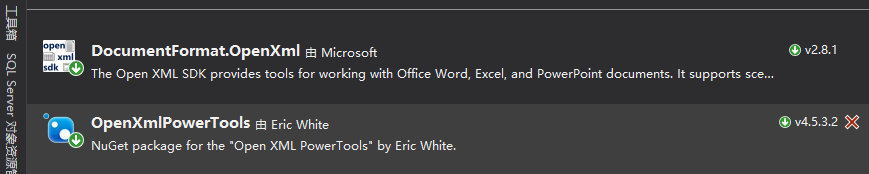
主要代码:
    public class WordToHtmlConverter

    {

        /// <summary>

        /// Convert Docx to Html

        /// </summary>

        /// <param name="source">source file full name</param>

        /// <returns>htmlstring</returns>

        public static string ToHtml(string source)

        {

            var htmlString = string.Empty;

            var file = new FileInfo(source);

            byte[] bytes = File.ReadAllBytes(file.FullName);

            using (MemoryStream memoryStream = new MemoryStream())

            {

                memoryStream.Write(bytes, , bytes.Length);

                using (var wDoc = WordprocessingDocument.Open(memoryStream, true))

                {

                    var imageFolder = source.Substring(, source.Length - ) + "_files";

                    int imageCounter = ;

                    HtmlConverterSettings settings = new HtmlConverterSettings()

                    {

                        AdditionalCss = "body { margin: 1cm auto; max-width: 20cm; padding: 0; }",

                        PageTitle = "新系统",

                        FabricateCssClasses = true,

                        CssClassPrefix = "pt-",

                        RestrictToSupportedLanguages = false,

                        RestrictToSupportedNumberingFormats = false,

                        ImageHandler = imageInfo =>

                        {

                            DirectoryInfo localDirInfo = new DirectoryInfo(imageFolder);

                            if (!localDirInfo.Exists)

                                localDirInfo.Create();

                            ++imageCounter;

                            string extension = imageInfo.ContentType.Split('/')[].ToLower();

                            ImageFormat imageFormat = null;

                            if (extension == "png")

                                imageFormat = ImageFormat.Png;

                            else if (extension == "gif")

                                imageFormat = ImageFormat.Gif;

                            else if (extension == "bmp")

                                imageFormat = ImageFormat.Bmp;

                            else if (extension == "jpeg")

                                imageFormat = ImageFormat.Jpeg;

                            else if (extension == "tiff")

                            {

                                // Convert tiff to gif.

                                extension = "gif";

                                imageFormat = ImageFormat.Gif;

                            }

                            else if (extension == "x-wmf")

                            {

                                extension = "wmf";

                                imageFormat = ImageFormat.Wmf;

                            }

                            // If the image format isn't one that we expect, ignore it,

                            // and don't return markup for the link.

                            if (imageFormat == null)

                                return null;

                            string imageFileName = imageFolder + "/image" +

                                imageCounter.ToString() + "." + extension;

                            try

                            {

                                imageInfo.Bitmap.Save(imageFileName, imageFormat);

                            }

                            catch (System.Runtime.InteropServices.ExternalException)

                            {

                                return null;

                            }

                            string imageSource = localDirInfo.Name + "/image" +

                                imageCounter.ToString() + "." + extension;

                            XElement img = new XElement(Xhtml.img,

                                new XAttribute(NoNamespace.src, imageSource),

                                imageInfo.ImgStyleAttribute,

                                imageInfo.AltText != null ?

                                    new XAttribute(NoNamespace.alt, imageInfo.AltText) : null);

                            return img;

                        }

                    };

                    XElement htmlElement = HtmlConverter.ConvertToHtml(wDoc, settings);

                    // Produce HTML document with <!DOCTYPE html > declaration to tell the browser we are using HTML5.

                    var html = new XDocument(new XDocumentType("html", null, null, null), htmlElement);

                    htmlString = html.ToString(SaveOptions.DisableFormatting);

                }

            }

            return htmlString;

        }

    }
        public string NoticePrint(NoticeResult model)

        {

            // 第一步,生成新的doc文档,替换模板文件中的标签,这里用的是NPOI,这个方法就不显示了,没什么东西。

            var path = this.GetDocFileName(model);

            // 第二步,把doc文件,转化成html文件

            var html = WordToHtmlConverter.ToHtml(path);

            // 第三步,对html追加script脚本

            var result = html + GetPrintScript();

            // 第四步,返回

            return result;

        }

        private string GetPrintScript()

        {

            return  @"<script type='text/javascript'> window.onload = function() { window.print(); };</script >";

        }
Controller Code:
public ActionResult Print(NoticeResult model)

        {

            var result = new Response<bool>();

            if (model != null)

            {

                var html = this.service.NoticePrint(model);

                return Content(html, "text/html");

            }

            result.ErrMsg = "打印参数异常";

            return Json(result);

        }
代码有删减,不能拿来直接用!!!
Asp.net mvc word预览与打印的更多相关文章
- ASP.NET MVC在线预览Excel、Word、TXT、PDF文件
代码: using System; using System.Collections.Generic; using System.Linq; using System.Web; using Syste ...
- 尝新体验ASP.NET Core 6预览版本中发布的最小Web API(minimal APIS)新特性
本文首发于<尝新体验ASP.NET Core 6预览版本中发布的最小Web API(minimal APIS)新特性> 概述 .NET开发者们大家好,我是Rector. 几天前(美国时间2 ...
- 数据库下载word预览功能的研究
本文参考了这里的一些方法http://tobetobe.blog.51cto.com/1392243/354420 一直想通过缓存来实现,奈何技术不够,走了曲线救国的思路,先下载,然后预览,删除下载文 ...
- 网站开发进阶(十二)JS实现打印功能(包括打印预览、打印设置等)
JS实现打印功能(包括打印预览.打印设置等) 绪 最近在进行项目开发时,需要实现后台管理端打印功能,遂在网上一阵搜索,搜到了很多相关的文章.其中绝大部分文章都是使用的Lodop5.0(Web打印和套打 ...
- 借助flexpaper实现word在线预览和打印
为了实现word能够在web上尽量以原始的排版样式展现出来,选择基于activex控件的方式太过于依赖某种浏览器,并且存在可能需要花费金钱购买相应的控件产品:于是借助flexpaper这种flash展 ...
- JS 打印功能代码可实现打印预览、打印设置等
<!DOCTYPE html PUBLIC "-//W3C//DTD XHTML 1.0 Transitional//EN" "http://www.w3.or ...
- word预览
word+excle表格在线浏览 word.ppt.xls文件实现在线预览的方式比较简单可以直接通过调用微软的在线预览功能实现 (预览前提:资源必须是公共可访问的) 通过iframe直接引用微软提供的 ...
- dev中 ,usercontrol打印界面内容,打印预览和打印
首先,在对应的文件夹下面添加引用,如下图 如果没有就下载下来包. 预先在本地文件夹下面建立.frx文件,像这样的, 然后在触发事件下面写 //打印预览 private void btn_Preview ...
- winform使用Barcodex控件预览和打印一维码
1.控件下载. http://files.cnblogs.com/files/masonblog/barcodex.zip . 包含barcodex.ocx控件.barcodex帮助文档.两个winf ...
随机推荐
- app瘦身和包压缩技术有什么区别?
APP瘦身 针对app文件中的文件进行优化,利用素材的拉伸,祛除不必要的文件,优化png, jpg素材,压缩音视频素材等方式实现app文件的减小. 包压缩技术 所谓包压缩,顾名思义就是将手游的安装包体 ...
- python在处理CSV文件时,字符串和列表写入的区别
概述 Python在处理CSV文件时,如果writerow的对象是<type 'unicode'>字符串时,写入到CSV文件时将会出现一个字符占一个单元格的情况: 但是将字符串转换为列表类 ...
- Laravel 5.3 使用内置的 Auth 组件实现多用户认证功能
https://blog.csdn.net/kevinbai_cn/article/details/54341779 概述 在开发中,我们经常会遇到多种类型的用户的认证问题,比如后台的管理员和前台的普 ...
- Java网络通信基础编程
一.同步阻塞方式(BIO) 方式一: 服务器端(Server): package com.ietree.basicskill.socket.mode1; import java.io.IOExcept ...
- 关于Softnet的加密。方式是使用API函数。。关键是开发号
首先是获取 开发号. 类似于这个玩意 http://www.cnblogs.com/wenluderen/p/4853563.html 这个帖子里面有介绍关于开发号的完整资料. ××××××××××× ...
- 手把手教 GitHub + Hexo 搭建博客
前言 在很久以前,博主就想着要有自主的博客专栏或者网站.经历了博客园这个需要所谓的编辑审核,一直比较困惑,这些编辑是什么出身,怎么知道技术博客的价值性. 接下来找到了开源中国,这个可以自由发言的地方. ...
- windows 2003 iis php
我的环境 是 windows server200 ee iis6.0 程序是php 1.一台安装好的 Windows 2003 服务器,并且已经安装了 IIS 6. 2.下载 windows ...
- webpack.dev.conf.js详解
转载自:https://www.cnblogs.com/ye-hcj/p/7087205.html webpack.dev.conf.js详解 //引入当前目录下的utils.js文件模块var ut ...
- win下安装wget以及使用wget
1. 安装wget网址:http://gnuwin32.sourceforge.net/packages/wget.htm下载http://downloads.sourceforge.net/gnuw ...
- POJ - 2125 Destroying The Graph (最小点权覆盖)
题意:给一张图,现在要删去所有的边,删去一个点的所有入边和所有出边都有其对应\(W_{i+}\)和\(W_{i-}\).求删去该图的最小花费,并输出解 分析:简而言之就是用最小权值的点集去覆盖所有的边 ...