
Enterprise Library:Unity的几个注意事项
背景
在.Net平台中,几乎所有的Ioc容器在注册方面都不一致,使用Unity需要注意几个事项,咱们通过实验进行验证一下。
验证的内容:
- 集合的获取。
- 生命周期管理。
实验
代码
 1 using System;

 2 using System.Collections.Generic;

 3 using System.Linq;

 4 using System.Text;

 5 using System.Threading.Tasks;

 6

 7 using Microsoft.Practices.Unity;

 8

 9 namespace UnityStudy

10 {

11     class Program

12     {

13         static void Main(string[] args)

14         {

15             UnityContainer container = new UnityContainer();

16

17             container.RegisterType<ITest, Test>(new PerThreadLifetimeManager());

18             container.RegisterType<ITest, TestA>("A");

19             container.RegisterType<ITest, TestB>("B");

20             container.RegisterType<ITest, Test>("C");

21             container.RegisterType<Test, Test>();

22             container.RegisterType<IOther, Test>();

23

24             Console.WriteLine(container.ResolveAll<ITest>().Count());

25             //输出:3

26

27             Console.WriteLine(container.Resolve<ITest>().GetHashCode());

28             Console.WriteLine(container.Resolve<ITest>().GetHashCode());

29

30             Console.WriteLine(container.Resolve<Test>().GetHashCode());

31             Console.WriteLine(container.Resolve<Test>().GetHashCode());

32

33             Console.WriteLine(container.Resolve<IOther>().GetHashCode());

34             Console.WriteLine(container.Resolve<IOther>().GetHashCode());

35             //输出:上边六行输出内容一样

36

37             Console.WriteLine(container.ResolveAll<ITest>().Last().GetHashCode());

38             Console.WriteLine(container.ResolveAll<ITest>().Last().GetHashCode());

39             //输出:输出两行完全不一样

40         }

41     }

42

43     public interface ITest { }

44

45     public interface IOther { }

46

47     public class Test : ITest, IOther { }

48

49     public class TestA : ITest { }

50

51     public class TestB : ITest { }

52 }
输出
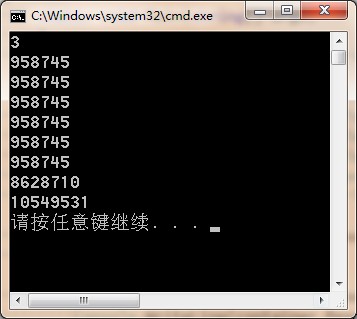
结论
- ResolveAll只返回命名注册。
- 生命周期和具体类型+注册的名字有关系。
备注
使用Unity获取具体类型是不用注册的,有些Ioc容器要求所有类型都必须先注册才能获取。
Enterprise Library:Unity的几个注意事项的更多相关文章
- 通过fsharp 使用Enterprise Library Unity 3 - 三种拦截模式的探索
这篇就三种拦截模式进行一下探索. 特性总结 类型 特点 其它 InterfaceInterceptor Innstance 仅单接口 类内部函数互相引用无法引起拦截行为 TransparentPr ...
- 通过fsharp 使用Enterprise Library Unity 2
接着Depandency Injection继续. 最想做的还是用现成的程序模块对程序进行行为注入.只是不急,在此之前自己写一个接口对象观察一下IInterceptionBehavior接口的功效. ...
- 黄聪:Microsoft Enterprise Library 5.0 系列教程(八) Unity Dependency Injection and Interception
原文:黄聪:Microsoft Enterprise Library 5.0 系列教程(八) Unity Dependency Injection and Interception 依赖注入容器Uni ...
- 微软Enterprise Library 4.1和Unity 1.2
说明 微软模式与实践团队今天发布了Enterprise Library 4.1和Unity 1.2版本,这次发布的主要新特性如下: 1. 支持Visual Studio 2008 SP1 2. Uni ...
- Enterprise Library系列文章目录(转载)
1. Microsoft Enterprise Library 5.0 系列(一) Caching Application Block (初级) 2. Microsoft Enterprise Lib ...
- Enterprise Library 5.0 系列教程
1. Microsoft Enterprise Library 5.0 系列教程(一) Caching Application Block (初级) 2. Microsoft Enterprise L ...
- 微软企业库5.0 学习之路——扩展学习篇、库中的依赖关系注入(重构 Microsoft Enterprise Library)[转]
这篇文章是我在patterns & practices看到的一篇有关EntLib5.0的文章,主要介绍了EntLib5.0的这次的架构变化由来,觉得很不错,大家可以看一下! 在过去几年中,依赖 ...
- 在数据库访问项目中使用微软企业库Enterprise Library,实现多种数据库的支持
在我们开发很多项目中,数据访问都是必不可少的,有的需要访问Oracle.SQLServer.Mysql这些常规的数据库,也有可能访问SQLite.Access,或者一些我们可能不常用的PostgreS ...
- 基于Enterprise Library的Winform开发框架实现支持国产达梦数据库的扩展操作
由于一个客户朋友的需求,需要我的Winform开发框架支持国产达梦数据库的操作,这个数据库很早就听过,但是真正一般项目用的很少,一般在一些特殊的项目可能需要用到.由于我的Winform开发框架,是基于 ...
随机推荐
- java并发编程实战笔记---(第三章)对象的共享
3.1 可见性 synchronized 不仅实现了原子性操作或者确定了临界区,而且确保内存可见性. *****必须在同步中才能保证:当一个线程修改了对象状态之后,另一个线程可以看到发生的状态变化. ...
- C语言实现knn
以后写代码一定要谨慎,提高代码的正确率. /*************************************** * 1.初始化距离为最大值 * 2.计算未知样本和每个训练样本的距离为dis ...
- span文字里面自动换行时怎么办
可以用white-space:nowrap来强制文字不换行,知道遇到<br>为止
- SAM-Toy Cars题解
题目描述 Jasio 是一个三岁的小男孩,他最喜欢玩玩具了,他有n 个不同的玩具,它们都被放在了很高的架子上所以Jasio 拿不到它们. 为了让他的房间有足够的空间,在任何时刻地板上都不会有超过k 个 ...
- bzoj 1415 期望dp + 记忆化搜索
思路:这个题看着感觉不能dp,其实是可以dp的,因为狼每次走两步,兔子每次走一步,每进行一轮以后,狼和兔子的距离 肯定是在接近的,没有相同的状态,dp之前预处理出来,每一步狼该往哪里走. #inclu ...
- laravel windows安装(composer)
1.安装composer参考windows 安装tp5 composer方式 2.先配置好本地虚拟域名,在cmd里面切换到网站根目录 ... 3.安装成功之后,在浏览器输入已配置的虚拟域名我的是,la ...
- elementUI 学习入门之 checkbox 复选框
CheckBox 复选框 与单选框基本类似.如:按钮样式.带边框.复选框按钮大小. eg: <template> <el-checkbox-group v-model="s ...
- 简述HttpSession的作用、使用方法,可用代码说明
HttpSession中可以跟踪并储存用户信息,把值设置到属性中,有2个方法:setAttribute(),getAttrribute(): 例如:在一个方法中用session.setAttribut ...
- Kali Linux缺少ifconfig命令
Kali Linux缺少ifconfig命令 ifconfig是配置和查看网络的基础命令.在某些Kali Linux版本中,可能会缺少ifconfig命令.这个时候,用户需要手动安装该命令.该命令 ...
- Code forces363D Renting Bikes
Renting Bikes Time Limit:1000MS Memory Limit:262144KB 64bit IO Format:%I64d & %I64u Subm ...