
如何使用 libtorch 实现 AlexNet 网络?
如何使用 libtorch 实现 AlexNet 网络?
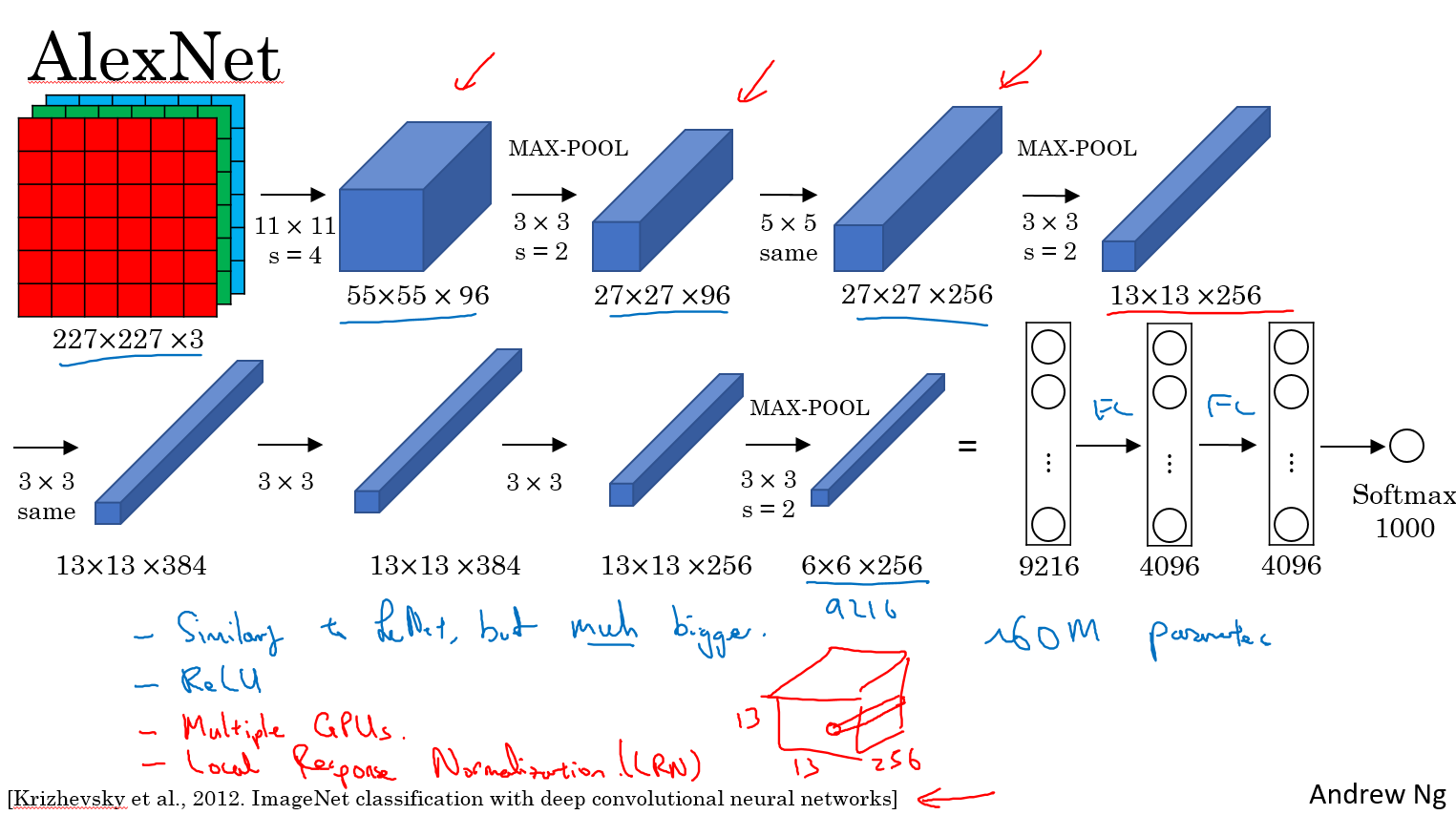
按照图片上流程写即可。输入的图片大小必须 227x227 3 通道彩色图片
// Define a new Module.

struct Net : torch::nn::Module {

	Net() {

		conv1 = torch::nn::Conv2d(torch::nn::Conv2dOptions(3, 96, { 11,11 }).stride({4,4}));

		conv2 = torch::nn::Conv2d(torch::nn::Conv2dOptions(96, 256, { 5,5 }).padding(2));

		conv3 = torch::nn::Conv2d(torch::nn::Conv2dOptions(256, 384, { 3,3 }).padding(1));

		conv4 = torch::nn::Conv2d(torch::nn::Conv2dOptions(384, 384, { 3,3 }).padding(1));

		conv5 = torch::nn::Conv2d(torch::nn::Conv2dOptions(384, 256, { 3,3 }).padding(1));

		fc1 = torch::nn::Linear(256*6*6,4096);

		fc2 = torch::nn::Linear(4096, 4096);

		fc3 = torch::nn::Linear(4096, 1000);

	}

	// Implement the Net's algorithm.

	torch::Tensor forward(torch::Tensor x) {

		x = conv1->forward(x);

		x = torch::relu(x);

		//LRN

		x = torch::max_pool2d(x, { 3,3 }, { 2,2 });

		x = conv2->forward(x);

		//LRN

		x = torch::relu(x);

		x = torch::max_pool2d(x, { 3,3 }, { 2,2 });

		x = conv3->forward(x);

		x = torch::relu(x);

		x = conv4->forward(x);

		x = torch::relu(x);

		x = conv5->forward(x);

		x = torch::relu(x);

		x = torch::max_pool2d(x, { 3,3 }, { 2,2 });

		x = x.view({ x.size(0),-1 });

		x = fc1->forward(x);

		x = torch::relu(x);

		x = torch::dropout(x,0.5,is_training());

		x = fc2->forward(x);

		x = torch::relu(x);

		x = torch::dropout(x, 0.5, is_training());

		x = fc3->forward(x);

		x = torch::log_softmax(x,1);

		return x;

	}

	// Use one of many "standard library" modules.

	torch::nn::Conv2d conv1{ nullptr };

	torch::nn::Conv2d conv2{ nullptr };

	torch::nn::Conv2d conv3{ nullptr };

	torch::nn::Conv2d conv4{ nullptr };

	torch::nn::Conv2d conv5{ nullptr };

	torch::nn::Linear fc1{ nullptr };

	torch::nn::Linear fc2{ nullptr };

	torch::nn::Linear fc3{ nullptr };

};
具体可参考这个
name: "AlexNet"

layer {

  name: "data"

  type: "Input"

  top: "data"

  input_param { shape: { dim: 10 dim: 3 dim: 227 dim: 227 } }

}

layer {

  name: "conv1"

  type: "Convolution"

  bottom: "data"

  top: "conv1"

  param {

    lr_mult: 1

    decay_mult: 1

  }

  param {

    lr_mult: 2

    decay_mult: 0

  }

  convolution_param {

    num_output: 96

    kernel_size: 11

    stride: 4

  }

}

layer {

  name: "relu1"

  type: "ReLU"

  bottom: "conv1"

  top: "conv1"

}

layer {

  name: "norm1"

  type: "LRN"

  bottom: "conv1"

  top: "norm1"

  lrn_param {

    local_size: 5

    alpha: 0.0001

    beta: 0.75

  }

}

layer {

  name: "pool1"

  type: "Pooling"

  bottom: "norm1"

  top: "pool1"

  pooling_param {

    pool: MAX

    kernel_size: 3

    stride: 2

  }

}

layer {

  name: "conv2"

  type: "Convolution"

  bottom: "pool1"

  top: "conv2"

  param {

    lr_mult: 1

    decay_mult: 1

  }

  param {

    lr_mult: 2

    decay_mult: 0

  }

  convolution_param {

    num_output: 256

    pad: 2

    kernel_size: 5

    group: 2

  }

}

layer {

  name: "relu2"

  type: "ReLU"

  bottom: "conv2"

  top: "conv2"

}

layer {

  name: "norm2"

  type: "LRN"

  bottom: "conv2"

  top: "norm2"

  lrn_param {

    local_size: 5

    alpha: 0.0001

    beta: 0.75

  }

}

layer {

  name: "pool2"

  type: "Pooling"

  bottom: "norm2"

  top: "pool2"

  pooling_param {

    pool: MAX

    kernel_size: 3

    stride: 2

  }

}

layer {

  name: "conv3"

  type: "Convolution"

  bottom: "pool2"

  top: "conv3"

  param {

    lr_mult: 1

    decay_mult: 1

  }

  param {

    lr_mult: 2

    decay_mult: 0

  }

  convolution_param {

    num_output: 384

    pad: 1

    kernel_size: 3

  }

}

layer {

  name: "relu3"

  type: "ReLU"

  bottom: "conv3"

  top: "conv3"

}

layer {

  name: "conv4"

  type: "Convolution"

  bottom: "conv3"

  top: "conv4"

  param {

    lr_mult: 1

    decay_mult: 1

  }

  param {

    lr_mult: 2

    decay_mult: 0

  }

  convolution_param {

    num_output: 384

    pad: 1

    kernel_size: 3

    group: 2

  }

}

layer {

  name: "relu4"

  type: "ReLU"

  bottom: "conv4"

  top: "conv4"

}

layer {

  name: "conv5"

  type: "Convolution"

  bottom: "conv4"

  top: "conv5"

  param {

    lr_mult: 1

    decay_mult: 1

  }

  param {

    lr_mult: 2

    decay_mult: 0

  }

  convolution_param {

    num_output: 256

    pad: 1

    kernel_size: 3

    group: 2

  }

}

layer {

  name: "relu5"

  type: "ReLU"

  bottom: "conv5"

  top: "conv5"

}

layer {

  name: "pool5"

  type: "Pooling"

  bottom: "conv5"

  top: "pool5"

  pooling_param {

    pool: MAX

    kernel_size: 3

    stride: 2

  }

}

layer {

  name: "fc6"

  type: "InnerProduct"

  bottom: "pool5"

  top: "fc6"

  param {

    lr_mult: 1

    decay_mult: 1

  }

  param {

    lr_mult: 2

    decay_mult: 0

  }

  inner_product_param {

    num_output: 4096

  }

}

layer {

  name: "relu6"

  type: "ReLU"

  bottom: "fc6"

  top: "fc6"

}

layer {

  name: "drop6"

  type: "Dropout"

  bottom: "fc6"

  top: "fc6"

  dropout_param {

    dropout_ratio: 0.5

  }

}

layer {

  name: "fc7"

  type: "InnerProduct"

  bottom: "fc6"

  top: "fc7"

  param {

    lr_mult: 1

    decay_mult: 1

  }

  param {

    lr_mult: 2

    decay_mult: 0

  }

  inner_product_param {

    num_output: 4096

  }

}

layer {

  name: "relu7"

  type: "ReLU"

  bottom: "fc7"

  top: "fc7"

}

layer {

  name: "drop7"

  type: "Dropout"

  bottom: "fc7"

  top: "fc7"

  dropout_param {

    dropout_ratio: 0.5

  }

}

layer {

  name: "fc8"

  type: "InnerProduct"

  bottom: "fc7"

  top: "fc8"

  param {

    lr_mult: 1

    decay_mult: 1

  }

  param {

    lr_mult: 2

    decay_mult: 0

  }

  inner_product_param {

    num_output: 1000

  }

}

layer {

  name: "prob"

  type: "Softmax"

  bottom: "fc8"

  top: "prob"

}
如何使用 libtorch 实现 AlexNet 网络?的更多相关文章
- AlexNet 网络详解及Tensorflow实现源码
版权声明:本文为博主原创文章,未经博主允许不得转载. 1. 图片数据处理 2. 卷积神经网络 2.1. 卷积层 2.2. 池化层 2.3. 全链层 3. AlexNet 4. 用Tensorflow搭 ...
- 第十六节,卷积神经网络之AlexNet网络实现(六)
上一节内容已经详细介绍了AlexNet的网络结构.这节主要通过Tensorflow来实现AlexNet. 这里做测试我们使用的是CIFAR-10数据集介绍数据集,关于该数据集的具体信息可以通过以下链接 ...
- 第十五节,卷积神经网络之AlexNet网络详解(五)
原文 ImageNet Classification with Deep ConvolutionalNeural Networks 下载地址:http://papers.nips.cc/paper/4 ...
- Caffe训练AlexNet网络,精度不高或者为0的问题结果
当我们使用Caffe训练AlexNet网络时,会遇到精度一值在低精度(30%左右)升不上去,或者精度总是为0,如下图所示: 出现这种情况,可以尝试使用以下几个方法解决: 1.数据样本量是否太少,最起码 ...
- 如何使用 libtorch 实现 LeNet 网络?
如何使用 libtorch 实现 LeNet 网络? LeNet 网络论文地址: http://yann.lecun.com/exdb/publis/pdf/lecun-01a.pdf
- AlexNet网络
AlexNet 中包含了比较新的技术点,首次在CNN中成功应用了 ReLu .Dropout和LRN等Trick. 1.成功使用了Relu作为CNN的激活函数,并验证其效果在较深的网络中超过了Sigm ...
- AlexNet网络的Pytorch实现
1.文章原文地址 ImageNet Classification with Deep Convolutional Neural Networks 2.文章摘要 我们训练了一个大型的深度卷积神经网络用于 ...
- 深入理解AlexNet网络
原文地址:https://blog.csdn.net/luoluonuoyasuolong/article/details/81750190 AlexNet论文:<ImageNet Classi ...
- pytorch实现AlexNet网络
直接上图吧 写网络就像搭积木
随机推荐
- cf 459c Pashmak and Buses
E - Pashmak and Buses Time Limit:1000MS Memory Limit:262144KB 64bit IO Format:%I64d & %I ...
- 如何在iOS上实现对HTTPS的支持(转)
原文地址:http://blog.5ibc.net/p/101504.html 首先,需要明确你使用HTTP/HTTPS的用途,因为OSX和iOS平台提供了多种API,来支持不同的用途,官方文档< ...
- cocos2dx中CCTableView乱位问题歪解
可能是引擎作者没有考虑到CCTableView里cell还会改变的需求,结果改变了 cell后其它的cell也跟着改变了.于是在网上查了一下,发现没有人遇到我的 问题,看来我总是遇到奇葩问题,不过也找 ...
- Java之旅hibernate(8)——基本关系映射
何为关系,何为映射,关系这个词想必大家都不陌生.比方你和老师之间是师生关系,你和父母之间是父子或者父女(母子或者母女关系). 关系是存在某种联系物体之间产生的.什么都是可能的.比方你和工具,你仅仅能使 ...
- sama5d3 开入测试
root@sama5d3-linux:~ echo 20 > /sys/class/gpio/export root@sama5d3-linux:~ echo 16 > /sys/clas ...
- Repeater DataTable 折叠动态加载
网上关于Repeater折叠一般都是直接绑定上去,然后设置样式隐藏显示,可是这样是不太合理的,应该是客户需要的时候,你才去加载出来.所以,自己研究了一段时间,总结出下面的实现方案 首先是控件部分 &l ...
- 后台登陆功能的实现 SESSION
控制器 <?php // 本类由系统自动生成,仅供测试用途 class IndexAction extends Action { public function index(){ $this-& ...
- cookie,Session机制的本质,跨应用程序的session共享
目录:一.术语session二.HTTP协议与状态保持三.理解cookie机制四.理解session机制五.理解javax.servlet.http.HttpSession六.HttpSession常 ...
- HTML5+Canvas+jQuery调用手机拍照功能实现图片上传(二)
上一篇仅仅讲到前台操作,这篇专门涉及到Java后台处理.前台通过Ajax提交将Base64编码过的图片数据信息传到Java后台,然后Java这边进行接收处理.通过对图片数据信息进行Base64解码,之 ...
- add命令
将文件加入到索引,要使用add命令.在<file>指定加入索引的文件.用空格分割可以指定多个文件. git add demo.html test.html //添加两个文件 添加当前目录下 ...