
实验 MPLS LDP配置
实验 MPLS LDP配置
一、学习目的
掌握启用和关闭MPLS的方法
掌握启用和关闭MPLS LDP配置方法
掌握使用MPLS LDP配置LSP的方法
二、拓扑图
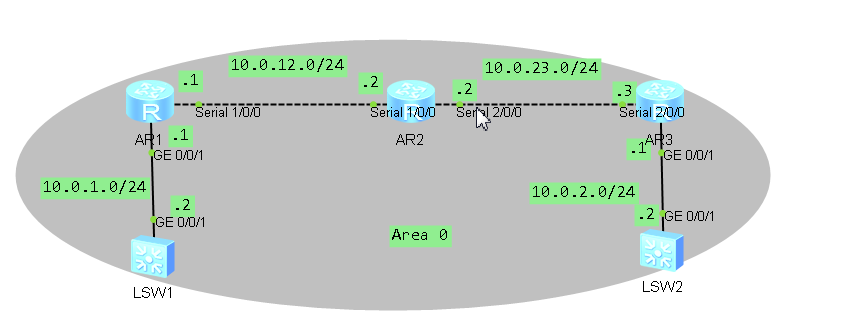
三、场景
你是公司的网管员,公司的网络了IP网络,为解决IP网络转发性能低下问题,决定使用MPLS技术来提高
路由器的转发速度,而静态LSP由管理员手式配置,LDP是专为标签发布而制定的标签分发协议
,为了配置灵活LDP来建议MPLS LSP
步骤一、基本配置与IP编址
给所有路由器和交换机配置IP地址和掩码
AR1配置脚本

sys

sysname AR1

int g0//

ip add 10.0.1.1

int s1//

ip add 10.0.12.1

int lo0

ip add 2.2.2.2

dis ip int br

AR2配置脚本

sys

sysname AR2

int s1//

ip add 10.0.12.2

int s2//

ip add 10.0.23.2

int lo0

ip add 3.3.3.3

dis ip int br

AR3配置脚本

sys

sysname AR3

int s2//

ip add 10.0.23.3

int g0//

ip add 10.0.2.1

int lo0

ip add 4.4.4.4

dis ip int br

SW1配置脚本

sys

sysname SW1

int vlanif

ip add 10.0.1.2

sw2配置脚本

sys

sysname SW2

int vlanif

ip add 10.0.2.2
步骤二、配置单区域OSPF
配置10.0.12.0/24
10.0.23.0/24
10.0.1.0/24
10.0.2.0/24四个网段属于OSPF区域0
AR1

sys

ospf  router-id 2.2.2.2

area

network 10.0.1.0 0.0.0.255

network 10.0.12.0 0.0.0.255

network 2.2.2.0 0.0.0.255

AR2

sys

ospf  router-id 3.3.3.3

area

network 10.0.12.0 0.0.0.255

network 10.0.23.0 0.0.0.255

network 3.3.3.0 0.0.0.255

AR3

sys

ospf  router-id 4.4.4.4

area

network 10.0.23.0 0.0.0.255

network 10.0.2.0 0.0.0.255

network 4.4.4.0 0.0.0.255

dis ospf brief

SW1

sys

ospf  router-id 1.1.1.1

area

network 10.0.1.0 0.0.0.255

SW2

sys

ospf  router-id 5.5.5.5

area

network 10.0.2.0 0.0.0.255
配置完成后,查看设备的路由表,并测试全网的连通性
[AR2]dis ip routing-table

Route Flags: R - relay, D - download to fib

------------------------------------------------------------------------------

Routing Tables: Public

Destinations :  Routes :

Destination/Mask Proto Pre Cost Flags NextHop Interface

3.3.3.0/ Direct   D 3.3.3.3 LoopBack0

3.3.3.3/ Direct   D 127.0.0.1 LoopBack0

3.3.3.255/ Direct   D 127.0.0.1 LoopBack0

10.0.1.0/ OSPF   D 10.0.12.1 Serial1//

10.0.2.0/ OSPF   D 10.0.23.3 Serial2//

10.0.12.0/ Direct   D 10.0.12.2 Serial1//

10.0.12.1/ Direct   D 10.0.12.1 Serial1//

10.0.12.2/ Direct   D 127.0.0.1 Serial1//

10.0.12.255/ Direct   D 127.0.0.1 Serial1//

10.0.23.0/ Direct   D 10.0.23.2 Serial2//

10.0.23.2/ Direct   D 127.0.0.1 Serial2//

10.0.23.3/ Direct   D 10.0.23.3 Serial2//

10.0.23.255/ Direct   D 127.0.0.1 Serial2//

127.0.0.0/ Direct   D 127.0.0.1 InLoopBack0

127.0.0.1/ Direct   D 127.0.0.1 InLoopBack0

127.255.255.255/ Direct   D 127.0.0.1 InLoopBack0

255.255.255.255/ Direct   D 127.0.0.1 InLoopBack0

[SW1]ping 10.0.2.2

PING 10.0.2.2:  data bytes, press CTRL_C to break

Reply from 10.0.2.2: bytes= Sequence= ttl= time= ms

Reply from 10.0.2.2: bytes= Sequence= ttl= time= ms

Reply from 10.0.2.2: bytes= Sequence= ttl= time= ms

Reply from 10.0.2.2: bytes= Sequence= ttl= time= ms

Reply from 10.0.2.2: bytes= Sequence= ttl= time= ms

--- 10.0.2.2 ping statistics ---

 packet(s) transmitted

 packet(s) received

0.00% packet loss

round-trip min/avg/max = // ms

[AR2]ping 10.0.1.2

PING 10.0.1.2:  data bytes, press CTRL_C to break

Reply from 10.0.1.2: bytes= Sequence= ttl= time= ms

Reply from 10.0.1.2: bytes= Sequence= ttl= time= ms

Reply from 10.0.1.2: bytes= Sequence= ttl= time= ms

Reply from 10.0.1.2: bytes= Sequence= ttl= time= ms

Reply from 10.0.1.2: bytes= Sequence= ttl= time= ms

--- 10.0.1.2 ping statistics ---

 packet(s) transmitted

 packet(s) received

0.00% packet loss

round-trip min/avg/max = // ms

[AR2]ping 10.0.2.2

PING 10.0.2.2:  data bytes, press CTRL_C to break

Reply from 10.0.2.2: bytes= Sequence= ttl= time= ms

Reply from 10.0.2.2: bytes= Sequence= ttl= time= ms

Reply from 10.0.2.2: bytes= Sequence= ttl= time= ms

Reply from 10.0.2.2: bytes= Sequence= ttl= time= ms

Reply from 10.0.2.2: bytes= Sequence= ttl= time= ms

--- 10.0.2.2 ping statistics ---

 packet(s) transmitted

 packet(s) received

0.00% packet loss

round-trip min/avg/max = // ms
步骤三、MPLS LDP配置
在各MPLS路由器上配置全局MPLS和LDP
###AR1

sys

mpls lsr-id 2.2.2.2

mpls

mpls ldp

###AR2

sys

mpls lsr-id 3.3.3.3

mpls

mpls ldp

###AR3

sys

mpls lsr-id 4.4.4.4

mpls

mpls ldp
在各MPLS路由器接口上配置MPLS和LDP
###AR1

sys

int s1//

mpls

mpls ldp

###AR2

sys

int s1//

mpls

mpls ldp

int s2//

mpls

mpls ldp

###AR3

sys

int s2//

mpls

mpls ldp
配置完成后 在节点上执行display mpls ldp session
命令,可以看到R1和R2 R3之间的本地LDP会话状态为“operational"
AR1]dis mpls ldp session

LDP Session(s) in Public Network

Codes: LAM(Label Advertisement Mode), SsnAge Unit(DDDD:HH:MM)

A '*' before a session means the session is being deleted.

------------------------------------------------------------------------------

PeerID Status LAM SsnRole SsnAge KASent/Rcv

------------------------------------------------------------------------------

3.3.3.3: Operational DU Passive :: /

------------------------------------------------------------------------------

TOTAL:  session(s) Found.

[AR2-Serial2//]dis mpls ldp session

LDP Session(s) in Public Network

Codes: LAM(Label Advertisement Mode), SsnAge Unit(DDDD:HH:MM)

A '*' before a session means the session is being deleted.

------------------------------------------------------------------------------

PeerID Status LAM SsnRole SsnAge KASent/Rcv

------------------------------------------------------------------------------

2.2.2.2: Operational DU Active :: /

4.4.4.4: Operational DU Passive :: /

------------------------------------------------------------------------------

TOTAL:  session(s) Found.

[AR2-Serial2//]dis mpls ldp session

LDP Session(s) in Public Network

Codes: LAM(Label Advertisement Mode), SsnAge Unit(DDDD:HH:MM)

A '*' before a session means the session is being deleted.

------------------------------------------------------------------------------

PeerID Status LAM SsnRole SsnAge KASent/Rcv

------------------------------------------------------------------------------

2.2.2.2: Operational DU Active :: /

4.4.4.4: Operational DU Passive :: /

------------------------------------------------------------------------------

TOTAL:  session(s) Found.

[AR3]display mpls ldp session

LDP Session(s) in Public Network

Codes: LAM(Label Advertisement Mode), SsnAge Unit(DDDD:HH:MM)

A '*' before a session means the session is being deleted.

------------------------------------------------------------------------------

PeerID Status LAM SsnRole SsnAge KASent/Rcv

------------------------------------------------------------------------------

3.3.3.3: Operational DU Active :: /

------------------------------------------------------------------------------

TOTAL:  session(s) Found.
步骤四、LDP建立LSP
在配置完成后,各MPLS路由器已经根据默认的LDP触发策略建立LSP。即所有主机路由触发
建立 LDP LSP
在各MPLS路由器上执行display mpls ldp lsp命令,可以看到所有主机路由都触发建立了
LDP LSP
[AR1]dis mpls ldp lsp

LDP LSP Information

-------------------------------------------------------------------------------

DestAddress/Mask In/OutLabel UpstreamPeer NextHop OutInterface

-------------------------------------------------------------------------------

2.2.2.2/32 3/NULL 3.3.3.3 127.0.0.1 InLoop0

*2.2.2.2/32 Liberal/1024 DS/3.3.3.3

3.3.3.3/32 NULL/3 - 10.0.12.2 S1/0/0

3.3.3.3/32 1024/3 3.3.3.3 10.0.12.2 S1/0/0

4.4.4.4/32 NULL/1025 - 10.0.12.2 S1/0/0

4.4.4.4/32 1025/1025 3.3.3.3 10.0.12.2 S1/0/0

-------------------------------------------------------------------------------

TOTAL: 5 Normal LSP(s) Found.

TOTAL: 1 Liberal LSP(s) Found.

TOTAL: 0 Frr LSP(s) Found.

A '*' before an LSP means the LSP is not established

A '*' before a Label means the USCB or DSCB is stale

A '*' before a UpstreamPeer means the session is stale

A '*' before a DS means the session is stale

A '*' before a NextHop means the LSP is FRR LSP

[AR2]dis mpls ldp lsp

LDP LSP Information

-------------------------------------------------------------------------------

DestAddress/Mask In/OutLabel UpstreamPeer NextHop OutInterface

-------------------------------------------------------------------------------

2.2.2.2/32 NULL/3 - 10.0.12.1 S1/0/0

2.2.2.2/32 1024/3 2.2.2.2 10.0.12.1 S1/0/0

2.2.2.2/32 1024/3 4.4.4.4 10.0.12.1 S1/0/0

*2.2.2.2/32 Liberal/1024 DS/4.4.4.4

3.3.3.3/32 3/NULL 2.2.2.2 127.0.0.1 InLoop0

3.3.3.3/32 3/NULL 4.4.4.4 127.0.0.1 InLoop0

*3.3.3.3/32 Liberal/1024 DS/2.2.2.2

*3.3.3.3/32 Liberal/1025 DS/4.4.4.4

4.4.4.4/32 NULL/3 - 10.0.23.3 S2/0/0

4.4.4.4/32 1025/3 2.2.2.2 10.0.23.3 S2/0/0

4.4.4.4/32 1025/3 4.4.4.4 10.0.23.3 S2/0/0

*4.4.4.4/32 Liberal/1025 DS/2.2.2.2

-------------------------------------------------------------------------------

TOTAL: 8 Normal LSP(s) Found.

TOTAL: 4 Liberal LSP(s) Found.

TOTAL: 0 Frr LSP(s) Found.

A '*' before an LSP means the LSP is not established

A '*' before a Label means the USCB or DSCB is stale

A '*' before a UpstreamPeer means the session is stale

A '*' before a DS means the session is stale

A '*' before a NextHop means the LSP is FRR LSP

[AR3]dis mpls ldp lsp

LDP LSP Information

-------------------------------------------------------------------------------

DestAddress/Mask In/OutLabel UpstreamPeer NextHop OutInterface

-------------------------------------------------------------------------------

2.2.2.2/32 NULL/1024 - 10.0.23.2 S2/0/0

2.2.2.2/32 1024/1024 3.3.3.3 10.0.23.2 S2/0/0

3.3.3.3/32 NULL/3 - 10.0.23.2 S2/0/0

3.3.3.3/32 1025/3 3.3.3.3 10.0.23.2 S2/0/0

4.4.4.4/32 3/NULL 3.3.3.3 127.0.0.1 InLoop0

*4.4.4.4/32 Liberal/1025 DS/3.3.3.3

-------------------------------------------------------------------------------

TOTAL: 5 Normal LSP(s) Found.

TOTAL: 1 Liberal LSP(s) Found.

TOTAL: 0 Frr LSP(s) Found.

A '*' before an LSP means the LSP is not established

A '*' before a Label means the USCB or DSCB is stale

A '*' before a UpstreamPeer means the session is stale

A '*' before a DS means the session is stale

A '*' before a NextHop means the LSP is FRR LSP
通常情况下,使用缺省的触发的策略,即由”HOST“方式触发建立 LDP LSP
在各MPLS路由上将LDP LSP的触发策略修改为all,使路由表中的所有静态路由和IGP表项
都可以触发建立LDP LSP。
##R1
sys
mpls
lsp-trigger all
##R2
sys
mpls
lsp-trigger all
##R3
sys
mpls
lsp-trigger all
s配置完成后,在各节点上执行display mpls ldp lsp 命令。可以看到ldp lsp的建立情况
[AR1]dis mpls ldp lsp

LDP LSP Information

-------------------------------------------------------------------------------

DestAddress/Mask In/OutLabel UpstreamPeer NextHop OutInterface

-------------------------------------------------------------------------------

2.2.2.0/ /NULL 3.3.3.3 2.2.2.2 Loop0

2.2.2.2/ /NULL 3.3.3.3 127.0.0.1 InLoop0

*2.2.2.2/ Liberal/ DS/3.3.3.3

*3.3.3.0/ Liberal/ DS/3.3.3.3

3.3.3.3/ NULL/ - 10.0.12.2 S1//

3.3.3.3/ / 3.3.3.3 10.0.12.2 S1//

4.4.4.4/ NULL/ - 10.0.12.2 S1//

4.4.4.4/ / 3.3.3.3 10.0.12.2 S1//

10.0.1.0/ /NULL 3.3.3.3 10.0.1.1 GE0//

*10.0.1.0/ Liberal/ DS/3.3.3.3

10.0.2.0/ NULL/ - 10.0.12.2 S1//

10.0.2.0/ / 3.3.3.3 10.0.12.2 S1//

10.0.12.0/ /NULL 3.3.3.3 10.0.12.1 S1//

*10.0.12.0/ Liberal/ DS/3.3.3.3

10.0.23.0/ NULL/ - 10.0.12.2 S1//

10.0.23.0/ / 3.3.3.3 10.0.12.2 S1//

-------------------------------------------------------------------------------

TOTAL:  Normal LSP(s) Found.

TOTAL:  Liberal LSP(s) Found.

TOTAL:  Frr LSP(s) Found.

A '*' before an LSP means the LSP is not established

A '*' before a Label means the USCB or DSCB is stale

A '*' before a UpstreamPeer means the session is stale

A '*' before a DS means the session is stale

A '*' before a NextHop means the LSP is FRR LSP

[AR2]dis mpls ldp lsp

LDP LSP Information

-------------------------------------------------------------------------------

DestAddress/Mask In/OutLabel UpstreamPeer NextHop OutInterface

-------------------------------------------------------------------------------

*2.2.2.0/ Liberal/ DS/2.2.2.2

2.2.2.2/ NULL/ - 10.0.12.1 S1//

2.2.2.2/ / 2.2.2.2 10.0.12.1 S1//

2.2.2.2/ / 4.4.4.4 10.0.12.1 S1//

*2.2.2.2/ Liberal/ DS/4.4.4.4

3.3.3.0/ /NULL 2.2.2.2 3.3.3.3 Loop0

3.3.3.0/ /NULL 4.4.4.4 3.3.3.3 Loop0

3.3.3.3/ /NULL 2.2.2.2 127.0.0.1 InLoop0

3.3.3.3/ /NULL 4.4.4.4 127.0.0.1 InLoop0

*3.3.3.3/ Liberal/ DS/2.2.2.2

*3.3.3.3/ Liberal/ DS/4.4.4.4

*4.4.4.0/ Liberal/ DS/4.4.4.4

4.4.4.4/ NULL/ - 10.0.23.3 S2//

4.4.4.4/ / 2.2.2.2 10.0.23.3 S2//

4.4.4.4/ / 4.4.4.4 10.0.23.3 S2//

*4.4.4.4/ Liberal/ DS/2.2.2.2

10.0.1.0/ NULL/ - 10.0.12.1 S1//

10.0.1.0/ / 2.2.2.2 10.0.12.1 S1//

10.0.1.0/ / 4.4.4.4 10.0.12.1 S1//

*10.0.1.0/ Liberal/ DS/4.4.4.4

10.0.2.0/ NULL/ - 10.0.23.3 S2//

10.0.2.0/ / 2.2.2.2 10.0.23.3 S2//

10.0.2.0/ / 4.4.4.4 10.0.23.3 S2//

*10.0.2.0/ Liberal/ DS/2.2.2.2

10.0.12.0/ /NULL 2.2.2.2 10.0.12.2 S1//

10.0.12.0/ /NULL 4.4.4.4 10.0.12.2 S1//

*10.0.12.0/ Liberal/ DS/2.2.2.2

*10.0.12.0/ Liberal/ DS/4.4.4.4

10.0.23.0/ /NULL 2.2.2.2 10.0.23.2 S2//

10.0.23.0/ /NULL 4.4.4.4 10.0.23.2 S2//

*10.0.23.0/ Liberal/ DS/2.2.2.2

*10.0.23.0/ Liberal/ DS/4.4.4.4

-------------------------------------------------------------------------------

TOTAL:  Normal LSP(s) Found.

TOTAL:  Liberal LSP(s) Found.

TOTAL:  Frr LSP(s) Found.

A '*' before an LSP means the LSP is not established

A '*' before a Label means the USCB or DSCB is stale

A '*' before a UpstreamPeer means the session is stale

A '*' before a DS means the session is stale

A '*' before a NextHop means the LSP is FRR LSP
步骤五、LDP inbound策略配置
R1性能较低如果不对R1收到的标签进行控制,则会建立大量的LSP。
消耗大量内存,R1无法承受
配置LDP inbound策略,R1只接收R2标签映射消息,使R1只建立到R2的LSP,从而减少资源的浪费
在R1上配置inbound策略只允许到R2的路由通过
##R1
sys
ip ip-prefix prefix1 permit 10.0.12.0 24
mpls ldp
inbound peer 3.3.3.3 fec ip-prefix prefix1
quit
dis mpls lsp
<AR1>sys
Enter system view, return user view with Ctrl+Z.
[AR1]
[AR1]ip ip-prefix prefix1 permit 10.0.12.0 24
[AR1]
[AR1]mpls ldp
[AR1-mpls-ldp]
[AR1-mpls-ldp]inbound peer 3.3.3.3 fec ip-prefix prefix1
[AR1-mpls-ldp]
[AR1-mpls-ldp]quit
[AR1]
[AR1]dis mpls lsp
-------------------------------------------------------------------------------
LSP Information: LDP LSP
-------------------------------------------------------------------------------
FEC In/Out Label In/Out IF Vrf Name
2.2.2.2/32 3/NULL -/-
10.0.1.0/24 3/NULL -/-
10.0.12.0/24 3/NULL -/-
2.2.2.0/24 3/NULL -/-
实验 MPLS LDP配置的更多相关文章
- 自制mpls ldp实验
实验步骤 步骤1:完成EIGRP BGP 及宣告配置 步骤2:完成LDP 的配置 过程校验 步骤1:校验和理解LDP 邻居关系的发现和邻接关系的建立 R4#show mpls ldp discover ...
- 自制mpls ldp实验
实验步骤 步骤1:完成EIGRP BGP 及宣告配置 步骤2:完成LDP 的配置 过程校验 步骤1:校验和理解LDP 邻居关系的发现和邻接关系的建立 R4#show mpls ldp discover ...
- MPLS LDP随堂笔记2
前一天排错 Acl 1 匹配所有ospf的数据包 (目的 ospf建立邻居关系 传递路由条目) 2 放行UDP报文 让LDP邻居能互相收发HELLO包 4 放行TCP报文 让LDP邻居能够建立TCP会 ...
- MPLS LDP随堂笔记2
前一天排错 Acl 1 匹配所有ospf的数据包 (目的 ospf建立邻居关系 传递路由条目) 2 放行UDP报文 让LDP邻居能互相收发HELLO包 4 放行TCP报文 让LDP邻居能够建立TCP会 ...
- MPLS LDP随堂笔记1
LDP 的使用原因(对于不同协议来说) LDP的四大功能 发现邻居 hello 5s 15s 224.0.0.2 发现邻居关系 R1 UDP 646端口 R2 UDP 646端口 此时形成邻居 建立邻 ...
- MPLS LDP随堂笔记1
LDP 的使用原因(对于不同协议来说) LDP的四大功能 发现邻居 hello 5s 15s 224.0.0.2 发现邻居关系 R1 UDP 646端口 R2 UDP 646端口 此时形成邻居 建立邻 ...
- 实验1_IPv6地址配置
IPv6地址配置 实验任务 (1)掌握如何在路由器及PC上配置IPv6地址 (2)掌握如何用IPv6 ping命令进行IPv6地址可达性检查 (3)掌握如何用命令来查看IPv6地址配置 实验过程 在R ...
- 实验 snort安装配置与规则编写
1 实验目的 在linux或windows任意一个平台下完成snort的安装,使snort工作在NIDS模式下,并编写符合相关情景要求的snort规则. 2 实验环境 物理机:windows 8.1 ...
- IPv6实验1_IPv6地址配置
IPv6地址配置 实验任务 (1)掌握如何在路由器及PC上配置IPv6地址 (2)掌握如何用IPv6 ping命令进行IPv6地址可达性检查 (3)掌握如何用命令来查看IPv6地址配置 实验过程 在R ...
随机推荐
- volatile和synchronized与lock的理解
volatile 特征: a:可见性:一个线程修改了某个共享变量的值,其他线程能够立马得知这个修改. b:禁止特定的处理器重排序. volatile的内存语义: 1.当写一个volatile变量的时候 ...
- ScriptManager.RegisterStartupScript失效的解决方案
在项目中一个页面使用System.Web.UI.ScriptManager.RegisterStartupScript(this.Page, this.GetType(), "success ...
- 判断弹出框存在(alert_is_ present)
系统弹窗这个是很常见的场景,有时候它不弹出来去操作的话,会抛异常.那么又不知道它啥时候会出来,那么久需要去判断弹窗是否弹出了 判断 alert 源码分析 class alert_is_present( ...
- oracle connect by用法
先用scott用户下的emp表做实验.emp表有个字段,一个是empno(员工编号),另一个是mgr(上级经理编号)下面是表中所有数据 1 select * from emp start with e ...
- C#基础知识-使用XML完成一个小程序(十一)
上一篇中讲到XML基本的结构,还有增删改查的方法,这一篇中我们就来利用XML来完成一个简单的订单系统,主要是实现一个简单学生名单的增删改查,如果想要应用到实际的环境中建议考虑数据量的问题,如果数据量大 ...
- 007.ASP.NET MVC控制器依赖注入
原文链接:http://www.codeproject.com/Articles/560798/ASP-NET-MVC-Controller-Dependency-Injection-for-Be 前 ...
- nginx+nodejs+mysql+memcached服务器后台架设centos6.5
需要的下面四个工具最好都采用yum安装,不要采用编译安装的方法,因为编译安装会导致某些依赖关系丢失. nginx 作为HTTP和反向代理,处理静态页面,动态服务交由nodejs服务. nodejs作为 ...
- 一:SpringIOC&DI
一:spring 1.spring介绍 spring负责管理项目中的所有对象,看作是项目中对象的管家. spring一站式框架: spring框架性质是属于容器性质的 容器中装什么对象就有什么功能,所 ...
- 问题小记(MyBatis传参出现的小问题)
问题一:在MyBatis中注解@Param和ParameterType不能一起用,会报错Parameter 'XXX' not found. Available parameters are [1, ...
- 简单的maven项目
手动建立一个简单的maven项目,不使用eclipse 好吧,第一步:建立一个项目路径,比如在d盘新建一个mavenTest文件夹,在mavenTest文件夹中建立HelloMaven的文件夹,作为项 ...