
自动化测试===unittest和requests接口测试案例,测试快递查询api(二)
在原来基础上生成测试报告:
首先需要 HTMLTestRunner.py 的unittest生成报告文件 (源码,自动化测试===unittest配套的HTMLTestRunner.py生成html报告源码)
然后稍微修改代码:
import requests

import json

import unittest

import time

from HTMLTestRunner import HTMLTestRunner

class MyTest(unittest.TestCase):

    def setUp(self):

        print("[+]start")

    def tearDown(self):

        print("[+]end")

    def zhongtong(self,type = "zhongtong", id = ""):

        self.url = "http://www.kuaidi100.com/query"

        self.params = {

        "type":type,

        "postid":id

        }

        self.headers={'user-agent': 'my-app/0.0.1'}

        r = requests.get(url = self.url, params = self.params , headers = self.headers)

        print(r.status_code)

        return r

class ExpressInquiry(MyTest):

    def test001_type_valid(self):

        print("")

        zhongtong = self.zhongtong(type = "shentong")

        self.assertIn("快递公司参数异常",zhongtong.text)

    def test002_type_invalid(self):

        print("")

        zhongtong = self.zhongtong(type = "sssssssssssss")

        self.assertIn("参数错误",zhongtong.text)

    def test003_id_valid(self):

        print("")

        id = self.zhongtong(id = "")

        self.assertIn("交通工程学院菜鸟驿站",id.text)

    def test004_id_invalid(self):

        print("")

        id = self.zhongtong(id = "")

        self.assertIn("参数错误",id.text)

    def test005_type_id_invalid(self):

        print("")

        type_and_id = self.zhongtong(type = "dads",id = "")

        #print(type_and_id.url)

        #print(type_and_id.text)

        self.assertIn("参数错误",type_and_id.text)

    def test006_type_id_null(self):

        print("")

        null = self.zhongtong(type = "", id = "")

        #print(null.url)

        #print(null.text)

        self.assertIn("参数错误",null.text)

def suite():

    now = time.strftime("%Y-%m-%d %H_%M_%S")

    filename = './' + now + 'test_result.html'

    fp = open(filename,'wb')

    runner = HTMLTestRunner(stream = fp,

                                   title = "快递查询接口测试报告",

                                   description = "测试用例执行情况:")

    suite = unittest.TestSuite()

    suite.addTest(ExpressInquiry("test001_type_valid"))

    suite.addTest(ExpressInquiry("test002_type_invalid"))

    suite.addTest(ExpressInquiry("test003_id_valid"))

    suite.addTest(ExpressInquiry("test004_id_invalid"))

    suite.addTest(ExpressInquiry("test005_type_id_invalid"))

    suite.addTest(ExpressInquiry("test006_type_id_null"))

    #unittest.TextTestRunner().run(suite)

    runner.run(suite)

    fp.close()

if __name__ == '__main__':

    #unittest.main(exit = False , verbosity = 2)

    #它是全局方法,把它屏蔽后,不在suite的用例就不会跑,exit = False表示中间有用例失败也继续执行;还有比较常用的verbosity=2,表示显示def名字

    suite()
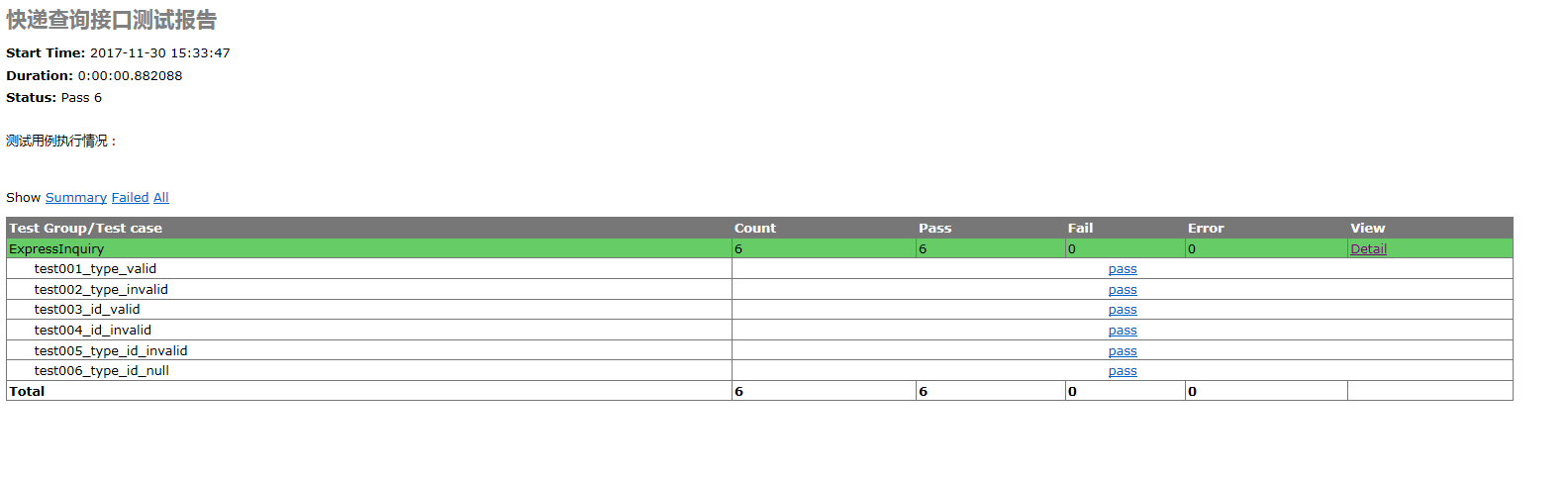
运行完毕的测试结果:
自动化测试===unittest和requests接口测试案例,测试快递查询api(二)的更多相关文章
- 快递查询API接口对接方法
各类接口 快递查询API有即时查询和订阅查询两种,即时是请求即返回数据,订阅则是订阅快递单号到接口,有物流轨迹更新则全量返回数据.目前常用的有快递鸟.快递100.快递网等. 快递鸟即时API可以查询3 ...
- 快递查询api(多接口方案)
/** 本环境使用php+smarty,结合两种快递api调取快递数据 * 说明,先快递鸟调取数据,失败后再调取快递网的数据* 快递鸟 http://www.kdniao.com 快递网 http:/ ...
- 各种快递查询--Api接口
授权成功我的密钥 爱查快递API使用说明文档 API地址: 以前:http://api.ickd.cn/?com=[]&nu=[]&id=[]&type=[]&enco ...
- 常用免费快递查询API对接案例
现在许多电商公司和ERP都会寻找比较适用的集成快递查询接口,减少对接难度,现在整理一下常用的免费快递查询接口,并附上调用案例,如果有觉得不对的地方,望能够一起沟通探讨! 一.快递查询接口 目前有提供免 ...
- 快递查询API接口(trackingmore)
快递查询接口 目前提供快递查询的接口平台有: Trackingmore 快递100 快递网 不同接口的区别: (1)Trackingmore支持380家快递公司,其中有55家为国内的快递,其余325家 ...
- baidu 快递查询API
<!DOCTYPE HTML PUBLIC "-//W3C//DTD HTML 4.01 Transitional//EN" "http://www.w3.org/ ...
- unittest,requests——接口测试脚本及报告
用unittest管理两个利用requests模块,做百度搜索的简单接口测试用例,之后自动输出报告 # encoding=utf-8import requests,unittest,HTMLTestR ...
- 快递查询API接口集成,有需要的可以直接用
适用于涉及经常发货.寄快递的人群.企业.电商网站.微信公众号平台等对接使用.支持国内外三百多家快递及物流公司的快递单号一站式查询. 使用说明: 1.KuadidiAPI.php 不需要修改改任何东西 ...
- 快递查询API
https://market.aliyun.com/products/56928004/cmapi014394.html#sku=yuncode839400000
随机推荐
- Spring Boot 最简单的HelloWorld
创建一个Spring Boot,可以直接使用构建工具(Maven或Gradle)创建,也可以使用spring.io网站创建,一般会选择使用spring.io创建 使用IDEA创建一个Spring Bo ...
- BZOJ4866 Ynoi2017由乃的商场之旅(莫队)
显然能重排为回文串相当于出现次数为奇数的字母不超过一个.考虑莫队,问题在于如何统计添加/删除一位的贡献.将各字母出现次数奇偶性看做二进制数,做一个前缀和一个后缀和.在右端添加一位时,更新区间的前缀.后 ...
- 关于Python的 a, b = b, a+b
Python中有一种写法:多个值同时赋给多个变量,如:a, b = b, a+b 1. A写法 a = 0, b = 1 a, b = b, a+b print a, b #结果为:1 1 这种写法, ...
- HUD.2544 最短路 (Dijkstra)
HUD.2544 最短路 (Dijkstra) 题意分析 1表示起点,n表示起点(或者颠倒过来也可以) 建立无向图 从n或者1跑dij即可. 代码总览 #include <bits/stdc++ ...
- HDOJ.1257 最少拦截系统 (贪心)
最少拦截系统 点我挑战题目 题意分析 一开始理解错了这道题.这么多个导弹排好序不只需要1个拦截系统吗.后来发现自己真傻.那出这个题还有啥意思,反正都需要一个.(:′⌒`) 给出n个导弹,这n个导弹的顺 ...
- selenium - webdriver - ActionChains类(鼠标操作)
ActionChains 类提供了鼠标操作的常用方法: perform(): 执行所有 ActionChains 中存储的行为: context_click(): 右击: double_click() ...
- 清北学堂模拟赛d6t6 棋盘迷宫
3.棋盘迷宫(boardgame.pas/c/cpp)(boardgame.in/out)时间限制:5s/空间限制:256M[题目描述]小 A 和小 Z 是非常要好的朋友, 而且他们都对迷宫游戏非常有 ...
- php防止用户输入进行跨站攻击的方式
1.对用户输入的内容进行转义 //1.过滤内容中html标记 $userinput=strip_tags($userinput); //2.转换成HTML实体 $userinput=htmlentit ...
- [USACO Mar08] 牛跑步
http://www.cogs.pro/cogs/problem/problem.php?pid=133 ★★★ 输入文件:cowjog.in 输出文件:cowjog.out 简单对比时间 ...
- C11简洁之道:模板改进
1. 右尖括号 我们在C++98/03中使用泛型编程的时候,经常遇到“>>”被当作右移操作符,而不是模板参数的结尾.假如我们有如下代码: template <typename T& ...