
Shrio第一天——入门与基本概述
一、Shiro是什么
Apache Shiro是Java的一个安全框架。(希罗:/笑哭)
Shiro可以非常容易的开发出足够好的应用,其不仅可以用在JavaSE环境,也可以用在JavaEE环境。
shiro官网:http://shiro.apache.org/
why shiro:
spring中有spring security (原名Acegi),是一个权限框架,它和spring依赖过于紧密,没有shiro使用简单。
Shiro在保持强大功能的同时,还在简单性和灵活性方面拥有巨大优势.简言之:简单,强大!
shiro不依赖于spring,shiro不仅可以实现 web应用的权限管理,还可以实现c/s系统,分布式系统权限管理,shiro属于轻量框架,越来越多企业项目开始使用shiro。
Shiro可以帮助我们完成:认证、授权、加密、会话管理、与Web集成、缓存等。
Shiro的结构:
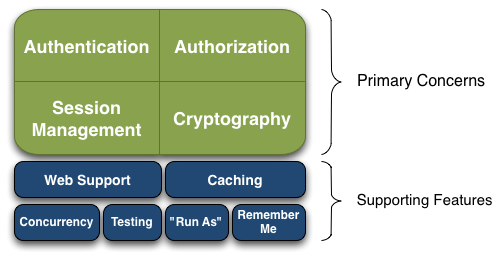
二、Shiro的架构
对于一个好的框架,从外部来看应该具有非常简单易于使用的API,且API契约明确;从内部来看的话,其应该有一个可扩展的架构,即非常容易插入用户自定义实现,因为任何框架都不能满足所有需求。
外部架构:
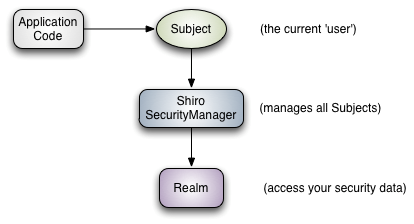
可以看到:应用代码直接交互的对象是Subject,也就是说Shiro的对外API核心就是Subject;其每个API的含义:
Subject:主体,代表了当前“用户”,这个用户不一定是一个具体的人,与当前应用交互的任何东西都是Subject,如网络爬虫,机器人等;即一个抽象概念;所有Subject都绑定到SecurityManager,与Subject的所有交互都会委托给SecurityManager;可以把Subject认为是一个门面;SecurityManager才是实际的执行者;
SecurityManager:安全管理器;即所有与安全有关的操作都会与SecurityManager交互;且它管理着所有Subject;可以看出它是Shiro的核心,它负责与后边介绍的其他组件进行交互,如果学习过SpringMVC,你可以把它看成DispatcherServlet前端控制器;
Realm:域,Shiro从从Realm获取安全数据(如用户、角色、权限),就是说SecurityManager要验证用户身份,那么它需要从Realm获取相应的用户进行比较以确定用户身份是否合法;也需要从Realm得到用户相应的角色/权限进行验证用户是否能进行操作;可以把Realm看成DataSource,即安全数据源。可以说,Realm是专用于安全框架的DAO.
内部架构:
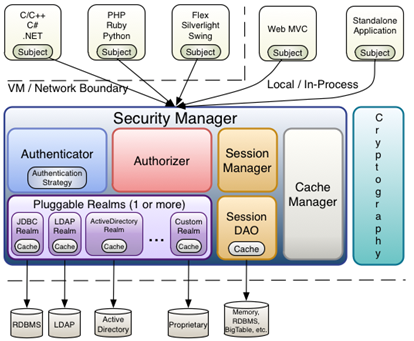
Subject:主体,可以看到主体可以是任何可以与应用交互的“用户”;
SecurityManager:相当于SpringMVC中的DispatcherServlet或者Struts2中的FilterDispatcher;是Shiro的心脏;所有具体的交互都通过SecurityManager进行控制;它管理着所有Subject、且负责进行认证和授权、及会话、缓存的管理。
Authenticator:认证器,负责主体认证的,这是一个扩展点,如果用户觉得Shiro默认的不好,可以自定义实现;其需要认证策略(Authentication Strategy),即什么情况下算用户认证通过了;
Authrizer:授权器,或者访问控制器,用来决定主体是否有权限进行相应的操作;即控制着用户能访问应用中的哪些功能;
Realm:可以有1个或多个Realm,可以认为是安全实体数据源,即用于获取安全实体的;可以是JDBC实现,也可以是LDAP实现,或者内存实现等等;由用户提供;注意:Shiro不知道你的用户/权限存储在哪及以何种格式存储;所以我们一般在应用中都需要实现自己的Realm;
SessionManager:如果写过Servlet就应该知道Session的概念,Session呢需要有人去管理它的生命周期,这个组件就是SessionManager;而Shiro并不仅仅可以用在Web环境,也可以用在如普通的JavaSE环境、EJB等环境;所有呢,Shiro就抽象了一个自己的Session来管理主体与应用之间交互的数据;这样的话,比如我们在Web环境用,刚开始是一台Web服务器;接着又上了台EJB服务器;这时想把两台服务器的会话数据放到一个地方,这个时候就可以实现自己的分布式会话(如把数据放到Memcached服务器);此特性可使它实现单点登录。
SessionDAO:DAO大家都用过,数据访问对象,用于会话的CRUD,比如我们想把Session保存到数据库,那么可以实现自己的SessionDAO,通过如JDBC写到数据库;比如想把Session放到Memcached中,可以实现自己的Memcached SessionDAO;另外SessionDAO中可以使用Cache进行缓存,以提高性能;
CacheManager:缓存控制器,来管理如用户、角色、权限等的缓存的;因为这些数据基本上很少去改变,放到缓存中后可以提高访问的性能(对session进行缓存等)
Cryptography:密码模块,Shiro提高了一些常见的加密组件用于如密码加密/解密的。
三、shiro的HelloWorld
1.加入依赖
<!-- 版本信息 -->

  <properties>

    <shiro.version>1.3.2</shiro.version>

  </properties>

  <dependencies>

      <!-- shiro -->

    <dependency>

        <groupId>org.apache.shiro</groupId>

        <artifactId>shiro-core</artifactId>

        <version>${shiro.version}</version>

    </dependency>

    <dependency>

        <groupId>org.apache.shiro</groupId>

        <artifactId>shiro-web</artifactId>

        <version>${shiro.version}</version>

    </dependency>

    <dependency>

        <groupId>org.apache.shiro</groupId>

        <artifactId>shiro-spring</artifactId>

        <version>${shiro.version}</version>

    </dependency>

    <!-- https://mvnrepository.com/artifact/org.slf4j/slf4j-log4j12 -->

    <dependency>

        <groupId>org.slf4j</groupId>

        <artifactId>slf4j-log4j12</artifactId>

        <version>1.6.1</version>

        <scope>test</scope>

    </dependency>

  </dependencies>
2.加入官方quick start的配置文件
log4j.properties:
#

# Licensed to the Apache Software Foundation (ASF) under one

# or more contributor license agreements.  See the NOTICE file

# distributed with this work for additional information

# regarding copyright ownership.  The ASF licenses this file

# to you under the Apache License, Version 2.0 (the

# "License"); you may not use this file except in compliance

# with the License.  You may obtain a copy of the License at

#

#     http://www.apache.org/licenses/LICENSE-2.0

#

# Unless required by applicable law or agreed to in writing,

# software distributed under the License is distributed on an

# "AS IS" BASIS, WITHOUT WARRANTIES OR CONDITIONS OF ANY

# KIND, either express or implied.  See the License for the

# specific language governing permissions and limitations

# under the License.

#

log4j.rootLogger=INFO, stdout

log4j.appender.stdout=org.apache.log4j.ConsoleAppender

log4j.appender.stdout.layout=org.apache.log4j.PatternLayout

log4j.appender.stdout.layout.ConversionPattern=%d %p [%c] - %m %n

# General Apache libraries

log4j.logger.org.apache=WARN

# Spring

log4j.logger.org.springframework=WARN

# Default Shiro logging

log4j.logger.org.apache.shiro=TRACE

# Disable verbose logging

log4j.logger.org.apache.shiro.util.ThreadContext=WARN

log4j.logger.org.apache.shiro.cache.ehcache.EhCache=WARN
shiro.ini:——身份凭据数据
#

# Licensed to the Apache Software Foundation (ASF) under one

# or more contributor license agreements.  See the NOTICE file

# distributed with this work for additional information

# regarding copyright ownership.  The ASF licenses this file

# to you under the Apache License, Version 2.0 (the

# "License"); you may not use this file except in compliance

# with the License.  You may obtain a copy of the License at

#

#     http://www.apache.org/licenses/LICENSE-2.0

#

# Unless required by applicable law or agreed to in writing,

# software distributed under the License is distributed on an

# "AS IS" BASIS, WITHOUT WARRANTIES OR CONDITIONS OF ANY

# KIND, either express or implied.  See the License for the

# specific language governing permissions and limitations

# under the License.

#

# =============================================================================

# Quickstart INI Realm configuration

#

# For those that might not understand the references in this file, the

# definitions are all based on the classic Mel Brooks' film "Spaceballs". ;)

# =============================================================================

# -----------------------------------------------------------------------------

# Users and their assigned roles

#

# Each line conforms to the format defined in the

# org.apache.shiro.realm.text.TextConfigurationRealm#setUserDefinitions JavaDoc

# -----------------------------------------------------------------------------

[users]

# user 'root' with password 'secret' and the 'admin' role

root = secret, admin

# user 'guest' with the password 'guest' and the 'guest' role

guest = guest, guest

# user 'presidentskroob' with password '12345' ("That's the same combination on

# my luggage!!!" ;)), and role 'president'

presidentskroob = 12345, president

# user 'darkhelmet' with password 'ludicrousspeed' and roles 'darklord' and 'schwartz'

darkhelmet = ludicrousspeed, darklord, schwartz

# user 'lonestarr' with password 'vespa' and roles 'goodguy' and 'schwartz'

lonestarr = vespa, goodguy, schwartz

# -----------------------------------------------------------------------------

# Roles with assigned permissions

#

# Each line conforms to the format defined in the

# org.apache.shiro.realm.text.TextConfigurationRealm#setRoleDefinitions JavaDoc

# -----------------------------------------------------------------------------

[roles]

# 'admin' role has all permissions, indicated by the wildcard '*'

admin = *

# The 'schwartz' role can do anything (*) with any lightsaber:

schwartz = lightsaber:*

# The 'goodguy' role is allowed to 'delete' (action) the user (type) with

# license plate 'zhangsan' (instance specific id)

goodguy = user:delete:zhangsan
3.引入quickstart.java文件:
package cn.shiro.helloworld;

import org.apache.shiro.SecurityUtils;

import org.apache.shiro.authc.*;

import org.apache.shiro.config.IniSecurityManagerFactory;

import org.apache.shiro.mgt.SecurityManager;

import org.apache.shiro.session.Session;

import org.apache.shiro.subject.Subject;

import org.apache.shiro.util.Factory;

import org.slf4j.Logger;

import org.slf4j.LoggerFactory;

/**

 * Simple Quickstart application showing how to use Shiro's API.

 *

 * @since 0.9 RC2

 */

public class Quickstart {

    private static final transient Logger log = LoggerFactory.getLogger(Quickstart.class);

    public static void main(String[] args) {

        // The easiest way to create a Shiro SecurityManager with configured

        // realms, users, roles and permissions is to use the simple INI config.

        // We'll do that by using a factory that can ingest a .ini file and

        // return a SecurityManager instance:

        // Use the shiro.ini file at the root of the classpath

        // (file: and url: prefixes load from files and urls respectively):

        Factory<SecurityManager> factory = new IniSecurityManagerFactory("classpath:shiro.ini");

        SecurityManager securityManager = factory.getInstance();

        // for this simple example quickstart, make the SecurityManager

        // accessible as a JVM singleton.  Most applications wouldn't do this

        // and instead rely on their container configuration or web.xml for

        // webapps.  That is outside the scope of this simple quickstart, so

        // we'll just do the bare minimum so you can continue to get a feel

        // for things.

        SecurityUtils.setSecurityManager(securityManager);

        // Now that a simple Shiro environment is set up, let's see what you can do:

        // get the currently executing user:

        // ��ȡ��ǰ�� Subject. ���� SecurityUtils.getSubject();

        Subject currentUser = SecurityUtils.getSubject();

        // Do some stuff with a Session (no need for a web or EJB container!!!)

        // ����ʹ�� Session

        // ��ȡ Session: Subject#getSession()

        Session session = currentUser.getSession();

        session.setAttribute("someKey", "aValue");

        String value = (String) session.getAttribute("someKey");

        if (value.equals("aValue")) {

            log.info("---> Retrieved the correct value! [" + value + "]");

        }

        // let's login the current user so we can check against roles and permissions:

        // ���Ե�ǰ���û��Ƿ��Ѿ�����֤. ���Ƿ��Ѿ���¼.

        // ���� Subject �� isAuthenticated()

        if (!currentUser.isAuthenticated()) {

            // ���û����������װΪ UsernamePasswordToken ����

            UsernamePasswordToken token = new UsernamePasswordToken("lonestarr", "vespa");

            // rememberme

            token.setRememberMe(true);

            try {

                // ִ�е�¼.

                currentUser.login(token);

            }

            // ��û��ָ�����˻�, �� shiro �����׳� UnknownAccountException �쳣.

            catch (UnknownAccountException uae) {

                log.info("----> There is no user with username of " + token.getPrincipal());

                return;

            }

            // ���˻�����, �����벻ƥ��, �� shiro ���׳� IncorrectCredentialsException �쳣��

            catch (IncorrectCredentialsException ice) {

                log.info("----> Password for account " + token.getPrincipal() + " was incorrect!");

                return;

            }

            // �û����������쳣 LockedAccountException

            catch (LockedAccountException lae) {

                log.info("The account for username " + token.getPrincipal() + " is locked.  " +

                        "Please contact your administrator to unlock it.");

            }

            // ... catch more exceptions here (maybe custom ones specific to your application?

            // ������֤ʱ�쳣�ĸ���.

            catch (AuthenticationException ae) {

                //unexpected condition?  error?

            }

        }

        //say who they are:

        //print their identifying principal (in this case, a username):

        log.info("----> User [" + currentUser.getPrincipal() + "] logged in successfully.");

        //test a role:

        // �����Ƿ���ijһ����ɫ. ���� Subject �� hasRole ����.

        if (currentUser.hasRole("schwartz")) {

            log.info("----> May the Schwartz be with you!");

        } else {

            log.info("----> Hello, mere mortal.");

            return;

        }

        //test a typed permission (not instance-level)

        // �����û��Ƿ�߱�ijһ����Ϊ. ���� Subject �� isPermitted() ������

        if (currentUser.isPermitted("lightsaber:weild")) {

            log.info("----> You may use a lightsaber ring.  Use it wisely.");

        } else {

            log.info("Sorry, lightsaber rings are for schwartz masters only.");

        }

        //a (very powerful) Instance Level permission:

        // �����û��Ƿ�߱�ijһ����Ϊ.

        if (currentUser.isPermitted("user:delete:zhangsan")) {

            log.info("----> You are permitted to 'drive' the winnebago with license plate (id) 'eagle5'.  " +

                    "Here are the keys - have fun!");

        } else {

            log.info("Sorry, you aren't allowed to drive the 'eagle5' winnebago!");

        }

        //all done - log out!

        // ִ�еdz�. ���� Subject �� Logout() ����.

        System.out.println("---->" + currentUser.isAuthenticated());

        currentUser.logout();

        System.out.println("---->" + currentUser.isAuthenticated());

        System.exit(0);

    }

}
//中文乱码有待解决
这里存在的问题是用户名密码直接写在ini配置文件中,难以管理,密码也不应该明文存储。这里后文会陆续有解决方案。
入门程序大致流程分析:
1、通过ini配置文件创建securityManager

2、调用subject.login方法主体提交认证,提交的token

3、securityManager进行认证,securityManager最终由ModularRealmAuthenticator进行认证。

4、ModularRealmAuthenticator调用IniRealm(给realm传入token) 去ini配置文件中查询用户信息

5、IniRealm根据输入的token(UsernamePasswordToken)从 shiro-first.ini查询用户信息,根据账号查询用户信息(账号和密码)

    如果查询到用户信息,就给ModularRealmAuthenticator返回用户信息(账号和密码)

    如果查询不到,就给ModularRealmAuthenticator返回null

6、ModularRealmAuthenticator接收IniRealm返回Authentication认证信息

    如果返回的认证信息是null,ModularRealmAuthenticator抛出异常(org.apache.shiro.authc.UnknownAccountException)

    如果返回的认证信息不是null(说明inirealm找到了用户),对IniRealm返回用户密码 (在ini文件中存在)和 token中的密码 进行对比,如果不一致抛出异常(org.apache.shiro.authc.IncorrectCredentialsException)
3.自定义Realm
通常自定义的realm继承AuthorizingRealm(重写认证和授权方法)。Realm的调用流程见上文
public class CustomRealm extends AuthorizingRealm {

    // 设置realm的名称

    @Override

    public void setName(String name) {

        super.setName("customRealm");

    }

    // 用于认证

    @Override

    protected AuthenticationInfo doGetAuthenticationInfo(

            AuthenticationToken token) throws AuthenticationException {

        // token是用户输入的

        // 第一步从token中取出身份信息

        String userCode = (String) token.getPrincipal();

        // 第二步:根据用户输入的userCode从数据库查询

        // ....

        // 如果查询不到返回null

        //数据库中用户账号是zhangsansan

        /*if(!userCode.equals("zhangsansan")){//

            return null;

        }*/

        // 模拟从数据库查询到密码

        String password = "111112";

        // 如果查询到返回认证信息AuthenticationInfo

        SimpleAuthenticationInfo simpleAuthenticationInfo = new SimpleAuthenticationInfo(

                userCode, password, this.getName());

        return simpleAuthenticationInfo;

    }

    // 用于授权

    @Override

    protected AuthorizationInfo doGetAuthorizationInfo(

            PrincipalCollection principals) {

        // TODO Auto-generated method stub

        return null;

    }

}
//认证信息:AuthenticationInfo authcInfo = new SimpleAuthenticationInfo(shop.getLoginName(), shop.getPassword(), "昵称或真实姓名");
当然,认证信息有其它重载构造器,视情况更换。
再将自定义的Realm进行配置(不然shiro怎么知道要用你的Realm呢):后面spring的注入原理类似,只是方式不同
[main]

#\u81ea\u5b9a\u4e49 realm

customRealm=cn.itcast.shiro.realm.CustomRealm

#\u5c06realm\u8bbe\u7f6e\u5230securityManager\uff0c\u76f8\u5f53 \u4e8espring\u4e2d\u6ce8\u5165

securityManager.realms=$customRealm
4.散列算法
在程序中对原始密码+盐进行散列,将散列值存储到数据库中,并且还要将盐也要存储在数据库中。
如果进行密码对比时,使用相同 方法,将原始密码+盐进行散列,进行比对。
md5散列程序:
public static void main(String[] args) {

        //原始 密码

        String source = "111111";

        //盐

        String salt = "qwerty";

        //散列次数

        int hashIterations = 2;

        //上边散列1次:f3694f162729b7d0254c6e40260bf15c

        //上边散列2次:36f2dfa24d0a9fa97276abbe13e596fc

        //构造方法中:

        //第一个参数:明文,原始密码

        //第二个参数:盐,通过使用随机数

        //第三个参数:散列的次数,比如散列两次,相当 于md5(md5(''))

        Md5Hash md5Hash = new Md5Hash(source, salt, hashIterations);

        String password_md5 =  md5Hash.toString();

        System.out.println(password_md5);

        //第一个参数:散列算法

        SimpleHash simpleHash = new SimpleHash("md5", source, salt, hashIterations);

        System.out.println(simpleHash.toString());

    }
将realm与散列集成,使得自定义realm支持散列算法:
public class CustomRealmMd5 extends AuthorizingRealm {

    // 设置realm的名称

    @Override

    public void setName(String name) {

        super.setName("customRealmMd5");

    }

    // 用于认证

    @Override

    protected AuthenticationInfo doGetAuthenticationInfo(

            AuthenticationToken token) throws AuthenticationException {

        // token是用户输入的

        // 第一步从token中取出身份信息

        String userCode = (String) token.getPrincipal();

        // 第二步:根据用户输入的userCode从数据库查询

        // ....

        // 如果查询不到返回null

        // 数据库中用户账号是zhangsansan

        /*

         * if(!userCode.equals("zhangsansan")){// return null; }

         */

        // 模拟从数据库查询到密码,散列值

        String password = "f3694f162729b7d0254c6e40260bf15c";

        // 从数据库获取salt

        String salt = "qwerty";

        //上边散列值和盐对应的明文:111111

        // 如果查询到返回认证信息AuthenticationInfo

        SimpleAuthenticationInfo simpleAuthenticationInfo = new SimpleAuthenticationInfo(

                userCode, password, ByteSource.Util.bytes(salt), this.getName());

        return simpleAuthenticationInfo;

    }

    // 用于授权

    @Override

    protected AuthorizationInfo doGetAuthorizationInfo(

            PrincipalCollection principals) {

        // TODO Auto-generated method stub

        return null;

    }
配置凭证匹配器(散列算法与散列次数):
[main]

#\u5b9a\u4e49\u51ed\u8bc1\u5339\u914d\u5668

credentialsMatcher=org.apache.shiro.authc.credential.HashedCredentialsMatcher

#\u6563\u5217\u7b97\u6cd5

credentialsMatcher.hashAlgorithmName=md5

#\u6563\u5217\u6b21\u6570

credentialsMatcher.hashIterations=1

#\u5c06\u51ed\u8bc1\u5339\u914d\u5668\u8bbe\u7f6e\u5230realm

customRealm=cn.itcast.shiro.realm.CustomRealmMd5

customRealm.credentialsMatcher=$credentialsMatcher

securityManager.realms=$customRealm
四、与sprng的集成
(请参见官方文档:http://shiro.apache.org/spring.html)
完整与SSM整合已抽取为一篇博文(陆续更新补充):http://www.cnblogs.com/jiangbei/p/7221565.html
五、基本工作原理
我们简单了解下大致的工作流程:

其中,DelegatingFilterProxy 作用是自动到 Spring 容器查找名 字为 shiroFilter(filter-name)的 bean 并把所有 Filter 的操作委托给它。
所以,web.xml中DelegatingFilterProxy的filter-name必须和spring配置文件中bean的id一致(否则加载就会报错,可以查看相关的spring的源码注释),若要自定义,请在filter中定义init-param定义targerBeanName!
当然,可以在filterChainDefinitions配置需要认证的页面!接下来来看如何配置受保护的URL(spring中的第六步):
[urls] 部分的配置,其格式是: “url=拦截器[参数],拦截 器[参数]”;
例如前面的配置(此处暂时未配置参数)
     <property name="filterChainDefinitions">

            <value>

                /login.jsp = anon

                # everything else requires authentication:

                /** = authc

            </value>

        </property>
所有默认的过滤器:(可以通过defaultFilter枚举类来查看)
public enum DefaultFilter {

    anon(AnonymousFilter.class),

    authc(FormAuthenticationFilter.class),

    authcBasic(BasicHttpAuthenticationFilter.class),

    logout(LogoutFilter.class),

    noSessionCreation(NoSessionCreationFilter.class),

    perms(PermissionsAuthorizationFilter.class),

    port(PortFilter.class),

    rest(HttpMethodPermissionFilter.class),

    roles(RolesAuthorizationFilter.class),

    ssl(SslFilter.class),

    user(UserFilter.class);

}
| anon | org.apache.shiro.web.filter.authc.AnonymousFilter |
| authc | org.apache.shiro.web.filter.authc.FormAuthenticationFilter |
| authcBasic | org.apache.shiro.web.filter.authc.BasicHttpAuthenticationFilter |
| perms | org.apache.shiro.web.filter.authz.PermissionsAuthorizationFilter |
| port | org.apache.shiro.web.filter.authz.PortFilter |
| rest | org.apache.shiro.web.filter.authz.HttpMethodPermissionFilter |
| roles | org.apache.shiro.web.filter.authz.RolesAuthorizationFilter |
| ssl | org.apache.shiro.web.filter.authz.SslFilter |
| user | org.apache.shiro.web.filter.authc.UserFilter |
//补充一个logout
解释如下:
anon:例子/admins/**=anon 没有参数,表示可以匿名使用。
authc:例如/admins/user/**=authc表示需要认证(登录)才能使用,FormAuthenticationFilter是表单认证,没有参数
perms:例子/admins/user/**=perms[user:add:*],参数可以写多个,多个时必须加上引号,并且参数之间用逗号分割,例如/admins/user/**=perms["user:add:*,user:modify:*"],当有多个参数时必须每个参数都通过才通过,
相当于 isPermitedAll()方法。
user:例如/admins/user/**=user没有参数表示必须存在用户, 身份认证通过或通过记住我认证通过的可以访问,当登入操作时不做检查
url 模式使用 Ant 风格模式(? * **的风格),

URL 权限采取第一次匹配优先的方式,即从头开始 使用第一个匹配的 url 模式对应的拦截器链。(按照定义的先后顺序匹配)
所以,一般/**放到最后。
Shrio第一天——入门与基本概述的更多相关文章
- Python入门篇-面向对象概述
Python入门篇-面向对象概述 作者:尹正杰 版权声明:原创作品,谢绝转载!否则将追究法律责任. 一.语言的分类 面向机器 抽象成机器指令,机器容易理解 代表:汇编语言 面向过程 做一件事情,排出个 ...
- 快速入门系列--MVC--01概述
虽然使用MVC已经不少年,相关技术的学习进行了多次,但是很多技术思路的理解其实都不够深入.其实就在MVC框架中有很多设计模式和设计思路的体现,例如DependencyResolver类就包含我们常见的 ...
- Python第一天——入门Python(1)数据定义
数据类型: 什么是数据? 在计算机科学中,数据是指所有能输入到计算机并被计算机程序处理的符号的介质的总称,是用于输入电子计算机进行处理,具有一定意义的数字字母.符号和模拟量等的统称.现在计算机存储和处 ...
- .NET Core实战项目之CMS 第一章 入门篇-开篇及总体规划
作者:依乐祝 原文地址:https://www.cnblogs.com/yilezhu/p/9977862.html 写在前面 千呼万唤始出来,首先,请允许我长吸一口气!真没想到一份来自28岁老程序员 ...
- net core体系-web应用程序-4asp.net core2.0 项目实战(CMS)-第一章 入门篇-开篇及总体规划
.NET Core实战项目之CMS 第一章 入门篇-开篇及总体规划 原文地址:https://www.cnblogs.com/yilezhu/p/9977862.html 写在前面 千呼万唤始出来 ...
- 第一篇 入门必备 (Android学习笔记)
第一篇 入门必备 第1章 初识Android 第2章 搭建你的开发环境 第3章 创建第一个程序--HelloWorld 第4章 使用Android工具 ●Android之父 Android安迪·罗 ...
- vivado设计一:建立第一个入门工程(基于zybo)
vivado设计一:建立第一个入门工程(基于zybo) 0赞 发表于 2014/6/17 23:03:25 阅读(8777) 评论(4) 软件:vivado 2013.4 电脑:xp系统 硬件:zyb ...
- 学会Git玩转GitHub(第一篇) 入门详解 - 精简归纳
学会Git玩转GitHub(第一篇) 入门详解 - 精简归纳 JERRY_Z. ~ 2020 / 9 / 25 转载请注明出处!️ 目录 学会Git玩转GitHub(第一篇) 入门详解 - 精简归纳 ...
- mybatis第一天——入门与概述
大纲摘要: 1.mybatis的介绍 2.Mybatis的入门 a) 使用jdbc操作数据库存在的问题 b) Mybatis的架构 c) Mybatis的入门程序 3.Dao的开发方法 a) 原始da ...
随机推荐
- SRAM(静态)存储器芯片的读/写周期
一. 要保证正确地读/写,必须注意CPU时序与存储器读/写周期的配合.一般存储器芯片手册都会给出芯片读/写周期的时序图. Intel 2114芯片的读.写周期时序如图所示. 二. 读周期 读操作时,必 ...
- codeforces 963A Alternating Sum
codeforces 963A Alternating Sum 题解 计算前 \(k\) 项的和,每 \(k\) 项的和是一个长度为 \((n+1)/k\) ,公比为 \((a^{-1}b)^k\) ...
- Nowcoder Girl 初赛 T5
Nowcoder Girl 初赛第五题 来源 Nowcoder Girl 初赛第五题 题面 \(n(1<=n<=10000)\)件武器,每件武器对于属性有加成,一共五种属性.若使用其中的\ ...
- scala基础入门
1.scala当中申明值和变量 scala当中的变量申明可以使用两种方式,第一种使用val来申明变量.第二种使用var来申明变量. 申明变量语法 val/var 变量名 [:变量类型] = 变量值 其 ...
- IOS .a静态库的和.framework制作
什么是库? 库是程序代码的集合,是共享程序代码的一种方式 根据源代码的公开情况,库可以分为2种类型 开源库 公开源代码,能看到具体实现 比如SDWebImage.AFNetworking 闭源库 不公 ...
- Java 读取Excel数据——POI-3.11 XSSF
POI - the Java API for Microsoft Documents 1.在Apache官网下载Apache最新poi版本:poi-bin-3.11-20141221.zip,解压: ...
- Mint-ui 中 Popup 作为组件引入,控制弹出框的显示与隐藏遇到的问题。
Popup组件的结构: <template> <div> <!--分享弹出窗 begin--> <mt-popup class="s ...
- 异步模式:Callbacks, Promises & Async/Await
[译]异步JavaScript的演变史:从回调到Promises再到Async/Await https://www.i-programmer.info/programming/theory/8864- ...
- C语言支持的四种变量存储类型
http://blog.csdn.net/zhandoushi1982/article/details/5425835 一)auto:auto称为自动变量(局部变量).局部变量是指在函数内部说明的变量 ...
- angular cli
1. 安装cnpm: npm install -g cnpm --registry=https://registry.npm.taobao.org 2. 安装angular/cli: cnpm ins ...