
【Mac】安装 Homebrew 出错 Failed during: git fetch origin master:refs/remotes/origin/master --tags --force
今天在 Mac 装 Homebrew 遇到了一个问题,在网上找了大量解决方案,做个总结。
Mac 版本 High Sierra 10.13.6。
问题描述
在 Mac 终端输入了 Homebrew 官网给的安装指令:
/usr/bin/ruby -e "$(curl -fsSL https://raw.githubusercontent.com/Homebrew/install/master/install)"
结果安装到最后出现了错误:
fatal: unable to access 'https://github.com/Homebrew/brew/': Could not resolve host: github.com

Failed during: git fetch origin master:refs/remotes/origin/master --tags --force
网上都说是网不通,可是我也挂着 ss,应该不是这个问题,很多解决方法是修改成镜像的链接,不过貌似都不见效。试着在终端 ping 了一下 GitHub 的地址:
ping github.com
结果出现了下面这个结果,还真是网不通。
ING github.com (13.250.177.223): 56 data bytes

Request timeout for icmp_seq 0

Request timeout for icmp_seq 1

Request timeout for icmp_seq 2

Request timeout for icmp_seq 3
解决方案
修改 host 配置,在终端中输入下列指令,打开编辑文件。
sudo vi /etc/hosts
按 s键 进入编辑模式,在最下面添加 192.30.253.113 github.com
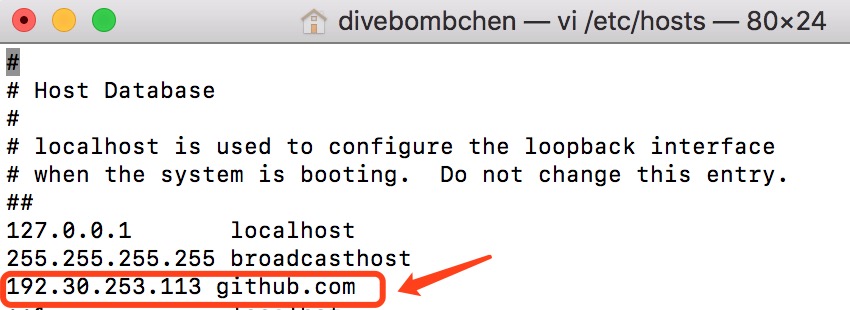
按 control + c键 保存,接着输入:wq退出即可。
再次尝试在终端 ping github.com,发现已经成功了。
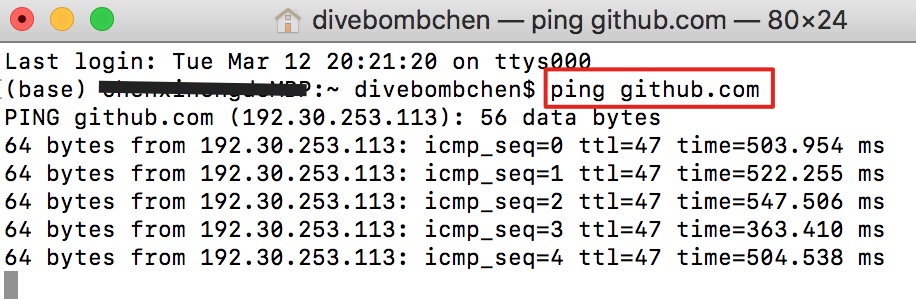
接着继续在终端输入官网的安装指令,就能安装成功了。
/usr/bin/ruby -e "$(curl -fsSL https://raw.githubusercontent.com/Homebrew/install/master/install)"
常见问题
如果在安装过程中出现以下情况,就是网不通,再次输入官网安装指令即可。
error: RPC failed; curl 56 LibreSSL SSL_read: SSL_ERROR_SYSCALL, errno 54

fatal: The remote end hung up unexpectedly
【Mac】安装 Homebrew 出错 Failed during: git fetch origin master:refs/remotes/origin/master --tags --force的更多相关文章
- homebrew安装问题(Failed during: git fetch origin master:refs/remotes/origin/master --tags --force)
在mac系统中,使用homebrew可以很方便的管理包.按照官网的说明执行以下命令时总是报错: /usr/bin/ruby -e "$(curl -fsSL https://raw.gith ...
- Mac 安装HomeBrew 出错
错误如下: error: could not lock config file /usr/local/Homebrew/.git/config: Permission denied fatal: co ...
- homebrew update 出现Failure while executing: git pull --quiet origin refs/heads/master:refs/remotes/origin/master解决方案
具体可以参考https://github.com/Homebrew/homebrew/issues/21002 cd /usr/local git status git reset --hard or ...
- 解决mac安装homebrew后报错-bash: brew: command not found
解决mac安装homebrew后报错-bash: brew: command not found 参照官网上很简单的一句安装命令, /usr/bin/ruby -e "$(curl ...
- Mac安装Homebrew的那些事儿
Mac安装Homebrew的那些事儿 最近小明刚换置了一个 Mac 本,想搭建一个属于自己的博客网站,需要用到 Node.js 环境,而Node.js 在 MacOS 中是由 Homebrew 进行安 ...
- 项目记事【Git】:git pull 出错 error: cannot lock ref 'refs/remotes/origin/feature/hy78861': is at d4244546c8cc3827491cc82878a23c708fd0401d but expected a6a00bf2e92620d0e06790122bab5aeee01079bf
今天 pull 代码的时候碰到以下问题(隐去了一些公司敏感信息): XXX@CN-00012645 MINGW64 /c/Gerrard/Workspace/XXX (master) $ git pu ...
- git问题 next fetch will store in remotes/origin
项目在git的下无法查找到需要的Branch
- Git Push:error: Couldn't set refs/remotes/origin/master;error: update_ref failed for ref 'refs/remot
作者:荒原之梦 原文链接:http://zhaokaifeng.com/?p=543 今天使用Git Push代码时产生错误: Rename from 'XXXX/.git/refs/remotes/ ...
- Mac安装homebrew,postman,charles
Homebrew是一款Mac OS平台下的软件包管理工具,拥有安装.卸载.更新.查看.搜索等很多实用的功能.简单的一条指令,就可以实现包管理,而不用你关心各种依赖和文件路径的情况,十分方便快捷. 1. ...
随机推荐
- EXCHANGE 2013 TLS传输层安全
默认情况下,SMTP流量是不被加密的,这就导致在公网上进行邮件沟通就像是在广播一样,任何人拦截到该邮件都可以轻而易举的读取其内容.但是现实场景中有许多敏感信息是通过邮件来进行发送的,所以其中一种保护邮 ...
- Analysis of Algorithms
算法分析 Introduction 有各种原因要求我们分析算法,像预测算法性能,比较不同算法优劣等,其中很实际的一条原因是为了避免性能错误,要对自己算法的性能有个概念. 科学方法(scientific ...
- JavaScript 变量声明提升
JavaScript 变量声明提升 一.变量提升的部分只是变量的声明,赋值语句和可执行的代码逻辑还保持在原地不动 二.在基本的语句(或者说代码块)中(比如:if语句.for语句.while语句.swi ...
- C语言基础笔试题一
1.下面的代码输出什么?为什么? void foo(void) { unsigned int a = 6; int b = -20; (a+b > 6)?puts(">6&quo ...
- Java中的Scanner类
java.util.Scanner是Java5的新特征,我们可以通过Scanner类来获取用户的输入.创建Scanner对象的基本语法: Scanner s = new Scanner(System. ...
- z-index终结者
版权声明:本文为博主原创文章,未经博主同意不得转载. https://blog.csdn.net/wangshuxuncom/article/details/30280627 z-in ...
- Guava包学习-Multimap
它和上一章的MultiSet的继承结果很相似,只不过在上层的接口是Multimap不是Multiset. Multimap的特点其实就是可以包含有几个重复Key的value,你可以put进入多个不同v ...
- 【[LNOI2014]LCA】
这题好神啊 能够\(1A\)真是不可思议 首先看到要求的这个柿子\(\sum_{i=l}^{r}deep[LCA(i,z)]\),而且\(l\)和\(r\)并不是来自与一棵子树或者一条链,而是编号连续 ...
- 【[JSOI2009]火星藏宝图】
这里是\(sb\)的\(O(nm)\)做法 上一篇题解里写的\(O(nm)\)做法并没有看懂,我真是好菜啊 这是一个用了斜率优化,但是复杂度仍然是\(O(nm)\)的做法 我们还是先写出简单的\(dp ...
- yii2.0 联表查询数据库报错:undefined index order_id
1.在查询时加了->select();如下,要加上order_id,即关联的字段(比如:order_id)比如要在select中,否则会报错:undefined index order_id / ...