
基于jQuery加入购物车飞入动画特效
基于jQuery加入购物车飞入动画特效。这是一款电商购物网站常用的把商品加入购物车代码。效果图如下:
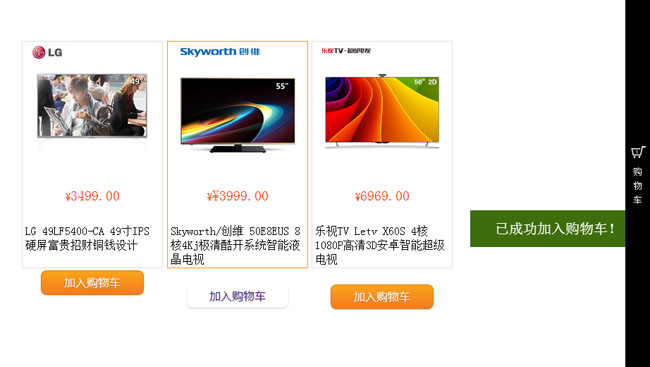
实现的代码。
html代码:
 <div id="main">

        <div class="demo">

            <div class="box">

                <img src="data:images/lg.jpg" width="180" height="180">

                <h4>

                    ¥<span>3499.00</span></h4>

                <p>

                    LG 49LF5400-CA 49寸IPS硬屏富贵招财铜钱设计</p>

                <a href="#" class="button orange addcar">加入购物车</a>

            </div>

            <div class="box">

                <img src="data:images/hs.jpg" width="180" height="180">

                <h4>

                    ¥<span>3799.00</span></h4>

                <p>

                    Hisense/海信 LED50T1A 海信电视官方旗舰店</p>

                <a href="#" class="button orange addcar">加入购物车</a>

            </div>

            <div class="box">

                <img src="data:images/cw.jpg" width="180" height="180">

                <h4>

                    ¥<span>¥3999.00</span></h4>

                <p>

                    Skyworth/创维 50E8EUS 8核4Kj极清酷开系统智能液晶电视</p>

                <a href="#" class="button orange addcar">加入购物车</a>

            </div>

            <div class="box">

                <img src="data:images/ls.jpg" width="180" height="180">

                <h4>

                    ¥<span>6969.00</span></h4>

                <p>

                    乐视TV Letv X60S 4核1080P高清3D安卓智能超级电视</p>

                <a href="#" class="button orange addcar">加入购物车</a>

            </div>

        </div>

    </div>

    <div class="m-sidebar">

        <div class="cart">

            <i id="end"></i><span>购物车</span>

        </div>

    </div>

    <div id="msg">

        已成功加入购物车!</div>

    </div>
css代码:
 .demo

        {

            width: 820px;

            margin: 60px auto 10px auto;

        }

        .m-sidebar

        {

            position: fixed;

            top:;

            right:;

            background: #000;

            z-index:;

            width: 35px;

            height: 100%;

            font-size: 12px;

            color: #fff;

        }

        .cart

        {

            color: #fff;

            text-align: center;

            line-height: 20px;

            padding: 200px 0 0 0px;

        }

        .cart span

        {

            display: block;

            width: 20px;

            margin: 0 auto;

        }

        .cart i

        {

            width: 35px;

            height: 35px;

            display: block;

            background: url(car.png) no-repeat;

        }

        #msg

        {

            position: fixed;

            top: 300px;

            right: 35px;

            z-index:;

            width: 1px;

            height: 52px;

            line-height: 52px;

            font-size: 20px;

            text-align: center;

            color: #fff;

            background: #360;

            display: none;

        }

        .box

        {

            float: left;

            width: 198px;

            height: 320px;

            margin-left: 5px;

            border: 1px solid #e0e0e0;

            text-align: center;

        }

        .box p

        {

            line-height: 20px;

            padding: 4px 4px 10px 4px;

            text-align: left;

        }

        .box:hover

        {

            border: 1px solid #f90;

        }

        .box h4

        {

            line-height: 32px;

            font-size: 14px;

            color: #f30;

            font-weight:;

        }

        .box h4 span

        {

            font-size: 20px;

        }

        .u-flyer

        {

            display: block;

            width: 50px;

            height: 50px;

            border-radius: 50px;

            position: fixed;

            z-index:;

        }

        .button

        {

            display: inline-block;

            outline: none;

            cursor: pointer;

            text-align: center;

            text-decoration: none;

            font: 16px/100% 'Microsoft yahei' ,Arial, Helvetica, sans-serif;

            padding: .5em 2em .55em;

            text-shadow: 0 1px 1px rgba(0,0,0,.3);

            -webkit-border-radius: .5em;

            -moz-border-radius: .5em;

            border-radius: .5em;

            -webkit-box-shadow: 0 1px 2px rgba(0,0,0,.2);

            -moz-box-shadow: 0 1px 2px rgba(0,0,0,.2);

            box-shadow: 0 1px 2px rgba(0,0,0,.2);

        }

        .button:hover

        {

            text-decoration: none;

        }

        .button:active

        {

            position: relative;

            top: 1px;

        }

        /* orange */

        .orange

        {

            color: #fef4e9;

            border: solid 1px #da7c0c;

            background: #f78d1d;

            background: -webkit-gradient(linear, left top, left bottom, from(#faa51a), to(#f47a20));

            background: -moz-linear-gradient(top,  #faa51a,  #f47a20);

            filter: progid:DXImageTransform.Microsoft.gradient(startColorstr='#faa51a', endColorstr='#f47a20');

        }

        .orange:hover

        {

            background: #f47c20;

            background: -webkit-gradient(linear, left top, left bottom, from(#f88e11), to(#f06015));

            background: -moz-linear-gradient(top,  #f88e11,  #f06015);

            filter: progid:DXImageTransform.Microsoft.gradient(startColorstr='#f88e11', endColorstr='#f06015');

        }

        .orange:active

        {

            color: #fcd3a5;

            background: -webkit-gradient(linear, left top, left bottom, from(#f47a20), to(#faa51a));

            background: -moz-linear-gradient(top,  #f47a20,  #faa51a);

            filter: progid:DXImageTransform.Microsoft.gradient(startColorstr='#f47a20', endColorstr='#faa51a');

        }
js代码:
  $(function () {

            var offset = $("#end").offset();

            $(".addcar").click(function (event) {

                var addcar = $(this);

                var img = addcar.parent().find('img').attr('src');

                var flyer = $('<img class="u-flyer" src="' + img + '">');

                flyer.fly({

                    start: {

                        left: event.pageX,

                        top: event.pageY

                    },

                    end: {

                        left: offset.left + 10,

                        top: offset.top + 10,

                        width: 0,

                        height: 0

                    },

                    onEnd: function () {

                        $("#msg").show().animate({ width: '250px' }, 200).fadeOut(1000);

                        addcar.css("cursor", "default").removeClass('orange').unbind('click');

                        this.destory();

                    }

                });

            });

        });
via:http://www.w2bc.com/Article/29464
基于jQuery加入购物车飞入动画特效的更多相关文章
- 8款基于Jquery的WEB前端动画特效
1.超炫酷的30个jQuery按钮悬停动画 按钮插件是最常见的jQuery插件之一,因为它用途广泛,而且配置起来最为方便.今天我们要分享的是30个超炫酷的jQuery悬停按钮动画,当我们将鼠标滑过按钮 ...
- 10款基于jquery的web前端动画特效
1.jQuery横向手风琴图片切换动画 之前我们为大家分享过很多款基于jQuery和CSS3的手风琴菜单和手风琴焦点图插件,比如CSS3响应式垂直手风琴菜单和jQuery横向手风琴图片展示插件.今天要 ...
- 基于jQuery+CSS3实现人物跳动特效
分享一款基于jQuery+CSS3实现人物跳动特效.这是一款类似gif图片效果的CSS3动画特效代码.效果图如下: 在线预览 源码下载 实现的代码. html代码: <div class=& ...
- 基于jQuery HTML5人物介绍卡片特效
基于jQuery HTML5人物介绍卡片特效.这是一款基于jquery.material-cards插件实现的人物介绍卡片形式特效代码.效果图如下: 在线预览 源码下载 实现的代码. html代码 ...
- 基于jQuery发展历程时间轴特效代码
分享一款基于jQuery发展历程时间轴特效代码,带左右箭头,数字时间轴选项卡切换特效下载.效果图如下: 在线预览 源码下载 实现的代码. html代码: <div id="time ...
- 基于jQuery悬停图片变色放大特效
分享一款基于jQuery悬停图片变色放大特效是一款响应式鼠标悬停图片放大效果代码.效果图如下: 在线预览 源码下载 实现的代码. html代码: <div style="width ...
- 基于jQuery图片弹出翻转特效代码
分享一款基于jQuery图片弹出翻转特效代码.这是一款基于jQuery+HTML5实现的,里面包含六款不同效果的鼠标点击图片弹出特效下载.效果图如下: 在线预览 源码下载 实现的代码. html代 ...
- 基于HTML5/CSS3图片网格动画特效
现在HTML5技术可以让网页上的图片变得非常神奇,各种各样的HTML5图片动画特效让你眼花缭乱.今天要分享的这款HTML5图片网格动画特效就非常炫酷.图片缩略图按网格的布局一行行排列,你只需点击按钮即 ...
- 一款基于jQuery的超酷动画幻灯片
今天给大家带来一款仿步步高vivo手机网站的一款首页焦点幻灯展示特效,带有超酷炫的动画特效,动态效果丝毫不逊色于flash动画,具有很强的视觉冲击力,推荐下载学习! 提示:兼容360.FireFox. ...
随机推荐
- 用openssl生成SSL使用的私钥和证书,并自己做CA签名(转)
本 文记叙的是一次基于SSL的socket通讯程序开发中,有关证书,签名,身份验证相关的步骤. 我们的场景下,socket服务端是java语言编写的,客户端是c语言.使用了一个叫做matrixssl的 ...
- 微信小程序项目实战之天气预报
概述 微信小程序项目实战之天气预报 详细 代码下载:http://www.demodashi.com/demo/10634.html 一.准备工作 1.注册微信小程序 2.注册和风天气账号 3.注册百 ...
- delphi實現按键精靈的功能
unit kbKernel; interfaceuses Windows, Messages, SysUtils, Variants, Classes, Graphics, Controls, Fo ...
- 如何发布开源自己的框架或类库到CocoaPods - 图文讲解
当自己的库已经上传GitHub后,那么如何快速简单的开源自己的库呢? 这里就是介绍如何将自己的类库上传到pods管理库,以便开源所有人都能方便使用. 准备前提: - 项目已上传到GitHub (注意, ...
- 【LeetCode】18. 4Sum (2 solutions)
4Sum Given an array S of n integers, are there elements a, b, c, and d in S such that a + b + c + d ...
- 修改注册表值解决ie被恶意窜改的问题
修改注册表值解决ie被恶意窜改的问题 IE消失 运行—Regedit 主键HKCU\Software\Microsoft\Windows\CurrentVersion\Explorer\HideDes ...
- 摘:VC开发数据库基础之ADO篇
一.ADO简介ADO(ActiveX Data Object)是Microsoft数据库应用程序开发的新接口,是建立在OLE DB之上的高层数据库访问技术,请不必为此担心,即使你对OLE DB,COM ...
- PLSQL_统计信息系列08_统计信息生成和还原
2015-02-01 Created By BaoXinjian
- AOV网与拓扑排序
在一个表示工程的有向图中,用顶点表示活动,用弧表示活动之间的优先关系,这样的有向图为顶点表示活动的网,我们称之为AOV网(Activity on Vextex Network).AOV网中的弧表示活动 ...
- lua学习笔记13:协程具体解释和举例
一.coroutine.create创建协程 參数是协程的主函数,返回一个thread对象 co = coroutine.create(function() print("coroutine ...