
java编写binder服务实例
文件目录结果如下:
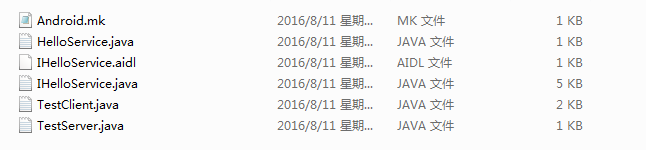
一、 编写AIDL文件
IHelloService.aidl:
 /** {@hide} */

 interface IHelloService

 {

     void sayhello();

     int sayhello_to(String name);

 }
1. 把 IHelloService.aidl 放入 frameworks/base/core/java/android/os
2. 修改 frameworks/base/Android.mk 添加一行
core/java/android/os/IVibratorService.aidl \
+ core/java/android/os/IHelloService.aidl \
3. mmm frameworks/base
4. 它会生成: ./out/target/common/obj/JAVA_LIBRARIES/framework_intermediates/src/core/java/android/os/IHelloService.java
IHelloService.java自动生成,无需修改
 /*

  * This file is auto-generated.  DO NOT MODIFY.

  * Original file: frameworks/base/core/java/android/os/IHelloService.aidl

  */

 /** {@hide} */

 public interface IHelloService extends android.os.IInterface

 {

     /** Local-side IPC implementation stub class. */

     public static abstract class Stub extends android.os.Binder implements IHelloService

     {

         private static final java.lang.String DESCRIPTOR = "IHelloService";

         /** Construct the stub at attach it to the interface. */

         public Stub()

         {

             this.attachInterface(this, DESCRIPTOR);

         }

         /**

          * Cast an IBinder object into an IHelloService interface,

          * generating a proxy if needed.

          */

         public static IHelloService asInterface(android.os.IBinder obj)

         {

             if ((obj==null)) {

             return null;

             }

             android.os.IInterface iin = obj.queryLocalInterface(DESCRIPTOR);

             if (((iin!=null)&&(iin instanceof IHelloService))) {

             return ((IHelloService)iin);

             }

             return new IHelloService.Stub.Proxy(obj);

         }

         @Override public android.os.IBinder asBinder()

         {

             return this;

         }

         @Override public boolean onTransact(int code, android.os.Parcel data, android.os.Parcel reply, int flags) throws android.os.RemoteException

         {

             switch (code)

             {

                 case INTERFACE_TRANSACTION:

                 {

                     reply.writeString(DESCRIPTOR);

                     return true;

                 }

                 case TRANSACTION_sayhello:

                 {

                     data.enforceInterface(DESCRIPTOR);

                     this.sayhello();

                     reply.writeNoException();

                     return true;

                 }

                 case TRANSACTION_sayhello_to:

                 {

                     data.enforceInterface(DESCRIPTOR);

                     java.lang.String _arg0;

                     _arg0 = data.readString();

                     int _result = this.sayhello_to(_arg0);

                     reply.writeNoException();

                     reply.writeInt(_result);

                     return true;

                 }

             }

             return super.onTransact(code, data, reply, flags);

         }

         private static class Proxy implements IHelloService

         {

             private android.os.IBinder mRemote;

             Proxy(android.os.IBinder remote)

             {

                 mRemote = remote;

             }

             @Override public android.os.IBinder asBinder()

             {

                 return mRemote;

             }

             public java.lang.String getInterfaceDescriptor()

             {

                 return DESCRIPTOR;

             }

             @Override public void sayhello() throws android.os.RemoteException

             {

                 android.os.Parcel _data = android.os.Parcel.obtain();

                 android.os.Parcel _reply = android.os.Parcel.obtain();

                 try {

                     _data.writeInterfaceToken(DESCRIPTOR);

                     mRemote.transact(Stub.TRANSACTION_sayhello, _data, _reply, 0);

                     _reply.readException();

                 }

                 finally {

                     _reply.recycle();

                     _data.recycle();

                 }

             }

             @Override public int sayhello_to(java.lang.String name) throws android.os.RemoteException

             {

                 android.os.Parcel _data = android.os.Parcel.obtain();

                 android.os.Parcel _reply = android.os.Parcel.obtain();

                 int _result;

                 try {

                     _data.writeInterfaceToken(DESCRIPTOR);

                     _data.writeString(name);

                     mRemote.transact(Stub.TRANSACTION_sayhello_to, _data, _reply, 0);

                     _reply.readException();

                     _result = _reply.readInt();

                 }

                 finally {

                     _reply.recycle();

                     _data.recycle();

                 }

                     return _result;

             }

         }

         static final int TRANSACTION_sayhello = (android.os.IBinder.FIRST_CALL_TRANSACTION + 0);

         static final int TRANSACTION_sayhello_to = (android.os.IBinder.FIRST_CALL_TRANSACTION + 1);

     }

     public void sayhello() throws android.os.RemoteException;

     public int sayhello_to(java.lang.String name) throws android.os.RemoteException;

 }
HelloService.java
 import android.util.Slog;

 /* 实现Hello服务的函数 */

 public class HelloService extends IHelloService.Stub {

     private static final String TAG = "HelloService";

     private int cnt1 = 0;

     private int cnt2 = 0;

     public void sayhello() throws android.os.RemoteException {

         cnt1++;

         Slog.i(TAG, "sayhello : cnt = "+cnt1);

     }

     public int sayhello_to(java.lang.String name) throws android.os.RemoteException {

         cnt2++;

         Slog.i(TAG, "sayhello_to "+name+" : cnt = "+cnt2);

         return cnt2;

     }

 }
TestServer.java 服务端测试程序
 import android.util.Slog;

 import android.os.ServiceManager;

 /* 1. addService

  * 2. while(true) { read data, parse data, call function, reply }

  */

 public class TestServer {

     private static final String TAG = "TestServer";

     public static void main(String args[])

     {

         /* add Service */

         Slog.i(TAG, "add hello service");

         ServiceManager.addService("hello", new HelloService());

         while (true)

         {

             try {

                 Thread.sleep(100);

               } catch (Exception e){}

         }

     }

 }
TestClient.java 客户端测试程序
 import android.util.Slog;

 import android.os.ServiceManager;

 import android.os.IBinder;

 /* 1. getService

  * 2. 调用服务的sayhello,sayhello_to

  *

  */

 /* test_client <hello|goodbye> [name] */

 public class TestClient {

     private static final String TAG = "TestClient";

     public static void main(String args[])

     {

         if (args.length == 0)

         {

             System.out.println("Usage: need parameter: <hello|goodbye> [name]");

             return;

         }

         if (args[0].equals("hello"))

         {

             /* 1. getService */

             IBinder binder = ServiceManager.getService("hello");

             if (binder == null)

             {

                 System.out.println("can not get hello service");

                 Slog.i(TAG, "can not get hello service");

                 return;

             }

             IHelloService svr = IHelloService.Stub.asInterface(binder);

             if (args.length == 1)

             {

                     try {

                     svr.sayhello();

                     System.out.println("call sayhello");

                     Slog.i(TAG, "call sayhello");

                   } catch (Exception e) {}

             }

             else

             {

                     try {

                     int cnt = svr.sayhello_to(args[1]);

                     System.out.println("call sayhello_to "+args[1]+" : cnt = "+cnt);

                     Slog.i(TAG, "call sayhello_to "+args[1]+" : cnt = "+cnt);

                   } catch (Exception e) {}

             }

         }

     }

 }
Android.mk文件
# Copyright 2008 The Android Open Source Project

#

LOCAL_PATH:= $(call my-dir)

include $(CLEAR_VARS)

LOCAL_SRC_FILES := HelloService.java IHelloService.java TestServer.java

LOCAL_MODULE := TestServer

include $(BUILD_JAVA_LIBRARY)

include $(CLEAR_VARS)

LOCAL_SRC_FILES := HelloService.java IHelloService.java TestClient.java

LOCAL_MODULE := TestClient

include $(BUILD_JAVA_LIBRARY)
二、编译:
把程序放到 /work/android-5.0.2/frameworks/testing/APP_Binder_JAVA_App
执行:
. setenv
lunch // 选择单板
mmm frameworks/testing/APP_Binder_JAVA_App
在out目录下它会生成 TestServer.jar, TestClient.jar
(3) 测试:
logcat TestServer:* TestClient:* HelloService:* *:S &
CLASSPATH=/mnt/android_fs/TestServer.jar app_process / TestServer &
CLASSPATH=/mnt/android_fs/TestClient.jar app_process / TestClient hello
CLASSPATH=/mnt/android_fs/TestClient.jar app_process / TestClient hello winfu
java编写binder服务实例的更多相关文章
- Java实现WebSocket服务
一.使用Tomcat提供的WebSocket库 Java可以使用Tomcat提供的WebSocket库接口实现WebSocket服务,代码编写也非常的简单.现在的H5联网游戏基本上都是使用WebSo ...
- Android native进程间通信实例-binder篇之——HAL层访问JAVA层的服务
有一天在群里聊天的时候,有人提出一个问题,怎样才能做到HAL层访问JAVA层的接口?刚好我不会,所以做了一点研究. 之前的文章末尾部分说过了service call 可以用来调试系统的binder服务 ...
- 【JavaService】使用Java编写部署windows服务
如果你玩windows系统,你对服务这个东西并不会陌生,服务可以帮我们做很多事情,在不影响用户正常工作的情况下,可以完成很多我们需要的需求. 众所周知,微软的visio studio内置的Servic ...
- JAVA服务实例内存高问题排查及解决
生产服务内存高问题 问题描述 1."计算中心" 服务在生产环境运行一段时间后,实际占用内存4.8G,业务运行正常,未出现OOM.(本文以此服务进行排查) 2.生产环境的老项目,均出 ...
- Flex通信-与Java实现Socket通信实例
Flex通信-与Java实现Socket通信实例 转自:http://blessht.iteye.com/blog/1136888 博客分类: Flex 环境准备 [服务器端] JDK1.6,“ja ...
- 实战WEB 服务器(JAVA编写WEB服务器)
实战WEB 服务器(JAVA编写WEB服务器) 标签: web服务服务器javawebsockethttp服务器 2010-04-21 17:09 11631人阅读 评论(24) 收藏 举报 分类: ...
- 基于 Web 的数据挖掘--自动抽取用 HTML、XML 和 Java 编写的信息
简介: 不可否认,万维网是到目前为止世界上最丰富和最密集的信息来源.但是,它的结构使它很难用系统的方法来利用信息.本文描述的方法和工具将使那些熟悉 Web 最常用技术的开发人员能快速而便捷地获取他们所 ...
- java编写规范及注意事项
java编写规范及注意事项 1.注释 常见注释有三种 // /**/ /****/ 如何才能写出漂亮的注释呢,注释的目的就是为了使你的代码让人更容易理解和维护,写一手好的注释是一个优秀码农的基本 ...
- 网页动物园2.0发布,经过几个月的努力,采用JAVA编写!
网页动物园2.0发布,经过几个月的努力,采用JAVA编写! 网页动物园2.0 正式发布!游戏发布 游戏名称: 网页动物园插件 游戏来源: 原创插件 适用版本: Discuz! X1.5 - X3.5 ...
随机推荐
- 在jenkins和sonar中集成jacoco(一)--使用jacoco收集单元测试的覆盖率
之前系统的持续集成覆盖率工具使用的是cobetura,使用的过程中虽然没什么问题,但感觉配置比较麻烦,现在准备改用jacoco这个覆盖率工具来代替它.接下来我介绍一下jenkins配置jacoco,并 ...
- 如何将Virtualbox和VMware虚拟机相互转换[译文211] - 转
迁移到其他的虚拟机程序可行会吓倒一批人.如果你已经按照自己的喜好设置好了虚拟机,那么就不需要再从头安装——你可以迁移现有的虚拟机. VirtualBox 和 VMware 使用不同的虚拟机格式,不过他 ...
- timer Compliant Controller project (4)layout and gerber, paning
1 LAYOUT 2 Gerber 3 CAM350-Paining
- 解决Eclipse中文乱码的问题
注意:显示中文所有的编码方式主要是GBK和UTF-8,UTF-8是国际通用的中文编码标准,推荐使用. 一. 设置工作空间的编码 编辑器的编码会影响到所有的项目中的字符的显示,可以说是作用最为广泛的设置 ...
- 怎么定位bug
测试发现bug,怎么定位?不同领域不同的测试对象,具体定位方法都不一样.自己定位bug的方法通常是以下过程: 1.发现bug,首先要查看bug的详细信息,根据描述初步分析是哪个模块哪段代码的问题 2. ...
- BZOJ2935: [Poi1999]原始生物(欧拉回路)
2935: [Poi1999]原始生物 Time Limit: 3 Sec Memory Limit: 128 MBSubmit: 150 Solved: 71[Submit][Status][D ...
- 【消息队列值Beanstalk】beeanstalk初识
Beanstalk是一个高性能.轻量级的.分布式的.内存型的消息队列系统.最初设计的目的是想通过后台异步执行耗时的任务来降低高容量Web应用系统的页面访问延迟.其实Beanstalkd是典型的类Mem ...
- bzoj 4570: [Scoi2016]妖怪 凸包
题目大意: http://www.lydsy.com/JudgeOnline/problem.php?id=4570 题解 我们知道如果一个怪物要取到攻击力的最大值,那么一定是把防御力都转化了 所以我 ...
- Yocto使用小技巧
1. 借助Yocto编译模块 SRC := mytest obj-m := $(SRC).o KDIR := /media/Yocto/build/tmp/work/poky-linux/linux- ...
- Mysql的“Table 'mysql.servers' doesn't exist”的解决方法
安装MYSQL后,又一次系统出现问题了,于是我查看mysql的错误日志,竟发现Table 'mysql.servers' doesn't exist问题的错误, 虽然与我的问题无关,但这个问题还是引起 ...