
安装ceph设置镜像源
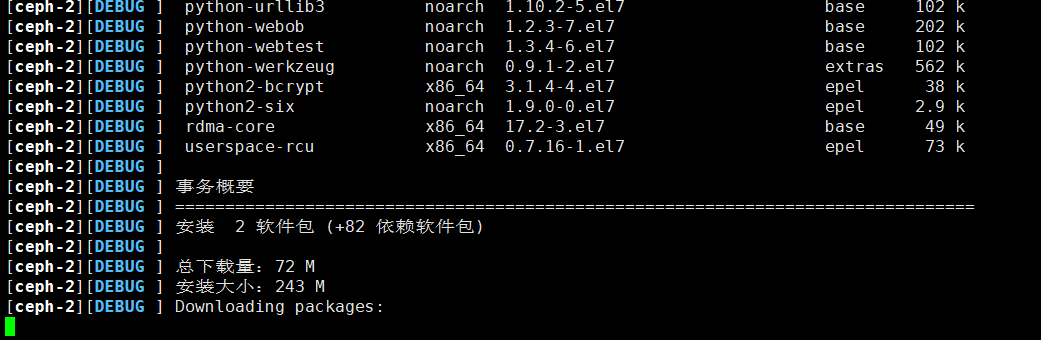
当安装ceph时 卡在这的时候ceph会替换成自己的镜像源 所以这个时候 赶紧再打开一个终端 替换成国内的清华大学的镜像源 就不会被替换回去了
ceph.repo 文件
[Ceph]

name=Ceph packages for $basearch

baseurl=https://mirrors.tuna.tsinghua.edu.cn/ceph/rpm-mimic/el7/$basearch

enabled=

gpgcheck=

type=rpm-md

gpgkey=https://mirrors.tuna.tsinghua.edu.cn/ceph/keys/release.asc

priority=

[Ceph-noarch]

name=Ceph noarch packages

baseurl=https://mirrors.tuna.tsinghua.edu.cn/ceph/rpm-mimic/el7/noarch

enabled=

gpgcheck=

type=rpm-md

gpgkey=https://mirrors.tuna.tsinghua.edu.cn/ceph/keys/release.asc

priority=

[ceph-source]

name=Ceph source packages

baseurl=https://mirrors.tuna.tsinghua.edu.cn/ceph/rpm-mimic/el7/SRPMS

enabled=

gpgcheck=

type=rpm-md

gpgkey=https://mirrors.tuna.tsinghua.edu.cn/ceph/keys/release.asc

priority=
如果上述文件已经被替换成ceph官方站点 请执行 下面命令
sudo sed -i 's#htt.*://download.ceph.com#https://mirrors.tuna.tsinghua.edu.cn/ceph#g' /etc/yum.repos.d/ceph.repo
在这儿有问题 请随时提出
安装ceph设置镜像源的更多相关文章
- PIP设置镜像源
PIP设置镜像源 pip安装Python包时候,默认是国外的下载源,速度太慢,本文介绍几种设置pip国内镜像源的方法 镜像源 阿里云 http://mirrors.aliyun.com/pypi/si ...
- yarn (npm) 切换设置镜像源
设置镜像源 1.查看一下当前源 yarn config get registry 2.切换为淘宝源 yarn config set registry https://registry.npm.taob ...
- Linux下一键安装Python3&更改镜像源&虚拟环境管理技巧
前言 之前分享过一篇<Linux系统自带Python2&yum的卸载及重装>,介绍了如何卸载及重装Linux(CentOS)自带的的Python2.7.今天主要介绍如何在Linux ...
- window下python 扩展库安装 使用第三方镜像源
0.前言 由于python的官方镜像位于国外,若使用pip或者easy_install安装第三方插件时或许会被限制,甚至连easy_install或pip也无法安装,例如在windows环境下 ...
- pip安装第三方库镜像源选择
在pip安装时,有些库速度及其缓慢从而导致失败,可以通过更改镜像源的方式来安装. 我在安装的时候使用了清华的镜像源,格式如下: 想要安装什么库就在后面替换即可.
- JavaScript npm/nrm 切换安装依赖的镜像源
nrm: npm registry manager npm 镜像源管理工具 安装nrm npm install -g nrm 查看所有的镜像源 nrm ls # nrm ls npm -------- ...
- python pip 安装使用国内镜像源
国内镜像源 清华:https://pypi.tuna.tsinghua.edu.cn/simple 阿里云:http://mirrors.aliyun.com/pypi/simple/ 中国科技大学 ...
- pip安装openvc-python国内镜像源
采用清华大学的镜像源. pip install -i https://pypi.tuna.tsinghua.edu.cn/simple --trusted-host pypi.tuna.tsinghu ...
- npm和yarn设置镜像源
npm 设置为淘宝源 npm config set registry https://registry.npm.taobao.org 使用nrm管理 nrm: npm registry manage ...
随机推荐
- Integer、new Integer() 和 int 比较的面试题
基本概念的区分: 1.Integer 是 int 的包装类,int 则是 java 的一种基本数据类型2.Integer 变量必须实例化后才能使用,而int变量不需要3.Integer 实际是对象的引 ...
- css动画-animation各个属性详解(转)
CSS3的animation很容易就能实现各种酷炫的动画,虽然看到别人的成果图会觉得很难,但是如果掌握好各种动画属性,做好酷炫吊炸天的动画都不在话下,好,切入正题. 一.动画属性: 动画属性包括:①a ...
- HMAC-SHA256 签名方法各个语音的实现方式之前端JavaScriptes6
sha256和16进制输出,网上很多种后端的验证方法,几乎没有前端的,所以自己写了个,希望给类似需求的人一个帮助,适用场景 腾讯云接口鉴权 v3签名 npm install sha256npm ins ...
- v-for同时循环一个对象和数组
<!DOCTYPE html> <html lang="zh"> <head> <meta charset="UTF-8&quo ...
- JavaScript关于md5加密
/*中文加密 *181009 * */ function md5(string) { var x = Array(); var k, AA, BB, CC, DD, a, b, c, d; var S ...
- 2018-2019-2 网络对抗技术 20165317 Exp2 后门原理与实践
2018-2019-2 网络对抗技术 20165317 Exp2 后门原理与实践 基础问题回答 例举你能想到的一个后门进入到你系统中的可能方式? 下载免费应用的时候会有绑定木马. 浏览某些网页时会有内 ...
- Elasticsearch学习笔记(九)partial update
一.什么是partial update? PUT /index/type/id,创建文档&替换文档,就是一样的语法 一般对应到应用程序中,每次的执行流程基本是这样的: (1)应用程序先发起一个 ...
- 来吧学学.Net Core之项目文件简介及配置文件与IOC的使用
序言 在当前编程语言蓬勃发展与竞争的时期,对于我们.net从业者来说,.Net Core是风头正紧,势不可挡的.芸芸口水之中,不学习使用Core,你的圈内处境或许会渐渐的被边缘化.所以我们还是抽出一点 ...
- 小程序 滚动wx.pageScrollTo
API:https://developers.weixin.qq.com/miniprogram/dev/api/wx.pageScrollTo.html wx.pageScrollTo 在小程序的开 ...
- Virtual Memory is deprecated in Redis 2.4
在读一个源码的讲解的文章时或者读一本关于某个技术的数据集时,可能书籍的讲解是滞后的,就是没有更上最新的代码,那么就要注意了WARNING! Virtual Memory is deprecated i ...