
Thanks David's Share
2019.4.12
Today, we got the invitation letter from US, when we discuss the journey, i saw perfect show of google map on David's computer, i would like to do the same thing so i ask David if he using a web proxy, then i know shadowsock.
Below is the infomation to use shadowsock.
Config on server:
1. got the shadowsock package: https://share.weiyun.com/5bS7OGY
2. unzip the package
3. double click Shadowsocks.exe to run the service
4. after that, in the task bar, find shadowsock, right click, select Server -> Edit Server, input server info as below, it's finished.
password: 0zhidaxiang
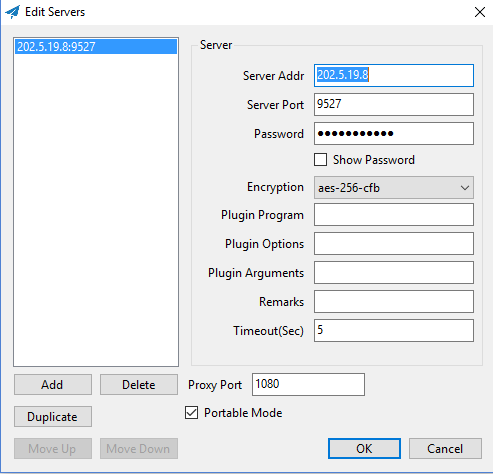
5. we have another way to config the server info via share server config, in task bar, right click shadowsock, select Servers -> Share Server Config, get the share url, copy it
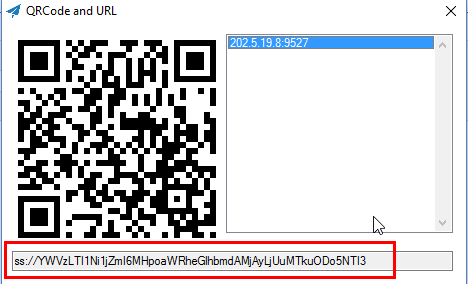
6. How to share it to other people? in another machine, right click shadowsock, select Servers -> import URL from Clipboard...
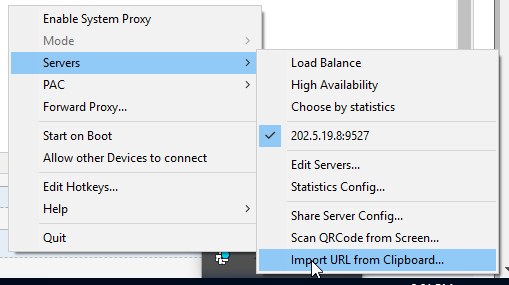
7. Server info will be filled automatically, you may need to modify the proxy port to a non-use port on your machine.
8. above all, server setup is finished.
Let's start browser config.
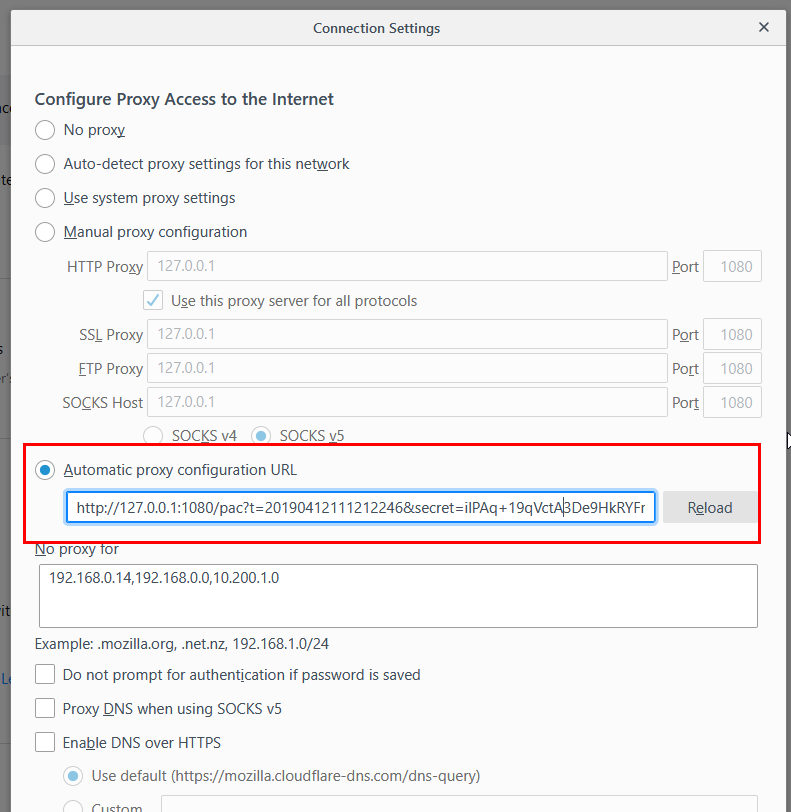
1. Select a browser, take firefox as example. open menu, direct to Options -> Network Settings
2. Also TWO ways to setup proxy,
- the first one, use proxy for all traffic on browser, not recommend
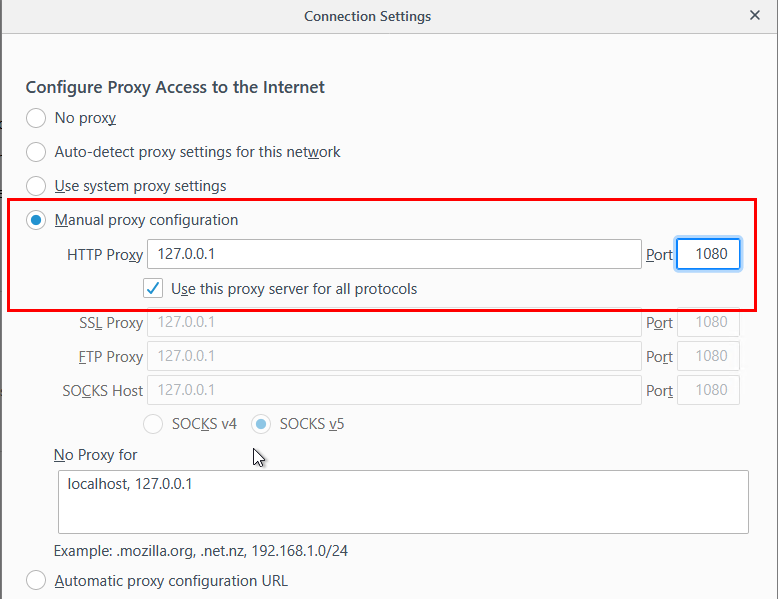
- the second one, only the traffic(website) blocked by GFWlist, how to do this, see below:
Right click shadowsock, select PAC -> Update Local PAC from GFWList.
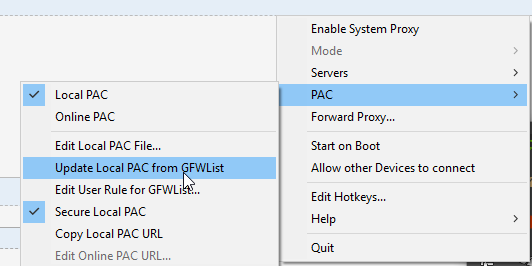
Again, right click shadowsock, select PAC -> Copy Local PAC URL, then paste it to browser's proxy settings.
Debug network:
Now we can use proxy on firefox, open firefox, try access google.com, facebook.com. youtube.com, all perfect access. happy face here ^-^
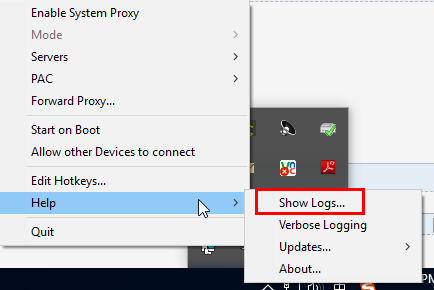
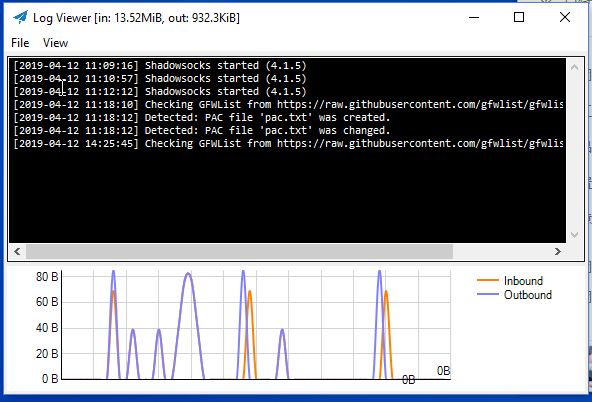
Monitor network trace: when config browser with the second way, we can find that, if access block list of GFW, the traffic raise up, if access non-block list of GFW, e.g. baidu.com, the traffic will not raise.
Thanks David again for the share. bye bye.
Thanks David's Share的更多相关文章
- LA 3231 - Fair Share
You are given N processors and M jobs to be processed. Two processors are specified to each job. To ...
- 重新想象 Windows 8.1 Store Apps (81) - 控件增强: WebView 之加载本地 html, 智能替换 html 中的 url 引用, 通过 Share Contract 分享 WebView 中的内容, 为 WebView 截图
[源码下载] 重新想象 Windows 8.1 Store Apps (81) - 控件增强: WebView 之加载本地 html, 智能替换 html 中的 url 引用, 通过 Share Co ...
- linux下安装MySQL出错file /usr/share/mysql/charsets/latin2.xml from install of MySQL-......
linux64 red hat 6.3企业版 开始错误装了32位mysql最后怎么也装不上64mysql了,折腾了一番最后全部卸载搞定: file /etc/init.d/mysql from ins ...
- sendEmail报错:at /usr/share/perl5/vendor_perl/IO/Socket/SSL.pm
sendEmail发送邮件是出现以下报错: ******************************************************************* Using the ...
- iOS - Share 分享/第三方登录
1.系统方式创建分享 按照下图在 Info.plist 文件中将 Localization native development region 的值改为 China.如果不设置此项弹出的分享页面中显示 ...
- share登录Samba可读可写(适合虚拟机下学习使用)
直接配置 smb.conf ( path = /etc/samba/smb.conf ). 首先,进入到 samba 文件夹: cd /etc/samba/ 备份 smb.conf: mv smb.c ...
- Select for update/lock in share mode 对事务并发性影响
select for update/lock in share mode 对事务并发性影响 事务并发性理解 事务并发性,粗略的理解就是单位时间内能够执行的事务数量,常见的单位是 TPS( transa ...
- file /usr/share/mysql/... conflicts with file from package mysql-libs-5.1.73-3.el6_5.x86_ 64 MySQL安装
在CentOS 6.5安装MySQL 5.6.17,安装到最后一个rpm文件MySQL-server时 安装命令是:rpm -ivh MySQL-server-5.6.17-1.el6.x86_64. ...
- Filestream/Windows Share导致Alwayson Failover失败
最近做了一个case, 客户在ALWAYSON环境下进行failover操作, 之后所有replica上的alwayson group状态变成了resolving. 并且在执行failover的rep ...
随机推荐
- linux学习:文件处理相关命令用法整理(正则表达式)
指令:ls.cat.du.rename.dirname.basename.sort.diff.seq.head.tail.tree.chmod.cut.paster.正则 一:统计文件大小,行数,字符 ...
- 使用php的curl爬去青果教务系统 课表(转)
1. 分析 首先我们要了解 Http Cookie 的作用(可参考HTTP cookies 详解),简单来说就是维持一个会话,这样我们就能在登陆一个网页后,就能进入这个网页需要登陆的界面. 现在我们需 ...
- myeclipse连接mysql失败出错,已解决问题
问题描述: 解决方案:
- MS17-010 漏洞研究——免考课题 20155104 赵文昊
免考实验与研究--MS17-010漏洞研究 研究内容 ·MS17-010漏洞的来源 ·MS17-010漏洞的攻击实例 ·MS17-010漏洞原理分析 ·MS17-010代码分析 写在前面:这次对一个漏 ...
- RuntimeError: implement_array_function method already has a docstring
根源:Numpy/Scipy/Pandas/Matplotlib/Scikit-learn 出现冲突 解决办法: pip uninstall scikit-learn pip uninstall ma ...
- Get WMS Static GoodLocation By Dynamic SQL
Dynamic SQL Store Procedure: Note: use variable,you need convert varchar and as a variable,not direc ...
- 把jmeter获取到的信息存到本地文件
1.jmeter使用正则表达式提取器,获取到响应信息,把获取到的响应信息写到本地文件 2.添加后置Bean Shell ,写入以下脚本 3.打开本地文件查看,写入成功 脚本内容如下: FileWrit ...
- 小程序开发 easy-less 配置
开发支付宝小程序, 不习惯直接写css 了,推动小程序的开发太低效,讲道理默认构建就应该支持less 和sass. vscode 有easy-less 插件,看下配置支持自定义扩展名. { &quo ...
- Cookie/Session的机制与安全
转载自:https://harttle.land/2015/08/10/cookie-session.html Cookie和Session是为了在无状态的HTTP协议之上维护会话状态,使得服务器可以 ...
- 【LeetCode每天一题】Add Binary(二进制加法)
Given two binary strings, return their sum (also a binary string).The input strings are both non-emp ...