
CSS代码检查工具stylelint
前面的话
CSS不能算是严格意义的编程语言,但是在前端体系中却不能小觑。 CSS 是以描述为主的样式表,如果描述得混乱、没有规则,对于其他开发者一定是一个定时炸弹,特别是有强迫症的人群。CSS 看似简单,想要写出漂亮的 CSS 还是相当困难。所以校验 CSS 规则的行动迫在眉睫。stylelint是一个强大的现代 CSS 检测器,可以让开发者在样式表中遵循一致的约定和避免错误。本文将详细介绍CSS代码检查工具stylelint
概述
stylelint拥有超过150条的规则,包括捕捉错误、最佳实践、控制可以使用的语言特性和强制代码风格规范。它支持最新的CSS语法,并且灵活可配置
Vue
下面在Vue框架下安装使用stylelint
1、安装stylelint、stylint-config-standard和stylelint-order
npm install stylelint --save-dev

npm install stylelint-config-standard --save-dev

npm install stylelint-order --save-dev
其中,stylelint是运行工具,stylelint-config-standard是stylelint的推荐配置,stylelint-order是CSS属性排序插件
安装完成后,package.json文件中会自动添加如下字段
    "stylelint": "^9.1.3",

    "stylelint-config-standard": "^18.2.0",

    "stylelint-order": "^0.8.1",
2、在根目录下创建.stylelintrc配置文件
{

  "extends": "stylelint-config-standard",

  "plugins": ["stylelint-order"],

  "rules": {

    "order/order": [

      "declarations",

      "custom-properties",

      "dollar-variables",

      "rules",

      "at-rules"

    ],

    "order/properties-order": [

      "position",

      "z-index",

      "top",

      "bottom",

      "left",

      "right",

      "float",

      "clear",

      "columns",

      "columns-width",

      "columns-count",

      "column-rule",

      "column-rule-width",

      "column-rule-style",

      "column-rule-color",

      "column-fill",

      "column-span",

      "column-gap",

      "display",

      "grid",

      "grid-template-rows",

      "grid-template-columns",

      "grid-template-areas",

      "grid-auto-rows",

      "grid-auto-columns",

      "grid-auto-flow",

      "grid-column-gap",

      "grid-row-gap",

      "grid-template",

      "grid-template-rows",

      "grid-template-columns",

      "grid-template-areas",

      "grid-gap",

      "grid-row-gap",

      "grid-column-gap",

      "grid-area",

      "grid-row-start",

      "grid-row-end",

      "grid-column-start",

      "grid-column-end",

      "grid-column",

      "grid-column-start",

      "grid-column-end",

      "grid-row",

      "grid-row-start",

      "grid-row-end",

      "flex",

      "flex-grow",

      "flex-shrink",

      "flex-basis",

      "flex-flow",

      "flex-direction",

      "flex-wrap",

      "justify-content",

      "align-content",

      "align-items",

      "align-self",

      "order",

      "table-layout",

      "empty-cells",

      "caption-side",

      "border-collapse",

      "border-spacing",

      "list-style",

      "list-style-type",

      "list-style-position",

      "list-style-image",

      "ruby-align",

      "ruby-merge",

      "ruby-position",

      "box-sizing",

      "width",

      "min-width",

      "max-width",

      "height",

      "min-height",

      "max-height",

      "padding",

      "padding-top",

      "padding-right",

      "padding-bottom",

      "padding-left",

      "margin",

      "margin-top",

      "margin-right",

      "margin-bottom",

      "margin-left",

      "border",

      "border-width",

      "border-top-width",

      "border-right-width",

      "border-bottom-width",

      "border-left-width",

      "border-style",

      "border-top-style",

      "border-right-style",

      "border-bottom-style",

      "border-left-style",

      "border-color",

      "border-top-color",

      "border-right-color",

      "border-bottom-color",

      "border-left-color",

      "border-image",

      "border-image-source",

      "border-image-slice",

      "border-image-width",

      "border-image-outset",

      "border-image-repeat",

      "border-top",

      "border-top-width",

      "border-top-style",

      "border-top-color",

      "border-top",

      "border-right-width",

      "border-right-style",

      "border-right-color",

      "border-bottom",

      "border-bottom-width",

      "border-bottom-style",

      "border-bottom-color",

      "border-left",

      "border-left-width",

      "border-left-style",

      "border-left-color",

      "border-radius",

      "border-top-right-radius",

      "border-bottom-right-radius",

      "border-bottom-left-radius",

      "border-top-left-radius",

      "outline",

      "outline-width",

      "outline-color",

      "outline-style",

      "outline-offset",

      "overflow",

      "overflow-x",

      "overflow-y",

      "resize",

      "visibility",

      "font",

      "font-style",

      "font-variant",

      "font-weight",

      "font-stretch",

      "font-size",

      "font-family",

      "font-synthesis",

      "font-size-adjust",

      "font-kerning",

      "line-height",

      "text-align",

      "text-align-last",

      "vertical-align",

      "text-overflow",

      "text-justify",

      "text-transform",

      "text-indent",

      "text-emphasis",

      "text-emphasis-style",

      "text-emphasis-color",

      "text-emphasis-position",

      "text-decoration",

      "text-decoration-color",

      "text-decoration-style",

      "text-decoration-line",

      "text-underline-position",

      "text-shadow",

      "white-space",

      "overflow-wrap",

      "word-wrap",

      "word-break",

      "line-break",

      "hyphens",

      "letter-spacing",

      "word-spacing",

      "quotes",

      "tab-size",

      "orphans",

      "writing-mode",

      "text-combine-upright",

      "unicode-bidi",

      "text-orientation",

      "direction",

      "text-rendering",

      "font-feature-settings",

      "font-language-override",

      "image-rendering",

      "image-orientation",

      "image-resolution",

      "shape-image-threshold",

      "shape-outside",

      "shape-margin",

      "color",

      "background",

      "background-image",

      "background-position",

      "background-size",

      "background-repeat",

      "background-origin",

      "background-clip",

      "background-attachment",

      "background-color",

      "background-blend-mode",

      "isolation",

      "clip-path",

      "mask",

      "mask-image",

      "mask-mode",

      "mask-position",

      "mask-size",

      "mask-repeat",

      "mask-origin",

      "mask-clip",

      "mask-composite",

      "mask-type",

      "filter",

      "box-shadow",

      "opacity",

      "transform-style",

      "transform",

      "transform-box",

      "transform-origin",

      "perspective",

      "perspective-origin",

      "backface-visibility",

      "transition",

      "transition-property",

      "transition-duration",

      "transition-timing-function",

      "transition-delay",

      "animation",

      "animation-name",

      "animation-duration",

      "animation-timing-function",

      "animation-delay",

      "animation-iteration-count",

      "animation-direction",

      "animation-fill-mode",

      "animation-play-state",

      "scroll-behavior",

      "scroll-snap-type",

      "scroll-snap-destination",

      "scroll-snap-coordinate",

      "cursor",

      "touch-action",

      "caret-color",

      "ime-mode",

      "object-fit",

      "object-position",

      "content",

      "counter-reset",

      "counter-increment",

      "will-change",

      "pointer-events",

      "all",

      "page-break-before",

      "page-break-after",

      "page-break-inside",

      "widows"

    ],

    "no-empty-source": null,

    "property-no-vendor-prefix": [true, {"ignoreProperties": ["background-clip"]}],

    "number-leading-zero": "never",

    "number-no-trailing-zeros": true,

    "length-zero-no-unit": true,

    "value-list-comma-space-after": "always",

    "declaration-colon-space-after": "always",

    "value-list-max-empty-lines": ,

    "shorthand-property-no-redundant-values": true,

    "declaration-block-no-duplicate-properties": true,

    "declaration-block-no-redundant-longhand-properties": true,

    "declaration-block-semicolon-newline-after": "always",

    "block-closing-brace-newline-after": "always",

    "media-feature-colon-space-after": "always",

    "media-feature-range-operator-space-after": "always",

    "at-rule-name-space-after": "always",

    "indentation": ,

    "no-eol-whitespace": true,

    "string-no-newline": null

  }

}
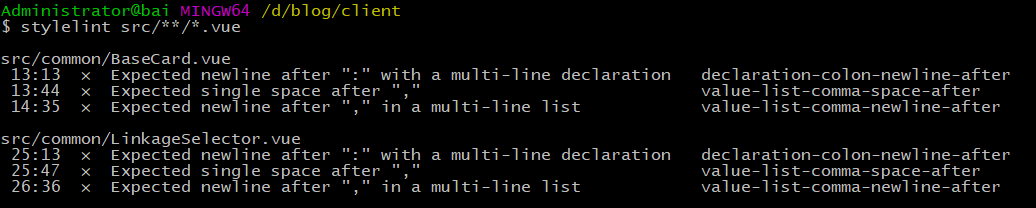
3、使用stylelint验证CSS代码即可,如验证src目录下的所有vue文件
react
react中使用styled-components来书写CSS代码,stylelint同样提供了插件来校验CSS
1、安装stylelint、stylelint-processor-styled-components、stylelint-config-styled-components、stylelint-config-recommend、stylelint-order
npm install --save-dev stylelint@9.1.3

npm install --save-dev stylelint-processor-styled-components

npm install --save-dev stylelint-config-styled-components

npm install --save-dev stylelint-config-recommended

npm install --save-dev stylelint-order
注意: 由于stylelint更新到9.2版本后,导致styled-components中的CSS代码无法正常校验,所以稳妥起见,使用9.1.3版本的stylelint
2、在根目录下新建配置文件.stylelintrc
{

  "processors": ["stylelint-processor-styled-components"],

  "extends": [

    "stylelint-config-recommended",

    "stylelint-config-styled-components"

  ],

  "plugins": ["stylelint-order"],

  "rules": {

    "order/order": [

      "declarations",

      "custom-properties",

      "dollar-variables",

      "rules",

      "at-rules"

    ],

...

}
3、同样地,使用stylelint命令即可校验

注意事项
1、fix命令
在stylelint的150多条规则中,使用fix命令,可以自动修复一些命令。但是,该fix命令一定要慎用。笔者在使用fix命令后,stylelint将React工程中的所有js文件里的代码全部清除,只留着了下可以识别的css部分
stylelint '**/*.js' --fix
2、配置scripts
可以在package.json中配置stylelint的快捷方式
  "scripts": {

    "lintcss": "stylelint 'src/**/*.js'"

  }
这样,使用npm run lintcss 命令即可实现相同效果
3、如果提示如下错误
Error: No configuration provided for
是因为在根路径下没有发现配置文件,如.stylelintrc
CSS代码检查工具stylelint的更多相关文章
- 代码检查工具jshint和csslint
前面的话 Douglas Crockford大神根据自己的理念用JavaScript写了一个JavaScript代码规范检查工具,这就是JSLint.后来非常流行,也的确帮助了广大的JavaScrip ...
- [原创]Java静态代码检查工具介绍
[原创]Java静态代码检查工具介绍 一 什么是静态代码检查? 静态代码分析是指无需运行被测代码,仅通过分析或检查源程序的语法.结构.过程.接口等来检查程序的正确性,找出代码隐藏的错误和缺陷,如参数 ...
- 最近开始研究PMD(一款采用BSD协议发布的Java程序代码检查工具)
PMD是一款采用BSD协议发布的Java程序代码检查工具.该工具可以做到检查Java代码中是否含有未使用的变量.是否含有空的抓取块.是否含有不必要的对象等.该软件功能强大,扫描效率高,是Java程序员 ...
- Android 代码检查工具SonarQube
http://blog.csdn.net/rain_butterfly/article/details/42170601 代码检查工具能帮我们检查一些隐藏的bug,代码检查工具中sonar是比较好的一 ...
- 【FLYabroad 】微软内部代码检查工具 (Microsoft Source Analysis for C#)[转]
SourceAnalysis (StyleCop)的终极目标是让所有人都能写出优雅和一致的代码,因此这些代码具有很高的可读性. 早就听说了微软内部的静态代码检查和代码强制格式美化工具 StyleCop ...
- 静态代码检查工具 cppcheck 的使用
CppCheck是一个C/C++代码缺陷静态检查工具.不同于C/C++编译器及其它分析工具,CppCheck只检查编译器检查不出来的bug,不检查语法错误.所谓静态代码检查就是使用一个工具检查我们 ...
- 静态代码检查工具 cppcheck 的使用(可分别集成到VS和QT Creator里)
CppCheck是一个C/C++代码缺陷静态检查工具.不同于C/C++编译器及其它分析工具,CppCheck只检查编译器检查不出来的bug,不检查语法错误.所谓静态代码检查就是使用一个工具检查我们写的 ...
- C#静态代码检查工具StyleCode
C#静态代码检查工具StyleCode -- 初探 最近我们Advent Data Service (ADS) 在项目上需要按照代码规范进行代码的编写工作,以方便将来代码的阅读与维护. 但是人工检查起 ...
- PMD-Java 代码检查工具对 error 和 warning 的配置
PMD是一款优秀的Java程序代码检查工具.该它可以检查Java代码中是否含有未使用的变量.是否含有空的抓取块.是否含有不必要的对象等. 但在使用过程中,你会项目中发现存在大量的 PMD 插件报出的 ...
随机推荐
- MySQL优化特定类型的查询
优化关联查询 如果想要优化使用关联的查询,我们需要特别留意以下几点: 确保ON或者USING子句中的列上有索引.在创建索引的时候需要考虑到关联的顺序.当表A和表B用列c关联的时候,如果优化器的关联顺序 ...
- Laravel5.5 邮件驱动使用 SMTP 驱动实现邮件发送
laravel5.5 邮件驱动 Laravel 支持多种邮件驱动,包括 smtp.Mailgun.Maildrill.Amazon SES.mail 和 sendmail.Mailgun . Mail ...
- jQuery.parseJSON()函数详解
jQuery.parseJSON()函数用于将格式完好的JSON字符串转为与之对应的JavaScript对象. 所谓”格式完好”,就是要求指定的字符串必须符合严格的JSON格式,例如:属性名称必须加双 ...
- Oracle11g: datetime
--上一月,上一年 select add_months(sysdate,-1) last_month,add_months(sysdate,-12) last_year from dual; --下一 ...
- dede后台删除文章后台还有分页显示解决方法
打开dede目录中content_list.php 大概在100行左右 $sql = "SELECT COUNT(*) AS dd FROM `#@__arctiny` $tinyQuery ...
- ORACLE中如何查找定位表最后DML操作的时间小结
在Oracle数据库中,如何查找,定位一张表最后一次的DML操作的时间呢? 方式有三种,不过都有一些局限性,下面简单的解析.总结一下. 1:使用ORA_ROWSCN伪列获取表最后的DML时间 ORA_ ...
- C#中Skip和Take的用法
Skip()和Take()方法都是IEnumerable<T> 接口的扩展方法,包括C#中的所有Collections类,如ArrayList,Queue,Stack等等,还有数组和字符串 ...
- 操作DataTable数据,修改某列的值
DataTable table : DataRow row=table.Rows[i];//DataTable的第i行 row.BeginEdit();//开始编辑行 row["column ...
- iOS中Realm数据库的基本用法
原文 http://git.devzeng.com/blog/simple-usage-of-realm-in-ios.html 主题 RealmiOS开发 Realm是由 Y Combinat ...
- Bootstrap -- 按钮样式与使用
Bootstrap -- 按钮样式与使用 1. 可用于<a>, <button>, 或 <input> 元素的按钮样式 按钮样式使用: <!DOCTYPE h ...