
多个router和多个network
一般搭建成功了opentack后,都会按照文档的这样创建网络
Scenario 1: one tenant, two networks, one router

Scenario 2: two tenants, two networks, two routers

然而neutron号称软件定义网络,可否创建更复杂的拓扑图
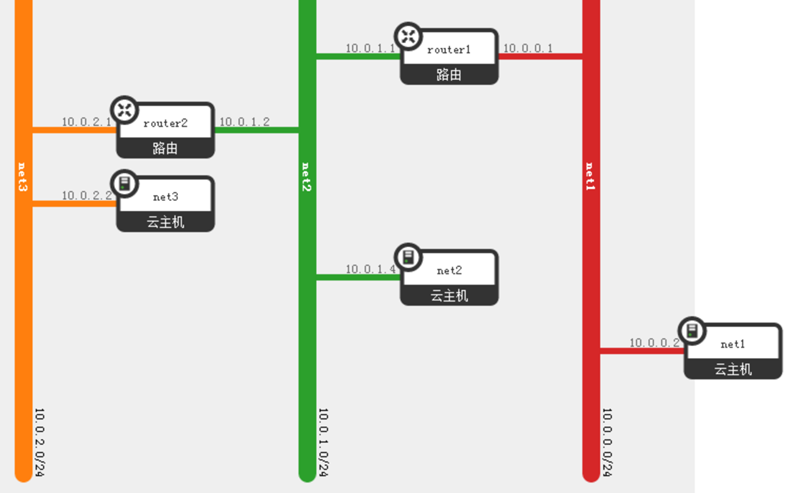
我创建了上面的三个网络,每个网络都运行一个主机,网络1和网络2,并不直接相连,但是通过网络2相连。
对于主机net1,由于网络只有一个路由器,所以gateway只能是它
root@net1:/home/ubuntu# ip addr
1: lo: <LOOPBACK,UP,LOWER_UP> mtu 16436 qdisc noqueue state UNKNOWN
link/loopback 00:00:00:00:00:00 brd 00:00:00:00:00:00
inet 127.0.0.1/8 scope host lo
inet6 ::1/128 scope host
valid_lft forever preferred_lft forever
2: eth0: <BROADCAST,MULTICAST,UP,LOWER_UP> mtu 1500 qdisc pfifo_fast state UP qlen 1000
link/ether fa:16:3e:f2:68:34 brd ff:ff:ff:ff:ff:ff
inet 10.0.0.2/24 brd 10.0.0.255 scope global eth0
inet6 fe80::f816:3eff:fef2:6834/64 scope link
valid_lft forever preferred_lft forever
root@net1:/home/ubuntu# route -n
Kernel IP routing table
Destination Gateway Genmask Flags Metric Ref Use Iface
0.0.0.0 10.0.0.1 0.0.0.0 UG 100 0 0 eth0
10.0.0.0 0.0.0.0 255.255.255.0 U 0 0 0 eth0
对于主机net3,所在的网络业只有一个路由器,所以gateway也只能是它
root@net3:/home/ubuntu# ip addr
1: lo: <LOOPBACK,UP,LOWER_UP> mtu 16436 qdisc noqueue state UNKNOWN
link/loopback 00:00:00:00:00:00 brd 00:00:00:00:00:00
inet 127.0.0.1/8 scope host lo
inet6 ::1/128 scope host
valid_lft forever preferred_lft forever
2: eth0: <BROADCAST,MULTICAST,UP,LOWER_UP> mtu 1500 qdisc pfifo_fast state UP qlen 1000
link/ether fa:16:3e:73:2b:1f brd ff:ff:ff:ff:ff:ff
inet 10.0.2.2/24 brd 10.0.2.255 scope global eth0
inet6 fe80::f816:3eff:fe73:2b1f/64 scope link
valid_lft forever preferred_lft forever
root@net3:/home/ubuntu# route -n
Kernel IP routing table
Destination Gateway Genmask Flags Metric Ref Use Iface
0.0.0.0 10.0.2.1 0.0.0.0 UG 100 0 0 eth0
10.0.2.0 0.0.0.0 255.255.255.0 U 0 0 0 eth0
比较纠结的是主机net2,它的网络上有两个路由器,默认gateway只能是一个,那它如何才能ping通两面的主机呢,必须手动添加路由器。
root@net2:/home/ubuntu# ip addr
1: lo: <LOOPBACK,UP,LOWER_UP> mtu 16436 qdisc noqueue state UNKNOWN
link/loopback 00:00:00:00:00:00 brd 00:00:00:00:00:00
inet 127.0.0.1/8 scope host lo
inet6 ::1/128 scope host
valid_lft forever preferred_lft forever
2: eth0: <BROADCAST,MULTICAST,UP,LOWER_UP> mtu 1500 qdisc pfifo_fast state UP qlen 1000
link/ether fa:16:3e:3c:65:ad brd ff:ff:ff:ff:ff:ff
inet 10.0.1.4/24 brd 10.0.1.255 scope global eth0
inet6 fe80::f816:3eff:fe3c:65ad/64 scope link
valid_lft forever preferred_lft forever
root@net2:/home/ubuntu# route -n
Kernel IP routing table
Destination Gateway Genmask Flags Metric Ref Use Iface
0.0.0.0 10.0.1.1 0.0.0.0 UG 100 0 0 eth0
10.0.0.0 10.0.1.1 255.255.255.0 UG 0 0 0 eth0
10.0.1.0 0.0.0.0 255.255.255.0 U 0 0 0 eth0
10.0.2.0 10.0.1.2 255.255.255.0 UG 0 0 0 eth0
到不同的网络,gateway不一样。
最后的问题是,net1和net3之间怎么通信,如果neutron创建的路由器支持动态路由就好了,一般通过routed或者gated,相邻的路由器router1和router2可以相互同步路由表,这样router1才可能知道,在router2的另一端,还有一个网络,反之亦然。
https://blueprints.launchpad.net/neutron/+spec/bgp-dynamic-routing
然而这个好像还没实现,所以要想net1和net3之间通信,需要手动添加路由表到路由器
我们修改router1的路由表
root@escto-bj-hp-z620:~# ip netns exec qrouter-8fd947fc-2b5b-40a3-b16e-72aabb001f2d route -n
Kernel IP routing table
Destination Gateway Genmask Flags Metric Ref Use Iface
10.0.0.0 0.0.0.0 255.255.255.0 U 0 0 0 qr-bbbc67c3-81
10.0.1.0 0.0.0.0 255.255.255.0 U 0 0 0 qr-10b0d153-4c
10.0.2.0 10.0.1.2 255.255.255.0 UG 0 0 0 qr-10b0d153-4c
再来修改router2的路由表
root@escto-bj-hp-z620:~# ip netns exec qrouter-d2c831c9-44ff-43dd-8c9d-2dc42370c2fd route -n
Kernel IP routing table
Destination Gateway Genmask Flags Metric Ref Use Iface
10.0.0.0 10.0.1.1 255.255.255.0 UG 0 0 0 qr-ad73f294-6d
10.0.1.0 0.0.0.0 255.255.255.0 U 0 0 0 qr-ad73f294-6d
10.0.2.0 0.0.0.0 255.255.255.0 U 0 0 0 qr-866838bd-d7
这样相互就ping通了
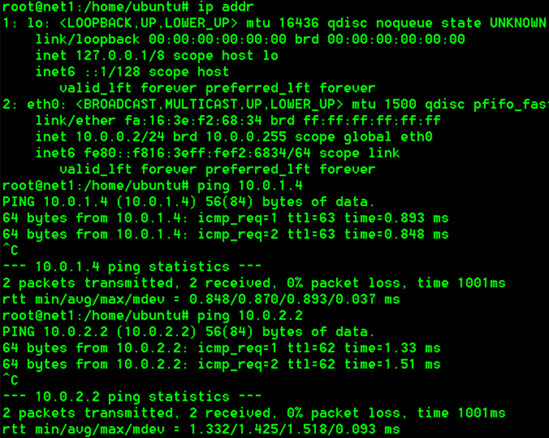
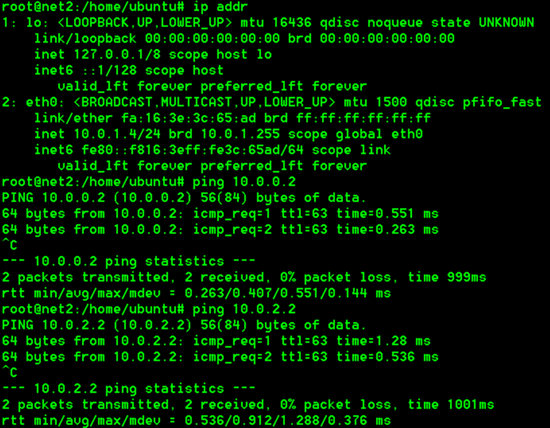
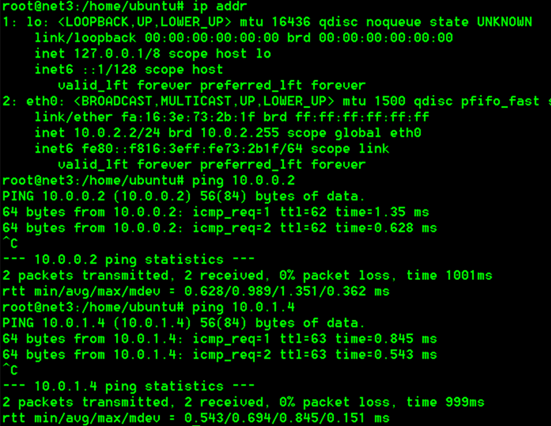
通过API创建路由表
https://blueprints.launchpad.net/neutron/+spec/quantum-l3-routes
多个router和多个network的更多相关文章
- Neutron 理解 (6): Neutron 是怎么实现虚拟三层网络的 [How Neutron implements virtual L3 network]
学习 Neutron 系列文章: (1)Neutron 所实现的虚拟化网络 (2)Neutron OpenvSwitch + VLAN 虚拟网络 (3)Neutron OpenvSwitch + GR ...
- 深入理解openstack网络架构(4)-----连接到public network
原文地址: https://blogs.oracle.com/ronen/entry/diving_into_openstack_network_architecture3 译文转自:http://b ...
- OVN实战---《The OVN Gateway Router》翻译
Overview 在本文中我将在前文的基础上添加一个OVN gateway router.gateway router将使得lab network能访问我们的overlay network The l ...
- OpenStack Network --- introduction部分 阅读笔记
Basic Networking 1.混杂模式(promiscuous mode):当网卡被配置为混杂模式时,它们会将所有的frame传递给操作系统,即使MAC地址不匹配. 2.交换机(switch) ...
- Vitual Router in The Cloud
VyOS and ESXi,VyOS Configuration The next step is to configure both VyOS routers. Before we do, we s ...
- Identifying a distributed denial of service (DDOS) attack within a network and defending against such an attack
The invention provides methods, apparatus and systems for detecting distributed denial of service (D ...
- Neutron 网络基本概念 - 每天5分钟玩转 OpenStack(66)
上次我们讨论了 Neutron 提供的功能,今天我们学习 Neutron 模块几个重要的概念. Neutron 管理的网络资源包括 Network,subnet 和 port,下面依次介绍. netw ...
- openstack网络(neutron)模式之GRE的基本原理
neutron网络目的是为OpenStack云更灵活的划分网络,在多租户的环境下提供给每个租户独立的网络环境. neutron混合实施了第二层的VLAN和第三层的路由服务,它可为支持的网络提供防火墙, ...
- 深入理解openstack网络架构(3)-----路由
原文地址: https://blogs.oracle.com/ronen/entry/diving_into_openstack_network_architecture2 译文转自:http://b ...
随机推荐
- 【转载】npm查看全局安装过的包
在使用node的时候,用npm安装了很多软件,过一段时间没有使用就会忘记,怎么查看自己全局安装过的包,用命令 npm list -g --depth 在百度里搜不到结果的,我在google里老外的文章 ...
- W3CSchool闯关笔记(中级脚本算法)
坚持下去,编程是一门艺术,与君共勉!!! function sumAll(arr) { var result = 0; var sn = Math.min(arr[0] , arr[1]); var ...
- flex布局学习
教程来自阮一峰的flex布局教程实例篇 容器五大属性: flex-direction:容器内项目的排列方向 (1)row:横向从左往右排列(默认) (2)row-reverse:横向从右往左排列 (3 ...
- C++示例
Linux C++ template使用示例: #include <iostream> #include <cstring> using namespace std; temp ...
- 高可用Redis(三):Hash类型
1.哈希类型键值结构 哈希类型也是key-value结构,key是字符串类型,其value分为两个部分:field和value 其中field部分代表属性,value代表属性对应的值 上面的图里,us ...
- 主席树——求区间第k个不同的数字(向右密集hdu5919)
和向左密集比起来向右密集只需要进行小小的额修改,就是更新的时候从右往左更新.. 自己写的被卡死时间.不知道怎么回事,和网上博客的没啥区别.. /* 给定一个n个数的序列a 每次询问区间[l,r],求出 ...
- Flume-ng高可用集群负载安装与配置
1. 写在前面 flume-ng高可用长在大数据处理环节第一个出现,对于处理日志文件有很好的作用,本篇博客将详细介绍flume-ng的高可用负载均衡搭建 2. flume-ng高可用负载均衡描述 在一 ...
- golang 读书笔记
介绍 Go语言是一种让代码分享更容易的编程语言.Go语言自带一些工具,让使用别人写的包更容易,并且分享自己写的包更容易. Go语言对并发的支持是这门语言最重要的特性之一.goroutine很像线程,但 ...
- Anki 2.0 用户手册
Anki 2.0 用户手册 目录 Anki 2.0 用户手册 视频介绍 卡片和模板 Javascript Anki 2.0 用户手册 视频介绍 共享牌组和基础复习技巧 调换卡片正反面 卡片样式设计 亲 ...
- 我的BO之强类型
弱类型的缺点 有些程序员对类型比较随意,从前端传来的数据,不管应该是什么类型,都以String接收.然后在什么地方转成应该有的类型则要"看心情",在Controller, Serv ...