
Android注解神器 ButterKnife框架
前言:
本人是一个只有几个月工作经验的码小渣。这是我写的第一篇博客,如有不足之处还请大家不要介意,还请大佬可以指出问题。
在这几个月的实战开发中自己也遇到了很多问题,真的是举步艰难啊!!!
在实战开发中遇到最多的就是findViewById我相信这也是很多和我一样初入安卓行业的码小渣遇到的最多的代码。
现在来给码小渣同志们分享一个非常实用的框架 “ButterKnife”
这是“听着music睡”大佬给我推荐的。大家可以关注一下他,人特别好。我的这篇文章就是参考了他的文章。
废话不多说上图、上代码。
代码写的不规范不要介意。
这是我平时写的最多的,相信你们一开始也是这样写的。
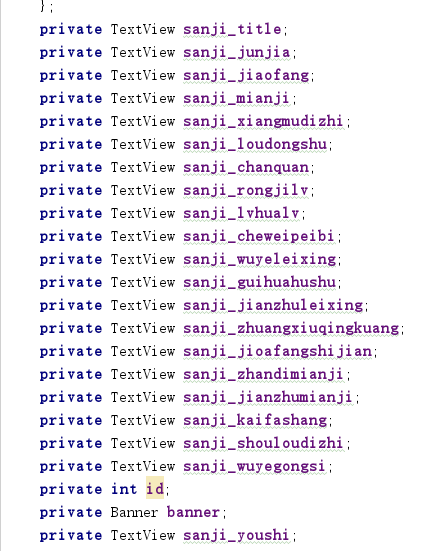

像我这样很多控件的时候代码就显得特别乱,不清晰。
今天我给大家介绍的ButterKnife框架就可以很好的解决这个问题。
使用ButterKnife框架
第一步:在项目中添加依赖
需要在app目录下的 build.gradle文件中添加 :
      implementation'com.jakewharton:butterknife:7.0.1'

 第二步:在Android Studio 中安装插件

  首先在Android Studio主界面中选择 "File" —— "Settings" —— 进入设置
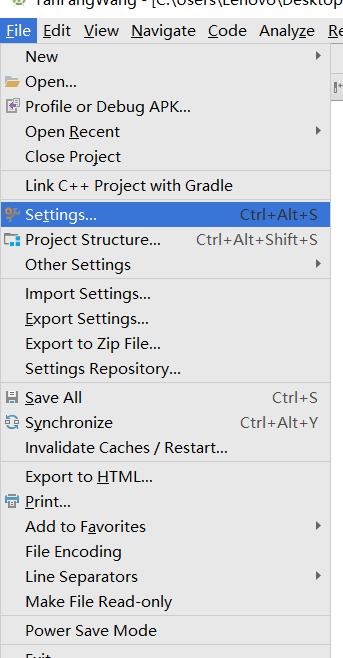
然后找到 "Plugins" 搜索 "Android ButterKnife" 安装插件 “Zelezny” 安装完成后Android Studio 会自动重启

下面就让我们来体验一下把。
新建一个新的布局:
<?xml version="1.0" encoding="utf-8"?>
<LinearLayout xmlns:android="http://schemas.android.com/apk/res/android"
    xmlns:app="http://schemas.android.com/apk/res-auto"
    xmlns:tools="http://schemas.android.com/tools"
    android:layout_width="match_parent"
    android:layout_height="match_parent"
    android:orientation="vertical"
    tools:context="com.example.lenovo.myapplication.MainActivity">

<TextView
    android:id="@+id/textView"
    android:gravity="center"
    android:text="你好"
    android:layout_width="match_parent"
    android:layout_height="50dp" />
    <TextView
        android:id="@+id/textView1"
        android:gravity="center"
        android:text="你是码小渣吗?"
        android:layout_width="match_parent"
        android:layout_height="50dp" />
    <TextView
        android:id="@+id/textView2"
    android:gravity="center"
    android:text="你好"
    android:layout_width="match_parent"
    android:layout_height="50dp" />
    <TextView
        android:id="@+id/textView3"
    android:gravity="center"
    android:text="你是第几个看我博客的码小渣"
    android:layout_width="match_parent"
    android:layout_height="50dp" />
    <TextView
        android:id="@+id/textView4"
    android:gravity="center"
    android:text="你好"
    android:layout_width="match_parent"
    android:layout_height="50dp" />
    <TextView
        android:id="@+id/textView5"
    android:gravity="center"
    android:text="谢谢你看我的博客"
    android:layout_width="match_parent"
    android:layout_height="50dp" />

</LinearLayout>

下面就开始在Activity中使用框架
新建一个Activity 在 Activity的中 右击布局文件 选择Generate...
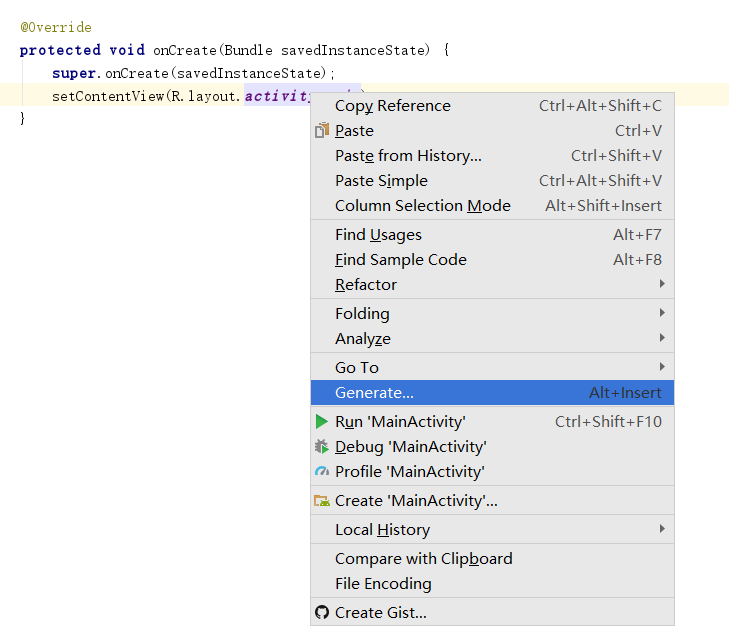
出现新的对话框 点击Generate Butterknife Injections
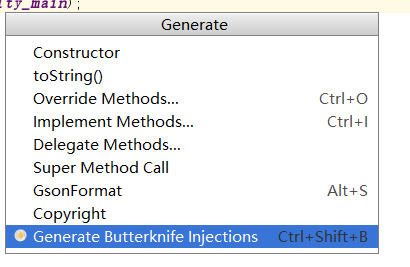
出现新的对话框 再这里我们可以选择 布局文件中的控件
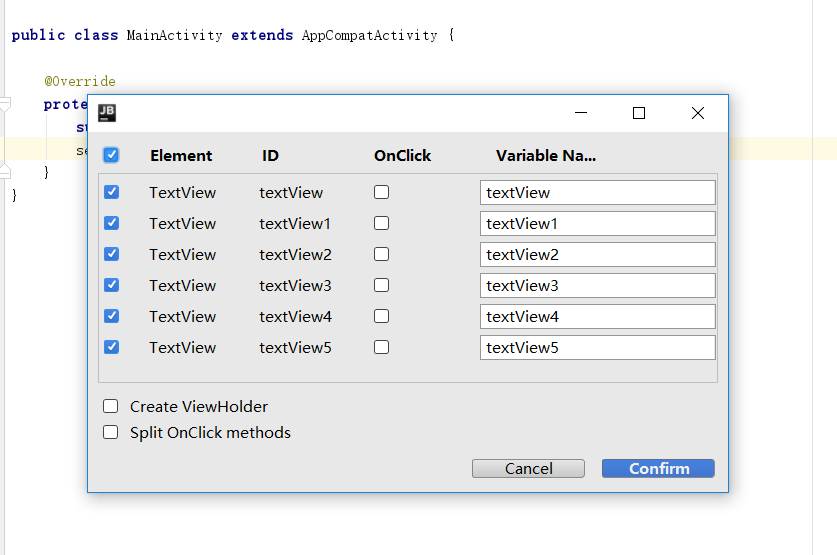
点击 Confirm 会自动帮你生成注解 在onCreate()里多了一行 ButterKnife.bind(this);代码
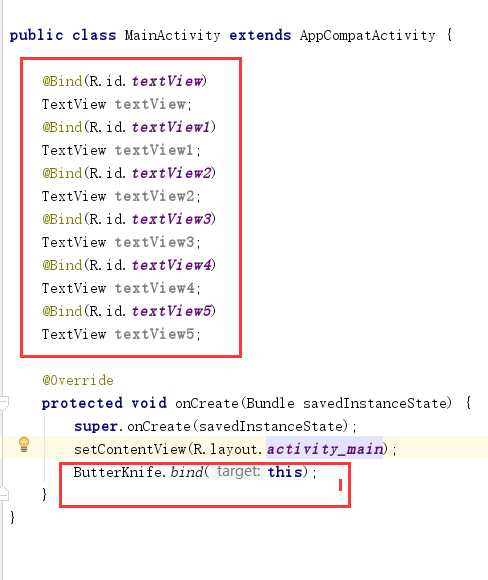
到这里 ButterKnife框架 就基本结束了 是不是很简单而且帮你省了很多事
但是有一部分人在运行项目的时候可能会遇见和我一样的问题

我也是翻遍度娘但是未曾找到解决方法 最后在大佬哪里得到解决办法
在app目录下的 build.gradle文件中的 defaultConfig 中加入下面的这些代码 就OK了。
 javaCompileOptions {

            annotationProcessorOptions {

                includeCompileClasspath = true

                arguments = [moduleName: project.getName()]

            }

        }
运行成功。

到这里 ButterKnife 框架 就结束了是不是很神奇啊。
希望我的这篇文章能为你带来帮助!!!
作者:码小渣

文章地址:https://www.cnblogs.com/nc-183/p/9902442.html

本文版权归作者所有,欢迎转载,但未经作者同意必须保留此段声明,且在文章页面明显位置给出原文链接,否则保留追究法律责任的权利。
Android注解神器 ButterKnife框架的更多相关文章
- Android 注解工具 ButterKnife
Butter Knife 是 Android 视图字段和方法绑定,使用注解处理来生成样板代码. 主要特性: 在字段使用 @FindView消除findViewById调用 使用 @FindViews在 ...
- Android注解使用之通过annotationProcessor注解生成代码实现自己的ButterKnife框架
前言: Annotation注解在Android的开发中的使用越来越普遍,例如EventBus.ButterKnife.Dagger2等,之前使用注解的时候需要利用反射机制势必影响到运行效率及性能,直 ...
- Android注解框架实战-ButterKnife
文章大纲 Android注解框架介绍 ButterKnife实战 项目源码下载 一.框架介绍 为什么要用注解框架? 在Android开发过程中,我们经常性地需要操作组件,操作方法有findVie ...
- Android开发之手把手教你写ButterKnife框架(三)
欢迎转载,转载请标明出处: http://blog.csdn.net/johnny901114/article/details/52672188 本文出自:[余志强的博客] 一.概述 上一篇博客讲了, ...
- Android开发之手把手教你写ButterKnife框架(二)
欢迎转载,转载请标明出处: http://blog.csdn.net/johnny901114/article/details/52664112 本文出自:[余志强的博客] 上一篇博客Android开 ...
- Android 注解框架对比
Java的注解(Annotation)相当于一种标记,在程序中加入注解就等于为程序打上某种标记,标记可以加在包,类,属性,方法,本地变量上.然后你可以写一个注解处理器去解析处理这些注解(人称编译时注解 ...
- 开发自己的山寨Android注解框架
目录 开发自己的山寨Android注解框架 开发自己的山寨Android注解框架 参考 Github黄油刀 Overview 在上一章我们学习了Java的注解(Annotation),但是我想大家可能 ...
- Android Butterknife框架
Android Butterknife框架 注解攻略 时间 2014-02-27 09:28:09 Msquirrel原文 http://www.msquirrel.com/?p=95 一.原理. ...
- Android常用优秀开源框架
Android常用优秀开源框架 https://github.com/Ericsongyl/AOSF AOSF:全称为Android Open Source Framework,即Android优秀开 ...
随机推荐
- [Swift]LeetCode882. 细分图中的可到达结点 | Reachable Nodes In Subdivided Graph
Starting with an undirected graph (the "original graph") with nodes from 0 to N-1, subdivi ...
- [Swift]LeetCode911. 在线选举 | Online Election
In an election, the i-th vote was cast for persons[i] at time times[i]. Now, we would like to implem ...
- php中mysqli_fetch_assoc()和mysqli_fetch_row()的区别
mysqli_fetch_assoc() 函数 从结果集中取得一行作为关联数组: <?php // 假定数据库用户名:root,密码:123456,数据库:RUNOOB $con=mysqli_ ...
- mysql 主主+ Keepalived 高可用
这是在mysql互为主从的基础上做的 yum -y install keepalived #两台机器上都装 配置Keepalived主从, vrrp_instance VI_1 { state ...
- DMA的基本概念
DMA允许外围设备和主内存之间直接传输 I/O 数据, DMA 依赖于系统.每一种体系结构DMA传输不同,编程接口也不同. 数据传输可以以两种方式触发:一种软件请求数据,另一种由硬件异步传输. 在第一 ...
- 像素数据YUV简介与觉存储格式介绍
主要学习链接:博客园.51CTO 前言 照例是先废话几句,下面的内容都是在学习时从网上找来的,并非我原创,我之所以要写这篇笔记是因为网的内容都很分散,找的时候要从各个地方看,很不方便,所以就自己总结了 ...
- 优化之XML组件
可在XML Parser 组件和XML Source定义中删除非project group,因为不需为这些非project group分配内存,但需要维护主键外键约束 ________________ ...
- Kafka对Java程序员有多重要?连阿里都再用它处理亿万级数据统计
一.了解淘宝Kafka架构 在ActiveMQ.RabbitMQ.RocketMQ.Kafka消息中间件之间,我们为什么要选择Kafka?下面详细介绍一下,2012年9月份我在支付宝做余额宝研发,20 ...
- BBS论坛(一)
1.1.项目结构搭建 (1)创建flask项目Perfect_bbs,然后搭建项目结构如下: (2)构建蓝图 cms/views.py # cmd/views.py from flask import ...
- 汇编语言 实验14 访问CMOS RAM
汇编语言 访问CMOS RAM CMOS RAM 是什么? 存放计算机开机必备的一些数据的硬件,由BIOS(Basic input/output system)调用其数据. 怎么用? 首先要理解端口的 ...