
路由器基础配置之单臂路由实现vlan间通信
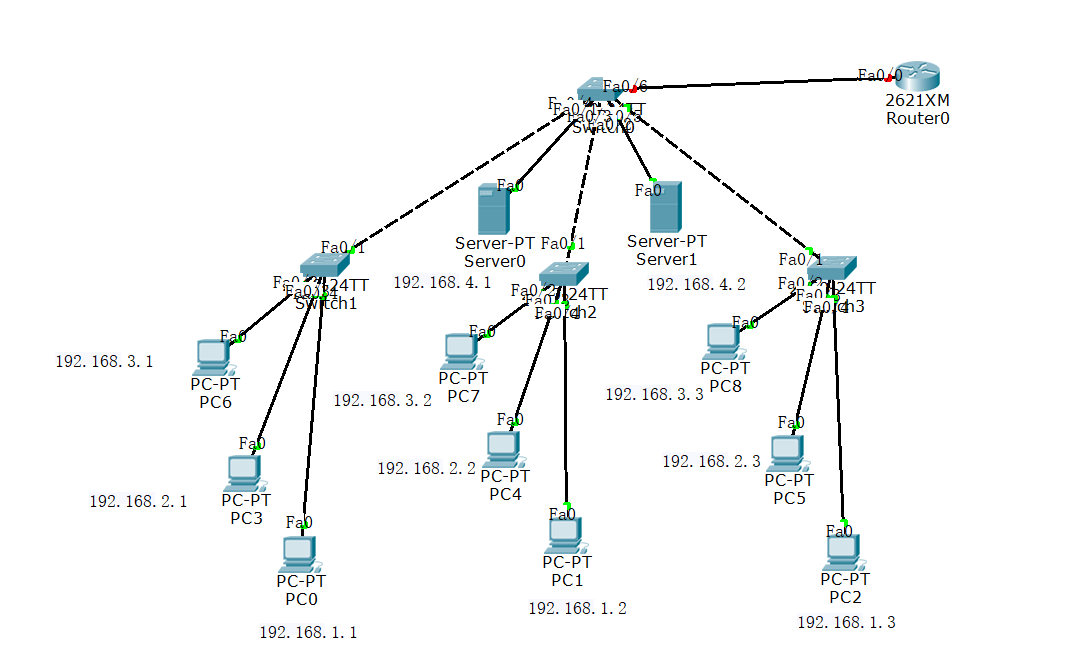
我们将以上面的拓扑图开始进行配置,目的为设置单臂路由实现vlan间通信,设置4个vlan,pc0,1,2为vlan10
pc3,4,5为vlan20;pc6,7,8为vlan30;server0,1为vlan40,为求方便,我们使用vtp来配置vlan
先配置switch0
enable 进入特权模式
configure terminal 进入全局配置模式
vtp domain abc(设置vtp的域为abc)
vtp mode server 设置switch0为server模式
vlan 10 创建vlan
vlan 20
vlan 30
vlan 40
interface f0/4
switchport mode trunk
exit
interface f0/3
switchport mode trunk
exit
interface f0/5
switchport mode trunk
exit
interface f0/1
switchport mode access
switchport access vlan 40
exit
interface f0/2
switchport mode access
switchport access vlan 40
配置switch1
enable 进入特权模式
configure terminal 进入全局配置模式
vtp domain abc 进入abc域
vtp mode client 设置为client客户模式
interface f0/2
switchport mode access
switchport access vlan 30
exit
interface f0/3
switchport mode access
switchport access vlan 20
exit
interface f0/4
switchport mode access
switchport access vlan 10
exit
配置switch2
enable 进入特权模式
configure terminal 进入全局配置模式
vtp domain abc 进入abc域
vtp mode client 设置为client客户模式
interface f0/2
switchport mode access
switchport access vlan 30
exit
interface f0/3
switchport mode access
switchport access vlan 20
exit
interface f0/4
switchport mode access
switchport access vlan 10
exit
配置switch3
enable 进入特权模式
configure terminal 进入全局配置模式
vtp domain abc 进入abc域
vtp mode client 设置为client客户模式
interface f0/2
switchport mode access
switchport access vlan 30
exit
interface f0/3
switchport mode access
switchport access vlan 20
exit
interface f0/4
switchport mode access
switchport access vlan 10
exit
配置路由器
enable 进入特权模式
configure terminal 进入全局配置模式
interface f0/0
no shutdown 先激活接口
exit
interface f0/0.1 进入虚拟子接口
encapsulation dot1Q 10 封装vlan 10
ip address 192.168.1.254 255.255.255.0
exit
interface f0/0.2 进入虚拟子接口
encapsulation dot1Q 20 封装vlan 20
ip address 192.168.2.254 255.255.255.0
exit
interface f0/0.3 进入虚拟子接口
encapsulation dot1Q 30 封装vlan 30
ip address 192.168.3.254 255.255.255.0
exit
interface f0/0.4 进入虚拟子接口
encapsulation dot1Q 40 封装vlan 40
ip address 192.168.4.254 255.255.255.0
exit
这样单臂路由间vlan通信就完成了
路由器基础配置之单臂路由实现vlan间通信的更多相关文章
- 单臂路由实现VLAN间通信
实验要求:利用路由器完成同vlan能通信,不同vlan也能通信 拓扑如下: 涉及内容有: 1.VTP的创建和配置 2.VLAN的创建和划分 3.路由器的单臂路由配置 配置如下: route1 enab ...
- 路由器配置——单臂路由实现VLAN间通信
一.实验目的:用路由器使同和不同vlan可以通信 二.拓扑图如下: 三.具体步骤: (1)R1路由器配置: Router>en --进入特权模式Router#conf t --进入全局配置模 ...
- 利用单臂路由实现VLAN间的路由
实验4:利用单臂路由实现VLAN间的路由. 实验原理: 实验内容: 本实验模拟公司网络场景,路由器R1是公司的出口网关,员工PC通过接入层交换机(如S2和S3)接入公司网络,接入层交换机又通过汇聚交 ...
- eNSP仿真软件之利用单臂路由实现VLAN间路由
1. 实验原理 以太网中,通常会使用VLAN技术隔离二层广播域来减少广播的影响,并增强网络的安全性和可管理性.其缺点是同时也严格地隔离了不同VLAN之间的任何二层流量,使分属于不同VLAN的用户不能直 ...
- VLAN实验4(在eNSP上利用单臂路由实现VLAN间路由)
原理概述: 以太网中,通常会使用VLAN技术隔离二层广播域来减少广播的影响*并增强 网络的安全性和可管理性.其缺点足同时也严格地隔离了不同VLAN之间的任何二层流量,使分属于不同VLAN的用户 不能直 ...
- VLAN实验4:利用单臂路由实现VLAN间路由
单臂路由: 实验环境: 实验拓扑图: 实验编址: 实验步骤:1.创建VLAN并配置Access.Trunk接口. 我们在S2上创建VLAN10和VLAN20,并且吧链接PC1的E0/0/1和链接PC2 ...
- 在ensp上利用单臂路由实验VLAN间路由
我们为什么要设置单臂路由? 因为我们要解决不同vlan,不同网络的PC机间的通信问题~ 那它为啥叫单臂路由嘞? 单臂路由的原理时通过一台路由器,使vlan间互通数据通过路由器进行三层转发,如果在路由器 ...
- eNSP——利用单臂路由实现VLAN间路由
原理: 以太网中,通常会使用VLAN技术隔离二层广播域来减少广播的影响,并增强网络的安全性和可管理性.其缺点是同时也严格地隔离了不同VLAN之间的任何二层流量,使分属于不同VLAN的用户不能直接互相通 ...
- 利用单臂路由实现vlan间路由
本实验模拟公司场景 通过路由器实现不同vlan部门间通讯,拓扑图如下
随机推荐
- 微信小程序可用的第三方库
1.wxDraw 轻量的小程序canvas动画库,专门用于处理小程序上canvas 的图形创建.图形动画,以及交互问题. 链接:http://project.ueflat.xyz/#/ 2.ZanUi ...
- Windows之CMD查看系统信息
Windows 系统通过命令行(CMD)查询系统信息有两种方式: 1.图形化界面: 在“运行”中键入CMD,然后输入 dxdiag,回车后弹出图形化界面 ------ DirectX 诊断工具. 2. ...
- HTML文本格式化用法
1.HTML 文本格式化标签 标签 描述 <b> 定义粗体文本 <em> 定义着重文字,显示为斜体 <i> 定义斜体字 <small> 定义小号字 &l ...
- ASP.NET MVC 音乐商店 - 3. 视图与模型
上一篇中使用字符串,这一篇我们就开始使用视图来处理. 我们已经可以从控制器的 Action 中返回一个字符串,这可以帮助我们更好地理解 Controller 是如何工作的.但是对于创建一个 Web 程 ...
- chrom锚点不能跳转的问题
最近做一调查页,对没有选择的问题做定位和提示,谷歌下定位不能跳转,解决方法: window.location.hash = 锚点: window.location = window.location;
- Python爬虫教程——入门五之URLError异常处理
大家好,本节在这里主要说的是URLError还有HTTPError,以及对它们的一些处理. 1.URLError 首先解释下URLError可能产生的原因: 网络无连接,即本机无法上网 连接不到特定的 ...
- ansible使用2-inventory & dynamic inventory
默认位置 /etc/ansible/hosts 标准 mail.example.com [webservers] foo.example.com bar.example.com [dbservers] ...
- DEEP LEARNING 大满贯课程表
Reinforcement Learning post by ISH GIRWAN Courses/Tutorials Deep Reinforcement Learning, Spring 2017 ...
- simotion byte/word ASCII码转换为字符、字符串
建立string类型,和byte类型(ASCII)的数据 将byte类型(ASCII)赋值给string中的一个字符 参考程序 VAR_GLOBAL myword :WORD; mystring :S ...
- leetcode 136、Single Number
Given a non-empty array of integers, every element appears twice except for one. Find that single on ...