
MySQL5.7.26 忘记Root密码小计
以前直接修改mysql.user就ok了,现在不行了,正好虚拟机MySQL的root密码忘记了,就简单记录下:(本方法不适合互联网线上项目,除非你不在意这段时间的损失)
PS:以UbuntuServer为例(CentOS你把配置文件的位置换下就ok了)
坑点:
- 不能和以前一样直接修改user表了,需要使用新命令
alter user 'root'@'localhost' identified with mysql_native_password by '复合密码强度的新密码';
ERROR 1290 (HY000): The MySQL server is running with the --skip-grant-tables option so it cannot execute this statementflush privileges;
修改密码
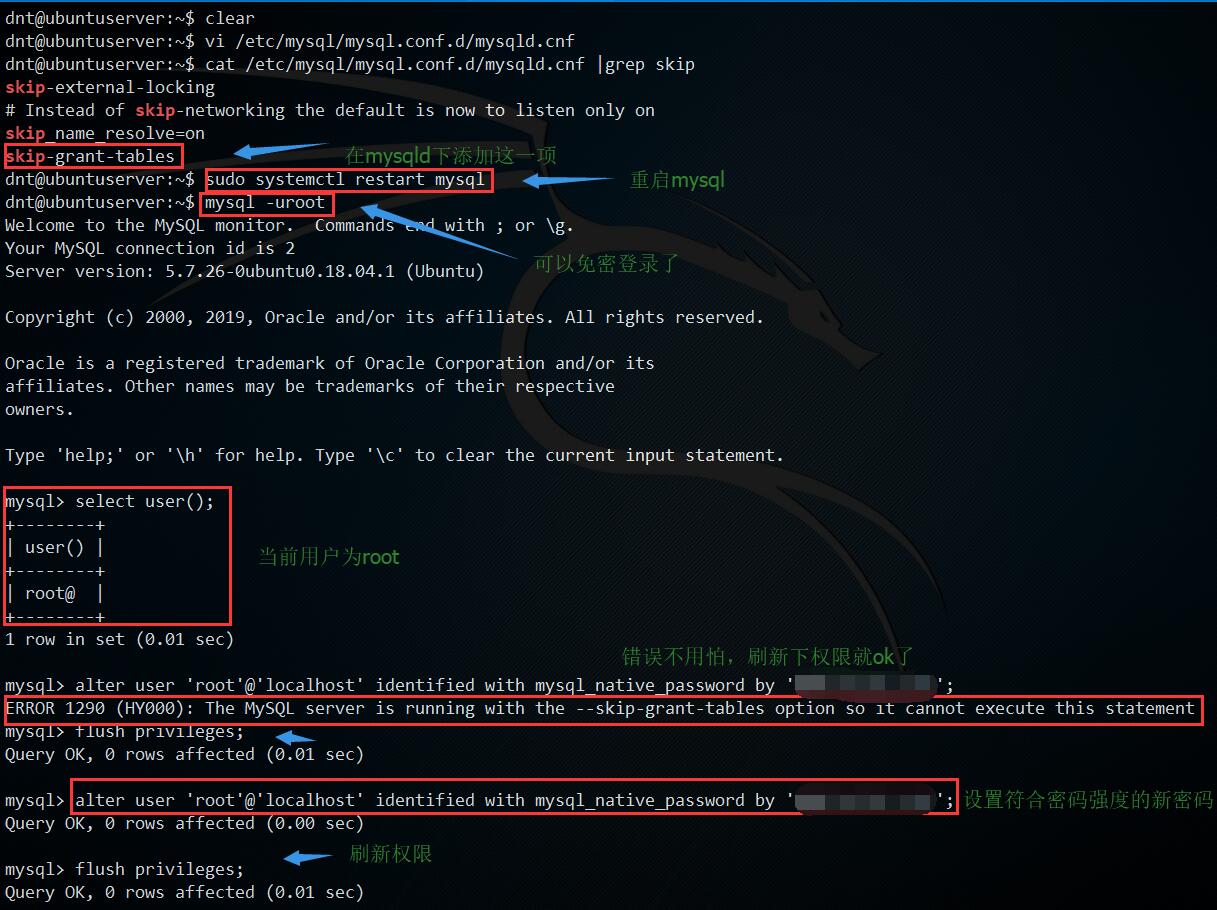
附录
dnt@ubuntuserver:~$ vi /etc/mysql/mysql.conf.d/mysqld.cnf

dnt@ubuntuserver:~$ cat /etc/mysql/mysql.conf.d/mysqld.cnf |grep skip

skip-external-locking

# Instead of skip-networking the default is now to listen only on

skip_name_resolve=on

skip-grant-tables

dnt@ubuntuserver:~$ sudo systemctl restart mysql

dnt@ubuntuserver:~$ mysql -uroot

Welcome to the MySQL monitor.  Commands end with ; or \g.

Your MySQL connection id is 2

Server version: 5.7.26-0ubuntu0.18.04.1 (Ubuntu)

Copyright (c) 2000, 2019, Oracle and/or its affiliates. All rights reserved.

Oracle is a registered trademark of Oracle Corporation and/or its

affiliates. Other names may be trademarks of their respective

owners.

Type 'help;' or '\h' for help. Type '\c' to clear the current input statement.

mysql> select user();

+--------+

| user() |

+--------+

| root@  |

+--------+

1 row in set (0.01 sec)

mysql> alter user 'root'@'localhost' identified with mysql_native_password by 'WWW.baidu.com1';

ERROR 1290 (HY000): The MySQL server is running with the --skip-grant-tables option so it cannot execute this statement

mysql> flush privileges;

Query OK, 0 rows affected (0.01 sec)

mysql> alter user 'root'@'localhost' identified with mysql_native_password by 'WWW.baidu.com1';

Query OK, 0 rows affected (0.00 sec)

mysql> flush privileges;

Query OK, 0 rows affected (0.01 sec)

mysql> exit

Bye
恢复正常
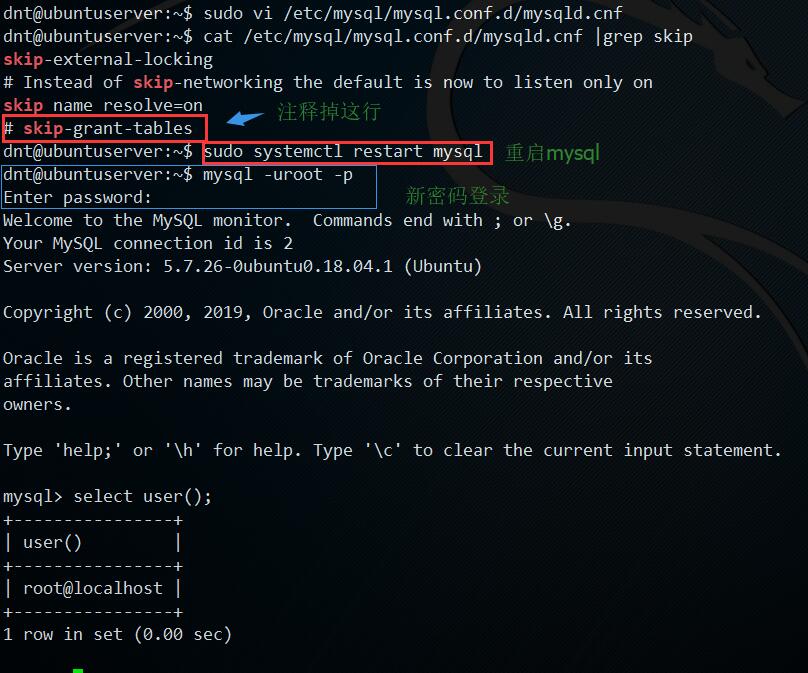
附录
dnt@ubuntuserver:~$ sudo vi /etc/mysql/mysql.conf.d/mysqld.cnf

dnt@ubuntuserver:~$ cat /etc/mysql/mysql.conf.d/mysqld.cnf |grep skip

skip-external-locking

# Instead of skip-networking the default is now to listen only on

skip_name_resolve=on

# skip-grant-tables

dnt@ubuntuserver:~$ sudo systemctl restart mysql

dnt@ubuntuserver:~$ mysql -uroot -p

Enter password:

Welcome to the MySQL monitor.  Commands end with ; or \g.

Your MySQL connection id is 2

Server version: 5.7.26-0ubuntu0.18.04.1 (Ubuntu)

Copyright (c) 2000, 2019, Oracle and/or its affiliates. All rights reserved.

Oracle is a registered trademark of Oracle Corporation and/or its

affiliates. Other names may be trademarks of their respective

owners.

Type 'help;' or '\h' for help. Type '\c' to clear the current input statement.

mysql> select user();

+----------------+

| user()         |

+----------------+

| root@localhost |

+----------------+

1 row in set (0.00 sec)
MySQL5.7.26 忘记Root密码小计的更多相关文章
- mysql 5.7.26 忘记root密码
1.关闭mysql [root@mysql ~]# /etc/init.d/mysqld stopShutting down MySQL.. SUCCESS! 2.修改参数文件/etc/my.cnf ...
- MySQL5.7 忘记root密码,怎么破?
MySQL5.7 忘记root密码,怎么破? 关服 # kill $mysql_pid 免密启动 # /usr/local/mysql57/bin/mysqld_safe --defaults-fil ...
- Linux忘记root密码怎么办?
开篇前言:Linux系统的root账号是非常重要的一个账号,也是权限最大的一个账号,但是有时候忘了root密码怎么办?总不能重装系统吧,这个是下下策,其实Linux系统中,如果忘记了root账号密码, ...
- Mac上MySQL忘记root密码且没有权限的处理办法&workbench的一些tips (转)
忘记Root密码肿么办 Mac上安装MySQL就不多说了,去mysql的官网上下载最新的mysql包以及workbench,先安装哪个影响都不大.如果你是第一次安装,在mysql安装完成之后,会弹出来 ...
- mysql 免安装与 忘记root密码 密码过期
免安装: 参考 :https://blog.csdn.net/werwqerwerwer/article/details/52919939 注:别忘了配置环境变量 忘记root密码解决办法: 1. ...
- 忘记root密码怎么办-单用户模式修改root密码
忘记root密码怎么办-单用户模式修改root密码================================= 1,开机3秒内按下向下的方向键,目的是为了不让它进入系统,而是停留在开机界面. 2 ...
- CentOS6.5的安装及忘记root密码的措施
CentOS6.5的安装及忘记root密码的措施 VMware虚拟机的配置 1.文件->新建->自定义->下一步 2.选择稍后安装操作系统 我们将采用自定义安装,杜绝VMware的一 ...
- mysql-管理命令【创建用户、授权、修改密码、删除用户和授权、忘记root密码】
一.创建用户 命令: CREATE USER 'username'@'host' IDENTIFIED BY 'password'; 关键参数说明: username - 创建登录用户名, host ...
- mysql忘记root密码连接本地库
http://www.cnblogs.com/zf2011/archive/2012/03/13/2393387.html 今天想做个小项目,决定用mysql数据库,但是好久没用mysql了,也忘掉了 ...
随机推荐
- redis学习笔记——内存映射数据结构
内存映射数据结构 解决问题:当一个对象包含的元素数量并不多,或者元素本身的体积并不大时,使用代价高昂的内部数据结构并不是最好的办法. 内存映射数据结构是一系列经过特殊编码的字节序列,创建它们所消耗的内 ...
- PHP使用mysqli连接MySQL数据库
使用mysqli函数库连接MySQL,支持面向对象和面向过程两种方式: 1.面向对象的使用方式 建立一个连接 $db = new mysqli('localhost', 'root', '123456 ...
- [CSS3]移动Web开发系列之CSS3增强型选择器
css3是移动Web开发的主要技术之中的一个.当前.CSS3技术最适合在移动Web开发中使用的特性有增强的选择器.阴影.强大的背景设置 .圆角边框 接下来我们主要解说增强型的选择器.主要分两种,属性选 ...
- php装饰器
<?php /* * 用一个类来装饰另一个类,动态的给一个对象增加一些额外功能,这些功能一般是在这个对象调用方法前或方法后 * 比如我们要给User类增加一个登陆日志的功能 */ // 抽象构件 ...
- Vue 事件修饰符 阻止默认事件
阻止默认事件: <a v-on:click.prevent="doThat"></a>
- vue vue-router beforeRouteEnter
beforeRouteEnter (to, from, next) { // 在渲染该组件的对应路由被 confirm 前调用 // 不!能!获取组件实例 `this` // 因为当守卫执行前,组件实 ...
- Hbase笔记3 shell命令
http://www.jb51.net/article/31172.htm 这个文章写得挺好 1.HBase的shell就和我们用Mysql的终端是一个意思,比如我们安装好Mysql,配置好了环境变量 ...
- @Autowired @Transaction @Service同时出现。
对于@Autowired,如果只写这些,肯定是根据类型自动装配这个没问题. @Service public class AcRoleServiceImpl implements AcRoleServi ...
- python--pipe
1.pipe 除了使用队列外,还可以使用管道在进程间执行消息传递 pipe([]duplex) 在进程间创建一条管道,并返回元组(conn1,conn2),其中conn1和conn2是表示管道两端的C ...
- 利用NIO的Selector处理服务器-客户端模型
package NIOTEST; import java.io.IOException; import java.net.InetAddress; import java.net.InetSocket ...