
MacOS下,Python2和Python3完美兼容使用(转)
问题阐述:
MacOS默认Python版本是2.7.10,随着Python3的进一步占有市场,Python2.7也将在2020年结束维护,所以在同一台电脑上安装多个Python版本势在必行。
一、pyenv的使用
首先,安装pyenv,参考地址。
1,安装Homebrew,参考地址;
2,安装pyenv:
$ brew update

$ brew install pyenv
3,添加pyenv init到shell里
$ echo -e 'if command -v pyenv 1>/dev/null 2>&1; then\n eval "$(pyenv init -)"\nfi' >> ~/.bash_profile
4,重启shell,使配置生效
然后,pyenv基本使用方法
1,列出系统安装的所有Python版本
ritchdeMacBook-Pro:~ ritch$ pyenv versions

* system (set by /Users/ritch/.pyenv/version)

  3.7.0
2,列出当前Python版本
ritchdeMacBook-Pro:~ ritch$ pyenv version

system (set by /Users/ritch/.pyenv/version)
3,列出pyenv可供安装使用的Python版本

ritchdeMacBook-Pro:~ ritch$ pyenv install -l

Available versions:

  2.1.3

  2.2.3

  2.3.7

   ...

   ...

  3.6.5

  3.6.6

  3.7.0

  3.7-dev

  3.8-dev
4,安装Python版本
ritchdeMacBook-Pro:~ ritch$ pyenv install 3.6.6

python-build: use openssl from homebrew

python-build: use readline from homebrew

Downloading Python-3.6.6.tar.xz...

-> https://www.python.org/ftp/python/3.6.6/Python-3.6.6.tar.xz

Installing Python-3.6.6...

python-build: use readline from homebrew

Installed Python-3.6.6 to /Users/ritch/.pyenv/versions/3.6.6
5,全局切换Python版本
ritchdeMacBook-Pro:~ ritch$ python

Python 2.7.10 (default, Oct  6 2017, 22:29:07)

[GCC 4.2.1 Compatible Apple LLVM 9.0.0 (clang-900.0.31)] on darwin

Type "help", "copyright", "credits" or "license" for more information.

>>> exit()

ritchdeMacBook-Pro:~ ritch$ pyenv versions

* system (set by /Users/ritch/.pyenv/version)

  3.6.6

  3.7.0

ritchdeMacBook-Pro:~ ritch$ python

Python 2.7.10 (default, Oct  6 2017, 22:29:07)

[GCC 4.2.1 Compatible Apple LLVM 9.0.0 (clang-900.0.31)] on darwin

Type "help", "copyright", "credits" or "license" for more information.

>>> exit()

ritchdeMacBook-Pro:~ ritch$ pyenv global 3.6.6

ritchdeMacBook-Pro:~ ritch$ python

Python 3.6.6 (default, Sep 27 2018, 13:24:00)

[GCC 4.2.1 Compatible Apple LLVM 9.1.0 (clang-902.0.39.2)] on darwin

Type "help", "copyright", "credits" or "license" for more information.

>>> exit()
其中Python版本控制,分为三个场景:
global:全局范围内Python版本的展示和修改。
local:当前目录下Python版本的展示和修改。
shell:当前shell会话Python版本的展示和修改,适用于脚本执行的情况,当前会话结束后,Python版本回复原样。
二、多版本情况的pip使用
Python好用的地方是,有很多成熟的第三方库。安装了多个Python版本,对应的pip怎么使用呢?
首先,安装
正常情况下,Python2 >= 2.7.9 或者 Python3 >= 3.4,pip已经被安装好了。
保证Upgrading pip:
ritchdeMacBook-Pro:~ ritch$ python -V

Python 3.6.6

ritchdeMacBook-Pro:~ ritch$ python -m pip install --upgrade pip

Collecting pip

  Using cached https://files.pythonhosted.org/packages/5f/25/e52d3f31441505a5f3af41213346e5b6c221c9e086a166f3703d2ddaf940/pip-18.0-py2.py3-none-any.whl

Installing collected packages: pip

  Found existing installation: pip 10.0.1

    Uninstalling pip-10.0.1:

      Successfully uninstalled pip-10.0.1

Successfully installed pip-18.0
如果系统里没有安装好pip,参看安装:
curl https://bootstrap.pypa.io/get-pip.py -o get-pip.py

python get-pip.py
然后,使用
Python 3.6.6,使用pip安装第三方库bs4:
ritchdeMacBook-Pro:~ ritch$ pyenv global 3.6.6

ritchdeMacBook-Pro:~ ritch$ python -V

Python 3.6.6

ritchdeMacBook-Pro:~ ritch$ python -m pip install bs4

Collecting bs4

  Downloading https://files.pythonhosted.org/packages/10/ed/7e8b97591f6f456174139ec089c769f89a94a1a4025fe967691de971f314/bs4-0.0.1.tar.gz

Collecting beautifulsoup4 (from bs4)

  Downloading https://files.pythonhosted.org/packages/21/0a/47fdf541c97fd9b6a610cb5fd518175308a7cc60569962e776ac52420387/beautifulsoup4-4.6.3-py3-none-any.whl (90kB)

    100% |████████████████████████████████| 92kB 537kB/s

Installing collected packages: beautifulsoup4, bs4

  Running setup.py install for bs4 ... done

Successfully installed beautifulsoup4-4.6.3 bs4-0.0.1
Python 3.7.0,使用pip安装第三方库bs4:
ritchdeMacBook-Pro:~ ritch$ pyenv global 3.7.0

ritchdeMacBook-Pro:~ ritch$ python -V

Python 3.7.0

ritchdeMacBook-Pro:~ ritch$ python -m pip install bs4

Collecting bs4

  Using cached https://files.pythonhosted.org/packages/10/ed/7e8b97591f6f456174139ec089c769f89a94a1a4025fe967691de971f314/bs4-0.0.1.tar.gz

Collecting beautifulsoup4 (from bs4)

  Using cached https://files.pythonhosted.org/packages/21/0a/47fdf541c97fd9b6a610cb5fd518175308a7cc60569962e776ac52420387/beautifulsoup4-4.6.3-py3-none-any.whl

Installing collected packages: beautifulsoup4, bs4

  Running setup.py install for bs4 ... done

Successfully installed beautifulsoup4-4.6.3 bs4-0.0.1
三、总结
pyenv配合pip,可以很好解决Python多版本的问题。
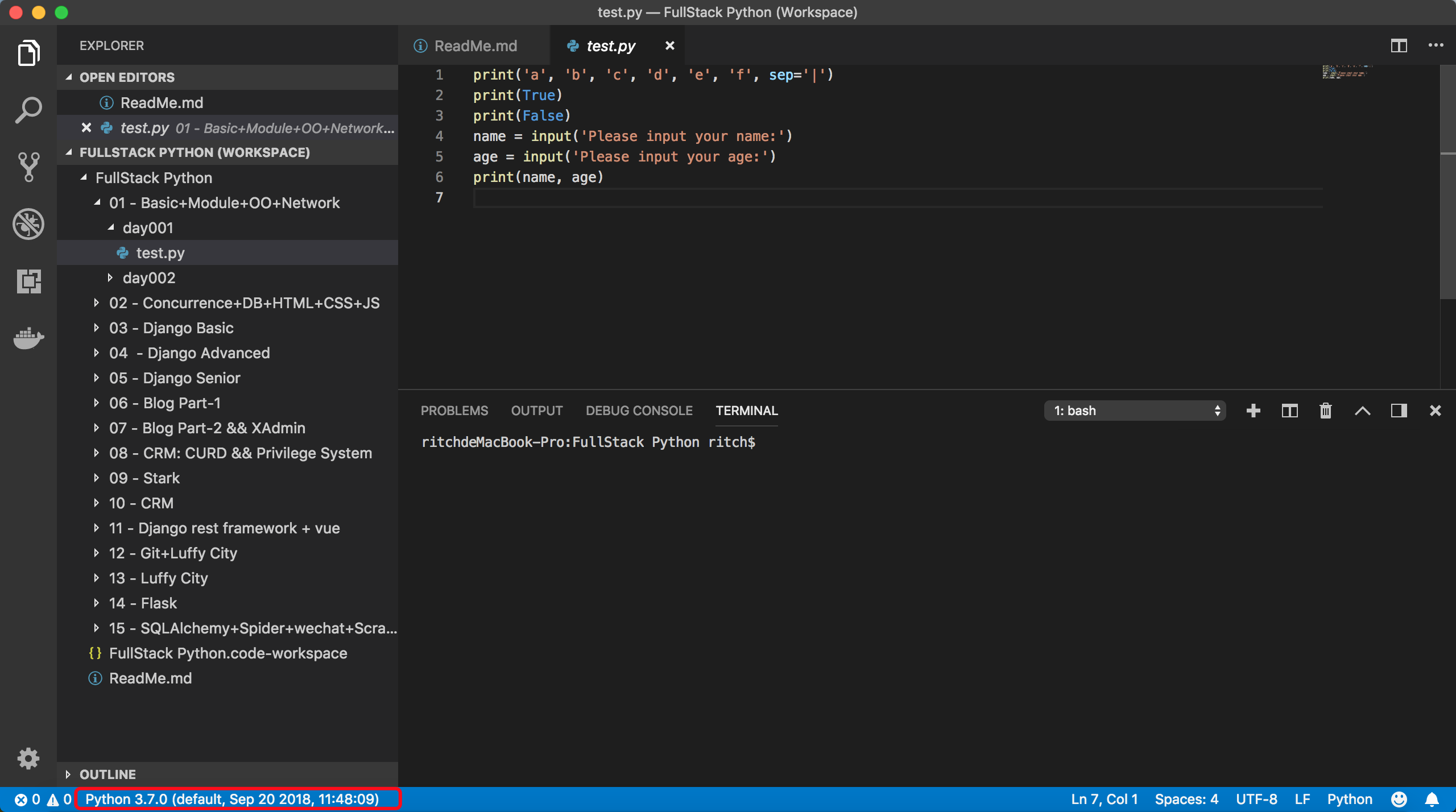
同时也可以在轻量级编辑器(VS Code、Sublime)上很好的配合使用,VS Code如下截图:
MacOS下,Python2和Python3完美兼容使用(转)的更多相关文章
- windows下python2和python3同时安装ipython
1.ipython简介: IPython 是一个 python 的交互式 shell,比默认的python shell 好用得多,支持变量自动补全,自动缩进,支持 bash shell 命令,内置了许 ...
- Windows下Python2与Python3两个版本共存的方法详解
来源:http://www.jb51.net/article/105311.htm 这篇文章主要介绍了Windows下Python2与Python3两个版本共存的方法,文中介绍的很详细,对大家具有一定 ...
- Windows下同时安装python2和python3如何兼容版本
引言:因学习需要把python2和python3都安装了,为了避免使用过程中混淆版本在网上找了一些解决方案,亲测可用.方法如下: 分别下载并安装Python2.x和Python3.x. 配置环境变量. ...
- Windows下python2与python3兼容设置
分别安装python2与python3后,我想直接通过命令python2.pip2与python3.pip3区分: 分别进入python安装目录下,修改python.exe为python2.exe.p ...
- win10下python2与python3以及pip共存
一 分别安装python2和python3 注意: 安装时记得勾选 Add Python.exe to Path 二 安装pip Python3最新版本有pip,无需安装 Python2: 下载pip ...
- linux下python2升级python3,python2和python3并存
wget https://www.python.org/ftp/python/3.6.4/Python-3.6.4.tgz 解压:tar -xzvf Python-3.6.4.tgz cd Pytho ...
- jupyter notebook下python2和python3共存(Ubuntu)
提示NOTICE 时间:2018/04/06 主题:Ubuntu 下CAFFE框架 主角:Jupyter Notebook 简介: Jupyter Notebook(此前被称为 IPython not ...
- win10下 anaconda 环境下python2和python3版本转换
在cmd的环境下,输入以下命令安装Python2.7的环境 conda create -n python27 python=2.7 anaconda 上面的代码创建了一个名为python27的pyth ...
- Linux下Python2升级Python3
Linux下Python2的升级方法: 一.下载Python3安装包: 1.在线下载 wget https://www.python.org/ftp/python/3.6.2/Python-3.6.2 ...
随机推荐
- C语言小程序(三)、判断两个日期之差
输入两个日期,计算之间相差多少天. 用了两种方法实现,第二种利用结构体,代码比较清晰,其余的都一样. 1.普通的写法 #include <stdio.h> int leapyear(int ...
- Arc066_E Addition and Subtraction Hard
传送门 题目大意 给定一个加减法的表达式,让你任意的添加合法的括号对,使的表达式最大. 题解 考虑到任意左括号一定加在减号右边,那么对于第一个左括号,与该左括号相邻的只含有加号的子序列的贡献一定为负, ...
- Django-进阶 分页,中间件
知识预览 分页 中间件 回到顶部 分页 Django的分页器(paginator) view from django.shortcuts import render,HttpResponse # Cr ...
- 测试你的浏览器是否支持WebGL(Does My Browser Support WebGL)
测试你的浏览器是否支持WebGL(Does My Browser Support WebGL) 关于WebGL:WebGL是一种3D绘图标准,这种绘图技术标准允许把JavaScript和OpenGL ...
- Excel对重复数据分组,求出不同的数据(office 2013)
第一步: 第二步: 第三步:
- Python-连接Redis并操作
首先开启redis的外连 sch01ar@ubuntu:~$ sudo vim /etc/redis/redis.conf 把bind 127.0.0.1这行注释掉 然后重启redis sudo /e ...
- [bzoj3670] [NOI2014] [lg2375] 动物园
nxt数组为KMP的next数组num[i]储存了i前面可以匹配的串的个数.先在KMP求nxt中顺便求出num最后再找到对于i的最大的前后缀不重叠的可匹配的j,ans*=(num[j]+1)%1000 ...
- Linux下UDP发送大量请求导致Operation not permitted的问题探讨
一.问题背景目前公司准备上微服务的架构模式,在对比大量的API网关之后,最后选中了Kong作为我们的API网关,在经过大量的研究之后,啊呸,踩坑之后,终于跑起来了,简直是普天同庆,撒花祝贺. 但是在美 ...
- ansible应用案例-一键安装flask
一.添加主机 sudo vim /etc/ansible/hosts ------------------------------------------------------> [group ...
- zookeeper相关知识的总结:
一.分布式协调技术 在给大家介绍ZooKeeper之前先来给大家介绍一种技术——分布式协调技术.那么什么是分布式协调技术?那么我来告诉大家,其实分布式协调技术 主要用来解决分布式环境当中多个进程之间的 ...