
vue常用片段
事件处理
基本骨架
子组件
axios
v-if
v-for
路由
设置style
计算属性
动态class
路由跳转
store
nextTick
事件处理:
直接写表达式:
@click="counter += 1"
调用方法:
   @click="greet"
   @click="greet(index)"
获取事件对象:
@click="warn('no', $event)"
事件修饰符:
@click.stop.prevent="doThat"
按键修饰符:
@keyup.13="submit"
基本骨架:
<script type="text/ecmascript-6">

import axios from 'axios'

export default {

   data(){

      return {

          useId:''

      }

   },

   created(){

        ..............

   },

   methods:{

       loginReq(){

            ............

       }

   },

   components: {

        XInput

   }

}

</script>
子组件:
  使用:
    <bpm-radio

      :appoRadioOption="appoRadioOption"  //传数据

      @optionChange="optionChange"   //子组件派发事件
    >

    </bpm-radio>

子组件:
  接收参数:
参数验证与默认:
    num: {

      type: Number,

      default: 100

    },
axios-post请求:
 axios.post('xxxxxxxxxxx',{

          userId:this.useId

        }

 ).then((res)=>{

           this.$vux.loading.hide()

           if(res.data.state==0){

           }else{

              this.$vux.alert.show({

                   title:'提示',

                   content:res.data.message

              })

           }

  })

或者:
axios-get请求:
 axios({

      method:'Get',

      url:'xxxxxxxxxx/oorder/getDtl?orderId='+orderId,

 }).then((res)=>{
v-if:
<div class="btnBox" v-if="orderStateNum==2">
</div>
<div v-else>
   <divider>暂无留言</divider>
</div>
v-for:
遍历数组:
<div class="orItem" v-for="item in orderInfo" @click="clickItem(item.orderId)">

        <div class="orItemHeader vux-1px-b">{{statusTag[item.orderState]}}

        </div>

        <div class="orItemBody vux-1px-b" v-for="proitem in item.orderList">

               <div class="txtBox">

                    <p class="tit">2222222222</p>

                    <p>2222222222</p>

                    <p>2222222222</p>

               </div>

        </div>

</div>

带index:
遍历对象:
 <li v-for="value in object">
    {{ value }}
 </li>
&获取键名:
v-for="(value, key) in object"
&获取索引:
v-for="(value, key, index) in object"
一定范围的取值:
<span v-for="n in 10">{{ n }} </span>
&与v-if混合使用:
  <li v-for="todo in todos" v-if="!todo.isComplete">  //v-for优先级更高,v-if作用于每一个for循环
     {{ todo }}
  </li>
路由方法:
this.$router.push({path:`/order/`+orderId})

this.$router.push({name:'catalogDtl',params:{id:item.Fsinger_id},query:{keyworth:'123lxf'}})

this.$router.push({path:`/page20/${item.Fsinger_id}`})
行间:
@click=“$router.go(-1)”
使用计算属性:

动态class:
1. 对象内表达式:
 如下模板:

     <div class="static"     v-bind:class="{ active: isActive, 'text-danger': hasError }"></div>

 如下 data:

     data: {  isActive: true,  hasError: false}
 渲染为:

     <div class="static active"></div>

:class="{'active':index==serverType,'radioItem':true}"
2.返回字符串的表达式:

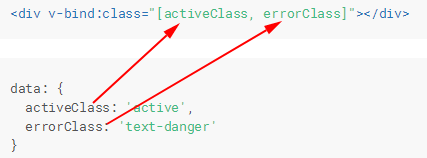
:class="[className, isMsg ? 'weui-icon_msg' : ' ']"
变量和字符串混合:

:style="{ color: activeColor, fontSize: fontSize + 'px' }" //变量为data中的值
路由跳转:
声明式:<router-link :to="...">

编程式:router.push(...)

this.$router.push({path: '/coach/' + this.$route.params.id, query: queryData});
目标路由获取query:
store:
直接获取store:
this.$store.state.wordId
async await:
   methods:{

      async checkBatchOpRight(){

        let res = await getLabelUsers('1001')   //等一个resolve

        ...
      }
  }
Promise:
export function getLabelUsers (tagId) {

    return new Promise((resolve, reject) => {

              .........

              resolve({

                   reqSuccess:true,

                   userList:res.data.userList

              })

              .........

    })

}
变量与表达式:



为dom元素添加事件:

css中使用背景图片:
nextTick:Vue.$nextTick(function(){
console.log(vm.$el.textContent)
})
watch:
watch:{

      receiveForm: {

            deep: true,  //data中对象的值的变化

            handler: function (newVal,oldVal){

                    this.modify()

            }

      }

}
vue常用片段的更多相关文章
- Vue常用经典开源项目汇总参考-海量
Vue常用经典开源项目汇总参考-海量 Vue是什么? Vue.js(读音 /vjuː/, 类似于 view) 是一套构建用户界面的 渐进式框架.与其他重量级框架不同的是,Vue 采用自底向上增量开发的 ...
- vue常用
vue常用的路由的状态管理
- 五、vue常用UI组件
下面简单的总结下vue常用的一些UI 组件,有一些我也没怎么用过,这里先罗列出来,便于自己后面使用的时候查找方便,大家有更好的可以给我推荐哦~ vuex: vux github ui demo:htt ...
- (二)Vue常用7个属性
学习vue我们必须之到它的7个属性,8个 方法,以及7个指令.787原则 el属性 用来指示vue编译器从什么地方开始解析 vue的语法,可以说是一个占位符. data属性 用来组织从view中抽象出 ...
- Vue常用语法及命令
1,Vue常用语法 vue常用语法之变量的定义 // 1,变量相关 // 变量的提升 var username = "雪雪"; var username ; console.log ...
- Vue常用的GitHub项目
Vue常用的GitHub项目(Demo案例) 应用实例 https://github.com/pagekit/pa... pagekit-轻量级的CMS建站系统 https://github.com/ ...
- vue常用的修饰符
v-model修饰符 <template> <div id="demo14"> <p>-----------------模板语法之修饰符---- ...
- vue进阶:vs code添加vue代码片段
如何设置? 选择或创建 配置代码 如何使用? 一.如何设置? 进入vs code主界面-->使用快捷键“ctrl + shift + p”: 如果你是使用Preferences:Configur ...
- Vue 常用三种传值方式
Vue常用的三种传值方式: 父传子 子传父 非父子传值 引用官网一句话:父子组件的关系可以总结为 prop 向下传递,事件向上传递.父组件通过 prop 给子组件下发数据,子组件通过事件给父组件发送消 ...
随机推荐
- 怎样在 Ubuntu Linux 上安装 MySQL
本教程教你如何在基于 Ubuntu 的 Linux 发行版上安装 MySQL.对于首次使用的用户,你将会学习到如何验证你的安装和第一次怎样去连接 MySQL. -- Sergiu MySQL 是一个典 ...
- ELKB是什么?
ELKB是四个开源软件的缩写,分别表示:Elasticsearch , Logstash, Kibana ,Beats. Elasticsearch是个开源分布式搜索引擎,提供搜集.分析.存储数据三大 ...
- 2017.10.26 JavaWeb----第五章 JavaBean技术
JavaWeb----第五章 JavaBean技术 (1)JavaBean技术 JavaBean技术是javaweb程序的重要组成部分,是一个可重复使用的软件组件,是用Java语言编写的.遵循一定的标 ...
- splay版
指针是个好东西 不过就是得判空 还有别忘传引用(其实应该都传引用) #include<cstdio> #include<algorithm> #include<iostr ...
- 【PC-x86-x64】JDK 32bit与64bit的区别及x64 PC的发展历程【转】
一次偶然分析的机会: 在进行Minecraft也就是所谓的我的世界游戏的时候,在对局域网进行开放的时候,我的是64bit的JDK,而我同学的是32bit的JDK,所以在进行局域网链接的时候就会出现In ...
- javabeans 内省 introspector BeanUtils
javaBeans 属性的概念 不只是字段,而是其get set 方法 且该get方法有返回值的称为属性,继承Object类的getClass方法 package com.swift.demo1; p ...
- Unicode编码字符 转换成汉字
转载:http://www.chengxuyuans.com/iPhone_IOS/48128.html - (NSString *)replaceUnicode:(NSString *)unicod ...
- js实现二分查找
二分查找需要数组是有序的,1.先从有序数组的最中间元素开始查找,如果和要查找的元素相等,直接返回索引,若不相等则下一步.2.如果指定的元素大于或者小于中间元素,则在大于或小于的那一半区域内查找,重复第 ...
- Centos7上docker的安装和基本使用
Centos7上Docker的相关操作 Docker的安装 1.检查内核版本 docker使用linux的内核必须是3.10以上,首先需要 # uname -r 2.使用yum安装docker # y ...
- js表格打印自动分页demo
本文翻译自:How Does setState Know What to Do? 原作者:Dan Abramov 如果有任何版权问题,请联系shuirong1997@icloud.com 当你在组件中 ...