
移动app整合个推进行消息推送
首先前端代码写好之后进行发行打包:

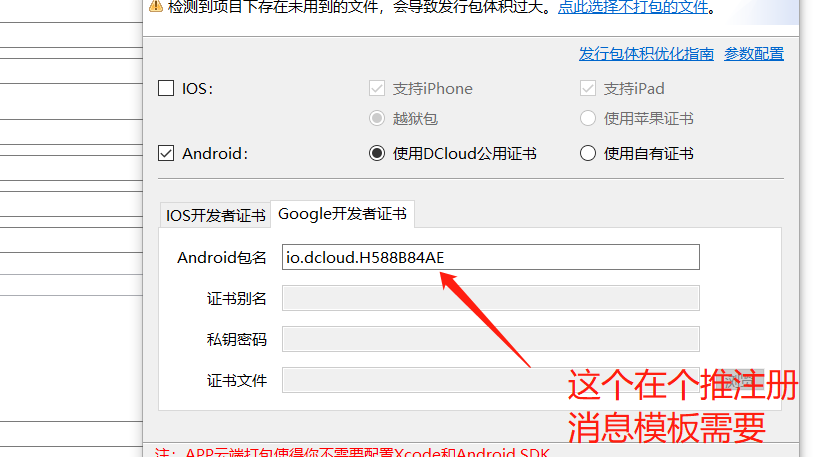
然后再进行发行打包:
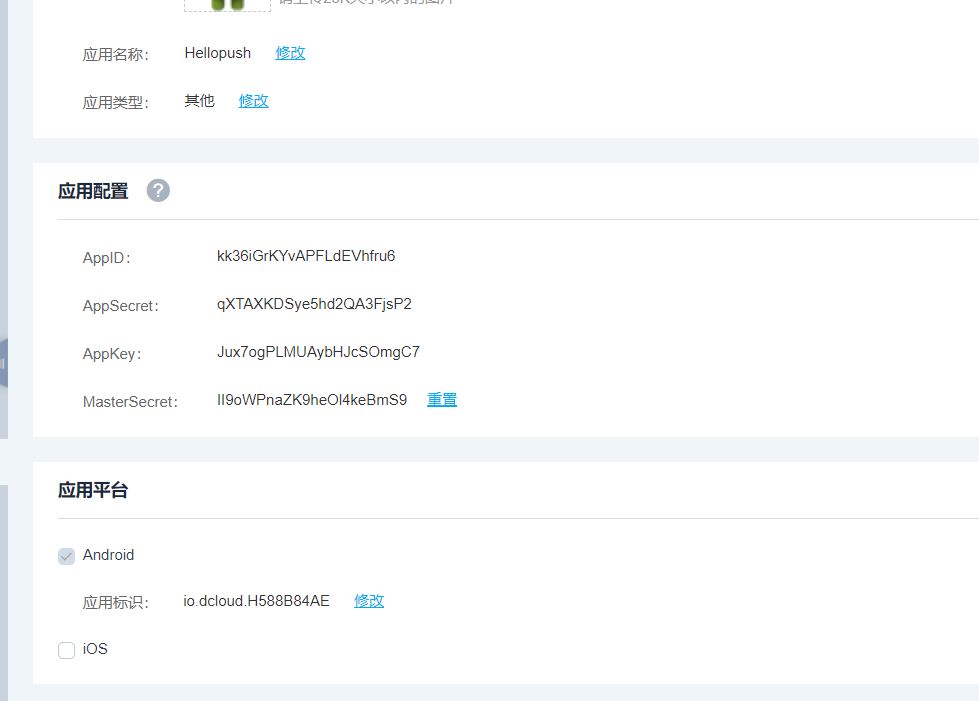
然后登录个推官网:
测试:

点击推送,在手机端就可以获取到信息了.
java代码测试:
package com.cxy.bean;

import java.io.IOException;

import java.util.ArrayList;

import java.util.List;

import com.gexin.rp.sdk.base.IAliasResult;

import com.gexin.rp.sdk.base.IBatch;

import com.gexin.rp.sdk.base.IIGtPush;

import com.gexin.rp.sdk.base.IPushResult;

import com.gexin.rp.sdk.base.impl.AppMessage;

import com.gexin.rp.sdk.base.impl.SingleMessage;

import com.gexin.rp.sdk.base.impl.Target;

import com.gexin.rp.sdk.base.uitls.AppConditions;

import com.gexin.rp.sdk.exceptions.RequestException;

import com.gexin.rp.sdk.http.IGtPush;

import com.gexin.rp.sdk.template.LinkTemplate;

import com.gexin.rp.sdk.template.NotificationTemplate;

import com.gexin.rp.sdk.template.TransmissionTemplate;

import com.gexin.rp.sdk.template.style.Style0;

public class GetuiUtils {

    /*AppID:

    kk36iGrKYvAPFLdEVhfru6

    AppSecret:

    qXTAXKDSye5hd2QA3FjsP2

    AppKey:

    Jux7ogPLMUAybHJcSOmgC7

    MasterSecret:

    II9oWPnaZK9heOl4keBmS9*/

    private static String appId = "kk36iGrKYvAPFLdEVhfru6";

    private static String appKey = "Jux7ogPLMUAybHJcSOmgC7";

    private static String masterSecret = "II9oWPnaZK9heOl4keBmS9";

    public static String host = "https://sdk.open.api.igexin.com/apiex.htm";

    public static String CID_A = "81a3d3c3bee1adb51d306771af2aeb6a";//在打包后的APP的js中获取 var cId = plus.push.getClientInfo().clientid;

    public static String CID_B = "bae837b470994d614f0773097b92dbf3";

    public static IGtPush push;

    static {

        push = new IGtPush(host, appKey, masterSecret);

    }

    /**

     * 绑定用户cid 别名

     *

     * @param Alias

     * @param CID

     * @return

     */

    public static boolean bindAlias(String alias, String CID) {

        IAliasResult bindSCid = push.bindAlias(appId, alias, CID);

        if (bindSCid.getResult()) {

            return true;

        }

        return false;

    }

    /**

     * 对单个用户推送消息

     *

     * @param alias

     * @param msg

     * @return

     */

    public static boolean pushMessageToSingle(String cid, String text, String transMsg) {

        IGtPush push = new IGtPush(host, appKey, masterSecret);

        NotificationTemplate template = notificationTemplate("title", text, transMsg);

        SingleMessage message = new SingleMessage();

        message.setOffline(true);

        // 离线有效时间,单位为毫秒,可选

        message.setOfflineExpireTime( *  * );

        message.setData(template);

        // 可选,1为wifi,0为不限制网络环境。根据手机处于的网络情况,决定是否下发

        message.setPushNetWorkType();

        Target target = new Target();

        target.setAppId(appId);

        target.setClientId(cid);

        //target.setAlias(Alias);

        IPushResult ret = null;

        try {

            ret = push.pushMessageToSingle(message, target);

        } catch (RequestException e) {

            e.printStackTrace();

            ret = push.pushMessageToSingle(message, target, e.getRequestId());

        }

        if (ret != null && ret.getResponse() != null && ret.getResponse().containsKey("result")) {

            System.out.println(ret.getResponse().toString());

            if (ret.getResponse().get("result").toString().equals("ok") && ret.getResponse().containsKey("status")) {

                return true;

            }

        }

        return false;

    }

    /**

     * 指定应用的所有用户群发推送消息

     *

     * @param msg

     */

    public static boolean pushtoAPP(String text, String transMsg) {

        IGtPush push = new IGtPush(host, appKey, masterSecret);

        NotificationTemplate template = notificationTemplate("title", text, transMsg);

        AppMessage message = new AppMessage();

        message.setData(template);

        message.setOffline(true);

        //离线有效时间,单位为毫秒,可选

        message.setOfflineExpireTime( *  * );

        //推送给App的目标用户需要满足的条件

        AppConditions cdt = new AppConditions();

        List<String> appIdList = new ArrayList<String>();

        appIdList.add(appId);

        message.setAppIdList(appIdList);

        //手机类型

        List<String> phoneTypeList = new ArrayList<String>();

        //省份

        List<String> provinceList = new ArrayList<String>();

        //自定义tag

        List<String> tagList = new ArrayList<String>();

        cdt.addCondition(AppConditions.PHONE_TYPE, phoneTypeList);

        cdt.addCondition(AppConditions.REGION, provinceList);

        cdt.addCondition(AppConditions.TAG, tagList);

        message.setConditions(cdt);

        IPushResult ret = push.pushMessageToApp(message, "msg_toApp");

        if (ret != null && ret.getResponse() != null && ret.getResponse().containsKey("result")) {

            System.out.println(ret.getResponse().toString());

            if (ret.getResponse().get("result").toString().equals("ok")) {

                return true;

            }

        }

        return false;

    }

    /**

     * 对单个用户推送透传消息

     *

     * @param alias

     * @param title

     * @param content

     * @return

     */

    public static boolean pushTransMessageToSingle(String cid, String msg) {

        TransmissionTemplate template = transTemplate(cid, msg);

        SingleMessage message = new SingleMessage();

        message.setOffline(true);

        // 离线有效时间,单位为毫秒,可选

        message.setOfflineExpireTime( *  * );

        message.setData(template);

        // 可选,1为wifi,0为不限制网络环境。根据手机处于的网络情况,决定是否下发

        message.setPushNetWorkType();

        Target target = new Target();

        target.setAppId(appId);

        target.setClientId(cid);

        IPushResult ret = null;

        try {

            ret = push.pushMessageToSingle(message, target);

        } catch (RequestException e) {

            e.printStackTrace();

            ret = push.pushMessageToSingle(message, target, e.getRequestId());

        }

        if (ret != null && ret.getResponse() != null && ret.getResponse().containsKey("result")) {

            System.out.println(ret.getResponse().toString());

            if (ret.getResponse().get("result").toString().equals("ok") && ret.getResponse().containsKey("status")) {

                return true;

            }

        }

        return false;

    }

    public static void pushMessageToIBatch(List<String> alias, String msg) {

        IBatch batch = push.getBatch();

        IPushResult ret = null;

        try {

            for (int i = ; i < alias.size(); i++) {

                // 构建客户a的透传消息a

                constructClientTransMsg(alias.get(i), msg, batch);

            }

            // 构建客户B的点击通知打开网页消息b

            // constructClientLinkMsg(CID_B,"msgB",batch);

            ret = batch.submit();

        } catch (Exception e) {

            e.printStackTrace();

        }

        System.out.println(ret.getResponse().toString());

    }

    private static NotificationTemplate notificationTemplate(String title, String text, String obj) {

        NotificationTemplate template = new NotificationTemplate();

        // 设置APPID与APPKEY

        template.setAppId(appId);

        template.setAppkey(appKey);

        // 透传消息设置,1为强制启动应用,客户端接收到消息后就会立即启动应用;2为等待应用启动

        template.setTransmissionType();

        template.setTransmissionContent(obj);

        // 设置定时展示时间

        // template.setDuration("2015-01-16 11:40:00", "2015-01-16 12:24:00");

        Style0 style = new Style0();

        // 设置通知栏标题与内容

        style.setTitle(title);

        style.setText(text);

        // 配置通知栏图标

        style.setLogo("XXX");

        // 配置通知栏网络图标

        //style.setLogoUrl("");

        // 设置通知是否响铃,震动,或者可清除

        style.setRing(true);

        style.setVibrate(true);

        style.setClearable(true);

        template.setStyle(style);

        return template;

    }

    private static TransmissionTemplate transTemplate(String cid, String msg) {

        TransmissionTemplate template = new TransmissionTemplate();

        // 设置APPID与APPKEY

        template.setAppId(appId);

        template.setAppkey(appKey);

        template.setTransmissionContent(msg);

        template.setTransmissionType(); // 这个Type为int型,填写1则自动启动app

        return template;

    }

    //点击通知打开应用模板

    public static void constructClientTransMsg(String cid, String msg, IBatch batch) throws Exception {

        SingleMessage message = new SingleMessage();

        NotificationTemplate template = new NotificationTemplate();

//        TransmissionTemplate template = new TransmissionTemplate();//自定义模板

        template.setAppId(appId);

        template.setAppkey(appKey);

        template.setTransmissionContent(msg);//消息内容

        template.setTransmissionType(); // 这个Type为int型,填写1则自动启动app

        Style0 style = new Style0();        // 设置通知栏标题与内容

        style.setTitle("第一个通知");

        style.setText(msg);        // 配置通知栏图标

        style.setLogo("icon.png");        // 配置通知栏网络图标

        style.setLogoUrl("");//网络图标地址

        // 设置通知是否响铃,震动,或者可清除

        style.setRing(true);

        style.setVibrate(true);

        style.setClearable(true);

        template.setStyle(style);

        message.setData(template);

        message.setOffline(true);

        message.setOfflineExpireTime( *  * );

        // 设置推送目标,填入appid和clientId

        Target target = new Target();

        target.setAppId(appId);

        target.setClientId(cid);

        batch.add(message, target);

    }

    //点击通知打开网页消息

    public static void constructClientLinkMsg(String cid, String msg, IBatch batch) throws Exception {

        SingleMessage message = new SingleMessage();

        LinkTemplate template = new LinkTemplate();

        template.setAppId(appId);

        template.setAppkey(appKey);

        template.setTitle("title");

        template.setText(msg);

        template.setLogo("push.png");

        template.setLogoUrl("logoUrl");

        template.setUrl("http://www.baidu.com");

        message.setData(template);

        message.setOffline(true);

        message.setOfflineExpireTime( * );

        // 设置推送目标,填入appid和clientId

        Target target = new Target();

        target.setAppId(appId);

        target.setClientId(cid);

        batch.add(message, target);

    }

}
测试:
public static void main(String[] args) throws IOException {

        IIGtPush push = new IGtPush(host, appKey, masterSecret);

        IBatch batch = push.getBatch();

        try {

            //构建客户a的透传消息a

            GetuiUtils.constructClientTransMsg(CID_A, "msgA", batch);

            //构建客户B的点击通知打开网页消息b

//            constructClientLinkMsg(CID_B, "msgB", batch);

        } catch (Exception e) {

            e.printStackTrace();

        }

        batch.submit();

    }
注意也可以进行异步推送,在springboot中使用@async这个来进行异步推送
首先需要引入pom依赖:
将下边的依赖放到maven项目的 pom.xml 中:

<dependency>

    <groupId>com.gexin.platform</groupId>

    <artifactId>gexin-rp-sdk-http</artifactId>

    <version>4.1.0.0</version>

</dependency>

然后再增加一个repository到 pom.xml 中:

 <repositories>

    <repository>

        <id>getui-nexus</id>

        <url>http://mvn.gt.igexin.com/nexus/content/repositories/releases/</url>

    </repository>

 </repositories>

在pom文件中引入:
在安卓4.0以后需要花钱集成厂商sdk,由于厂商的系统会自动杀死相关未使用的app,从而导致不能推送,需要跟个推客服联系
如果需要单独推送的话需要前端获取cid,然后存入数据,再进行存储,和推送
移动app整合个推进行消息推送的更多相关文章
- springboot整合websocket实现一对一消息推送和广播消息推送
maven依赖 <dependency> <groupId>org.springframework.boot</groupId> <artifactId> ...
- 浅谈APP消息推送
作为移动端APP产品运营最重要的运营手段,消息推送(push)被越来越多的APP厂商所重视,在信息泛滥的移动互联网时代,手机APP应用安装得越来越多,小小的手机屏幕每天收到的消息推送也越来越多,站在用 ...
- 使用WeCloud消息推送接口发送消息NodeJs版
WeCloud是一家初创公司的产品,眼下主要在做Android和IOS消息推送这块.他们提供了用于向设备发送消息的协议,详细协议内容见消息推送协议. 这篇文章将使用NodeJs基于这个推送协议完毕向A ...
- IOS开发之实现App消息推送
转自:http://blog.csdn.net/shenjie12345678/article/details/41120637 第一部分 首先第一步当然是介绍一下苹果的推送机制(APNS)咯(ps: ...
- IOS开发之实现App消息推送(最新)
好久没有写过博客啦,今天就由本菜鸟给大家做一个简单的IOSApp消息推送教程吧!一切从0开始,包括XCode6, IOS8, 以及苹果开发者中心最新如何注册应用,申请证书以及下载配置概要文件,相信很多 ...
- IOS8开发之实现App消息推送
第一部分 Apple Push Notification Service 首先第一步当然是介绍一下苹果的推送机制(APNS)咯(ps:其实每一篇教程都有),先来看一张苹果官方对其推送做出解释的概要图. ...
- App设计:消息推送和界面路由跳转
概要 app消息推送.显示通知栏,点击跳转页面是很一般的功能了,下面以个推为例演示push集成,消息处理模块及app内部路由模块的简单设计. 推送 推送sdk集成 集成sdk步骤根据文档一步步做就行了 ...
- python 全栈开发,Day131(向app推送消息,玩具端消息推送)
先下载github代码,下面的操作,都是基于这个版本来的! https://github.com/987334176/Intelligent_toy/archive/v1.4.zip 注意:由于涉及到 ...
- APP的消息推送(极光推送)
APP的消息推送,使用的第三方平台是极光推送 简单案例(以Thinkphp为例): 1.下载下载PHPSDK 2.把PHPSDK目录下的jpush-api-php-client-3.5.1\src\J ...
随机推荐
- 2015.3.20 Oracle使用正则表达式
.Oracle正则表达式使用介绍 正则表达式具有强大.便捷.高效的文本处理功能.能够添加.删除.分析.叠加.插入和修整各种类型的文本和数据.Oracle从10g开始支持正则表达式 ..下面通过一些例子 ...
- Canopy聚类算法(经典,看图就明白)
只有这个算法思想比较对,其他 的都没有一开始的remove: 原网址:http://www.shahuwang.com/?p=1021 Canopy Clustering 这个算法是2000年提出来的 ...
- 搭建node.js
#node.js:概念介绍及安装 # python服务器.php ->aphche.java ->tomcat. iis # 它是一个可以运行JAVASCRIPTR 的运行环境 # 它可以 ...
- leetcode661
vector<vector<int>> imageSmoother(vector<vector<int>>& M) { ; vector< ...
- UML在软件开发中各个阶段的作用和意义
经典的软件工程思想将软件开发分成5个阶段:需求分析,系统分析与设计,系统实现,测试及维护五个阶段. 之所以如此,是因为软件开发中饣含了物和人的因素,存在着很大的不确定性,这使得软件工程不可能像理想的, ...
- taglib标签在web.xml文件中报错的解决办法
报错的原因分析: 在jsp2.0中,且2.4版的DTD验证中,taglib描述符,正确写法是放到<jsp-config></jsp-config>描述符中.所以,我们的tagl ...
- oracle 调整输出的列宽、行宽
调整列宽 col 列名 format a20 调整行宽 set linesize 150
- js语法和数据类型
基础知识(Basics) JavaScript 的很多语法借鉴自 Java,但也受 Awk,Perl 和 Python 影响. JavaScript 是大小写敏感的,使用 Unicode 字符集. 在 ...
- PCL—关键点检测(NARF)低层次点云处理
博客转载自:http://www.cnblogs.com/ironstark/p/5051533.html 关键点检测本质上来说,并不是一个独立的部分,它往往和特征描述联系在一起,再将特征描述和识别. ...
- mysql--约束条件
主键的测试 PRIMARY KEY(PRIMARY可以省略) --查看创建表的标的定义,可以查看主键 SHOW CREATE TABLE user1; ,'king');--主键不能重复 ,'kin ...