
微服务网关从零搭建——(二)搭建api网关(不带验证)
环境准备
创建空的core2.1 api项目 演示使用名称APIGateWay 过程参考上一篇
完成后在appsettings.json 添加节点
"Setting": {
"Port": "5000"
}
搭建过程
添加文件configuration.json
{

  "ReRoutes": [

    // API:demo1

    {

      "UseServiceDiscovery": true,

      "DownstreamPathTemplate": "/api/{url}",

      "DownstreamScheme": "http",

      "ServiceName": "demoAPi",

      "LoadBalancerOptions": {

        "Type": "RoundRobin"

      },

      "UpstreamPathTemplate": "/demo1/{url}",

      "UpstreamHttpMethod": [ "Get", "Post" ],

      "ReRoutesCaseSensitive": false // non case sensitive

    }

    //,

    //// API:demo2

    //{

    //  "UseServiceDiscovery": true,

    //  "DownstreamPathTemplate": "/api/{url}",

    //  "DownstreamScheme": "http",

    //  "ServiceName": "demoAPi2",

    //  "LoadBalancerOptions": {

    //    "Type": "RoundRobin"

    //  },

    //  "UpstreamPathTemplate": "/demo2/{url}",

    //  "UpstreamHttpMethod": [ "Get", "Post" ],

    //  "ReRoutesCaseSensitive": false // non case sensitive

    //}

  ],

  "GlobalConfiguration": {

    "ServiceDiscoveryProvider": {

      "Host": "localhost", // Consul Service IP

      "Port":  // Consul Service Port

    }

  }

}
configuration.json
参数说明参见上一篇结尾处。
修改Program.cs 如下:
using System;

using System.Collections.Generic;

using System.IO;

using System.Linq;

using System.Threading.Tasks;

using Microsoft.AspNetCore;

using Microsoft.AspNetCore.Hosting;

using Microsoft.Extensions.Configuration;

using Microsoft.Extensions.Logging;

namespace APIGateWay

{

    public class Program

    {

        public static string StartPort;

        public static void Main(string[] args)

        {

            var config = new ConfigurationBuilder()

.SetBasePath(Directory.GetCurrentDirectory())

.AddJsonFile("appsettings.json", optional: true)

.Build();

            StartPort = config.GetSection("Setting")["Port"];

            CreateWebHostBuilder(args).Build().Run();

        }

        public static IWebHostBuilder CreateWebHostBuilder(string[] args) =>

            WebHost.CreateDefaultBuilder(args)

                .UseStartup<Startup>()

                .UseUrls($"http://*:{StartPort}")

                .ConfigureAppConfiguration((hostingContext, builder) =>

                {

                    builder.AddJsonFile("configuration.json", false, true);

                });

    }

}
Program
添加 Ocelot.Provider.Consul nuget引用
修改startup.cs文件为
using System;

using System.Collections.Generic;

using System.Linq;

using System.Threading.Tasks;

using Microsoft.AspNetCore.Builder;

using Microsoft.AspNetCore.Hosting;

using Microsoft.AspNetCore.Mvc;

using Microsoft.Extensions.Configuration;

using Microsoft.Extensions.DependencyInjection;

using Microsoft.Extensions.Logging;

using Microsoft.Extensions.Options;

using Ocelot.DependencyInjection;

using Ocelot.Middleware;

using Ocelot.Provider.Consul;

namespace APIGateWay

{

    public class Startup

    {

        public Startup(IConfiguration configuration)

        {

            Configuration = configuration;

        }

        public IConfiguration Configuration { get; }

        // This method gets called by the runtime. Use this method to add services to the container.

        public void ConfigureServices(IServiceCollection services)

        {

            services.AddOcelot(Configuration).AddConsul();

            services.AddMvc().SetCompatibilityVersion(CompatibilityVersion.Version_2_1);

        }

        // This method gets called by the runtime. Use this method to configure the HTTP request pipeline.

        public void Configure(IApplicationBuilder app, IHostingEnvironment env)

        {

            if (env.IsDevelopment())

            {

                app.UseDeveloperExceptionPage();

            }

            //app.UseMvc();//no need

            app.UseOcelot().Wait();

        }

    }

}
Startup
注意事项:
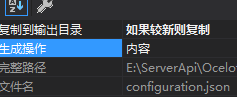
1.appsettings.json 和 configuration.json 均需要设置
2.services.AddOcelot(Configuration).AddConsul();
此处必须增加 服务发现的AddConsul
到此带有consul的网关搭建完成
微服务网关从零搭建——(二)搭建api网关(不带验证)的更多相关文章
- 实测 | 转型微服务,这4大工具谁是API网关性能最优?
转自:http://www.servicemesh.cn/?/article/45 作者:Turgay Çelik 翻译:钟毅(Drew Zhong) 原文:Comparing API Gateway ...
- NET Core微服务之路:基于Ocelot的API网关Relay实现--RPC篇
前言 我们都知道,API网关是工作在应用层上网关程序,为何要这样设计呢,而不是将网关程序直接工作在传输层.或者网络层等等更底层的环境呢?让我们先来简单的了解一下TCP/IP的五层模型. (图片 ...
- Spring Cloud 微服务二:API网关spring cloud zuul
前言:本章将继续上一章Spring Cloud微服务,本章主要内容是API 网关,相关代码将延续上一章,如需了解请参考:Spring Cloud 微服务一:Consul注册中心 Spring clou ...
- .Net Core微服务入门全纪录(五)——Ocelot-API网关(下)
前言 上一篇[.Net Core微服务入门全纪录(四)--Ocelot-API网关(上)]已经完成了Ocelot网关的基本搭建,实现了服务入口的统一.当然,这只是API网关的一个最基本功能,它的进阶功 ...
- JHipster生成微服务架构的应用栈(四)- 网关微服务示例
本系列文章演示如何用JHipster生成一个微服务架构风格的应用栈. 环境需求:安装好JHipster开发环境的CentOS 7.4(参考这里) 应用栈名称:appstack 认证微服务: uaa 业 ...
- 微服务之:从零搭建ocelot网关和consul集群
介绍 微服务中有关键的几项技术,其中网关和服务服务发现,服务注册相辅相成. 首先解释几个本次教程中需要的术语 网关 Gateway(API GW / API 网关),顾名思义,是企业 IT 在系统边界 ...
- SpringCloud微服务实战——搭建企业级开发框架(四十五):【微服务监控告警实现方式二】使用Actuator(Micrometer)+Prometheus+Grafana实现完整的微服务监控
无论是使用SpringBootAdmin还是使用Prometheus+Grafana都离不开SpringBoot提供的核心组件Actuator.提到Actuator,又不得不提Micrometer ...
- docker微服务部署之:三,搭建Zuul微服务项目
docker微服务部署之:二.搭建文章微服务项目 一.新增demo_eureka模块,并编写代码 右键demo_parent->new->Module->Maven,选择Module ...
- docker微服务部署之:一,搭建Eureka微服务项目
先说明一下docker需要搭建的微服务的基本情况: 项目情况:一个demo_parent项目,下面三个子模块:demo_eureka(eureka服务).demo_article(文章服务).demo ...
- 微服务架构:Eureka集群搭建
版权声明:本文为博主原创文章,转载请注明出处,欢迎交流学习! 服务注册.发现是微服务架构的关键原理之一,由于微服务架构是由一系列职责单一的细粒度服务构成的网状结构,服务之间通过轻量机制进行通信,这就必 ...
随机推荐
- xode5.1.1设置IOS欢迎界面的方法
先准备3张不同尺寸的欢迎图.文件名称分别为: Default.png iPhone 320X480分辨率屏幕默认启动图片. Default@2x.png iPhone 640X960分辨率屏幕默认启 ...
- 【Dairy】2016.10.23 观火&中彩记
...................... 就第一条可以! 观火10分钟,长郡附近老房子起火...
- codeforces 963B Destruction of a Tree
B. Destruction of a Tree time limit per test 1 second memory limit per test 256 megabytes input stan ...
- libnids 中哈希表的建立
//hash.c #include <sys/types.h>#include <sys/time.h>#include <stdio.h>#include < ...
- ODP.NET Managed 相关文章收集
一.Oracle 对.net支持的一些基础知识了解介绍. 1.早年的时候,微软自己做的有 System.Data.OracleClient. 现在已经成了过期类了.性能等都不是很好. 2.Orac ...
- SeasLog的日志
https://github.com/Neeke/SeasLog/blob/master/README_zh.md 中文文档地址, 这是一个很好用的记录日志扩展,可以用于项目之中
- c++ swap函数
swap(a,b)也就是把a和b的值互换. 头文件:#include<algorithm>,swap要加using namespace std:
- 模拟 URAL 1149 Sinus Dances
题目传送门 /* 模拟:找到规律分别输出就可以了,简单但是蛮有意思的 */ #include <cstdio> #include <algorithm> #include &l ...
- 2018 ACM 国际大学生程序设计竞赛上海大都会赛重现赛-K-Matrix Multiplication(矩阵乘法)
题目描述 In mathematics, matrix multiplication or matrix product is a binary operation that produces a m ...
- Android 性能优化(10)网络优化( 6)Optimizing General Network Use
Optimizing General Network Use This lesson teaches you to Compress Data Cache Files Locally Optimize ...