
Data Science With R In Visual Studio
R Projects
Similar to Python, when we installed the data science tools we get an “R” section in our templates. If you go there you’ll see something like this:

Only one template to choose from, but that’s ok! That is all we need.
R Interactive
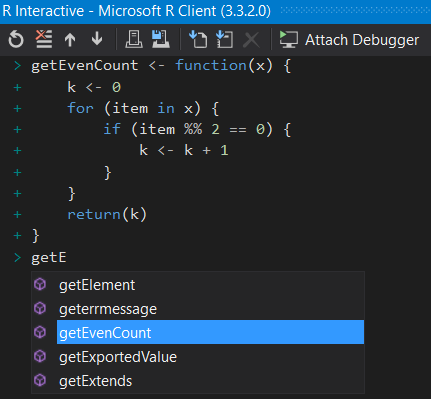
Just like there’s a Python Interactive, there’s also an R Interactive window. It acts very similar to the Python Interactive, as well. Just highlight or put your cursor on the line in a script you want to send to the interactive and hit Ctrl+Enter. Of course, you can just type directly into the interactive to get some quick result or feedback on a piece of code. Oh, and there is syntax highlighting and intellisense right in the interactive!
Running R Code
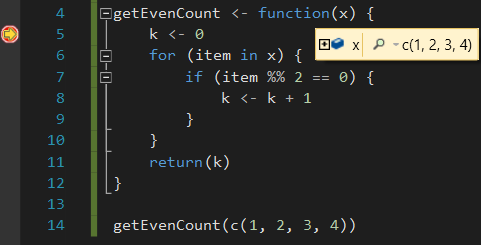
Like all applications in Visual Studio, just hitting the green “Run” button will execute your code. And, just like with Python, you can set a breakpoint in your R code and debug through it.
Visualizations
Having R support in Visual Studio wouldn’t be useful if it didn’t support visualizations. Similar to RStudio, Visual Studio has a tab that’s used to display plots.
Luckily, R comes provided with quite a few sample data sets. To list them all just type in data(). Let’s look at a dataset called JohnsonJohnson, which is quarterly earning of Johnson & Johnson from around 1960 to 1980. Let’s use a scatterplot that also adds a curve.
scatter.smooth(JohnsonJohnson)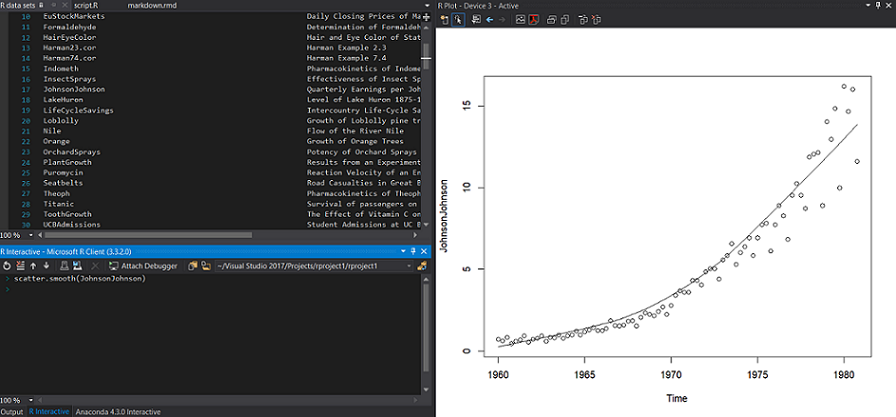
Pretty nice for just a small line of code! You can imagine how much more complicated the visualizations can get just by adding a bit more code.
R Markdown
R has a really nice feature to help distribution code, text, and visualizations with R Markdown. Pretty similar to Python’s Jupyter Notebooks, it also features a way to output to different formats, such as PDF and HTML. Visual Studio also has support for this, though it takes a little bit to set up. Microsoft has a nice documentation page that details all that you need to do. Now you can create R Markdown files in Visual Studio!
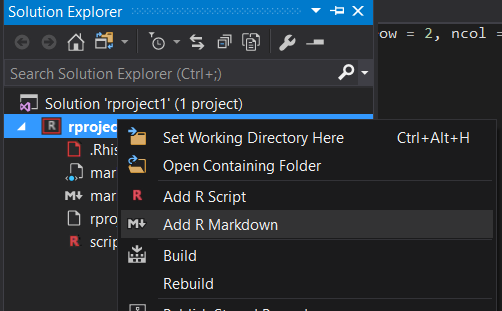
While you can output your R Markdown document in HTML, PDF, and Word, RStudio has a few more ways you can. It allows you to also output as an actual web site or a scientific article. Hopefully, Visual Studio can provide most of the other output types fairly soon.
Shiny Apps
One of the things I have a hard time trying to find are ways to deploy your models. Sure you can have everything local, but what’s good about that if no one else can see or use it? Well, the same team who brought us RStudio also has a very compelling feature for R to share your findings – Shiny. This framework allows you to create web applications to share your findings and, even better, to share your models for anyone to interact with. They also supply hosting for your web applications, so they have all that you need to get your findings and models out to the world.
Unfortunately, Visual Studio doesn’t support Shiny. Although, I really hope they will integrate better support for Azure in order to deploy web services that will call into our models and host web applications that use those web services.
Data Science With R In Visual Studio的更多相关文章
- SQL Server Data Tools – Business Intelligence for Visual Studio 2012安装时提示“The CPU architecture....”的解决方法
SQL Server Data Tools – Business Intelligence for Visual Studio 2012,一个很强大的工具,下载地址:http://www.micros ...
- Microsoft SQL Server Data Tools - Business Intelligence for Visual Studio 2013 http://www.microsoft.com/en-us/download/details.aspx?id=42313
Microsoft SQL Server Data Tools - Business Intelligence for Visual Studio 2013 http://www.microsoft. ...
- Microsoft SQL Server Data Tools - Business Intelligence for Visual Studio 2013 SSIS
VS2012 SSDTBI_VS2012_x86_CHS.exe http://www.microsoft.com/zh-CN/download/details.aspx?id=36843 VS201 ...
- Visual Studio 2015 Update 2
Visual Studio Community 2015(带Update2)(社区版,针对个人免费): 简体中文版 || SHA1:待更新 繁体中文版 || SHA1:待更新 英文版 || SHA1: ...
- visual studio 使用正则查找或替换示例
visual studio 使用正则查找或替换示例 注意哟:使用之前应做好备份 visual studio 2015: 多行替换 (.*)point\ =(.*);\r\n.+this.([A-Za- ...
- visual studio 2012 链接Mysql 5.1
首先在nuGet 下载MySql.Data.Entity 安装 mysql for visual studio http://www.mysql.com/why-mysql/windows/visua ...
- 使用Visual Studio Team Services敏捷规划和项目组合管理(一)——使用团队、区域和迭代
使用Visual Studio Team Services敏捷规划和项目组合管理(一)--使用团队.区域和迭代 概述 在本实验,你将会了解Visual Studio Team Services提供的敏 ...
- Visual Studio Team Services 动手实验
Visual Studio Team Services 动手实验 概述 为Visual Studio Team Services提供的动手实验,要完成实验首先需要满足以下条件: Visual Stud ...
- R8:Learning paths for Data Science[continuous updating…]
Comprehensive learning path – Data Science in Python Journey from a Python noob to a Kaggler on Pyth ...
随机推荐
- 【Codeforces 339】Xenia and Bit Operations
Codeforces 339 D 题意:给定\(2^n\)个数字,现在把它们进行如下操作: 相邻的两个数取\(or\) 相邻的两个数取\(xor\) 以此类推,直到剩下一个数. 问每次修改一个数字, ...
- markdown的使用语法的补充
markdown的使用语法的补充 markdown的语法在网络上有很多,例如简书的教程这个是参考简书上的教程 但是有几个语法需要记住. 添加图片,如果要添加图片,他的语法格式是首先一个感叹号!然后[] ...
- 一款优秀的前端框架——AngularJS
前 言 AngularJS是一款为了克服HTML在构建应用上的不足而设计的优秀的前端JS框架.AngularJS有着诸多特性,最为核心的是:MVC.模块化.自动化双向数据绑定.语义化标签.依赖注 ...
- CSS Modules入门教程
为什么引入CSS Modules 或者可以这么说,CSS Modules为我们解决了什么痛点.针对以往我写网页样式的经验,具体来说可以归纳为以下几点: 全局样式冲突 过程是这样的:你现在有两个模块,分 ...
- 【IE11请求中止】 XMLHttpRequest: 网络错误 0x2ef3的意外出现
BUG现象 今天排查BUG遇到一个有趣的BUG,测试的截图显示 这个BUG只在IE11下出现. BUG原因 这个问题的原因是keep-alive机制引起. 当浏览器在向一个网址发起请求时,会建立一个t ...
- Linux iostat 命令
iostat 命令是 I/O statistics(输入/输出统计)的缩写,用来报告系统的 CPU 统计信息和块设备及其分区的 IO 统计信息.iostat 是 sysstat 工具集的一个工具,在 ...
- 使用insert ignore来避免向数据库重复插入数据
mysql中 insert ignore 的使用示例如下: INSERT IGNORE INTO `table_name` (`reportid`, `content`) VALUES (‘11111 ...
- Sql Server中的nvarchar(n)、varchar(n) 和Mysql中的char(n)、varchar(n)
刚才有幸看了下 nvarchar(n)和varchar(n),感觉以前的认知有误. nvarchar(n):n指的是字符个数,范围是1-4000,存储的是可变长度的Unicode字符数据. 按字符存储 ...
- java 接口实现防盗门功能
Door: package locker; public abstract class Door { public abstract void open(); public abstract void ...
- poj3984 广度搜索BFS
迷宫问题 Description 定义一个二维数组: int maze[5][5] = { 0, 1, 0, 0, 0, 0, 1, 0, 1, 0, 0, 0, 0, 0, 0, 0, 1, 1 ...