
webservice学习01:wsdl文档结构
webservice学习01:wsdl文档结构
wsdl文档结构
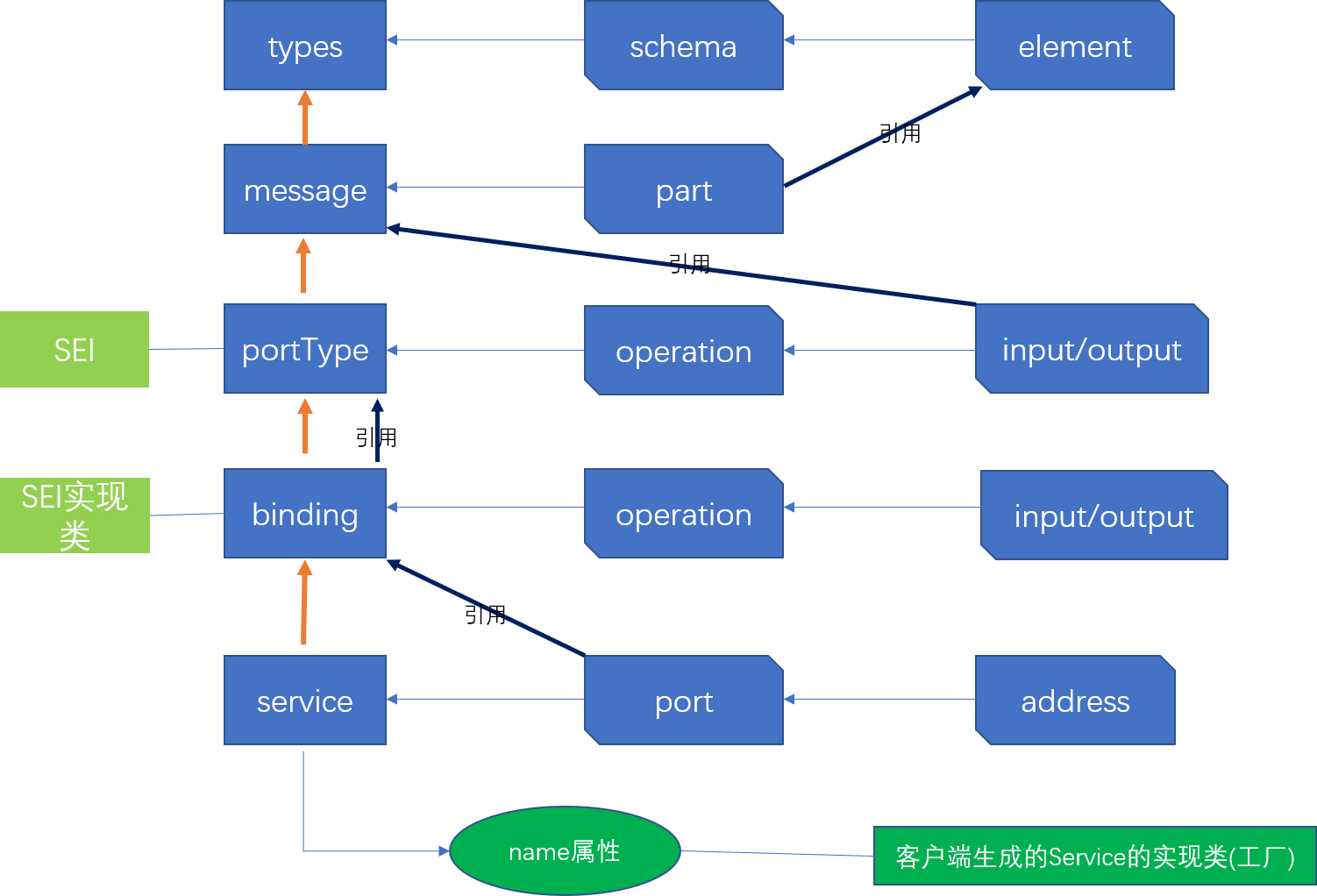
WSDL文档示例
<wsdl:definitions xmlns:xsd="http://www.w3.org/2001/XMLSchema" xmlns:wsdl="http://schemas.xmlsoap.org/wsdl/" xmlns:tns="http://impl.ws.newyork.zjport.gov.cn/" xmlns:soap="http://schemas.xmlsoap.org/wsdl/soap/" xmlns:ns2="http://schemas.xmlsoap.org/soap/http" xmlns:ns1="http://ws.newyork.zjport.gov.cn/" name="ReceiveEncryptDeclareServiceImplService" targetNamespace="http://impl.ws.newyork.zjport.gov.cn/">

    <wsdl:types>

        <xs:schema xmlns:xs="http://www.w3.org/2001/XMLSchema" xmlns:tns="http://ws.newyork.zjport.gov.cn/" elementFormDefault="unqualified" targetNamespace="http://ws.newyork.zjport.gov.cn/" version="1.0">

            <xs:element name="receive" type="tns:receive"/>

            <xs:element name="receiveResponse" type="tns:receiveResponse"/>

            <xs:complexType name="receive">

                <xs:sequence>

                    <xs:element minOccurs="0" name="content" type="xs:string"/>

                    <xs:element minOccurs="0" name="msgType" type="xs:string"/>

                    <xs:element minOccurs="0" name="dataDigest" type="xs:string"/>

                    <xs:element minOccurs="0" name="sendCode" type="xs:string"/>

                </xs:sequence>

            </xs:complexType>

            <xs:complexType name="receiveResponse">

                <xs:sequence>

                    <xs:element minOccurs="0" name="return" type="xs:string"/>

                </xs:sequence>

            </xs:complexType>

        </xs:schema>

    </wsdl:types>

    <wsdl:message name="receiveResponse">

        <wsdl:part element="ns1:receiveResponse" name="parameters"> </wsdl:part>

    </wsdl:message>

    <wsdl:message name="receive">

        <wsdl:part element="ns1:receive" name="parameters"> </wsdl:part>

    </wsdl:message>

    <wsdl:portType name="ReceiveEncryptDeclareService">

        <wsdl:operation name="receive">

            <wsdl:input message="ns1:receive" name="receive"> </wsdl:input>

            <wsdl:output message="ns1:receiveResponse" name="receiveResponse"> </wsdl:output>

        </wsdl:operation>

    </wsdl:portType>

    <wsdl:binding name="ReceiveEncryptDeclareServiceImplServiceSoapBinding" type="ns1:ReceiveEncryptDeclareService">

        <soap:binding style="document" transport="http://schemas.xmlsoap.org/soap/http"/>

        <wsdl:operation name="receive">

            <soap:operation soapAction="" style="document"/>

            <wsdl:input name="receive">

                <soap:body use="literal"/>

            </wsdl:input>

            <wsdl:output name="receiveResponse">

                <soap:body use="literal"/>

            </wsdl:output>

        </wsdl:operation>

    </wsdl:binding>

    <wsdl:service name="ReceiveEncryptDeclareServiceImplService">

        <wsdl:port binding="tns:ReceiveEncryptDeclareServiceImplServiceSoapBinding" name="ReceiveEncryptDeclareServiceImplPort">

            <soap:address location="http://122.224.230.4:18003/newyorkWS/ws/ReceiveEncryptDeclare"/>

        </wsdl:port>

    </wsdl:service>

</wsdl:definitions>
webservice学习01:wsdl文档结构的更多相关文章
- HTML5经典案例学习-----新元素添加文档结构
直接上代码了,大家如果发现问题了,记得提醒我哦,谢谢啦,嘻嘻 <!DOCTYPE html> <!-- 不区分大小写 --> <html lang="en&qu ...
- 【WebService】WebService之WSDL文档深入分析(三)
WSDL概念 WSDL(网络服务描述语言,Web Services Description Language)是一门基于 XML 的语言,用于描述 Web Services 以及如何对它们进行访问. ...
- WSDL 文档解析
学习webservice,就离不了WSDL文档,他是我们开发WebService的基础,虽说,现在现在有许多WebService的开源框架使得我们可以根据WSDL生成客户端代码,但是,了解WSDL文档 ...
- 4. svg学习笔记-文档结构元素和样式的使用
svg除了绘图元素之外还有一部分是专门用于文档结构的,这类元素有<g>,<use>,<defs>,<symbol>等 <g>元素 如果我们仅 ...
- 10LaTeX学习系列之---Latex的文档结构
目录 目录 前言 (一)对于Ctex宏包中的文档结构 1.说明 2.源代码 3.输出效果 4.技巧 (二)对于ctexart的文档结构 1.说明 2.源代码 3.输出效果 (三)对于ctexbook的 ...
- MongoDB学习笔记(四) 用MongoDB的文档结构描述数据关系
MongoDB的集合(collection)可以看做关系型数据库的表,文档对象(document)可以看做关系型数据库的一条记录.但两者并不完全对等.表的结构是固定的,MongoDB集合并没有这个约束 ...
- WSDL文档深入分析
借助jdk的wsimort.exe工具生成客户端代码 格式:wsimport -keep url //url为wsdl文件的路径 直接生成客户端代码会抛异常, 无法生成客户端代码, 解决办法: 将 ...
- (二)发布第一个WebService服务与DSWL文档解析
1. 编写接口 package service; import javax.jws.WebService; /** * 第一个webservice服务, * @WebService注解表示这是一个we ...
- HTML5的文档结构和新增标签
一.HTML5 文档结构1.第一步:打开 开发工具,打开指定文件夹:2.第二步:保存 index.html 文件到磁盘中,.html 是网页后缀:3.第三步:开始编写 HTML5 的基本格式.< ...
随机推荐
- idea properties文件中文无法正常显示
引用:https://blog.csdn.net/u010999809/article/details/81204457 问题:在idea打开配置文件,已经设置了全局编码格式为UTF-8,和项目编码格 ...
- ocr_vote disk损坏恢复
1. 检查votedisk和 ocr备份[root@rh6rac1 bin]./ocrconfig -showbackuprh6rac1 2019/03/19 16:57:40 /or ...
- SnapKit配置过程记录
第一步,从https://github.com/SnapKit/SnapKit下载源码的ZIP包,解压出来是这个样子的: 第二步,新建一个iOS工程(Swift版本的),并将SnapKit-devel ...
- linux centos7下mysql安装--韩国庆
首先我先给大家介绍下MariaDB和mysql的区别. 上图,“MySQL之父”的骨灰级程序员Monty,但是mysql被Oracle收购后,Monty又开始去发展另一条数据库的道路,并且以Monty ...
- Pandas学习笔记(三)
(1)系列对象( Series)基本功能 编号 属性或方法 描述 1 axes 返回行轴标签列表. 2 dtype 返回对象的数据类型(dtype). 3 empty 如果系列为空,则返回True. ...
- 使用shell进行etl数据验证
方法如下: 整理校验的类型,不同的类型配置文件不一样. 1:校验数据增量:需要设置表名,增量字段. 2:非法值校验:设置表名,条件,校验字段,合法值/非法值范围. 3:自定义校验:设置表名,校验名称, ...
- my first note
please do not laugh It is very glad to be here, I will study hard.
- Python全栈开发记录_第五篇(装饰器)
单独记录装饰器这个知识点是因为这个知识点是非常重要的,必须掌握的(代码大约150行). 了解装饰器之前要知道三个知识点 作用域,上一篇讲到过顺序是L->E->G->B 高阶函数: 满 ...
- 把JavaScript对象转化成JSON对象
js => jsonvar jsonVar = {key: value}var jsonString = JSON.stringify(jsonVar) //将JS对象转换为JSON字符串va ...
- Web漏洞扫描工具(批量脱壳、反序列化、CMS)
一.什么是Web漏洞扫描工具 即是指“扫描Web应用以查找安全漏洞(如跨站脚本,SQL注入,命令执行,目录遍历和不安全服务器配置)的自动化工具”,其中许多可能是由不安全或不正确的编码和设计.另一方面, ...