
Jmeter Distributed (Remote) Testing: Master Slave Configuration
What is Distributed Testing?
DistributedTestingis a kind of testing which use multiple systems to perform Stress Testing. Distributed testing is applied for testing websites and server applications when they are working with multiple clients simultaneously.
Distributes testing uses client-server model as the figure below:

- Master: the system running JMeter GUI, control each slave.
- Slave: the system running JMeter-server, receive a command from the master and send a request to a server under test.
- Target: the web server under test, get a request from slaves.
Remote Test Example
Precondition:
- The firewalls on the systems are turned off. In some cases, the firewall may still be blocking the traffic. You should disable the Window firewall orLinuxfirewall.
- All the machines should be on the same subnet. If machines are not on the same subnet, maybe they will not recognize each other in the network.
- Use the same version of JMeter to avoid unanticipated errors/issues.
Here is the roadmap for this testing:
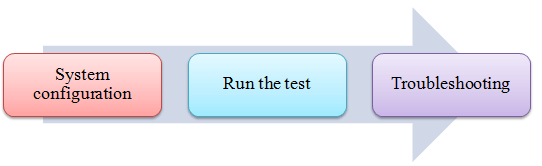
Step 1) System configuration
Setup slave systems, go to jmeter/bin directory and execute file "jmeter-server.bat".
Assume that a slave machine has IP address: 192.168.0.10. On windows, you should see a window appear like the following figure:
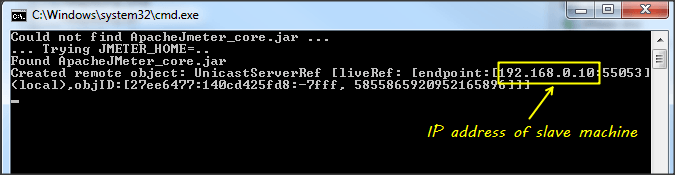
On the master systems, go to /bin directory and edit file jmeter.properites, add IP slave machine as below

Step 2) Run the test
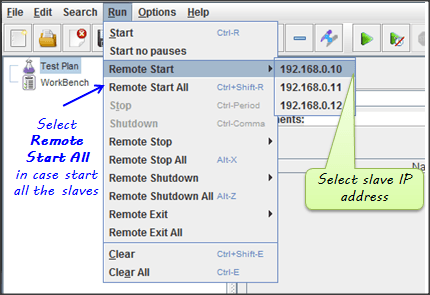
At this point, you are ready to start load testing. On the master machine, run JMeter GUI and open the test plan.
Click Run on the menu bar; select Remote start -> select the IP address of slave machine
Step 3) Troubleshooting
If you are unable to run test form the above machine and see below error, simply ask an owner of a slave machine to run the JMeter-server.bat File.

Disable Firewall on both master and slave machines to fix this error.
Limitation:
There are some basic limitations for distributed testing. Here's list of the known items:
- Server and all clients must be on the same subnet.
- Distributed testing required target server to have the large processing power. The target Server could be easily overloaded in case it gets too many requests by distributed JMeter tests.
- A single JMeter can only handle a limited number of threads (100- 300 threads).
- The distributed JMeter tests are complex, difficult for a beginner to build.
Jmeter Distributed (Remote) Testing: Master Slave Configuration的更多相关文章
- Redis Master/Slave 实践
本次我们将模拟 Master(1) + Slave(4) 的场景,并通过ASP.NET WEB API进行数据的提交及查询,监控 Redis Master/Slave 数据分发情况,只大致概述,不会按 ...
- 17.1.1.2 Setting the Replication Slave Configuration
17.1.1.2 Setting the Replication Slave Configuration 在一个复制slave, 你必须创建一个唯一的server ID,如果这个没有做,slave设置 ...
- git push origin master 报错 remote rejected] master -> master (branch is currently checked out)
解决办法: 977down vote You can simply convert your remote repository to bare repository (there is no wor ...
- 【摘录】JDBC Master Slave(JDBC方式的JMS集群)
JDBC Master Slave First supported in ActiveMQ version 4.1 If you are using pure JDBC and not using t ...
- redis之master.slave主从复制
简介 主机数据更新后根据配置和策略,自动同步到备机的master/slave机制,master以写为主,slave以读为主 从库配置 配置从库,不配主库 配置从库: 格式: slaveof 主库ip ...
- show master/slave status求根溯源
show master/slave status分别是查看主数据库以及副数据库的状态,是一种能查看主从复制运行情况的方式. 这里仅仅讨论linux下的nysql5.7.13版本的执行情况 一.show ...
- Windows下搭建MySQL Master Slave
一.背景 服务器上放了很多MySQL数据库,为了安全,现在需要做Master/Slave方案,因为操作系统是Window的,所以没有办法使用keepalived这个HA工具,但是我们可以接受人工进行切 ...
- MongoDB学习笔记——Master/Slave主从复制
Master/Slave主从复制 主从复制MongoDB中比较常用的一种方式,如果要实现主从复制至少应该有两个MongoDB实例,一个作为主节点负责客户端请求,另一个作为从节点负责从主节点映射数据,提 ...
- redis 学习笔记(3)-master/slave(主/从模式)
类似mysql的master-slave模式一样,redis的master-slave可以提升系统的可用性,master节点写入cache后,会自动同步到slave上. 环境: master node ...
随机推荐
- Linux安装/升级pip
Linux安装/升级pip 1.执行脚本 # wget https://bootstrap.pypa.io/get-pip.py # 如果没有 wget,先安装 wget # yum -y insta ...
- c# datatable按主键合并相同主键返回新的datatable
一.概述: 在python转c#时,python中pandas.merge可以按主键合并两个datatable,苦苦找了很久,希望c#也有同样的函数,未果,就自己写了一个,目前测试没问题,同样我也考虑 ...
- TensorFlow实现回归
数据:fetch_california_housing(加利福尼亚的房价数据) 1.解析解法 import tensorflow as tf import numpy as np from sklea ...
- Python学习【02】Python基础
一.Python内部执行过程 1.Python的后缀名可以是任意? print("hello,world") 保存成 .py / .txt / .sb / .aaa 都可以用在 ...
- WordPress版微信小程序3.2版发布
WordPress版微信小程序(下称开源版)距离上次更新已经过去大半年了,在此期间,我开发新的专业版本-微慕小程序(下称微慕版),同时开源版的用户越来越多,截止到2018年11月26日,在github ...
- Linux SVN 操作详解(转)
1.将文件checkout到本地目录 svn checkout path(path是服务器上的目录) 例如:svn checkout svn://192.168.1.1/pro/domain ...
- SOD框架的Model、连接数据库及增删改查
using PWMIS.DataMap.Entity; using System; using System.Collections.Generic; using System.Linq; using ...
- omniPlan密匙
密钥所有者都是youliyuan.OmniPlan 3:HOMJ-QOJH-OIBN-TNIH-HWUN-TEEH-WUNNKWO-HVKB-JAZE-UIHH-XAVY-BEEX-AVYBCRW-M ...
- macbook查找卸载pkg
pkg是macOS下的一种比较复杂的安装方式,装完了想要卸载有点不太好找,MAC下有个命令工具pkgutil,运行命令pkgutil --pkgs可以找到你的所有pkg,如图: 当然,也可以用grep ...
- nginx配置location总结及rewrite规则写法(转)
一个示例: location = / { # 精确匹配 / ,主机名后面不能带任何字符串 [ configuration A ] } location / { # 因为所有的地址都以 / 开头,所以这 ...