
Springboot+websocket+定时器实现消息推送
由于最近有个需求,产品即将到期(不同时间段到期)时给后台用户按角色推送,功能完成之后在此做个小结
1. 在启动类中添加注解@EnableScheduling
package com.hsfw.backyard.websocket333;

/**

 * @Description

 * @Author: liucq

 * @Date: 2019/1/25

 */

import org.mybatis.spring.annotation.MapperScan;

import org.springframework.boot.SpringApplication;

import org.springframework.boot.autoconfigure.SpringBootApplication;

import org.springframework.boot.builder.SpringApplicationBuilder;

import org.springframework.boot.web.support.SpringBootServletInitializer;

import org.springframework.scheduling.annotation.EnableScheduling;

@SpringBootApplication

@MapperScan("com.siwei.insurance.*.dao")

/**

 *  //该注解是开启定时任务的支持

 */

@EnableScheduling

public class lifeInsuranceApplication extends SpringBootServletInitializer {

    @Override

    protected SpringApplicationBuilder configure(SpringApplicationBuilder builder) {

        return builder.sources(lifeInsuranceApplication.class);

    }

    public static void main(String[] args) {

        SpringApplication.run(lifeInsuranceApplication.class, args);

    }

}
2. 写定时器
package com.hsfw.backyard.websocket333;

/**

 * @Description

 * @Author: liucq

 * @Date: 2019/1/25

 */

import com.siwei.insurance.permission.dao.RolePermissionDao;

import com.siwei.insurance.productManage.dao.ExpirePushMsgMapper;

import com.siwei.insurance.productManage.service.ProductService;

import org.springframework.beans.factory.annotation.Autowired;

import org.springframework.scheduling.annotation.Scheduled;

import java.util.ArrayList;

import java.util.List;

@Componentpublic

class ProductExpireTask {

    @Autowired

    private RolePermissionDao rolePermissionDao;

    @Autowired

    private ProductService productService;

    @Autowired

    private ExpirePushMsgMapper expirePushMsgMapper;

    /**

     * 每天早上0点执行

     */

    @Scheduled(cron = "0 0 0 1/1 * ?")

    public void productExpire() {

        //距离到期还有一个月提醒

        String oneMonthExpireDate = DateUtil.addOneMonth();

        dealExpireProduct(oneMonthExpireDate);

        //距离到期还有一天提醒

        String oneDayExpireDate = DateUtil.addOneDay();

        dealExpireProduct(oneDayExpireDate);

        //距离到期还有一周提醒

        String oneWeekExpireDate = DateUtil.addFewDays(7);

        dealExpireProduct(oneWeekExpireDate);

    }

    private void dealExpireProduct(String expireDate) {

        List<Map<String, Object>> expireProductMapList = productService.findExpireProducts(expireDate);

        if (expireProductMapList != null && !expireProductMapList.isEmpty()) {

            // 根据路径查询需要推送的角色

            List<String> needPushRoleIds = rolePermissionDao.findNeedPushRoleIdByUrl(TotalConstant.PRODUCT_PUSH_URL);

            List<ExpirePushMsg> expirePushMsgs = new ArrayList<>();

            for (Map<String, Object> expireProductMap : expireProductMapList) {

                ExpirePushMsg expirePushMsg = new ExpirePushMsg();

                expirePushMsg.setNeedPushEntityId((int) expireProductMap.get("id"));

                expirePushMsg.setNeedPushEntityNo((String) expireProductMap.get("insuranceNo"));

                String productName = (String) expireProductMap.get("insuranceName");

                expirePushMsg.setNeedPushEntityName(productName);

                //设置此推送消息的到期时间

                expirePushMsg.setExpireDate(DateUtil.stringToDate(DateUtil.addOneDay()));

                expirePushMsg.setPushType(2);

                StringBuffer needPushRoleIdString = new StringBuffer();

                needPushRoleIds.forEach(e -> needPushRoleIdString.append(e + ";"));

                expirePushMsg.setPushRoleId(needPushRoleIdString.toString().trim());

                String productExpireDateString = DateUtil.dateToShotString((Date) expireProductMap.get("expiryDate"));

                expirePushMsg.setPushMsg("您的产品:" + productName + ",将于" + productExpireDateString + "即将过期,请及时处理!");

                expirePushMsgs.add(expirePushMsg);

            }

            expirePushMsgMapper.insertAll(expirePushMsgs);

        }

    }

    @Scheduled(cron = "0 0 0 1/1 * ?")

    public void pushMsgExpire() {

        String oneDayExpireDate = DateUtil.getZeroTime(DateUtil.addOneDay());

        //推送消息只存在一天,根据到期时间将数据删除

        expirePushMsgMapper.deleteByExpireDate(oneDayExpireDate);

    }

}
DateUtil工具类
package com.hsfw.backyard.websocket333;

/**

 * @Description

 * @Author: liucq

 * @Date: 2019/1/25

 */

import org.apache.commons.lang3.StringUtils;

import java.text.ParsePosition;

import java.text.SimpleDateFormat;

import java.util.Calendar;

import java.util.Date;

/**

 * @Description 时间处理工具类  * @author linxiunan * @date 2018年9月3日

 */

public class DateUtil {

    private static final SimpleDateFormat dayOfDateFormat = new SimpleDateFormat("yyyy-MM-dd");

    private static final SimpleDateFormat secondOfDateFormat = new SimpleDateFormat("yyyy-MM-dd HH:mm:ss");

    /**

     * @return 当天时间加一天,返回"yyyy-MM-dd"格式

     */

    public static String addOneDay() {

        Calendar calendar = Calendar.getInstance();

        calendar.add(Calendar.DAY_OF_MONTH, 1);

        return dayOfDateFormat.format(calendar.getTime());

    }

    /**

     * @return 当天时间加一月,返回"yyyy-MM-dd"格式

     */

    public static String addOneMonth() {

        Calendar calendar = Calendar.getInstance();

        calendar.add(Calendar.MONTH, 1);

        return dayOfDateFormat.format(calendar.getTime());

    }

    /**

     * @param dayNumber 加的天数     * @return 返回当天时间添加几天之后的时间,返回"yyyy-MM-dd"格式

     */

    public static String addFewDays(int dayNumber) {

        Calendar calendar = Calendar.getInstance();

        calendar.add(Calendar.DAY_OF_MONTH, dayNumber);

        return dayOfDateFormat.format(calendar.getTime());

    }

    /**

     * @param dateString 需要转换成时间格式的日期字符串     * @return 返回字符串转换成的时间

     */

    public static Date stringToDate(String dateString) {

        ParsePosition parsePosition = new ParsePosition(0);

        if (dateString.contains(" ")) {

            return secondOfDateFormat.parse(dateString, parsePosition);

        } else {

            return dayOfDateFormat.parse(dateString, parsePosition);

        }

    }

    /**

     * @param date 需要转换成字符串格式的日期     * @return 返回"yyyy-MM-dd"格式的转换后的字符串

     */

    public static String dateToShotString(Date date) {

        return dayOfDateFormat.format(date);

    }

    /**

     * @param date 需要转换成字符串格式的日期     * @return 返回"yyyy-MM-dd HH:mm:ss"格式的转换后的字符串

     */

    public static String dateToLongString(Date date) {

        return secondOfDateFormat.format(date);

    }

    /**

     * @param dateString 需要获取0点的时间字符串,如果获取当天0点,传null即可     * @return 返回"yyyy-MM-dd HH:mm:ss"格式的某天0点字符串

     */

    public static String getZeroTime(String dateString) {

        if (StringUtils.isBlank(dateString)) {

            Calendar calendar = Calendar.getInstance();

            calendar.set(Calendar.HOUR_OF_DAY, 0);

            calendar.set(Calendar.MINUTE, 0);

            calendar.set(Calendar.SECOND, 0);

            return secondOfDateFormat.format(calendar.getTime());

        } else {

            Date date = stringToDate(dateString);

            return dateToLongString(date);

        }

    }

}
3. 引入websocket所需jar包
<dependency>

    <groupId>org.springframework.boot</groupId>

    <artifactId>spring-boot-starter-websocket</artifactId>

</dependency>
4. 配置websocket
编写MyEndpointConfigure类
package com.hsfw.backyard.websocket333;

/**

 * @Description

 * @Author: liucq

 * @Date: 2019/1/25

 */

import org.springframework.beans.BeansException;

import org.springframework.beans.factory.BeanFactory;

import org.springframework.context.ApplicationContext;

import org.springframework.context.ApplicationContextAware;

import javax.websocket.server.ServerEndpointConfig;

public class MyEndpointConfigure extends ServerEndpointConfig.Configurator implements ApplicationContextAware {

    private static volatile BeanFactory context;

    @Override

    public <T> T getEndpointInstance(Class<T> clazz) throws InstantiationException {

        return context.getBean(clazz);

    }

    @Override

    public void setApplicationContext(ApplicationContext applicationContext) throws BeansException {

        MyEndpointConfigure.context = applicationContext;

    }

}
websocket配置类
package com.hsfw.backyard.websocket333;

/**

 * @Description

 * @Author: liucq

 * @Date: 2019/1/25

 */

import org.springframework.context.annotation.Bean;

import org.springframework.context.annotation.Configuration;

import org.springframework.web.socket.server.standard.ServerEndpointExporter;

@Configuration

public class WebSocketConfig {

    @Bean

    public ServerEndpointExporter serverEndpointExporter() {

        return new ServerEndpointExporter();

    }

    @Bean

    public MyEndpointConfigure newConfigure() {

        return new MyEndpointConfigure();

    }

}
这里需要重点说明一下,在websocket配置类中,第一个配置是因为使用springboot内置容器,自己开发时需要配置,如果有独立的容器需要将其注释掉,也就意味着,如果将项目打成WAR包,部署到服务器,使用Tomcat启动时,需要注释掉ServerEndpointExporter配置;MyEndpointConfigure配置是因为我的需求需要,需要在websocket类中注入service层或者dao层的接口,MyEndpointConfigure配置就是为了解决websocket无法注入的问题,如果没有需要可以不用配置
---------------------
5. websocket类
package com.hsfw.backyard.websocket333;

/**

 * @Description

 * @Author: liucq

 * @Date: 2019/1/25

 */

import org.apache.commons.lang.StringUtils;

import org.slf4j.Logger;

import org.slf4j.LoggerFactory;

import org.springframework.beans.factory.annotation.Autowired;

import org.springframework.stereotype.Component;

import javax.websocket.OnClose;

import javax.websocket.OnError;

import javax.websocket.OnMessage;

import javax.websocket.OnOpen;

import javax.websocket.server.PathParam;

import javax.websocket.server.ServerEndpoint;

import java.io.IOException;

import java.util.ArrayList;

import java.util.List;

import java.util.concurrent.CopyOnWriteArraySet;

@Component

@ServerEndpoint(value = "/productWebSocket/{userId}", configurator = MyEndpointConfigure.class)

public class ProductWebSocket {

    // 静态变量,用来记录当前在线连接数。应该把它设计成线程安全的。

    private static int onlineCount = 0;

    // concurrent包的线程安全Set,用来存放每个客户端对应的ProductWebSocket对象。

    private static CopyOnWriteArraySet<ProductWebSocket> webSocketSet = new CopyOnWriteArraySet<ProductWebSocket>();

    // 与某个客户端的连接会话,需要通过它来给客户端发送数据    private Session session;

    @Autowired

    private UserRoleDao userRoleDao;

    @Autowired

    private ExpirePushMsgMapper expirePushMsgMapper;

    private Logger log = LoggerFactory.getLogger(ProductWebSocket.class);

    /**

     * 连接建立成功调用的方法

     */

    @OnOpen

    public void onOpen(@PathParam("userId") String userId, Session session) {

        log.info("新客户端连入,用户id:" + userId);

        this.session = session;

        webSocketSet.add(this); // 加入set中

        addOnlineCount(); // 在线数加1

        // 相关业务处理,根据拿到的用户ID判断其为那种角色,根据角色ID去查询是否有需要推送给该角色的消息,有则推送

        if (StringUtils.isNotBlank(userId)) {

            List<String> roleIds = userRoleDao.findRoleIdByUserId(userId);

            List<String> totalPushMsgs = new ArrayList<String>();

            for (String roleId : roleIds) {

                List<String> pushMsgs = expirePushMsgMapper.findPushMsgByRoleId(roleId);

                if (pushMsgs != null && !pushMsgs.isEmpty()) {

                    totalPushMsgs.addAll(pushMsgs);

                }

            }

            if (totalPushMsgs != null && !totalPushMsgs.isEmpty()) {

                totalPushMsgs.forEach(e -> sendMessage(e));

            }

        }

    }

    /**

     * 连接关闭调用的方法

     */

    @OnClose

    public void onClose() {

        log.info("一个客户端关闭连接");

        webSocketSet.remove(this); // 从set中删除

        subOnlineCount(); // 在线数减1

    }

    /**

     * 收到客户端消息后调用的方法

     * * @param message     客户端发送过来的消息

     */

    @OnMessage

    public void onMessage(String message, Session session) {

    }

    /**

     * 发生错误时调用

     */

    @OnError

    public void onError(Session session, Throwable error) {

        log.error("websocket出现错误");

        error.printStackTrace();

    }

    public void sendMessage(String message) {

        try {

            this.session.getBasicRemote().sendText(message);

            log.info("推送消息成功,消息为:" + message);

        } catch (IOException e) {

            e.printStackTrace();

        }

    }

    /**

     * 群发自定义消息

     */

    public static void sendInfo(String message) throws IOException {

        for (ProductWebSocket productWebSocket : webSocketSet) {

            productWebSocket.sendMessage(message);

        }

    }

    public static synchronized int getOnlineCount() {

        return onlineCount;

    }

    public static synchronized void addOnlineCount() {

        ProductWebSocket.onlineCount++;

    }

    public static synchronized void subOnlineCount() {

        ProductWebSocket.onlineCount--;

    }

}
这样后台的功能基本上就算是写完了,前端配合测试一下
6. 前端测试
写一个页面,代码如下
<!DOCTYPE HTML>

<html>

<head>

    <title>My WebSocket</title>

</head>

<body>

Welcome<br/>

<input id="text" type="text" /><button onclick="send()">Send</button>    <button onclick="closeWebSocket()">Close</button>

<div id="message">

</div>

</body>

<script type="text/javascript">

    var websocket = null;

    //判断当前浏览器是否支持WebSocket

    if('WebSocket' in window){

        websocket = new WebSocket("ws://localhost:8080/productWebSocket/001");

    }

    else{

        alert('Not support websocket')

    }

    //连接发生错误的回调方法

    websocket.onerror = function(){

        setMessageInnerHTML("error");

    };

    //连接成功建立的回调方法

    websocket.onopen = function(event){

        setMessageInnerHTML("open");

    }

    //接收到消息的回调方法

    websocket.onmessage = function(event){

        setMessageInnerHTML(event.data);

    }

    //连接关闭的回调方法

    websocket.onclose = function(){

        setMessageInnerHTML("close");

    }

    //监听窗口关闭事件,当窗口关闭时,主动去关闭websocket连接,防止连接还没断开就关闭窗口,server端会抛异常。

    window.onbeforeunload = function(){

        websocket.close();

    }

    //将消息显示在网页上

    function setMessageInnerHTML(innerHTML){

        document.getElementById('message').innerHTML += innerHTML + '<br/>';

    }

    //关闭连接

    function closeWebSocket(){

        websocket.close();

    }

    //发送消息

    function send(){

        var message = document.getElementById('text').value;

        websocket.send(message);

    }

</script>

</html>
项目启动之后,打开页面
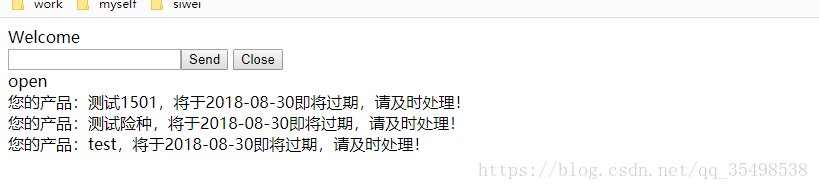
open下方就是我添加的消息,可以看出已经成功推送,到此该功能就算完成结束了
参考地址:https://www.cnblogs.com/bianzy/p/5822426.html
Springboot+websocket+定时器实现消息推送的更多相关文章
- springboot+websocket+sockjs进行消息推送【基于STOMP协议】
springboot+websocket+sockjs进行消息推送[基于STOMP协议] WebSocket是在HTML5基础上单个TCP连接上进行全双工通讯的协议,只要浏览器和服务器进行一次握手,就 ...
- springboot整合websocket实现一对一消息推送和广播消息推送
maven依赖 <dependency> <groupId>org.springframework.boot</groupId> <artifactId> ...
- 拾人牙慧篇之——基于HTML5中websocket来实现消息推送功能
一.写在前面 要求做一个,后台发布信息,前台能即时得到通知的消息推送功能.网上搜了也有很多方式,ajax的定时询问,Comet方式,Server-Sent方式,以及websocket.表示除了定时询问 ...
- 简易集成websocket技术实现消息推送
Websocket 简介 首先介绍下WebSocket,它是一种网络通信技术,该技术最大的特点就是,服务器端可以主动往客户端发送消息:当然,客户端也可以主动往服务器发送消息,实现两端的消息通信,属于网 ...
- python websocket Django 实时消息推送
概述: WebSocket 是什么? WebSocket 是 HTML5 提供的一种浏览器与服务器间进行全双工通讯的协议.依靠这种协议可以实现客户端和服务器端 ,一次握手,双向实时通信. WebSoc ...
- WebSocket与消息推送
B/S结构的软件项目中有时客户端需要实时的获得服务器消息,但默认HTTP协议只支持请求响应模式,这样做可以简化Web服务器,减少服务器的负担,加快响应速度,因为服务器不需要与客户端长时间建立一个通信链 ...
- HTML5 学习总结(五)——WebSocket与消息推送
B/S结构的软件项目中有时客户端需要实时的获得服务器消息,但默认HTTP协议只支持请求响应模式,这样做可以简化Web服务器,减少服务器的负担,加快响应速度,因为服务器不需要与客户端长时间建立一个通信链 ...
- HTML5 学习笔记(五)——WebSocket与消息推送
B/S结构的软件项目中有时客户端需要实时的获得服务器消息,但默认HTTP协议只支持请求响应模式,这样做可以简化Web服务器,减少服务器的负担,加快响应速度,因为服务器不需要与客户端长时间建立一个通信链 ...
- 使用websocket进行消息推送服务
Websocket主要做消息推送,简单,轻巧,比comet好用 入门了解:https://www.cnblogs.com/xdp-gacl/p/5193279.html /** * A Web Soc ...
随机推荐
- 007grafana监控时间戳转换
一. https://d.jyall.me/dashboard-solo/db/soloview?panelId=1&var-metrics=stats.gauges.zookeeper.mo ...
- Qt 出现“undefined reference to `vtable for”
在QT中定义了一个线程类,继承自QThread, 在类中未加 Q_OBJECT 时编译正常,加入后报错如下: undefined reference to `vtable for myThread' ...
- backtrace和backtrace_symbols
一般察看函数运行时堆栈的方法是使用GDB(bt命令)之类的外部调试器,但是,有些时候为了分析程序的BUG,(主要针对长时间运行程序的分析),在程序出错时打印出函数的调用堆栈是非常有用的. 在glibc ...
- Light OJ 1078
题意: 给你 N,K 输出 KKKK.....KK能整除 N, 输出 K 的个数, (最小) 基础数学, 取摸运算即可. #include<bits/stdc++.h> using nam ...
- 分布式服务管理框架 ZooKeeper
核心功能 统一命名服务(Name Service) 通过有层次的目录结构产生唯一的名称,同时可以将名称关联到特定资源 配置管理(Configuration Management) ...
- python字符串str和字节数组bytes相互转化
1 引言 后续待补充 2 代码 b = b"Hello, world!" # bytes s = "Hello, world!" # string print( ...
- [C][代码实例]冒泡排序
#include <stdio.h> #include <stdlib.h> #include <stdbool.h> #include <string.h& ...
- oracle数据库链路和同义词
Oracle数据库链路的建立和使用 先来一个例子: --创建数据库链路create public database link xaffdblink connect to zdcl identi ...
- 姿势摆好,一招学会android的布局优化!
作为android应用来讲,无论应用本身多么美观,功能多么强大,内容多么丰富.但如果App本身打开界面缓慢超过手机16ms刷新一次页面的时间,就会产生卡顿.用户体验都会变得极差,导致用户量减少.所以我 ...
- Ubuntu16.04配置Tomcat的80端口访问
[问题描述] 在阿里云 ECS 服务器 Ubuntu16.04 下部署 Java Web 应用时,发现配置的 Tomcat 服务启动后 80 端口无法被监听. [问题原因] 出现该问题的主要原因是:非 ...