
对Spring Ioc的理解
1. 新建一个maven项目,工程目录如下
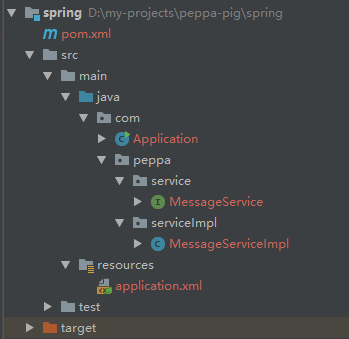
2. 添加接口MessageService及其实现类MessageServiceImpl
MessageService.java
package com.peppa.service;

public interface MessageService {

    String getMessage();

}
MessageServiceImpl.java
package com.peppa.serviceImpl;

import com.peppa.service.MessageService;

public class MessageServiceImpl implements MessageService {

    @Override

    public String getMessage() {

        return "hello world!";

    }

}
pom文件中添加spring-context依赖
<!-- https://mvnrepository.com/artifact/org.springframework/spring-context -->

        <dependency>

            <groupId>org.springframework</groupId>

            <artifactId>spring-context</artifactId>

            <version>5.1.5.RELEASE</version>

        </dependency>
在resources目录下添加application.xml文件,内容如下
<?xml version="1.0" encoding="UTF-8" ?>

<beans xmlns="http://www.springframework.org/schema/beans"

       xmlns:xsi="http://www.w3.org/2001/XMLSchema-instance"

xsi:schemaLocation="http://www.springframework.org/schema/beans http://www.springframework.org/schema/beans/spring-beans.xsd" default-autowire="byName">

    <bean id="messageService" class="com.peppa.serviceImpl.MessageServiceImpl"></bean>

</beans>
添加Application.java,将MessageService从context中取出来,而不是使用 new MessageServiceImpl() 获取
package com;

import com.peppa.service.MessageService;

import org.springframework.context.ApplicationContext;

import org.springframework.context.support.ClassPathXmlApplicationContext;

public class Application {

    public static void main(String[] args) {

        ApplicationContext context = new ClassPathXmlApplicationContext("classpath:application.xml");

        System.out.println("start success");

        MessageService messageService = context.getBean(MessageService.class);

        System.out.println("will print hello world");

        System.out.println(messageService.getMessage());

    }

}
通过配置文件来启动Spring的ApplicationContext,也就是IoC的核心。ApplicationContext启动过程中,会负责创建实例Bean,往各个Bean中注入依赖等。
对Spring Ioc的理解的更多相关文章
- 谈谈对Spring IOC的理解(转)
学习过Spring框架的人一定都会听过Spring的IoC(控制反转) .DI(依赖注入)这两个概念,对于初学Spring的人来说,总觉得IoC .DI这两个概念是模糊不清的,是很难理解的,今天和大家 ...
- 谈谈对Spring IOC的理解
学习过Spring框架的人一定都会听过Spring的IoC(控制反转) .DI(依赖注入)这两个概念,对于初学Spring的人来说,总觉得IoC .DI这两个概念是模糊不清的,是很难理解的,今天和大家 ...
- Spring系列之谈谈对Spring IOC的理解
学习过Spring框架的人一定都会听过Spring的IoC(控制反转) .DI(依赖注入)这两个概念,对于初学Spring的人来说,总觉得IOC .DI这两个概念是模糊不清的,是很难理解的,今天和大家 ...
- 谈谈对Spring IOC的理解【转】
学习过Spring框架的人 一定都会听过Spring的IoC(控制反转) .DI(依赖注入)这两个概念,对于初学Spring的人来说,总觉得IoC .DI这两个概念是模糊不清的,是很难理解的,今天和大 ...
- Spring IOC的理解
学习过Spring框架的人一定都会听过Spring的IoC(控制反转) .DI(依赖注入)这两个概念,对于初学Spring的人来说,总觉得IoC .DI这两个概念是模糊不清的,是很难理 ...
- 谈谈对Spring IOC的理解(转载)
学习过Spring框架的人一定都会听过Spring的IoC(控制反转) .DI(依赖注入)这两个概念,对于初学Spring的人来说,总觉得IoC .DI这两个概念是模糊不清的,是很难理解的,今天和大家 ...
- 谈谈对Spring IOC的理解(转发)
学习过Spring框架的人一定都会听过Spring的IoC(控制反转) .DI(依赖注入)这两个概念,对于初学Spring的人来说,总觉得IoC .DI这两个概念是模糊不清的,是很难理解的,今天和大家 ...
- 谈谈对Spring IOC的理解(转载)
学习过Spring框架的人一定都会听过Spring的IoC(控制反转) .DI(依赖注入)这两个概念,对于初学Spring的人来说,总觉得IoC .DI这两个概念是模糊不清的,是很难理解的,今天和大家 ...
- Spring学习总结(一)---谈谈对Spring IOC的理解(一:理论知识理解)
学习过Spring框架的人一定都会听过Spring的IoC(控制反转) .DI(依赖注入)这两个概念,对于初学Spring的人来说,总觉得IoC .DI这两个概念是模糊不清的,是很难理解的,今天和大家 ...
- spring ioc DI 理解
下面是我从网上找来的一些大牛对spring ioc和DI的理解,希望也能让你对Spring ioc和DI的设计思想有更进一步的认识. 一.分享Iteye的开涛对Ioc的精彩讲解 Ioc—Inversi ...
随机推荐
- 原来你是这样的setTimeout
先上代码 console.log("start"); setTimeout(function(){ console.log("Hello"); },200); ...
- js date 和 math
Math 用于执行常用的数学任务 console.log(Math.E); 自然数底数2.718 console.log(Math.PI); 圆周率3.1415926 console.log(Math ...
- Spock - Document -06 - Modules
Modules Peter Niederwieser, The Spock Framework TeamVersion 1.1 Guice Module Integration with the Gu ...
- java面试题03
1.一个”.java”源文件中是否可以包含多个类(不是内部类)?有什么限制?一个".java"源文件中是否可以包括多个类(不是内部类)?有什么限制?这个是可以的,一个“.java” ...
- Servlet中的编码问题
对于response.setContentType()和response.setCharacterEncoding()的理解: 经过一些实践,对着两个方法有了一些自己的理解,有可能今后的学习中会发现自 ...
- 小妖精的完美游戏教室——东方PROJECT,同人,th12灵梦A
╮(╯▽╰)╭没办法,小妖精Balous也很讨厌学院化的教育呀,一点意义都没有. 这次就上传东方地灵殿灵梦A逻辑部分的核心代码吧,估计连老师都看不懂.动画部分的代码就不放上来了. //======== ...
- 关于java的跨平台特性
Write once, compile anywhere,“一次编译,到处运行”的著名口号大家想必都听说过吧一次编译:把java代码(.java文件)通过编译器转换成字节码(.class文件)(符合j ...
- 渗透测试学习 九、 MSsql注入上
MSsql注入漏洞详解 (Asp.Aspx站,常见于棋牌网站.考试网站.大学网站.政府网站.游戏网站.OA办公系统) 大纲:msSQL数据库调用分析 msSQL注入原理 msSQL注入另类玩法 msS ...
- 《DSP using MATLAB》Problem 7.24
又到清明时节,…… 注意:带阻滤波器不能用第2类线性相位滤波器实现,我们采用第1类,长度为基数,选M=61 代码: %% +++++++++++++++++++++++++++++++++++++++ ...
- JMeter安装时Binarys与Source,tgz与zip如何选择?
在 http://jmeter.apache.org/download_jmeter.cgi 或 http://jmeter.apache.org/ 的 Download 版块下载 JMet ...