
使用shell解析脚本依赖关系,并自动补数
将脚本依赖关系放到表中
使用shell解析脚本依赖关系,递归的计算各个脚本。
#!/bin/bash

# 2017.08. dm 补数

basepath=$(cd `dirname $`; pwd)

cd $basepath

source /etc/profile

source ../etc/env.ini

 if [[ $# -ne  ]]; then

   echo "参数格式错误!"

   echo "$0 [运算日期,格式:'yyyy-mm-dd'] [运算类型:down/up] [表名列表] "

   echo "注:运算类型:down:表名是dm结果表,首先查找并调用其依赖的脚本,然后调用结果表。up:根据传入的前置表,查找其影响的结果表,然后执行。"

   echo "注:表名列表 (如果传入一个以上的表,需要用\" \"分割,\"\"包裹):单表,例如“dm_event_meterial”;多表,例如“\dm_event_meterial,dm_voice_meterial\"”"

   exit

 fi

#运算类型 run_type down up

run_type=$

#脚本名

shellNames=$

#运算日期

sdate=$(date -d "-1 day" "+%Y-%m-%d")

if [[ $# -eq  ]]; then

  sdate=$(date -d "$1" "+%Y-%m-%d")

fi

#映射关系缓存

dmDic=""

#刷新映射关系缓存

function dic(){

  local dm=$

  dmDic=$(spark-sql -e "

  use $HIVE_DB_ODS_S;

  select concat_ws(\",\",tmp.dm,tmp.shell) from

  (

    select dm,shell

    from yq_control_execute

    where dm=\"$dm\"

    union

    select c2.dm as dm,c2.shell as shell

    from yq_control_execute c1

    inner join

    yq_control_execute c2

    on c1.shell = c2.dm

    where c1.dm=\"$dm\"

    union

    select c3.dm as dm,c3.shell as shell

    from yq_control_execute c1

    inner join

    yq_control_execute c2

    on c1.shell = c2.dm

    inner join

    yq_control_execute c3

    on c2.shell = c3.dm

    where c1.dm=\"$dm\"

  ) tmp where tmp.shell!=tmp.dm

  ;

  ")

}

#将参数的shell列表转化为dm列表

function getDms(){

  local first=

  shellNameSqlPart=""

  for _shellName in $shellNames

  do

    if [[ "$first" -ne "" ]]; then

      shellNameSqlPart=$shellNameSqlPart",\"$_shellName\""

    else

      shellNameSqlPart=\"$_shellName\"

      ((first++))

    fi

  done

  echo $(spark-sql -S -e "

  use $HIVE_DB_ODS_S;

    select dm from

    (

      select dm

      from yq_control_execute

      where shell in ($shellNameSqlPart)

      union

      select c1.dm

      from yq_control_execute c1

      inner join

      yq_control_execute c2

      on c1.shell = c2.dm

      where c2.shell in ($shellNameSqlPart)

      union

      select c1.dm

      from yq_control_execute c1

      inner join

      yq_control_execute c2

      on c1.shell = c2.dm

      inner join

      yq_control_execute c3

      on c2.shell = c3.dm

      where c3.shell in ($shellNameSqlPart)

    ) tmp

  ;

  ")

}

#根据dm返回其依赖的shell列表

function getShellS() {

  if [[ $# -ne  ]]; then

    echo "$0 parameter length error."

    exit

  fi

  local target=$

  local shells=""

  for line in $dmDic

  do

      local __dm=$(echo $line|cut -d ',' -f )

      local __shell=$(echo $line|cut -d ',' -f )

      if [[ "$target" == "$__dm" ]]; then

        local shells=$shells" "$__shell

      fi

  done

  echo $shells

}

runnedArray=""

runCount=

#检查并执行脚本

#只执行dm开头并且没有执行过的脚本,执行过后存入已执行列表

function checkAndRun(){

  local flag=

  local c_shell=$

  for record in $runnedArray

  do

    if [[ "$record" ==  "$c_shell" ]]; then

      local flag=

    fi

  done

#  echo "已执行的脚本"$runnedArray

  if [[ "$flag" == "" && "${c_shell:0:2}" == "dm" ]]; then

     runnedArray="$runnedArray ${c_shell}"

     ((runCount++))

     echo "【$runCount】sh ./deal/${c_shell}.sh"

     sh ./deal/${c_shell}.sh $sdate

     sh ./export/main.sh $sdate ${c_shell}

  fi

}

#递归执行dm

function run(){

  local _dm=$

  for shell in  $(getShellS $_dm)

  do

  # echo $shell"==>"$_dm

   if [[ "${shell:0:2}" == "dm" ]]; then

      run $shell

      checkAndRun $shell

   fi

  done

  if [[ "${_dm:0:2}" == "dm" ]]; then

     checkAndRun $_dm

  fi

}

if [[ "$run_type" == "up" ]]; then

  #找出其对应的结果表 遍历执行

  for dm in $(getDms $shellNames)

  do

    #执行前 更新依赖关系

    dic $dm

    run $dm

  done

else

  #遍历执行传入的dm列表

  for dm in $shellNames

  do

    #执行前 更新依赖关系

    dic $dm

    run $dm

  done

fi
脚本依赖表的格式:
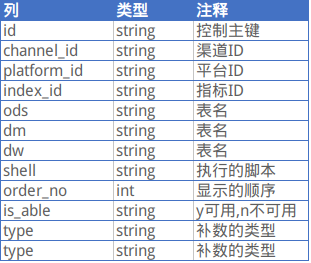
这个依赖表除了有脚本的源表和目标表的关系,还有数据的来源类型(平台和渠道);如果要实现基本功能的话,如下几列即可。
| 列 | 类型 | 注释 |
| from | string | 源表 |
| to | string | 目标表 |
使用shell解析脚本依赖关系,并自动补数的更多相关文章
- Prism 4 文档 ---第3章 管理组件间的依赖关系
基于Prism类库的应用程序可能是由多个松耦合的类型和服务组成的复杂应用程序,他们需要根据用户的动作发出内容和接收通知进行互动,由于他们是松耦合的,他们需要一种方式来互动和交流来传递业务功能的需求. ...
- Makefile 7——自动生成依赖关系 三颗星
后面会介绍gcc获得源文件依赖的方法,gcc这个功能就是为make而存在的.我们采用gcc的-MM选项结合sed命令.使用sed进行替换的目的是为了在目标名前加上“objs/”前缀.gcc的-E选项, ...
- makefile自动生成依赖关系
手工编写依赖关系不仅工作量大而且极易出现遗漏,更新也很难及时,修改源或头文件后makefile可能忘记修改.为了解决这个问题,可以用gcc的-M选项自动生成目标文件和源文件的依赖关系.-M选项会把包含 ...
- Shell 命令行,写一个自动整理 ~/Downloads/ 文件夹下文件的脚本
Shell 命令行,写一个自动整理 ~/Downloads/ 文件夹下文件的脚本 在 mac 或者 linux 系统中,我们的浏览器或者其他下载软件下载的文件全部都下载再 ~/Downloads/ 文 ...
- pip自动生成requirements.txt依赖关系清单
Python项目中经常会带requirements.txt文件,里面是项目所依赖的包的列表,也就是依赖关系清单,这个清单也可以使用pip命令自动生成. pip命令: 1 pip freeze > ...
- 自动配置pom文件,构建maven项目jar包依赖关系,找到jar包运用到jmeter
首先说下pom文件特别方便的优点: 什么是pom文件? POM(Project Object Model) 是Maven的基础. 它是一个XML文件,包含了Maven用来build项目所需要的项目配置 ...
- Shell脚本交互之:自动输入密码
Shell脚本交互之:自动输入密码 2016年04月09日 19:41:26 zhangjikuan 阅读数:58208 标签: Shell交互自动输入密码expect重定向管道 更多 个人分类: A ...
- IDEA maven项目查自动查看依赖关系,解决包冲突问题
在maven项目中找到pom.xml,打开. <dependencies> <dependency> <groupId>org.apache.storm</g ...
- Ambari服务依赖关系图生成脚本
1. 生成服务依赖关系 #!/usr/bin/python import sys import commands import json def genDependString(ip): url=&q ...
随机推荐
- matlab中特殊符号如希腊字符
使用legend 'Best' 图标标识放在图框内不与图冲突的最佳位置'BestOutside' 图标标识放在图框外使用最小空间的最佳位置 legend('sin','cos','location', ...
- Qt学习资料
网址:http://www.qter.org/portal.php?mod=list&catid=18 qt开源社区 (门户)里面有在线学习资料(讲的比较粗略 但是进程比较快 适用于快速学习) ...
- 取MySQL结果集的第一条记录
select * FROM SU_supplycontract t WHERE supplyContractCode="CRM20180813002" limit 1;
- Python学习笔记–Chapter 2
1.字符串中添加制表符,可使用字符组合\t 2.字符串中添加换行符,可使用字符组合\n 3.字符串\n\t可以换到下一行,并且在开头添加一个制表符. 4.删除末尾空白,使用方法rstrip() 5.删 ...
- access数据库之cookie注入
本来今天想写post注入的,但这几天正好看到chookie的注入的视频.就先写一下这个.大家对于我说的get post cookie注入可能会认为SQL注入就这几种方式.这概念是错的.Get post ...
- JavaWeb(二)
三.搭建JavaWeb应用开发环境——Tomcat服务器 3.1.疑问:学习web开发,为什么必须要先装一个WEB服务器? 在本地计算机上随便创建一个web页面,用户是无法访问到的,但是如果启动tom ...
- 解决: Homestead 环境下, yarn install --no-bin-links, NPM run dev, 命令报错
执行以下命令: 1 $ rm -rf node_modules 2 $ yarn config set registry http://registry.cnpmjs.org 3 $ yarn ins ...
- pytorch dataloader num_workers
https://discuss.pytorch.org/t/guidelines-for-assigning-num-workers-to-dataloader/813/5 num_workers 影 ...
- java的几种模式以及如何实现的
创建Bean实例的方式: 1) 通过构造器(有参或无参) 方式: <bean id="" class=""/> 2) 通过静态工厂方法 方式: &l ...
- 使用VMWare虚拟机打开MFC报错:不支持16位系统
可能这个问题的比较小众,但还是提供一下自己的思路. 笔者使用的是VMWare Fusion11的版本,采用windows7sp1的虚拟机. 在打开Mac系统共享过来的VC++的MFC文件运行时报错:不 ...