
SharePoint 2010 在同意匿名訪问的站点中隐藏登陆链接
版权声明:本文为博主原创文章,未经博主同意不得转载。 https://blog.csdn.net/u012025054/article/details/37565787
SharePoint 2010 在同意匿名訪问的站点中隐藏登陆链接
比方这里,关于在站点中对于匿名訪问用户隐藏登陆链接也与它有关。
<%@ Register Tagprefix="SharePoint" Namespace="Microsoft.SharePoint.WebControls" Assembly="Microsoft.SharePoint, Version=14.0.0.0, Culture=neutral, PublicKeyToken=71e9bce111e9429c" %> <%@ Register Tagprefix="Utilities" Namespace="Microsoft.SharePoint.Utilities" Assembly="Microsoft.SharePoint, Version=14.0.0.0, Culture=neutral, PublicKeyToken=71e9bce111e9429c" %> <%@ Import Namespace="Microsoft.SharePoint" %> <%@ Assembly Name="Microsoft.Web.CommandUI, Version=14.0.0.0, Culture=neutral, PublicKeyToken=71e9bce111e9429c" %>

<%@ Control Language="C#" Inherits="Microsoft.SharePoint.WebControls.Welcome,Microsoft.SharePoint,Version=14.0.0.0,Culture=neutral,PublicKeyToken=71e9bce111e9429c"   AutoEventWireup="false" compilationMode="Always" %>

  <SharePoint:PersonalActions accesskey="<%$Resources:wss,personalactions_menu_ak%>" ToolTip="<%$Resources:wss,open_menu%>" runat="server" id="ExplicitLogout" Visible="false">

	<CustomTemplate>

	 <SharePoint:FeatureMenuTemplate runat="server"

		 FeatureScope="Site"

		 Location="Microsoft.SharePoint.StandardMenu"

		 GroupId="PersonalActions"

		 id="ID_PersonalActionMenu"

		 UseShortId="true"

		 >

		 <SharePoint:MenuItemTemplate runat="server" id="ID_PersonalInformation"

				 Text="<%$Resources:wss,personalactions_personalinformation%>"

				 Description="<%$Resources:wss,personalactions_personalinformationdescription%>"

				 MenuGroupId="100"

				 Sequence="100"

				 ImageUrl="/_layouts/images/menuprofile.gif"

				 UseShortId="true"

				 />

		 <SharePoint:MenuItemTemplate runat="server" id="ID_LoginAsDifferentUser"

				 Text="<%$Resources:wss,personalactions_loginasdifferentuser%>"

				 Description="<%$Resources:wss,personalactions_loginasdifferentuserdescription%>"

				 MenuGroupId="200"

				 Sequence="100"

				 UseShortId="true"

				 />

		 <SharePoint:MenuItemTemplate runat="server" id="ID_RequestAccess"

				 Text="<%$Resources:wss,personalactions_requestaccess%>"

				 Description="<%$Resources:wss,personalactions_requestaccessdescription%>"

				 MenuGroupId="200"

				 UseShortId="true"

				 Sequence="200"

				 />

		 <SharePoint:MenuItemTemplate runat="server" id="ID_Logout"

				 Text="<%$Resources:wss,personalactions_logout%>"

				 Description="<%$Resources:wss,personalactions_logoutdescription%>"

				 MenuGroupId="200"

				 Sequence="300"

				 UseShortId="true"

				 />

		 <SharePoint:MenuItemTemplate runat="server" id="ID_PersonalizePage"

				 Text="<%$Resources:wss,personalactions_personalizepage%>"

				 Description="<%$Resources:wss,personalactions_personalizepagedescription%>"

				 ImageUrl="/_layouts/images/menupersonalize.gif"

				 ClientOnClickScript="javascript:ChangeLayoutMode(true);"

				 PermissionsString="AddDelPrivateWebParts,UpdatePersonalWebParts"

				 PermissionMode="Any"

				 MenuGroupId="300"

				 Sequence="100"

				 UseShortId="true"

				 />

		 <SharePoint:MenuItemTemplate runat="server" id="ID_SwitchView"

				 MenuGroupId="300"

				 Sequence="200"

				 UseShortId="true"

				 />

		 <SharePoint:MenuItemTemplate runat="server" id="MSOMenu_RestoreDefaults"

				 Text="<%$Resources:wss,personalactions_restorepagedefaults%>"

				 Description="<%$Resources:wss,personalactions_restorepagedefaultsdescription%>"

				 ClientOnClickNavigateUrl="javascript:SP.SOD.execute('browserScript', 'MSOWebPartPage_RestorePageDefault')"

				 MenuGroupId="300"

				 Sequence="300"

				 UseShortId="true"

				 />

	 </SharePoint:FeatureMenuTemplate>

	</CustomTemplate>

</SharePoint:PersonalActions>
还有一部分是作为SharePoint Application Page Link的用户控件ExplicitLogin。
<SharePoint:ApplicationPageLink runat="server" id="ExplicitLogin"

	ApplicationPageFileName="Authenticate.aspx" AppendCurrentPageUrl=true

	Text="<%$Resources:wss,login_pagetitle%>" style="display:none" Visible="false" />
这个链接我们须要研究一下。默认是不可见的。当用户未被认证时出现。也就是匿名用户看到的。这样他们就能够登陆了。
protected override void OnLoad(EventArgs e)

    {

        //base.OnLoad(e);

        base.OnLoad(e);

        if (HttpContext.Current.User.Identity.IsAuthenticated)

        {

            this.ExplicitLogout.Visible = true;

        }

        else

        {

            this.ExplicitLogin.Visible = false;

            this.ExplicitLogin.Attributes.CssStyle.Add("display", "block");

        }

    }
在母版页引用这个自己定义的CustomWelcome.ascx文件。
<%@ Register TagPrefix="wssuc" TagName="CustomWelcome" src="~/_controltemplates/CustomWelcome.ascx" %>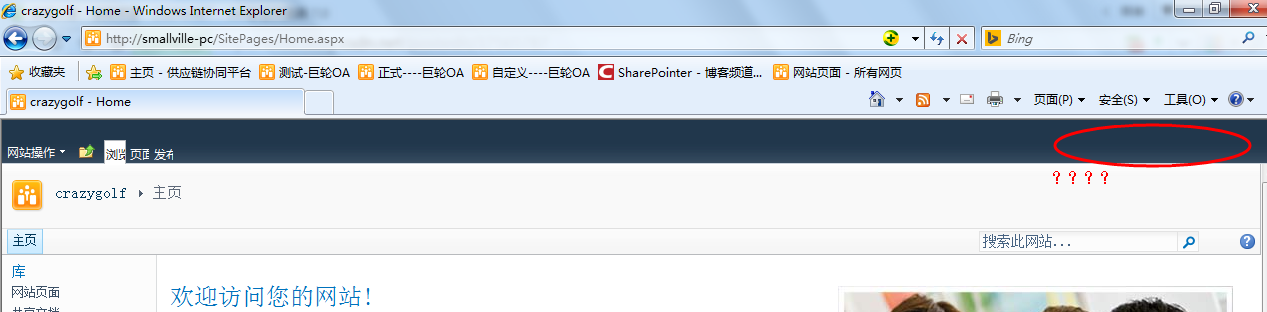
<wssuc:Welcome id="IdWelcome" runat="server" EnableViewState="false"></wssuc:Welcome>
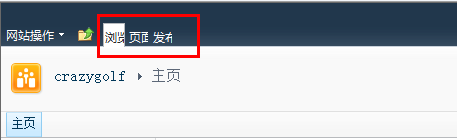
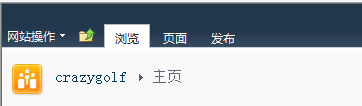
加入Visible="False"后,刷新首页。
恢复正常。
SharePoint 2010 在同意匿名訪问的站点中隐藏登陆链接的更多相关文章
- 匿名訪问之(一)web application级别
假设用SharePoint做一个对外开放的公共站点,比方公司展示站点.那么浏览站点的人不须要注冊和登陆.就应该能看到内容.这个时候就须要对站点开启匿名訪问. SharePoint的匿名訪问是从上而下的 ...
- MYSQL加入远程用户或同意远程訪问三种方法
加入远程用户admin密码为password GRANT ALL PRIVILEGES ON *.* TO admin@localhost IDENTIFIED BY \'password\' WIT ...
- 您可能试图从server上的安全浏览器訪问此站点。请启用脚本然后又一次载入此页。
您可能试图从server上的安全浏览器訪问此站点.请启用脚本然后又一次载入此页. 我使用域Admin组的账户登入SharePoint2010的server,打开SharePoint首页 ...
- [Phonegap+Sencha Touch] 移动开发76 让cordova app訪问远端站点也能调用cordova插件功能
原文链接:http://blog.csdn.net/lovelyelfpop/article/details/50735395 我相信.应该会有一些cordova开发人员想过实现以下这种app: 使用 ...
- SharePoint 2013 开启訪问请求
1.通常,我们进入SharePoint 2013网站,假设没权限会提示该网站未被共享,而没有切换账号或者申请訪问,实在是非常流氓:事实上,SharePoint为我们提供了訪问请求页面.可是可能须要手动 ...
- 设计模式之二十四:訪问者模式(Visitor)
訪问者模式: 定义了一个作用于一个类的一些操作,訪问者模式同意在不改变类的前提下添加一些操作. Represent an operation to be performed on the elemen ...
- 关于Apacheserver的訪问控制
Apache的訪问控制指对不论什么资源的不论什么方式的訪问控制. 一.基于主机或者IP地址的控制 这样的訪问控制基于訪问者的主机名或者IP地址,通过使用 Deny 和 Allow 指令.实现同意或者禁 ...
- Android 訪问权限清单
Android权限设置 概述 权限 说明 訪问登记属性 android.permission.ACCESS_CHECKIN_PROPERTIES 读取或写入登记check-in数据库属性表的权限 获取 ...
- 设计模式之十五:訪问者模式(Visitor Pattern)
訪问者模式(Visitor Pattern)是GoF提出的23种设计模式中的一种,属于行为模式. 据<大话设计模式>中说算是最复杂也是最难以理解的一种模式了. 定义(源于GoF<De ...
随机推荐
- 【Tomcat】Tomcat工作原理
Tomcat 总体结构 Tomcat 的结构很复杂,但是 Tomcat 也非常的模块化,找到了 Tomcat 最核心的模块,您就抓住了 Tomcat 的“七寸”.下面是 Tomcat 的总体结构图: ...
- Spring-继承JdbcDaoSupport类后简化配置文件内容
正常情况下,我们在实现类中想要晕用模板类需要在配置文件中注入连接池,再将连接池注入给模板类,然后在实现类中得到. <!-- 配置C3P0连接池 --> <bean id = &quo ...
- JDK的动态代理-----为接口进行代理
JDK的动态代理是必须掌握的,动态代理的好处就不用我多说了吧 :) 小弟最近在研究mybatis的源码实现,就开始了解mybatis的Mapper代理机制,为什么接口不用实现类也能代理? 好了,废话不 ...
- JS ES6中的箭头函数(Arrow Functions)使用
转载这篇ES6的箭头函数方便自己查阅. ES6可以使用“箭头”(=>)定义函数,注意是函数,不要使用这种方式定义类(构造器). 一.语法 基础语法 (参数1, 参数2, …, 参数N) => ...
- BZOJ1058: [ZJOI2007]报表统计(set)
Time Limit: 15 Sec Memory Limit: 162 MBSubmit: 4190 Solved: 1420[Submit][Status][Discuss] Descript ...
- 2018-08-29 浏览器插件实现GitHub代码翻译原型演示
此原型源自此想法: 中文化源码. 考虑到IDE插件工作量较大, 且与IDE绑定. 在代码转换工具的各种实现中, 综合考虑实用+易用+长远改进潜力, 浏览器插件似乎较有优势. 于是用最快捷的方式实现这一 ...
- Java的关键字
下面列出Java关键字.这些保留字不能用于常量.变量和任标识示字符的名称 没事儿时多背背,对你没有坏处哒! 类别 关键字 说明 访问控制 private 私有的 protected 受保护的 publ ...
- linux tmp清理这些事
tmp目录 首先看下FHS的定义. FHS(Filessystem Hierarchy Standard) 的重点在于规范每个特定的目录下应该要放置什么样子的数据. tmp约定的存放内容 /tmp 这 ...
- Centos7开启ssh免密码登录
1.输入命令:cd .ssh进入rsa公钥私钥目录(清空旧秘钥) 2.在当前目录下执行ssh-keygen -t rsa,三次回车后生成新的公钥(id_rsa.pub)私钥(id_rsa)文件(每个节 ...
- java中获取系统的当前时间
转自:http://www.cnblogs.com/Matrix54/archive/2012/05/01/2478158.html 一. 获取当前系统时间和日期并格式化输出: import java ...