
MyBatis的demo
把以前写的关于mybatis的demo放在这边,以便查看。
目录结构:
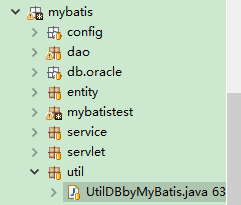
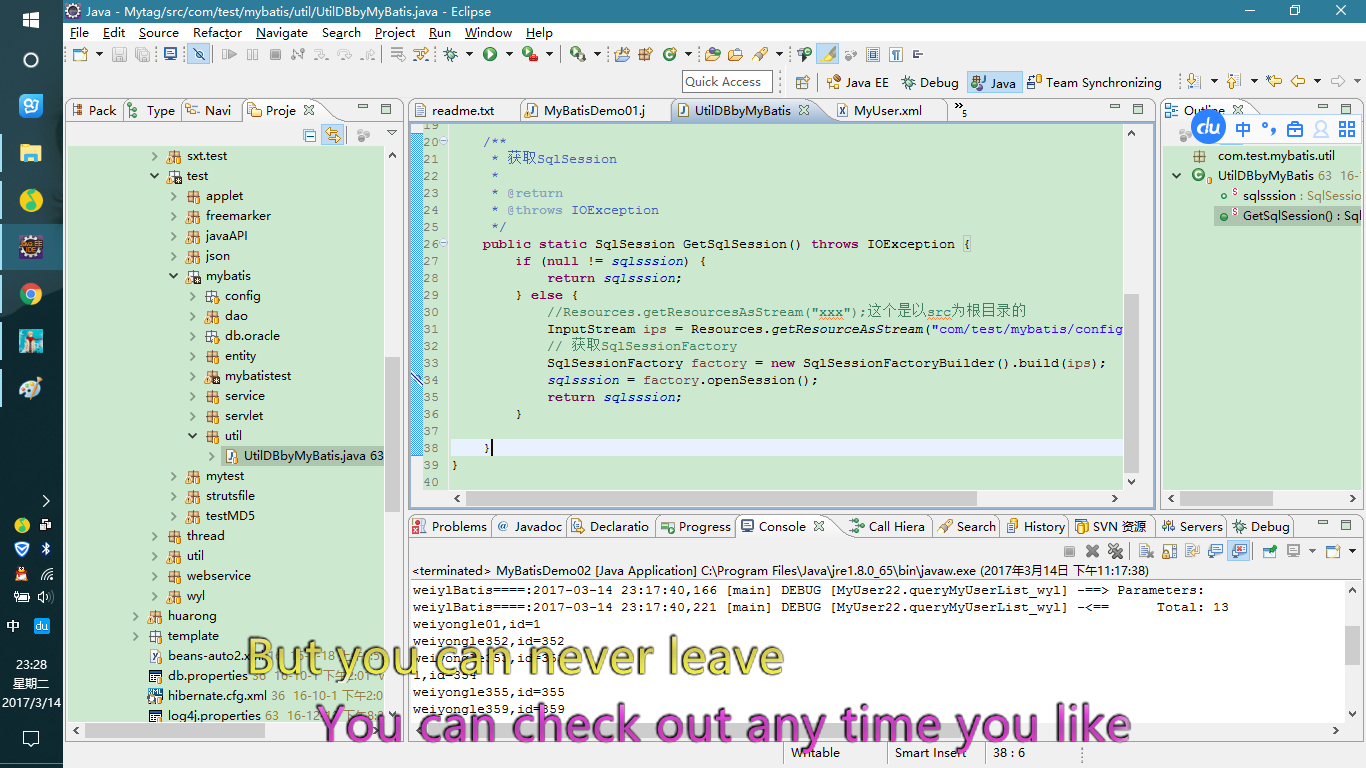
 package com.test.mybatis.util;

 import java.io.IOException;

 import java.io.InputStream;

 import org.apache.ibatis.io.Resources;

 import org.apache.ibatis.session.SqlSession;

 import org.apache.ibatis.session.SqlSessionFactory;

 import org.apache.ibatis.session.SqlSessionFactoryBuilder;

 /**

  * 数据库连接工具类(MyBatis框架相关)

  *

  * @author Wei

  * @time 2016年11月6日 下午5:08:33

  */

 public class UtilDBbyMyBatis {

     public static SqlSession sqlsssion;

     /**

      * 获取SqlSession

      *

      * @return

      * @throws IOException

      */

     public static SqlSession GetSqlSession() throws IOException {

         if (null != sqlsssion) {

             return sqlsssion;

         } else {

             //Resources.getResourcesAsStream("xxx");这个是以src为根目录的

             InputStream ips = Resources.getResourceAsStream("com/test/mybatis/config/Configuration.xml");

             // 获取SqlSessionFactory

             SqlSessionFactory factory = new SqlSessionFactoryBuilder().build(ips);

             sqlsssion = factory.openSession();

             return sqlsssion;

         }

     }

 }
Configuration.xml:
 <?xml version="1.0" encoding="UTF-8" ?>

 <!-- Copyright 2009-2016 the original author or authors. Licensed under the

     Apache License, Version 2.0 (the "License"); you may not use this file except

     in compliance with the License. You may obtain a copy of the License at http://www.apache.org/licenses/LICENSE-2.0

     Unless required by applicable law or agreed to in writing, software distributed

     under the License is distributed on an "AS IS" BASIS, WITHOUT WARRANTIES

     OR CONDITIONS OF ANY KIND, either express or implied. See the License for

     the specific language governing permissions and limitations under the License. -->

 <!DOCTYPE configuration

     PUBLIC "-//mybatis.org//DTD Config 3.0//EN"

     "http://mybatis.org/dtd/mybatis-3-config.dtd">

 <configuration>

     <settings>

         <setting name="useGeneratedKeys" value="false" />

         <setting name="useColumnLabel" value="true" />

     </settings>

     <!-- <typeAliases> <typeAlias alias="UserAlias" type="org.apache.ibatis.submitted.complex_property.User"/>

         </typeAliases> -->

     <environments default="development">

         <environment id="development">

             <transactionManager type="JDBC">

                 <property name="" value="" />

             </transactionManager>

             <dataSource type="UNPOOLED">

                 <!-- Oracle数据库配置 -->

                 <property name="driver" value="oracle.jdbc.driver.OracleDriver" />

                 <property name="url" value="jdbc:oracle:thin:@localhost:1521:orcl2" />

                 <property name="username" value="hr" />

                 <property name="password" value="hr" />

             </dataSource>

         </environment>

     </environments>

     <!-- 配置的实体类 20161106添加 -->

     <mappers>

         <!-- <mapper resource="org/apache/ibatis/submitted/complex_property/User.xml" /> -->

         <!-- 这个路径是从src下开始的,即以src作为根目录的,

             这点和Resources.getResourcesAsStream("xx")里的xx一样,都是指向的具体文件的路径

             ,都是以src为根目录 -->

         <mapper resource="com/test/mybatis/config/MyUser.xml" />

     </mappers>

 </configuration>
MyUser.xml:
<?xml version="1.0" encoding="UTF-8"?>
<!-- Copyright 2009-2016 the original author or authors. Licensed under the
Apache License, Version 2.0 (the "License"); you may not use this file except
in compliance with the License. You may obtain a copy of the License at http://www.apache.org/licenses/LICENSE-2.0
Unless required by applicable law or agreed to in writing, software distributed
under the License is distributed on an "AS IS" BASIS, WITHOUT WARRANTIES
OR CONDITIONS OF ANY KIND, either express or implied. See the License for
the specific language governing permissions and limitations under the License. -->
<!DOCTYPE mapper
PUBLIC "-//mybatis.org//DTD Mapper 3.0//EN"
"http://mybatis.org/dtd/mybatis-3-mapper.dtd"> <mapper namespace="MyUser22">
<!-- 配置返回结果所属类 -->
<resultMap type="com.test.mybatis.entity.MyUser" id="UserResult">
<!-- 在数据库里如果是主键,那么就用<id>标签,其他字段用<column>标签 ,
这里的type对应着java代码中的例如: java.sql.Types.BOOLEAN -->
<id column="id" jdbcType="INTEGER" property="id" />
<!-- column的值对应的是数据库里的字段名,property对应着实体类的属性 -->
<result column="username" jdbcType="VARCHAR" property="username" />
<!-- <result column="password" jdbcType="VARCHAR" property="password.encrypted" /> -->
<result column="administrator" jdbcType="VARCHAR" property="administrator" />
</resultMap>
<!--Java代码使用示例: SqlSession.selectList("queryMyUserList_wyl"); -->
<select id="queryMyUserList_wyl" resultMap="UserResult">
SELECT * FROM MyUser
WHERE 1=1
</select> <select id="queryMyUserListbyName_wyl" parameterType="com.test.mybatis.entity.MyUser" resultMap="UserResult">
SELECT ID,USERNAME,PASSWORD,ADMINISTRATOR FROM MyUser
WHERE 1=1
<!-- <if test="username !=null and !"".equals(username.trim())"> -->
<if test="username !=null ">
and USERNAME like '%'||#{username}||'%'
</if>
</select> <!--同一个Mapper文件下, 不能有重复的id -->
<!-- <select id="queryMyUserList_wyl" resultMap="UserResult"> SELECT * FROM
MyUser WHERE 1=1 </select> --> <select id="find" parameterType="long" resultMap="UserResult">
SELECT * FROM
MyUser WHERE id = #{id:INTEGER}
</select>
<delete id="deleteOne" parameterType="int">
<!-- where 条件携程 #{_parameter}的形式具体 详见:http://www.imooc.com/video/4350, -->
delete from MyUser where ID = #{_parameter}
</delete> <!-- 批量删除 -->
<delete id="deleteBatch" parameterType="java.util.List">
delete from MyUser where id in (
<!-- 用逗号隔开item属性值代表list集合中的每一项 -->
<foreach collection="list" item="theitem" >
${theitem}
</foreach>
)
</delete>
</mapper>
MyUser.java:
 package com.test.mybatis.entity;

 public class MyUser {

     private Long id;

     /*

      * user specified user ID

      */

     private String username;

     /*

      * encrypted password

      */

     private EncryptedString password;

     String administrator;

     public MyUser() {

         setUsername(new String());

         setPassword(new EncryptedString());

         setAdministrator("我是admin");

     }

     public Long getId() {

         return id;

     }

     public void setId(Long id) {

         this.id = id;

     }

     public String getUsername() {

         return username;

     }

     public void setUsername(String username) {

         this.username = username;

     }

     public EncryptedString getPassword() {

         return password;

     }

     public void setPassword(EncryptedString password) {

         this.password = password;

     }

     public String getAdministrator() {

         return administrator;

     }

     public void setAdministrator(String administrator) {

         this.administrator = administrator;

     }

 }
MyBatisDemo01.java
 package com.test.mybatis.mybatistest;

 import java.io.IOException;

 import java.util.ArrayList;

 import java.util.List;

 import org.apache.ibatis.session.SqlSession;

 import org.apache.log4j.Logger;

 import com.test.mybatis.entity.EncryptedString;

 import com.test.mybatis.entity.MyUser;

 import com.test.mybatis.service.MaintainService;

 import com.test.mybatis.util.UtilDBbyMyBatis;

 /**

  * MyBatis测试类

  *

  * @author Wei

  * @time 2016年11月6日 下午5:13:18

  */

 public class MyBatisDemo01 {

     public static void main(String[] args) throws IOException {

         SqlSession sqlSession = UtilDBbyMyBatis.GetSqlSession();

         /*

          * SqlSession.selectList(String str);里的str是根据实体类映射文件里的id来寻找的,

          * 实际上框架内部是通过"命名空间.str"的形式来查找对应的sql语句的(这个命名空间就是

          * 映射文件的namespace的值,具体到这个例子中就是<mapper namespace="MyUser22">),比如

          * sqlSession.selectList("queryMyUserList_wyl");这行代码,框架内部是根据

          * sqlSession.selectList("MyUser22.queryMyUserList_wyl");来寻找的,

          */

         List<MyUser> list = sqlSession.selectList("queryMyUserList_wyl");

         int len = list.size();

         for (int i = 0; i < len; i++) {

             System.out.println(list.get(i).getUsername() + ",id=" + list.get(i).getId());

         }

         System.out.println("==============分割线==============");

         MyUser user = new MyUser();

         user.setUsername("weiyongle359");

         user.setAdministrator("hr");

 //        user.setId(new Long(359));

         user.setPassword(new EncryptedString());

         System.out.println("==111111111111111111============分割线==============");

         Logger log = Logger.getRootLogger();

 //        log.debug("");

 //        log.info("");

 //        log.warn("xxxx");

 //        log.error("");

         List<MyUser> list2 = sqlSession.selectList("queryMyUserListbyName_wyl",user);

         System.out.println("==22222222222222222============分割线==============");

         int len2 = list2.size();

         for (int i = 0; i < len2; i++) {

             System.out.println(list2.get(i).getUsername() + ",id=" + list2.get(i).getId());

         }

         System.out.println("测试删除");

         int num = new MaintainService().delete("358");

         System.out.println("删除了"+num+"条数据");

         System.out.println("测试批量删除");

         List<String> idlist = new ArrayList<String>();

         idlist.add("342");

         idlist.add("356");

         idlist.add("357");

         int num2 = new MaintainService().deleteBatch(idlist);

     }

 }
Oracle的建表语句:
 --select * from MyUser for update;

 --建表语句

 create table MyUser (

 id number,

 username varchar2(32) not null,

 password varchar2(128) not null,

 administrator varchar2(5),

 primary key (id)

 );

 --插入数据

 insert into MyUser

   (ID, USERNAME, PASSWORD, ADMINISTRATOR)

 values

   (BXGX_SEQ_AAZ611.Nextval,

    'weiyongle' || BXGX_SEQ_AAZ611.Nextval,

    'hr',

    'hr');
MyBatis的demo的更多相关文章
- MyBatis使用DEMO及cache的使用心得
下面是一个简单的MyBatis使用DEMO. 整体结构 整体代码大致如下: POM依赖 需要引用两个jar包,一个是mybatis,另一个是mysql-connector-java,如果是maven工 ...
- Mybatis入门DEMO
下面将通过以下步骤说明如何使用MyBatis开发一个简单的DEMO: 步骤一:新建表STUDENTS 字段有: Stu_Id.Stu_Name.Stu_Age.Stu_Birthday CREATE ...
- mybatis写demo时遇到的问题
写demo的时候,用mybatis的配置文件链接数据库,始终链接不上,太急人了.仔细查阅,发现在mysql中新增的表没有事务支持.还有就是mysql搜索引擎支持的不对.我换了一下 innodb的引擎, ...
- 最基础的mybatis入门demo
demo结构 数据库情况 (不会转sql语句 骚瑞) 数据库连接信息 jdbc.properties jdbc.driver=com.mysql.jdbc.Driver jdbc.url=jdbc:m ...
- MyBatis 入门Demo
新建数据库my_db,新建表student_tb id为主键,不自动递增. 不必插入数据. 下载MyBatis https://github.com/mybatis/mybatis-3/release ...
- Mybatis入门Demo(单表的增删改查)
1.Mybatis 什么是Mybatis: mybatis是一个持久层框架,用java编写的 它封装了jdbc操作的很多细节,使开发者只需要关注sql语句本身,而无需关注注册驱动.创建连接等繁杂过程 ...
- 3.springMVC+spring+Mybatis整合Demo(单表的增删该查,这里主要是贴代码,不多解释了)
前面给大家讲了整合的思路和整合的过程,在这里就不在提了,直接把springMVC+spring+Mybatis整合的实例代码(单表的增删改查)贴给大家: 首先是目录结构: 仔细看看这个目录结构:我不详 ...
- mybatis框架demo first
SqlMapConfig.xml: <?xml version="1.0" encoding="UTF-8" ?> <!DOCTYPE con ...
- MyBatis入门级Demo
1.创建Java工程MyBatisTest001,导入jar包(mybatis-3.2.1/mysql-connector-java-5.1.24-bin); 2.创建User表,数据库(MySql) ...
随机推荐
- C++编写 动态链接库dll 和 调用dll
参考:https://jingyan.baidu.com/article/ff42efa92c49cfc19e2202fd.html 和htps://jingyan.baidu.com/article ...
- 【转】wamp出现You don’t have permission to access/on this server提示
本地搭建wamp,输入http://127.0.0.1访问正常,当输入http://localhost/,apache出现You don't have permission to access/on ...
- 【angularjs】pc端使用angular搭建项目,实现导出excel功能
此为简单demo. <!DOCTYPE html> <html ng-app="myApp"> <head> <meta charset= ...
- .NET Core微服务实施之Consul服务发现与治理
.NET Core微服务实施之Consul服务发现与治理 Consul官网:https://www.consul.io Consul下载地址:https://www.consul.io/downl ...
- Boost 和 Boost.Build 的设置
问题: 安装编译完 Boost 后,如果不设置 BOOST_ROOT 和 BOOST_BUILD_PATH 则可能导致使用 bjam 时定位到 Boost 默认的路径 /usr/share/boost ...
- python:unittest之跳过测试和预期失败的用例
在利用单元测试框架执行测试用例的过程中,有时只需要执行一部分用例,或者跳过某些暂不需要执行的用例,python的unittest框架就内置这样的功能. 前面的博客介绍了unittest框架的测试用例加 ...
- mysql及python交互
mysql在之前写过一次,那时是我刚刚进入博客,今天介绍一下mysql的python交互,当然前面会把mysql基本概述一下. 目录: 一.命令脚本(mysql) 1.基本命令 2.数据库操作命令 3 ...
- position fixed 相对于父级定位
<!DOCTYPE html> <html lang="en"> <head> <meta charset="UTF-8&quo ...
- c++ 入门之对象指针
我们想 像使用基本数据类型一样使用类,自然,类自然也有指针,我们通过下面的代码来领教一下对象指针存在的意义: # include "iostream" # include &quo ...
- Mysql数据库中索引的概念总结
1.索引的目的是什么 1.快速访问数据表中的特定信息,提高检索速度 2.创建唯一性索引,保证数据库表中每一行数据的唯一性. 3.加速表和表之间的连接 4.使用分组和排序子句进行数据检索时,可以显著减少 ...