
在Eclipse上运行Spark(Standalone,Yarn-Client)
欢迎转载,且请注明出处,在文章页面明显位置给出原文连接。
原文链接:http://www.cnblogs.com/zdfjf/p/5175566.html
我们知道有eclipse的Hadoop插件,能够在eclipse上操作hdfs上的文件和新建mapreduce程序,以及以Run On Hadoop方式运行程序。那么我们可不可以直接在eclipse上运行Spark程序,提交到集群上以YARN-Client方式运行,或者以Standalone方式运行呢?
答案是可以的。下面我来介绍一下如何在eclipse上运行Spark的wordcount程序。我用的hadoop 版本为2.6.2,spark版本为1.5.2。
1.Standalone方式运行
1.1 新建一个普通的java工程即可,下面直接上代码,
 /*

  * Licensed to the Apache Software Foundation (ASF) under one or more

  * contributor license agreements.  See the NOTICE file distributed with

  * this work for additional information regarding copyright ownership.

  * The ASF licenses this file to You under the Apache License, Version 2.0

  * (the "License"); you may not use this file except in compliance with

  * the License.  You may obtain a copy of the License at

  *

  *    http://www.apache.org/licenses/LICENSE-2.0

  *

  * Unless required by applicable law or agreed to in writing, software

  * distributed under the License is distributed on an "AS IS" BASIS,

  * WITHOUT WARRANTIES OR CONDITIONS OF ANY KIND, either express or implied.

  * See the License for the specific language governing permissions and

  * limitations under the License.

  */

 package com.frank.spark;

 import scala.Tuple2;

 import org.apache.spark.SparkConf;

 import org.apache.spark.api.java.JavaPairRDD;

 import org.apache.spark.api.java.JavaRDD;

 import org.apache.spark.api.java.JavaSparkContext;

 import org.apache.spark.api.java.function.FlatMapFunction;

 import org.apache.spark.api.java.function.Function2;

 import org.apache.spark.api.java.function.PairFunction;

 import java.util.Arrays;

 import java.util.List;

 import java.util.regex.Pattern;

 public final class JavaWordCount {

   private static final Pattern SPACE = Pattern.compile(" ");

   public static void main(String[] args) throws Exception {

     if (args.length < 1) {

       System.err.println("Usage: JavaWordCount <file>");

       System.exit(1);

     }

     SparkConf sparkConf = new SparkConf().setAppName("JavaWordCount");

     sparkConf.setMaster("spark://192.168.0.1:7077");

     JavaSparkContext ctx = new JavaSparkContext(sparkConf);

     ctx.addJar("C:\\Users\\Frank\\sparkwordcount.jar");

     JavaRDD<String> lines = ctx.textFile(args[0], 1);

     JavaRDD<String> words = lines.flatMap(new FlatMapFunction<String, String>() {

       @Override

       public Iterable<String> call(String s) {

         return Arrays.asList(SPACE.split(s));

       }

     });

     JavaPairRDD<String, Integer> ones = words.mapToPair(new PairFunction<String, String, Integer>() {

       @Override

       public Tuple2<String, Integer> call(String s) {

         return new Tuple2<String, Integer>(s, 1);

       }

     });

     JavaPairRDD<String, Integer> counts = ones.reduceByKey(new Function2<Integer, Integer, Integer>() {

       @Override

       public Integer call(Integer i1, Integer i2) {

         return i1 + i2;

       }

     });

     List<Tuple2<String, Integer>> output = counts.collect();

     for (Tuple2<?,?> tuple : output) {

       System.out.println(tuple._1() + ": " + tuple._2());

     }

     ctx.stop();

   }

 }
代码直接从spark安装包解压后在examples/src/main/java/org/apache/spark/examples/JavaWordCount.java拷贝出来,唯一不同的地方在增加了44行和46行,44行设置了Master,为hadoop的master 结点的IP,端口号为7077。46行设置了工程打包后放置在windows上的路径。
1.2 加入spark依赖包spark-assembly-1.5.2-hadoop2.6.0.jar,这个包可以从spark 安装包解压 后在lib目录下。
1.3 配置要统计的文件在hdfs上的路径
Run As->Run Configurations

点击Arguments,因为程序中47行要求输入被统计的文件路径,所以在这里配置以下,文件必须放在hdfs上,所以这里的ip也是你的hadoop的master机器的ip.
1.4 接下来就是Run程序了,统计的结果会显示在eclipse的控制台。你也可以通过spark的web页面查看刚才提交的程序。
2. 以YARN-Client方式运行
2.1 先上代码
 /*

  * Licensed to the Apache Software Foundation (ASF) under one or more

  * contributor license agreements.  See the NOTICE file distributed with

  * this work for additional information regarding copyright ownership.

  * The ASF licenses this file to You under the Apache License, Version 2.0

  * (the "License"); you may not use this file except in compliance with

  * the License.  You may obtain a copy of the License at

  *

  *    http://www.apache.org/licenses/LICENSE-2.0

  *

  * Unless required by applicable law or agreed to in writing, software

  * distributed under the License is distributed on an "AS IS" BASIS,

  * WITHOUT WARRANTIES OR CONDITIONS OF ANY KIND, either express or implied.

  * See the License for the specific language governing permissions and

  * limitations under the License.

  */

 package com.frank.spark;

 import scala.Tuple2;

 import org.apache.spark.SparkConf;

 import org.apache.spark.api.java.JavaPairRDD;

 import org.apache.spark.api.java.JavaRDD;

 import org.apache.spark.api.java.JavaSparkContext;

 import org.apache.spark.api.java.function.FlatMapFunction;

 import org.apache.spark.api.java.function.Function2;

 import org.apache.spark.api.java.function.PairFunction;

 import java.util.Arrays;

 import java.util.List;

 import java.util.regex.Pattern;

 public final class JavaWordCount {

   private static final Pattern SPACE = Pattern.compile(" ");

   public static void main(String[] args) throws Exception {

38     System.setProperty("HADOOP_USER_NAME", "hadoop");

     if (args.length < 1) {

       System.err.println("Usage: JavaWordCount <file>");

       System.exit(1);

     }

     SparkConf sparkConf = new SparkConf().setAppName("JavaWordCountByFrank01");

     sparkConf.setMaster("yarn-client");

     sparkConf.set("spark.yarn.dist.files", "C:\\software\\workspace\\sparkwordcount\\src\\yarn-site.xml");

     sparkConf.set("spark.yarn.jar", "hdfs://192.168.0.1:9000/user/hadoop/spark-assembly-1.5.2-hadoop2.6.0.jar");

     JavaSparkContext ctx = new JavaSparkContext(sparkConf);

     ctx.addJar("C:\\Users\\Frank\\sparkwordcount.jar");

     JavaRDD<String> lines = ctx.textFile(args[0], 1);

     JavaRDD<String> words = lines.flatMap(new FlatMapFunction<String, String>() {

       @Override

       public Iterable<String> call(String s) {

         return Arrays.asList(SPACE.split(s));

       }

     });

     JavaPairRDD<String, Integer> ones = words.mapToPair(new PairFunction<String, String, Integer>() {

       @Override

       public Tuple2<String, Integer> call(String s) {

         return new Tuple2<String, Integer>(s, 1);

       }

     });

     JavaPairRDD<String, Integer> counts = ones.reduceByKey(new Function2<Integer, Integer, Integer>() {

       @Override

       public Integer call(Integer i1, Integer i2) {

         return i1 + i2;

       }

     });

     List<Tuple2<String, Integer>> output = counts.collect();

     for (Tuple2<?,?> tuple : output) {

       System.out.println(tuple._1() + ": " + tuple._2());

     }

     ctx.stop();

   }

 }
2.2 程序解释
38行,如果你的windows用户名和集群上用户名不一样,这里就应该配置一下。比如我windows用户名为Frank,而装有hadoop的集群username为hadoop,这里我就以38行这样设置。
46行,这里配置以yarn-client方式
48行,以这种方式运行时候,每一次运行都会把spark-assembly-1.5.2-hadoop2.6.0.jar包上传到hdfs下这次生成的application-id文件夹下,会耗费几分钟时间,这里也可以配置spark.yarn.jar,先把spark-assembly-1.5.2-hadoop2.6.0.jar上传到hdfs一个目录下,这样就不用每次从windows上传到hdfs下了。参考https://spark.apache.org/docs/1.5.2/running-on-yarn.html
spark.yarn.jar :The location of the Spark jar file, in case overriding the default location is desired. By default, Spark on YARN will use a Spark jar installed locally, but the Spark jar can also be in a world-readable location on HDFS. This allows YARN to cache it on nodes so that it doesn't need to be distributed each time an application runs. To point to a jar on HDFS, for example, set this configuration to "hdfs:///some/path".
51行,把项目打包后放在windows上的路径。
2.3 程序配置
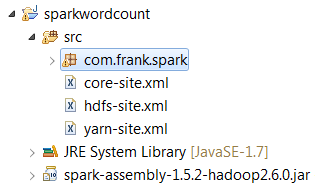
把3个配置文件放在src下,配置文件从hadoop的linux机器上拷贝下来。
2.4 配置要统计的文件在hdfs上的路径
参考1.3,同样结果显示在eclipse控制台。
在Eclipse上运行Spark(Standalone,Yarn-Client)的更多相关文章
- 运行 Spark on YARN
运行 Spark on YARN Spark 0.6.0 以上的版本添加了在yarn上执行spark application的功能支持,并在之后的版本中持续的 改进.关于本文的内容是翻译官网的内容,大 ...
- Spark学习之在集群上运行Spark
一.简介 Spark 的一大好处就是可以通过增加机器数量并使用集群模式运行,来扩展程序的计算能力.好在编写用于在集群上并行执行的 Spark 应用所使用的 API 跟本地单机模式下的完全一样.也就是说 ...
- 在集群上运行Spark
Spark 可以在各种各样的集群管理器(Hadoop YARN.Apache Mesos,还有Spark 自带的独立集群管理器)上运行,所以Spark 应用既能够适应专用集群,又能用于共享的云计算环境 ...
- Spark学习之在集群上运行Spark(6)
Spark学习之在集群上运行Spark(6) 1. Spark的一个优点在于可以通过增加机器数量并使用集群模式运行,来扩展程序的计算能力. 2. Spark既能适用于专用集群,也可以适用于共享的云计算 ...
- cdh 上安装spark on yarn
在cdh 上安装spark on yarn 还是比较简单的,不需要独立安装什么模块或者组件. 安装服务 选择on yarn 模式:上面 Spark 在spark 服务中添加 在yarn 服务中添加 g ...
- 《Spark 官方文档》在Mesos上运行Spark
本文转自:http://ifeve.com/spark-mesos-spark/ 在Mesos上运行Spark Spark可以在由Apache Mesos 管理的硬件集群中运行. 在Mesos集群中使 ...
- linux下在eclipse上运行hadoop自带例子wordcount
启动eclipse:打开windows->open perspective->other->map/reduce 可以看到map/reduce开发视图.设置Hadoop locati ...
- Windows下IntelliJ IDEA中运行Spark Standalone
ZHUAN http://www.cnblogs.com/one--way/archive/2016/08/29/5818989.html http://www.cnblogs.com/one--wa ...
- mac上eclipse上运行word count
1.打开eclipse之后,建立wordcount项目 package wordcount; import java.io.IOException; import java.util.StringTo ...
随机推荐
- POJ2823(优先队列)
Sliding Window Time Limit: 12000MS Memory Limit: 65536K Total Submissions: 50738 Accepted: 14590 ...
- 解除win10禁ping方法
在局域网中,有一台电脑安装了win10操作系统,win10电脑连接网络没有问题,就是在其他电脑ping这台windows10电脑时就是ping不通,显示“请求超时.”.虽然这台windows10电脑联 ...
- 3.javascript转换日期字符串为Date对象
js中文网 阮一峰 1.求format“xxxx年xx月xx日 xx:xx”类型的两个日期天数差 var start = "2017年09月17日 13:51"; var end ...
- libvirt kvm云主机监控
libvirt
- Manasa and Combinatorics
题意: 给定n,求问由2n个字母B,n个字母A构成的字符串中 任意前缀B的个数大于A的个数且任意后缀B的个数大于A的个数的 字符串个数. 解法: 注意到答案不易于直接计算,所以我们考虑应用容斥原理. ...
- C. Pearls in a Row
C. Pearls in a Row time limit per test 2 seconds memory limit per test 256 megabytes input standard ...
- 1.8 Hive运行日志配置和查看
一.配置文件 1.重命名配置文件 # 把/opt/modules/hive-0.13.1/conf/hive-log4j.properties.template重命名为hive-log4j.prope ...
- c/c++面试19-22----inline的那些事儿
19 为什么引入内联函数 a:宏定义为什么效率高 通常替代c语言中表达式形式的宏定义来解决程序函数调用问题,使用的是预处理器实现,没有参数压栈等到做. 缺点: (1) 仅仅进行简单的替换,不能进行参数 ...
- Excel2007格式分析和XML解析
1. excel2007是使用xml格式来存储的,把一个excel文件后缀改为.zip,打开之后就直接可以看到一个excel文件对应的xml格式的文件了. 这里面有几部分 对于docProps目 ...
- java web 学习-网络资源
[网络收集] 1. JavaWeb学习总结——JSP中的九个内置对象 2. Jsp九大内置对象以及四个作用域 他人学习汇总资源 1. http://www.cnblogs.com/xdp-gacl/t ...