
Resolving 'Root Partition Is Filling Up' Issue on Sophos UTM Firewall
from:
https://wandersick.blogspot.com/2016/06/resolving-root-partition-is-filling-up.html
This is a quick guide on how to resolve an occasional problem that could happen to neglected Sophos UTM firewall with default settings, where updates are automatically downloaded to device, filling up storage after some time.
An email alert similar to the below is sent to administrator when it happens:
From: Firewall Notification System [do-not-reply@fw-notify.net]
Sent: 18 June 2016 11:58 PM
To: Administrator [admin@wandersick.com]
Subject: [SOPHOS][INFO-150] Root partition is filling up - please checkRoot partition is filling up - please check. Current usage: 86%
--
System Uptime : 362 days 1 hour 2 minutes
System Load : 0.05
System Version : Sophos UTM 9.210-20Please refer to the manual for detailed instructions.
To solve it, one way is to
- SSH into Sophos UTM firewall using root login
- Remove content under Sophos update directory (Main focus of this blog post)
- Configure firmware download interval for System Up2Date packages from Automatic to Manual
1. SSH into Sophos UTM firewall using root with public key authentication
In order for root
login to be made possible, it is required to first generate a private
key and set up public key authentication. You may refer to any guide
found on the Internet such as this one.
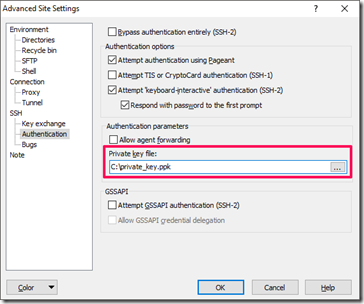
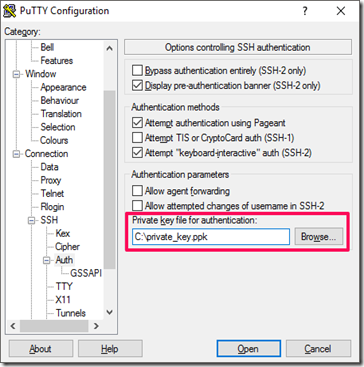
After enabling root login, we can then authenticate using
the private key file using SCP/SSH clients such as WinSCP, PuTTy by
specifying private key file as shown below.
a. Specifying private key file in WinSCP SCP client:
b. Specifying private key file in PuTTy SSH client:
2. Remove content under Sophos update directory
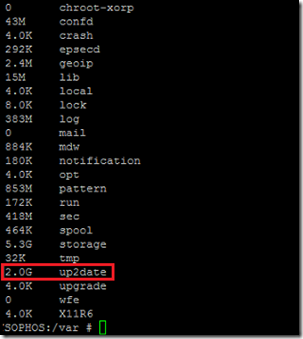
Commands for determining storage utilization on directory /var
- cd /var
- du -shx *
After root SSH login, executing the above directory size checking commands revealed the /var/up2date folder (containing downloaded firmware updates) took 2GB of space on the device.
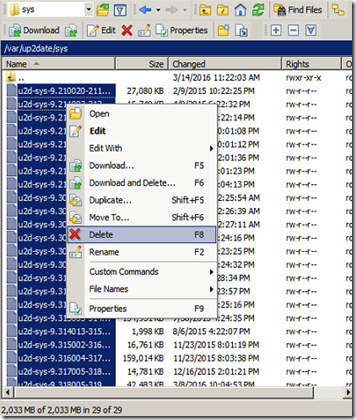
Mitigate the situation by removing the update files under /var/up2date/sys. Below screenshot shows a way to do it using WinSCP. (Backing up the files is recommended prior to deletion.)
Command for listing space utilization statistics on each file system mounted on device
- df -h
Before removing the files, the disk utilization was 86%:
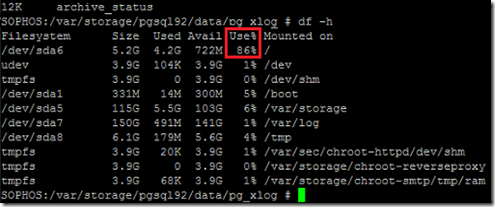
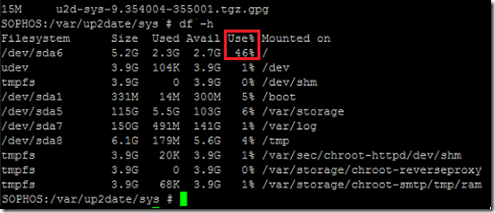
After removing the files, the disk utilization lowered to 46%:
3. Configure download interval for System Up2Date packages as Manual
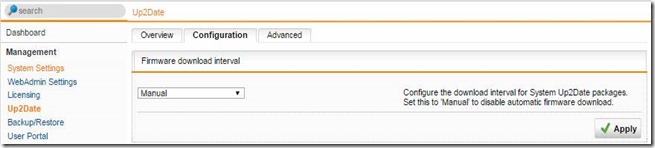
To prevent this problem from recurring, firmware download interval can be set to Manual
on the firewall. After configuring the setting, firewall updates will
not be automatically downloaded, hence device storage won’t be filled up
as easily.
Tip: Be sure to do this quickly after
moving/deleting the files. Otherwise, the device storage will be filled
up again by the update download next time
Hope this post provides a quick way to resolve this problem for those who encounter it.
Update in April 2017:
Fix it as early as we can! It was found that if we leave the problem
unresolved until the firewall disk partition becomes 100% full, web
administration console (httpd) will fail with the error below, and we
must recover the firewall via console logon (or using Windows PE/Linux
boot disc USB).
Internal Server Error
The server encounted an internal error or misconfiguration and was unable to complete your request.
Please
contact the server administrator at admin to inform them of the time
this error occurred, and the actions you performed just before this
error.More information about this error may be available in the server error log.
Additionally, a 500 Internal Server Error error was encountered while trying to use an ErrorDocument to handle the request.
Troubleshooting firewall 100% disk full – can't believe we can boot up #firewall with Windows PE or Linux boot disc (USB) like a PC #Sophos pic.twitter.com/AhGFOzeMqj
— a wandersick (@wandersick) April 5, 2017
Reference
Root partition filling up…
https://community.sophos.com/products/unified-threat-management/f/52/t/30237
let's find where the problem is, from the command line as root:
cd /
du -shx *And then go into the largest in the list and do du -shx * again.
It looks like you're now on 9.318, so I would set the Download interval to "Manual" and delete everything in /var/up2date/sys
Resolving 'Root Partition Is Filling Up' Issue on Sophos UTM Firewall的更多相关文章
- raspi-config Expand root partition to fill SD card 原理
/********************************************************************************** * raspi-config E ...
- 解决Sophos UTM 9防火墙上的“根分区填满”问题
Resolving 'Root Partition Is Filling Up' Issue on Sophos UTM Firewall 收到“Sophos UTM 9”防火墻的“根分區填满”问题的 ...
- Extend a root LVM partition online
There is also a quick remedy for the emergency situation when your root partition runs out of disk s ...
- /etc/issue 查看系统版本号
查看系统版本号 [root@mysql bin]# cat /etc/issue CentOS release 6.4 (Final) Kernel \r on an \m
- CentOS5.4安装redmine详细步骤
>>>>概述<<<< 这里不解释什么是redmine及用来做什么,如果不知道用来做什么,估计也不会把它安装到CentOS5.4上.哈哈…… 以下为详细的 ...
- linux tcp调优
Linux TCP Performance Tuning News Linux Performance Tuning Recommended Books Recommended Links Linux ...
- 数据仓库006 - MySQL 5.6.x - Linux最佳生产环境离线部署
一.离线安装包 文件准备 这里以mysql-5.6.23-linux-glibc2.5-x86_64.tar.gz为例,记一次MySQL 5.6.x 的生产环境离线部署过程.使用SecureCRT连接 ...
- Linux基础介绍【第三篇】
更改SSH服务端远程登录的配置 windows服务端的默认远程管理端口是3389,管理员用户是administrator,普通用户是guest.Linux的管理用户是root,普通用户默认有很多个,远 ...
- Centos6版本升级
1.查看当前版本 [root@IDC-D-1699 docker]# cat /etc/issue CentOS release 6.8 (Final) Kernel \r on an \m 2.升级 ...
随机推荐
- [转] Vuex入门(2)—— state,mapState,...mapState对象展开符详解
1.state state是什么? 定义:state(vuex) ≍ data (vue) vuex的state和vue的data有很多相似之处,都是用于存储一些数据,或者说状态值.这些值都将被挂载 ...
- 包含min函数的栈 【微软面试100题 第二题】
题目要求:定义栈的数据结构,请在该类型中实现一个能够得到栈的最小元素的min函数.在该栈中,调用min.push及pop的时间复杂度都是O(1). 参考题目:剑指offer第21题. 题目分析: 1. ...
- Hydux: 一个 Elm-like 的 全功能的 Redux 替代品
在学习和使用 Fable + Elmish 一段时间之后,对 Elm 架构有了更具体的了解, 和预料中的一样,Redux 这种来自 Elm 的风格果然还是和强类型的 Meta Language 语言更 ...
- 从Windows想Linux上传文件 Linux(CentOS) 上安装vsftpd
今天想在Linux上搭建个LAMP环境,以前用的Linux都安装了图形界面,但是这次用的阿里云服务器是纯命令模式,用起来有点不大适应. 最大的不适应就是获取apache等软件了,以前直接登录相应网站, ...
- 听说你的模型损失是NaN
听说你的模型损失是NaN 有时候,模型跑着跑着,损失就莫名变NaN了.不过,经验告诉我们,大部分NaN主要是因为除数是0或者传给log的数值不大于0.下面说说是log出NaN的几种常见解决方法. 毕竟 ...
- [python学习篇][书籍学习][python standrad library][内建类型]之数值
数值类型 — int, float, long, complex 有四种不同的数值类型:普通整数.长整数.浮点数和复数 普通整数(或者简称整数)使用C中的long实现,其精度至少为32位(sys.ma ...
- [错误处理]: How to deal with chrome failing to launch GPU process
https://github.com/jupyter/notebook/issues/2836 "export BROWSER=google-chrome" command wor ...
- javascript学习笔记 - 执行环境及作用域
一 执行环境(环境) 1.每个执行环境都有一个关联的全局变量对象.例如:web浏览器中,window对象为全局变量对象.环境中定义的所有变量和函数都保存在该对象中.全局执行环境是最外围的环境. 2.执 ...
- ssh 远程执行绝对路径命令mysqld_multi 报my_print_defaults不存在
通过SSH直接执行远程命令(这种方式会使用Bash的non-interactive + non-login shell模式)找不到命令参考:http://ghoulich.xninja.org/201 ...
- Git 应用问题(一) —— failed to push some refs to git
今天在本地创建了一个新的 repository,想关联到 Github 上的时候出现问题,如下: Gerrard@LAPTOP-79570TK2 MINGW64 /g/github-workspace ...