
Resolving 'Root Partition Is Filling Up' Issue on Sophos UTM Firewall
from:
https://wandersick.blogspot.com/2016/06/resolving-root-partition-is-filling-up.html
This is a quick guide on how to resolve an occasional problem that could happen to neglected Sophos UTM firewall with default settings, where updates are automatically downloaded to device, filling up storage after some time.
An email alert similar to the below is sent to administrator when it happens:
From: Firewall Notification System [do-not-reply@fw-notify.net]
Sent: 18 June 2016 11:58 PM
To: Administrator [admin@wandersick.com]
Subject: [SOPHOS][INFO-150] Root partition is filling up - please checkRoot partition is filling up - please check. Current usage: 86%
--
System Uptime : 362 days 1 hour 2 minutes
System Load : 0.05
System Version : Sophos UTM 9.210-20Please refer to the manual for detailed instructions.
To solve it, one way is to
- SSH into Sophos UTM firewall using root login
- Remove content under Sophos update directory (Main focus of this blog post)
- Configure firmware download interval for System Up2Date packages from Automatic to Manual
1. SSH into Sophos UTM firewall using root with public key authentication
In order for root
login to be made possible, it is required to first generate a private
key and set up public key authentication. You may refer to any guide
found on the Internet such as this one.
After enabling root login, we can then authenticate using
the private key file using SCP/SSH clients such as WinSCP, PuTTy by
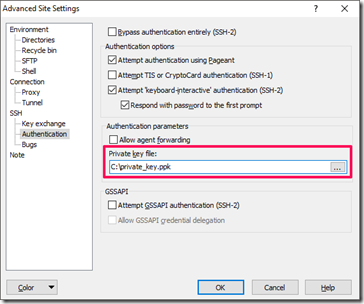
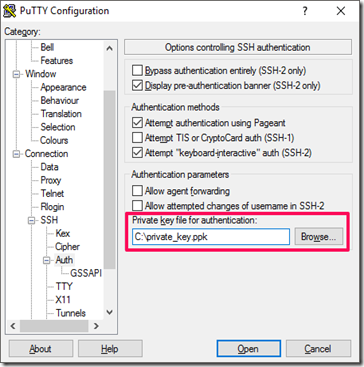
specifying private key file as shown below.
a. Specifying private key file in WinSCP SCP client:
b. Specifying private key file in PuTTy SSH client:
2. Remove content under Sophos update directory
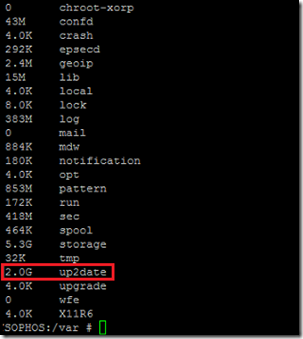
Commands for determining storage utilization on directory /var
- cd /var
- du -shx *
After root SSH login, executing the above directory size checking commands revealed the /var/up2date folder (containing downloaded firmware updates) took 2GB of space on the device.
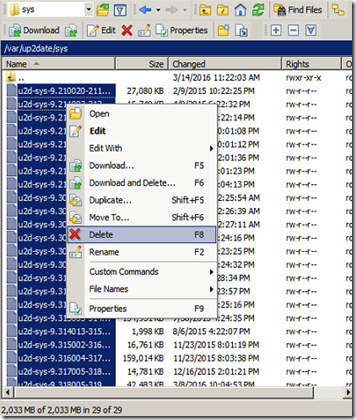
Mitigate the situation by removing the update files under /var/up2date/sys. Below screenshot shows a way to do it using WinSCP. (Backing up the files is recommended prior to deletion.)
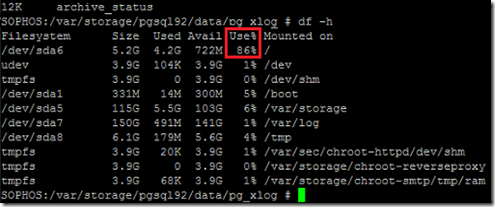
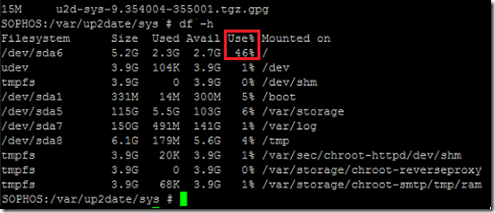
Command for listing space utilization statistics on each file system mounted on device
- df -h
Before removing the files, the disk utilization was 86%:
After removing the files, the disk utilization lowered to 46%:
3. Configure download interval for System Up2Date packages as Manual
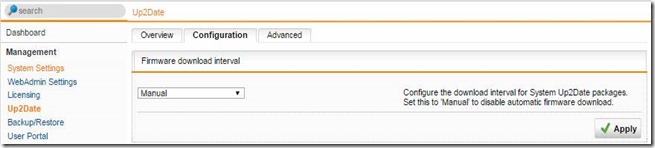
To prevent this problem from recurring, firmware download interval can be set to Manual
on the firewall. After configuring the setting, firewall updates will
not be automatically downloaded, hence device storage won’t be filled up
as easily.
Tip: Be sure to do this quickly after
moving/deleting the files. Otherwise, the device storage will be filled
up again by the update download next time
Hope this post provides a quick way to resolve this problem for those who encounter it.
Update in April 2017:
Fix it as early as we can! It was found that if we leave the problem
unresolved until the firewall disk partition becomes 100% full, web
administration console (httpd) will fail with the error below, and we
must recover the firewall via console logon (or using Windows PE/Linux
boot disc USB).
Internal Server Error
The server encounted an internal error or misconfiguration and was unable to complete your request.
Please
contact the server administrator at admin to inform them of the time
this error occurred, and the actions you performed just before this
error.More information about this error may be available in the server error log.
Additionally, a 500 Internal Server Error error was encountered while trying to use an ErrorDocument to handle the request.
Troubleshooting firewall 100% disk full – can't believe we can boot up #firewall with Windows PE or Linux boot disc (USB) like a PC #Sophos pic.twitter.com/AhGFOzeMqj
— a wandersick (@wandersick) April 5, 2017
Reference
Root partition filling up…
https://community.sophos.com/products/unified-threat-management/f/52/t/30237
let's find where the problem is, from the command line as root:
cd /
du -shx *And then go into the largest in the list and do du -shx * again.
It looks like you're now on 9.318, so I would set the Download interval to "Manual" and delete everything in /var/up2date/sys
Resolving 'Root Partition Is Filling Up' Issue on Sophos UTM Firewall的更多相关文章
- raspi-config Expand root partition to fill SD card 原理
/********************************************************************************** * raspi-config E ...
- 解决Sophos UTM 9防火墙上的“根分区填满”问题
Resolving 'Root Partition Is Filling Up' Issue on Sophos UTM Firewall 收到“Sophos UTM 9”防火墻的“根分區填满”问题的 ...
- Extend a root LVM partition online
There is also a quick remedy for the emergency situation when your root partition runs out of disk s ...
- /etc/issue 查看系统版本号
查看系统版本号 [root@mysql bin]# cat /etc/issue CentOS release 6.4 (Final) Kernel \r on an \m
- CentOS5.4安装redmine详细步骤
>>>>概述<<<< 这里不解释什么是redmine及用来做什么,如果不知道用来做什么,估计也不会把它安装到CentOS5.4上.哈哈…… 以下为详细的 ...
- linux tcp调优
Linux TCP Performance Tuning News Linux Performance Tuning Recommended Books Recommended Links Linux ...
- 数据仓库006 - MySQL 5.6.x - Linux最佳生产环境离线部署
一.离线安装包 文件准备 这里以mysql-5.6.23-linux-glibc2.5-x86_64.tar.gz为例,记一次MySQL 5.6.x 的生产环境离线部署过程.使用SecureCRT连接 ...
- Linux基础介绍【第三篇】
更改SSH服务端远程登录的配置 windows服务端的默认远程管理端口是3389,管理员用户是administrator,普通用户是guest.Linux的管理用户是root,普通用户默认有很多个,远 ...
- Centos6版本升级
1.查看当前版本 [root@IDC-D-1699 docker]# cat /etc/issue CentOS release 6.8 (Final) Kernel \r on an \m 2.升级 ...
随机推荐
- navicat for mysql 在win7下设置定时计划之导出数据处理
navicat for mysql 在win7下设置定时计划之导出数据处理 博客分类: mysql navitcatmysql定时任务导出 前两篇记录了,navicat for mysql计划的入门 ...
- 记一次运行spark程序遇到的权限问题
设置回滚点在本地运行时正常,在集群时就报错,后来是发现ceshi这个目录其他用户没有写的权限,修改其他用户的权限就好了 hdfs dfs - /ceshi
- 聊聊、Spring 第一篇
Spring 大家都不陌生,企业应用中很流行的一个平台.从最开始的 Servlet 控制所有,到 MVC 模式的出现.从 SSH (Struts.Spring.Hibernate) 所谓的三剑客 到 ...
- webpack的像素转vw单位的loader插件
安装: npm i px2vw-view-loader 配置: 按以下loader格式,添加进入webpack配置文件,实现从px转换成vw,适用于移动端项目 module: { rules: [{ ...
- wine-qq 安装
http://www.bubuko.com/infodetail-343048.html
- struts2的一些功能
一.interceptor拦截器 1.自定义拦截器 public class Cus_Emp_Interceptor implements Interceptor { public String in ...
- P1023 税收与补贴问题 (模拟)
题目链接 Solution 比较恶心的模拟题(主要是难看懂题意其实) 题意戳这里 然后根据一些简单的数学常识,可以知道这是一个二次函数. 所以我们每次枚举一个值,然后判定政府给出的价格是否是顶点即可. ...
- hdu 1250 树形DP
Anniversary party Time Limit:1000MS Memory Limit:32768KB 64bit IO Format:%I64d & %I64u S ...
- c#.NET的事件与委托例子
原文发布时间为:2008-07-25 -- 来源于本人的百度文章 [由搬家工具导入] using System;using System.Data;using System.Configuration ...
- Solr5.2.1+Zookeeper3.4.9分布式集群搭建
1.选取三台服务器 由于机器比较少,现将zookeeper和solr都部署在以下三台机器上.(以下操作都是在172.16.20.101主节点上进行的哦) 172.16.20.101 主节点 172.1 ...