
python 基础之第九天
###############错误和异常########################


说明:e 是错误的具体原因,else 表示没有异常才会执行else的语句,finally 是无乱有没异常都要执行
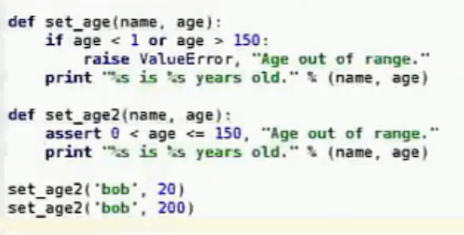
raise 自定义触发异常
assert 断言异常,assert 后面的为真,这句话没有意义,不会执行;为假,则会执行‘Age out of range’
############例子###############

#############with 语句###################

######################函数的参数####################
#####‘*args'#########
In [9]: def foo(*args):

   ...:     print args

   ...:

In [10]: foo(10)

(10,)

In [11]: foo(10,20,'fush')

(10, 20, 'fush')

###########################
In [12]: def add(x,y):
....: return x+y
....:
In [13]: add(*[10,20])
Out[13]: 30
In [14]: add(*(10,20))
Out[14]: 30
###########**args#############
In [15]: def bar(**args):

   ....:     print agrs

In [18]: bar(name='bob',age=23)

{'age': 23, 'name': 'bob'}
##########大招################
In [21]: def fun1(args,*non_args,**kwargs):

    print args

    print non_args

    print kwargs

In [23]: fun1(10)

10

()

{}

In [24]: fun1(10,20)

10

(20,)

{}

In [25]: fun1(10,(20,30))

10

((20, 30),)

{}

In [26]: fun1(10,(20,30),name='bob')

10

((20, 30),)

{'name': 'bob'}
######################实战案例################

[root@master script]# cat num_game.py

#!/usr/bin/python

# coding:utf-8

import random

def probe():

    CMDs = {'+':add,'-':sub}

    N_list = [random.randint(1,50) for i in range(2)]

    N_list.sort(reverse=True)

    op = random.choice('+-')

    answer =  CMDs[op](*N_list)

    prompt = '%s %s %s = ' % (N_list[0],op,N_list[1])

    tries = 0

    while tries < 3:

        result = int(raw_input(prompt))

        if answer == result:

            print 'Very Good!'

            break

        print 'answer is wrong!'

        tries +=1

    else:

        print '\033[31;1m正确答案是%s%s\033[0m' % (prompt,answer)

def add(x,y):

    return x+y

def sub(x,y):

    return x-y

if __name__ == '__main__':

    while True:

        probe()

        choice = raw_input('Contine(Y/N) ').strip()[0]

        if choice in 'Nn ':

            break
检测:
[root@master script]# python num_game.py

49 + 35 = 45

answer is wrong!

49 + 35 = 45

answer is wrong!

49 + 35 = 45

answer is wrong!

Contine(Y/N) y

27 + 10 = 37

Very Good!

Contine(Y/N) n
#########################记账系统#####################

shell:

[root@master script]# date +%F

2017-08-16

[root@master script]# date +%Y-%m-%d

2017-08-16

python:

In [1]: import time

In [2]: time.strftime('%F')   #或者 time.strftime('%Y-%m-%d')

Out[2]: '2017-08-16'
代码如下:
[root@master script]# cat account.py

#!/usr/bin/python

# coding:utf-8

import os

import cPickle as P

import time

import sys

def spend_money(wallet,record,date,amount,comment):

    with open(wallet) as fobj:

        balance = P.load(fobj) - amount

    with open(wallet,'w') as fobj:

        P.dump(balance,fobj)

    with open(record,'a') as fobj:

        fobj.write('%-12s%-8s%-10s%-10s%-20s\n' % (date,amount,'N/A',balance,comment))

def save_money((wallet,record,date,amount,comment)):

    with open(wallet) as fobj:

        balance = P.load(fobj) + amount

    with open(wallet,'w') as fobj:

        P.dump(balance,fobj)

    with open(record,'a') as fobj:

        fobj.write('%-12s%-8s%-10s%-10s%-20s\n' % (date,'N/A',amount,balance,comment))

def query_money(wallet,record):

    print '%-12s%-8s%-10s%-10s%-20s\n' % ('date','spend','save','balance','comment')

    with open(record) as fobj:

        for line in fobj:

            print line

    with open(wallet) as fobj:

        print 'New balance:\n%s' %(P.load(fobj))

def show_menu(wallet,record):

    CMDs = {'':spend_money,'':save_money,'':query_money}

    prompt = """(0) spend_money

(1) save_money

(2) query

(3) quit

Please your choice(0/1/2/3):"""

    while True:

        try:

            choice = raw_input(prompt).strip()[0]

        except(KeyboardInterrupt,EOFError):

            print "Bye-Bye"

            sys.exit(1)

        #except IndexError:

        #    continue

        if choice == '':

            print 'Bye-Bye'

            break

        if choice not in '':

            print 'Invalid input,Try again'

            continue

        args = (wallet,record)

        if choice in '':

            date = time.strftime('%F')

            amount = int(raw_input('amount:'))

            comment = raw_input('comment:')

            args = (wallet,record,date,amount,comment)

        CMDs[choice](*args)

if __name__ == '__main__':

    wallet = 'wallet.data'

    record = 'record.txt'

    if not os.path.exists(wallet):

        with open(wallet,'w') as fobj:

            P.dump(10000,fobj)

    if not os.path.exists(record):

        os.mknod(record)

    show_menu(wallet,record)
效果如下:
[root@master script]# python account.py

(0) spend_money

(1) save_money

(2) query

(3) quit

Please your choice(0/1/2/3):2

date        spend   save      balance   comment

2017-08-16  N/A     500       10500     water

2017-08-16  400     N/A       10100     supermarket

New balance:

10100

(0) spend_money

(1) save_money

(2) query

(3) quit

Please your choice(0/1/2/3):3

Bye-Bye
python 基础之第九天的更多相关文章
- python基础第一章
Python基础 第一个python程序 变量 程序交互 基本数据类型 格式化输出 基本运算符 流程控制if...else... 流程控制-循环 第一个python程序 文件执行 1.用notepad ...
- 孤荷凌寒自学python第七十九天开始写Python的第一个爬虫9并使用pydocx模块将结果写入word文档
孤荷凌寒自学python第七十九天开始写Python的第一个爬虫9 (完整学习过程屏幕记录视频地址在文末) 今天在上一天的基础上继续完成对我的第一个代码程序的书写. 到今天终于完成了对docx模块针对 ...
- 孤荷凌寒自学python第六十九天学习并实践beautifulsoup对象用法2
孤荷凌寒自学python第六十九天学习并实践beautifulsoup对象用法2 (完整学习过程屏幕记录视频地址在文末) 今天继续学习beautifulsoup对象的属性与方法等内容. 一.今天进一步 ...
- 孤荷凌寒自学python第五十九天尝试使用python来读访问远端MongoDb数据服务
孤荷凌寒自学python第五十九天尝试使用python来读访问远端MongoDb数据服务 (完整学习过程屏幕记录视频地址在文末) 今天是学习mongoDB数据库的第五天.今天的感觉是,mongoDB数 ...
- 孤荷凌寒自学python第四十九天继续研究跨不同类型数据库的通用数据表操作函数
孤荷凌寒自学python第四十九天继续研究跨不同类型数据库的通用数据表操作函数 (完整学习过程屏幕记录视频地址在文末,手写笔记在文末) 今天继续建构自感觉用起来顺手些的自定义模块和类的代码. 不同类型 ...
- 孤荷凌寒自学python第三十九天python 的线程锁Lock
孤荷凌寒自学python第三十九天python的线程锁Lock (完整学习过程屏幕记录视频地址在文末,手写笔记在文末) 当多个线程同时操作一个文件等需要同时操作某一对象的情况发生时,很有可能发生冲突, ...
- python之最强王者(2)——python基础语法
背景介绍:由于本人一直做java开发,也是从txt开始写hello,world,使用javac命令编译,一直到使用myeclipse,其中的道理和辛酸都懂(请容许我擦干眼角的泪水),所以对于pytho ...
- Python开发【第二篇】:Python基础知识
Python基础知识 一.初识基本数据类型 类型: int(整型) 在32位机器上,整数的位数为32位,取值范围为-2**31-2**31-1,即-2147483648-2147483647 在64位 ...
- Python小白的发展之路之Python基础(一)
Python基础部分1: 1.Python简介 2.Python 2 or 3,两者的主要区别 3.Python解释器 4.安装Python 5.第一个Python程序 Hello World 6.P ...
随机推荐
- iOS -- SKTextureAtlas类
SKTextureAtlas类 继承自 NSObject 符合 NSCodingNSObject(NSObject) 框架 /System/Library/Frameworks/SpriteKi ...
- Go -- LRU算法(缓存淘汰算法)(转)
1. LRU1.1. 原理 LRU(Least recently used,最近最少使用)算法根据数据的历史访问记录来进行淘汰数据,其核心思想是“如果数据最近被访问过,那么将来被访问的几率也更高”. ...
- paramiko执行命令超时的问题
问题:paramiko远程执行命令,需要等到命令返回信息,如果命令执行时间比较长,返回信息就需要等很久 方案:1.使用nohup + 待执行命令 + & ,使用后台执行的方式,应该可以快速返回 ...
- Java第三次实验要求
实验三 类与对象(一) 一. 实验目的 1. 掌握类与对象的基本概念: 2. 掌握类的声明.创建与用法: 3. 掌握类的构造方法的定义与用法 4. 掌握类的成员变量.成员方法的定义与用法: 5. 理解 ...
- vue-class-component 以class的模式写vue组件
vue英文官网推荐了一个叫vue-class-component的包,可以以class的模式写vue组件.vue-class-component(以下简称Component)带来了很多便利: 1.me ...
- Odoo电子数据交换(EDI)
Odoo EDI功能能在odoo实例之间交换数据,可以交换哪些数据呢? 默认支持: account.invoice 发票,含发票行 res.currency res.partner purchase. ...
- C++11 并发指南四(<future> 详解三 std::future & std::shared_future)(转)
上一讲<C++11 并发指南四(<future> 详解二 std::packaged_task 介绍)>主要介绍了 <future> 头文件中的 std::pack ...
- 【转载】ViewState的用法
本文导读:在web窗体控件设置为runat = "server",这个控件会被附加一个隐藏的属性_ViewState,_ViewState存放了所有控件在ViewState中的状态 ...
- php实现双色球算法
function DoubleBall(){ $sysBlueball = mt_rand(1,16); $sysRedball = array(1,2,3,4,5,6,7,8,9,10,11,12, ...
- do export method of oracle all database tables with dmp files.
usually we need to export the database tables to backup and others use. So we must know what to do e ...