
hadoop FileSystem类和SequenceFile类实例
Hadoop的FileSystem类是与Hadoop的某一文件系统进行交互的API,虽然我们主要聚焦于HDFS实例,但还是应该集成FileSystem抽象类,并编写代码,使其在不同的文件系统中可移植,对于测试编写的程序非常重要。可以使用本地文件系统中的存储数据快速进行测试。
一、从Hadoop FileSystem读取数据
1、java.net.URL
private FileSystem fs;

    /**

     * 通过FsUrlStreamHandlerFactory实例调用java.net.URL对象的setURLStreamHandlerFactory方法,让java程序识别Hadoop的HDFS url

            每个java虚拟机只能调用一次这个方法,因此通常在静态方法中调用。这个限制意味着如果程序的其他组件已经声明了一个setURLStreamHandlerFactory实例,你

          将无法使用这种方法从hadoop中读取数据

     */

    static {

        URL.setURLStreamHandlerFactory(new FsUrlStreamHandlerFactory());

    }

    /**

     * 读取hadoop文件系统中文件的内容(不推荐使用)

     */

    @Test

    public void catFiles(){

        InputStream inputStream=null;

        try {

            //调用java.net.URL对象打开数据流

            inputStream=new URL("hdfs://s100:8020/user/enmoedu/test.txt").openStream();

            //调用copyBytes函数,可以在输入流和输出流之间复制数据,

            //System.out输出到控制台,第三个参数是设置缓冲区大小,最后一个,设置复制结束后是否关闭数据流

            IOUtils.copyBytes(inputStream, System.out, 1024,false);

        } catch (IOException e) {

            e.printStackTrace();

        }finally{

            //关闭数据流

            IOUtils.closeStream(inputStream);

        }

    }
执行结果:
hello chengpingyijun

hello enmoedu
2、org.apache.hadoop.fs.FileSystem
/**

     * 读取hadoop文件系统中文件的内容(推荐使用)

     */

    @Test

    public void fileSystemCat(){

        String url="hdfs://s100:8020/user/enmoedu/test.txt";

        Configuration configuration=new Configuration();

        InputStream inputStream=null;

        try {

            //通过给定的URI方案和权限来确定要使用的文件系统

            fs=FileSystem.get(URI.create(url),configuration);

            //FileSystem实例后,调用open()来获取文件的输入流

             inputStream=fs.open(new Path(url));

                 //调用copyBytes函数,可以在输入流和输出流之间复制数据,

                //System.out输出到控制台,第三个参数是设置缓冲区大小,最后一个,设置复制结束后是否关闭数据流

             IOUtils.copyBytes(inputStream, System.out, 1024,false);

        } catch (IOException e) {

            e.printStackTrace();

        }finally {

            //关闭数据流

            IOUtils.closeStream(inputStream);

        }

    }
执行结果:
hello chengpingyijun

hello enmoedu
查看HDFS上test.txt中的内容

3、在HDFS上创建目录
在HDFS上查看在user/目录下没有test文件
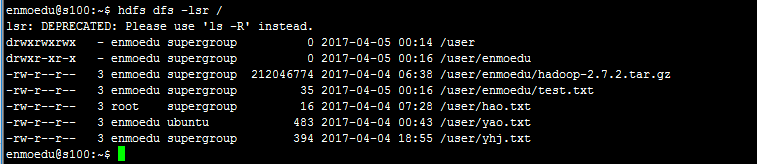
/**

     * 创建目录

     */

    @Test

    public void creatDir(){

        String url="hdfs://s100:8020/user/test";

        //configuration封装了HDFS客户端或者HDFS集群的配置信息,

        //该方法通过给定的URI方案和权限来确定要使用的文件系统

        Configuration configuration=new Configuration();

        try {

            //通过给定的URI方案和权限来确定要使用的文件系统

            fs=FileSystem.get(URI.create(url), configuration);

            fs.mkdirs(new Path(url));

            System.out.println("========================");

        } catch (IOException e) {

            e.printStackTrace();

        }

    }
执行结果
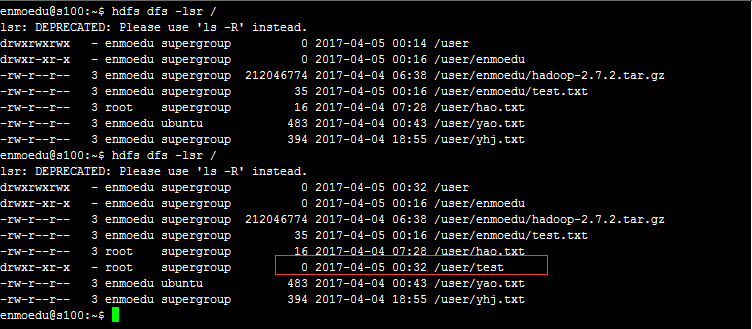
4、在HDFS上删除目录
/**

     * 删除目录

     */

    @Test

    public void deleteDir(){

        String url="hdfs://s100:8020/user/test";

        Configuration configuration=new Configuration();

        try {

            //通过给定的URI方案和权限来确定要使用的文件系统

            fs=FileSystem.get(URI.create(url), configuration);

            fs.delete(new Path(url));

            System.out.println("========================");

        } catch (IOException e) {

            e.printStackTrace();

        }

    }
执行结果:
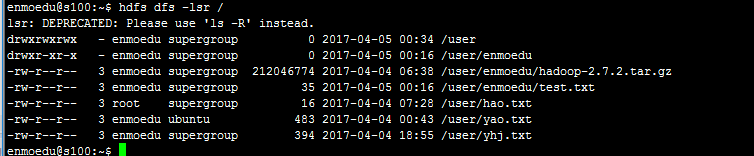
5、列出目录下的文件或目录名称示例
/**

     * 列出目录下的文件或目录名称示例

     */

    @Test

    public void listFiles(){

        String urls[]={"hdfs://s100:8020/user/","hdfs://s100:8020/user/test.txt"};

        Configuration configuration=new Configuration();

        try {

            //通过给定的URI方案和权限来确定要使用的文件系统

            fs=FileSystem.get(URI.create(urls[1]), configuration);

            //FileStatus类中封装了文件系统中文件和目录的元数据,包括文件的长度、块大小、复本、所有者、及权限信息

            FileStatus file=fs.getFileStatus(new Path(urls[1]));

            //文件大小

            long lenthg=file.getLen();

            //块大小

            long size=file.getBlockSize();

            //最近修改时间

            long time=file.getModificationTime();

            //复本数

            int n=file.getReplication();

            //所有者

            String owner=file.getOwner();

            //权限信息

            String chmod=file.getPermission().toString();

            System.out.println("user目录下的方件有");

            System.out.println("====================================");

            //调用FileSystem中的listStatus()方法返回一个FileStatus[]数组

            FileStatus[] listFiles=fs.listStatus(new Path(urls[0]));

            //遍历listFiles

            for (int i = 0; i < listFiles.length; i++) {

                FileStatus fileStatus = listFiles[i];

                System.out.println(fileStatus.getPath().toString());

            }

            System.out.println("user目录下的文件所具有的属性");

            System.out.println("====================================");

            System.out.println("文件大小是:"+lenthg);

            System.out.println("块大小"+size);

            System.out.println("最近修改时间:"+time);

            System.out.println("复本数"+n);

            System.out.println("文件所有者"+owner);

            System.out.println("权限信息"+chmod);

            //关闭输入流

            fs.close();

        } catch (IOException e) {

            e.printStackTrace();

        }

    }
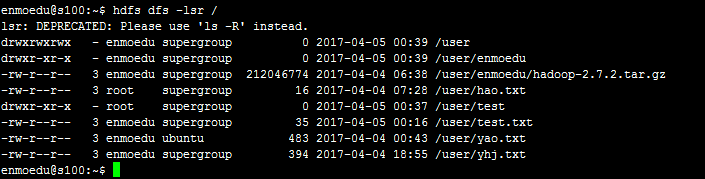
执行结果
user目录下的方件有

====================================

hdfs://s100:8020/user/enmoedu

hdfs://s100:8020/user/hao.txt

hdfs://s100:8020/user/test

hdfs://s100:8020/user/test.txt

hdfs://s100:8020/user/yao.txt

hdfs://s100:8020/user/yhj.txt

user目录下的文件所具有的属性

====================================

文件大小是:35

块大小134217728

最近修改时间:1491376577359

复本数3

文件所有者enmoedu

权限信息rw-r--r--
6、查看文件系统中文件存储的位置信息
/**

     * 查看文件系统中文件存储节点的位置信息

     */

    @Test

    public void locationFile(){

        //测试hdfs上hadoop-2.7.2.tar.gz包的位置信息,其中hadoop-2.7.2.tar.gz的大小是212046774kb约202M

        String url="hdfs://s100:8020/user/enmoedu/hadoop-2.7.2.tar.gz";

        //configuration封装了HDFS客户端或者HDFS集群的配置信息,

        //该方法通过给定的URI方案和权限来确定要使用的文件系统

        Configuration configuration=new Configuration();

        try {

            //通过给定的URI方案和权限来确定要使用的文件系统

            fs=FileSystem.get(URI.create(url), configuration);

            //FileStatus的getFileStatus()方法用于获取文件或目录的FileStatus对象

            FileStatus fileStatu=fs.getFileStatus(new Path(url));

            //通过getFileBlockLocations方法获取location节点信息,第一个参数FileStatus对象,第二个是起始,第三个是结束

            BlockLocation [] locationMsg=fs.getFileBlockLocations(fileStatu, 0, fileStatu.getLen());

            //遍历BlockLocation对象

            for (int i = 0; i < locationMsg.length; i++) {

                //获取主机名

                String hosts[] =locationMsg[i].getHosts();

                System.out.println("block_"+i+"_location:"+hosts[i]);

            }

        } catch (IOException e) {

            e.printStackTrace();

        }

    }
执行结果
block_0_location:s102

block_1_location:s105
二、Hadoop SequenceFile的读写操作
SequenceFile是HDFS API提供的一种二进制文件支持,这种二进制文件直接将<key,value>序列化到文件中。
1、通过SequenceFile向方件中写入数据
/**

     * 通过SequenceFile向方件中写入内容

     */

    @Test

    public void wirteSequenceFile(){

        String [] text={"Right Here Waiting","Oceans apart, day after day","and I slowly go insane.",

                " I hear your voice on the line,","But it doesn't stop the pain. "};

        String url="hdfs://s100:8020/user/testsqu";

        Configuration configuration=new Configuration();

        //Writer内部类用于文件的写操作,假设Key和Value都为Text类型

        SequenceFile.Writer writer=null;

        try {

            fs=FileSystem.get(URI.create(url), configuration);

            //相当于java中的int

            IntWritable key=new IntWritable();

            Text value=new Text();

            writer=SequenceFile.createWriter(fs, configuration, new Path(url), key.getClass(), value.getClass());

            for (int i = 0; i < text.length; i++) {

                key.set(text.length-i);

                value.set(text[i%text.length]);

                //通过writer向文档中写入记录

                writer.append(key, value);

            }

        } catch (IOException e) {

            e.printStackTrace();

        }finally {

            IOUtils.closeStream(writer);

        }

    }
执行结果
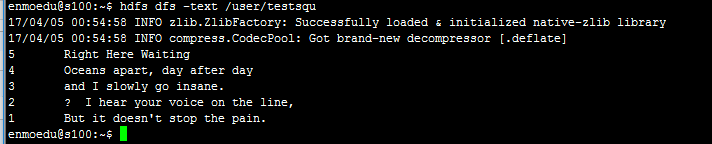
2、通过SequenceFile读取文件中的类容
/**

     * 读取SequenceFile中的内容

     */

    @Test

    public void readSequenceFile(){

        String url="hdfs://s100:8020/user/testsqu";

        Configuration configuration=new Configuration();

        //Reader内部类用于文件的读取操作

        SequenceFile.Reader reader=null;

        try {

            fs=FileSystem.get(URI.create(url), configuration);

            reader=new SequenceFile.Reader(fs, new Path(url), configuration);

            Writable key=(Writable) ReflectionUtils.newInstance(reader.getKeyClass(),configuration);

            Writable value=(Writable) ReflectionUtils.newInstance(reader.getValueClass(), configuration);

            long position=reader.getPosition();

            while (reader.next(key, value)) {

                System.out.printf("[%s]\t%s\n",key,value);

                position=reader.getPosition();

            }

        } catch (IOException e) {

            e.printStackTrace();

        }finally {

            IOUtils.closeStream(reader);

        }

    }
执行结果
[5]	Right Here Waiting

[4]	Oceans apart, day after day

[3]	and I slowly go insane.

[2]	 I hear your voice on the line,

[1]	But it doesn't stop the pain.
hadoop FileSystem类和SequenceFile类实例的更多相关文章
- 【转】C#类的分类(静态类、实例类、嵌套类、结构、简单的抽象类、简单的密封类)
静态类 -------------------------------------------------------------------------------- 静态类就是在class关键字前 ...
- Java Class类以及获取Class实例的三种方式
T - 由此 Class 对象建模的类的类型.例如,String.class 的类型是Class<String>.如果将被建模的类未知,则使用Class<?>. publi ...
- Ruby学习: 类的定义和实例变量
ruby是完全面向对象的,所有的数据都是对象,没有独立在类外的方法,所有的方法都在类中定义的. 一.类的定义语法 类的定义以 class 关键字开头,后面跟类名,以 end标识符结尾. 类中的方法以 ...
- Asp.Net Core 2.0 项目实战(6)Redis配置、封装帮助类RedisHelper及使用实例
本文目录 1. 摘要 2. Redis配置 3. RedisHelper 4.使用实例 5. 总结 1. 摘要 由于內存存取速度远高于磁盘读取的特性,为了程序效率提高性能,通常会把常用的不常变动的数 ...
- python 类的定义 实例化 实例完后初始化
先来看看 类的__init__, 类的__new__ , 元类的__new__的执行顺序 class TMetaclass(type): def __new__(cls,name,bases,attr ...
- python类属性和类方法(类的结构、实例属性、静态方法)
类属性和类方法 目标 类的结构 类属性和实例属性 类方法和静态方法 01. 类的结构 1.1 术语 —— 实例 使用面相对象开发,第 1 步 是设计 类 使用 类名() 创建对象,创建对象 的动作有两 ...
- python 全栈开发,Day18(对象之间的交互,类命名空间与对象,实例的命名空间,类的组合用法)
一.对象之间的交互 现在我们已经有一个人类了,通过给人类一些具体的属性我们就可以拿到一个实实在在的人.现在我们要再创建一个狗类,狗就不能打人了,只能咬人,所以我们给狗一个bite方法.有了狗类,我们还 ...
- python的面向对象-类的数据属性和实例的数据属性相结合-无命名看你懵逼不懵逼系列
1. class Chinese: country='China' def __init__(self,name): self.name=name def play_ball(self,ball): ...
- DI容器Ninject在管理接口和实现、基类和派生类并实现依赖注入方面的实例
当一个类依赖于另一个具体类的时候,这样很容易形成两者间的"强耦合"关系.我们通常根据具体类抽象出一个接口,然后让类来依赖这个接口,这样就形成了"松耦合"关系,有 ...
随机推荐
- 51nod 1572 宝岛地图
题目来源: CodeForces 基准时间限制:1 秒 空间限制:131072 KB 分值: 20 难度:3级算法题 勇敢的水手们到达了一个小岛,在这个小岛上,曾经有海盗在这里埋下了一些宝藏.然而,我 ...
- 2018.2.10 使用SSH连接远程滴滴云服务器Ubuntu (Windows下) 及 putty工具永久设置字体、颜色
一开始会有人问云服务器是什么? 云服务器是一种类似VPS服务器的虚拟化技术, VPS是采用虚拟软件,VZ或VM在一台服务器上虚拟出多个类似独立服务器的部分,每个部分都可以做单独的操作系统,管理方法同服 ...
- 剑指offer46 求1+2+...+n 以及& &&区别
参考代码: class Solution { public: int Sum_Solution(int n) { int result = n; result && (result + ...
- java中的同步与异步
在多线程的环境中,经常会碰到数据的共享问题,即当多个线程需要访问同一个资源时,它们需要以某种顺序来确保该资源在某--时刻只能被-一个线程使用,否则,程序的运行结果将会是不可预料的,在这种情况下就必须对 ...
- Codevs1082 线段树练习 3
题目描述 Description 给你N个数,有两种操作: 1:给区间[a,b]的所有数增加X 2:询问区间[a,b]的数的和. 输入描述 Input Description 第一行一个正整数n,接下 ...
- php代码压缩
php代码压缩,除可以使用token_get_all进行压缩之外,还可以使用系统自带的函数 php_strip_whitespace (PHP 5) php_strip_whitespace — ...
- Golang ioutil读写文件测试
运用 ioutil.ReadFile .ioutil.WriteFile package main import ( "io/ioutil" "log" &qu ...
- tomcat报错:java.io.IOException: 您的主机中的软件中止了一个已建立的连接。
tomcat报错: org.apache.catalina.connector.ClientAbortException: java.io.IOException: 您的主机中的软件中止了一个已建立的 ...
- gulp的安装和使用
安装nodejs -> 全局安装gulp -> 项目安装gulp以及gulp插件 -> 配置gulpfile.js -> 运行任务 1.去nodejs官网安装nodejs 2. ...
- Python学习笔记:面向对象(类)
1.类定义:Python3中,如果新建的类没有继承任何其他类,默认继承基础类object.Python2中如果没有显式继承object类就是经典类,而显式继承了object类就是新式类,Python2 ...