
Django API 为 D3 提供数据
在工作中见过有的人即便使用了Django,依然还在采取json或geojson的文件形式为页面提供数据,相当于嵌入数据而非加载。下面是个简单有效的例子:
先从 model.py 开始
 # models.py

 from django.db import models

 class Play(models.Model):

     name = models.CharField(max_length=100)

     date = models.DateTimeField()
urls.py 建立一个 API 的数据(JSON格式)输出路径,另一个给图像输出页面。
 # urls.py

 from django.conf.urls import url

 from .views import graph, play_count_by_month

 urlpatterns = [

     url(r'^$', graph),

     url(r'^api/play_count_by_month', play_count_by_month, name='play_count_by_month'),

 ]
views.py
# views.py

from django.db import connections

from django.db.models import Count

from django.http import JsonResponse

from django.shortcuts import render

from .models import Play

def graph(request):

    return render(request, 'graph/graph.html')

def play_count_by_month(request):

    data = Play.objects.all() \

        .extra(select={'month': connections[Play.objects.db].ops.date_trunc_sql('month', 'date')}) \

        .values('month') \

        .annotate(count_items=Count('id'))

    return JsonResponse(list(data), safe=False)
下面则是HTML部分
 <!DOCTYPE html>

 <meta charset="utf-8">

 <style>

 body {

   font: 10px sans-serif;

 }

 .axis path,

 .axis line {

   fill: none;

   stroke: #000;

   shape-rendering: crispEdges;

 }

 .x.axis path {

   display: none;

 }

 .line {

   fill: none;

   stroke: steelblue;

   stroke-width: 1.5px;

 }

 </style>

 <body>

 <script src="http://d3js.org/d3.v3.js"></script>

 <script>

 var margin = {top: 20, right: 20, bottom: 30, left: 50},

     width = 960 - margin.left - margin.right,

     height = 500 - margin.top - margin.bottom;

 var parseDate = d3.time.format("%Y-%m-%d").parse; // for dates like "2014-01-01"

 //var parseDate = d3.time.format("%Y-%m-%dT00:00:00Z").parse;  // for dates like "2014-01-01T00:00:00Z"

 var x = d3.time.scale()

     .range([0, width]);

 var y = d3.scale.linear()

     .range([height, 0]);

 var xAxis = d3.svg.axis()

     .scale(x)

     .orient("bottom");

 var yAxis = d3.svg.axis()

     .scale(y)

     .orient("left");

 var line = d3.svg.line()

     .x(function(d) { return x(d.month); })

     .y(function(d) { return y(d.count_items); });

 var svg = d3.select("body").append("svg")

     .attr("width", width + margin.left + margin.right)

     .attr("height", height + margin.top + margin.bottom)

   .append("g")

     .attr("transform", "translate(" + margin.left + "," + margin.top + ")");

 d3.json("{% url "play_count_by_month" %}", function(error, data) {

   data.forEach(function(d) {

     d.month = parseDate(d.month);

     d.count_items = +d.count_items;

   });

   x.domain(d3.extent(data, function(d) { return d.month; }));

   y.domain(d3.extent(data, function(d) { return d.count_items; }));

   svg.append("g")

       .attr("class", "x axis")

       .attr("transform", "translate(0," + height + ")")

       .call(xAxis);

   svg.append("g")

       .attr("class", "y axis")

       .call(yAxis)

     .append("text")

       .attr("transform", "rotate(-90)")

       .attr("y", 6)

       .attr("dy", ".71em")

       .style("text-anchor", "end")

       .text("Play count");

   svg.append("path")

       .datum(data)

       .attr("class", "line")

       .attr("d", line);

 });

 </script>

 </body>

 </html>
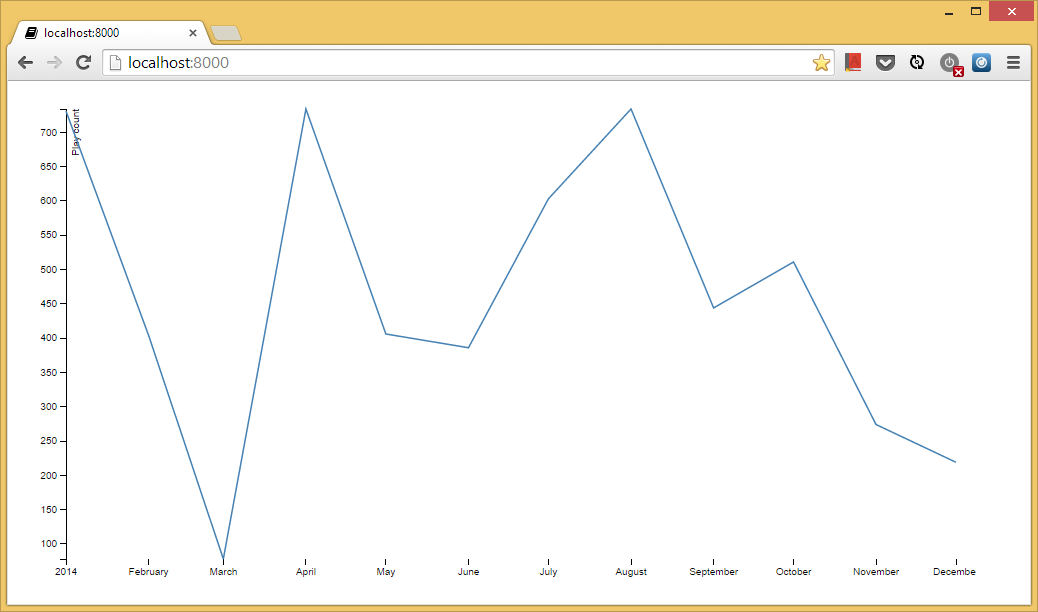
输出结果,大家可以在admin里调整数据。
Django API 为 D3 提供数据的更多相关文章
- Django API验证(令牌)
1. 获取接口信息 Client端 import requests import time import hashlib ctime = time.time() key = 'akfljakfjakl ...
- Django API接口FK ManyTo Many 模板
Url from django.contrib import admin from django.urls import path, re_path from django.urls import i ...
- Django API view 登录认证
文件分类 url from django.contrib import admin from django.urls import path, re_path from django.urls imp ...
- 【AMAD】django-formapi -- 一个DJANGO API框架,可使用签名request,可使用form作为API的验证工具
动机 简介 个人评分 动机 如何快速构建API,使用view就行了? 如果快速构建一个可以验证参数的API,使用django-formapi1吧! 简介 class DivisionCall(call ...
- Django api
http://www.cnblogs.com/wulaoer/p/5276050.html
- Django API 自定义状态码
class BaseResponse(object): def __init__(self): self.code = 1000 self.data = None self.error = None ...
- django API返回中文乱码
renturn HttpResponse(json.dumps(data,ensure_ascii=False))
- 初识Django —Python API接口编程入门
初识Django —Python API接口编程入门 一.WEB架构的简单介绍 Django是什么? Django是一个开放源代码的Web应用框架,由Python写成.我们的目标是用Python语言, ...
- 【Django】ESRTful APi
如何利用rest framework搭建Django API框架! 环境:win10 python3.6 思路步骤: 创建一个可以序列化的类 去数据库取数据交给序列化的类处理 把序列化的数据返回前 ...
随机推荐
- Sqoop环境安装
环境下载 首先将下载的 sqoop-1.4.6.bin__hadoop-2.0.4-alpha.tar.gz放到 /usr/hadoop/目录下(该目录可以自定义,一般为Hadoop集群安装目录),然 ...
- android 开发-ListView与ScrollView事件冲突处理(事件分发机制处理)
ListView和ScrollView都存在滚动的效果,所以一般不建议listView和scrollView进行嵌套使用,但有些需求则需要用到两者嵌套.在android的学习中学了一种事件分发处理机制 ...
- vue简单的CheckBox节点树
初学vue.js,恰好公司有个页面需要做一个简单的CheckBox组成的节点树,于是摸索着写了一个. 业务逻辑为:选中父节点,子节点全部选中:取消选中父节点,子节点全部取消:选中字节点,父节点选中. ...
- DRF之视图组件
不断的优化我们写的程序,是每个程序员必备的技能和职业素养,也是帮助我们成长的非常重要的手段. 使用serializer进行put接口设计 根据规范,PUT接口用来定义用户对数据修改的逻辑,也就是upd ...
- Python开发环境Wing IDE搜索工具介绍
Wing IDE编辑器的搜索工具提供了一个基于友好GUI的搜索和替换工具. 某些情况下搜索可能会跨越整个文件,也有可能被限制到当前所选择的区域:可以区分大小写,也可以设置为不区分:可以被限制为只匹配整 ...
- 用log4net快速构建asp.net 异常日志
log4net是一个非常完善的日志组件. 有着强大的可配置性. 有助于提高开发效率 .log4net是apache组织开发的日志组件, 同其姐妹log4j一样, 是一个开源项目. 可以以插件的形式应用 ...
- python资料汇总
http://www.cnblogs.com/vamei/archive/2012/09/13/2682778.html
- 解决 Unable to convert MySQL date/time value to System.DateTime
C#读取MySql时,如果存在字段类型为date/datetime时的可能会出现以下问题“Unable to convert MySQL date/time value to System.DateT ...
- World Wind Java开发之十二——加载粗制三维模型(ExtrudedPolygon)(转)
ww可以根据DLG图批量生成假三维模型,这对于小区等特征相似的建筑物模型的构建是非常有用的.下面来看如何一步步实现假三维模型的加载: 1.Shp文件的制作 首先在arcmap下数字化几个建筑物,并新建 ...
- Android(java)学习笔记82:利用SpannableString设置复合文本
1. SpannableString设置复合文本: TextView通常用来显示普通文本,但是有时候需要对其中某些文本进行样式.事件方面的设置.Android系统通过SpannableString类来 ...