
Spring Boot2.0之Admin-UI分布式微服务监控中心
前面https://www.cnblogs.com/toov5/p/9823353.html 说的很不好用哈哈 还需要json格式化
我们可以用Admin-UI 比较爽歪歪
原理:
将所有服务的监控中心管理存放在admin ui平台上

JSON数据放到注册中心去,用于展示。
下面我们创建如图所示的这个监控server端
创建maven工程 pom依赖
<parent>

		<groupId>org.springframework.boot</groupId>

		<artifactId>spring-boot-starter-parent</artifactId>

		<version>2.0.0.RELEASE</version>

	</parent>

	<dependencies>

		<dependency>

			<groupId>de.codecentric</groupId>

			<artifactId>spring-boot-admin-starter-server</artifactId>

			<version>2.0.0</version>

		</dependency>

		<dependency>

			<groupId>org.springframework.boot</groupId>

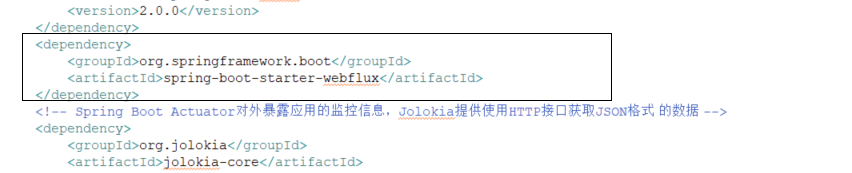
			<artifactId>spring-boot-starter-webflux</artifactId>

		</dependency>

		<!-- Spring Boot Actuator对外暴露应用的监控信息,Jolokia提供使用HTTP接口获取JSON格式 的数据 -->

		<dependency>

			<groupId>org.jolokia</groupId>

			<artifactId>jolokia-core</artifactId>

		</dependency>

		<dependency>

			<groupId>org.springframework.boot</groupId>

			<artifactId>spring-boot-starter-actuator</artifactId>

		</dependency>

		<dependency>

			<groupId>com.googlecode.json-simple</groupId>

			<artifactId>json-simple</artifactId>

			<version>1.1</version>

		</dependency>

	</dependencies>
注意这里的web组件被替代了
然后启动文件:
package com.toov5.adminUiServer;

import org.springframework.boot.SpringApplication;

import org.springframework.boot.autoconfigure.EnableAutoConfiguration;

import org.springframework.context.annotation.Configuration;

import de.codecentric.boot.admin.server.config.EnableAdminServer;

@Configuration

@EnableAutoConfiguration

@EnableAdminServer

public class AdminServerApplication {

    public static void main(String[] args) {

        SpringApplication.run(AdminServerApplication.class, args);

    }

}
@Configuration 类似于创建bean
一定要在项目中:@EnableAdminServer 启动!!!!
application.yml配置文件:
然后给这个项目服务起名字
spring:

  application:

    name: spring-boot-admin-server
项目陆目录结构:

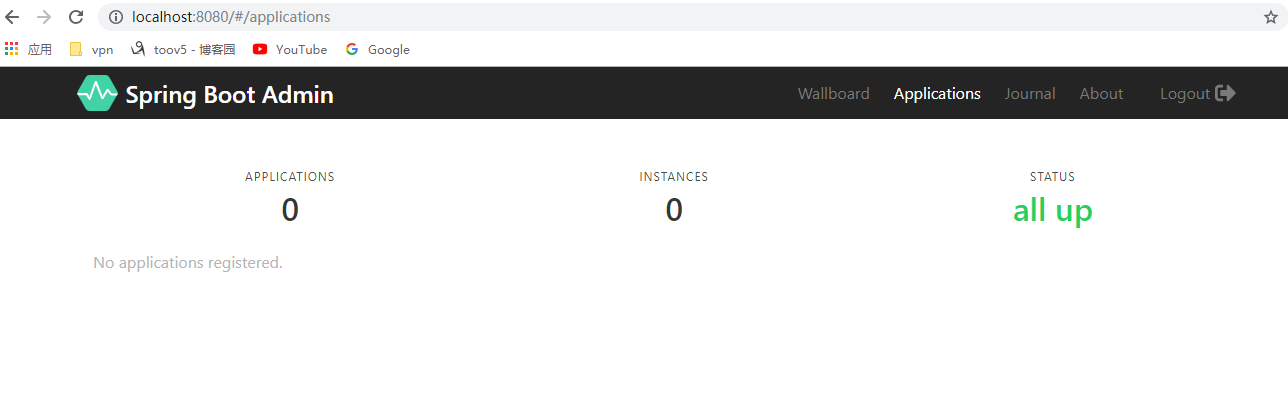
启动,访问:

等待被注册过来~
对了在写这个教程时候遇到了个jar包 maven下载不下来 看到了有些jar包是下载不下来的的确
下面吧client端注册到上面的server端

首先依赖的jar包pom文件
<parent>

		<groupId>org.springframework.boot</groupId>

		<artifactId>spring-boot-starter-parent</artifactId>

		<version>2.0.0.RELEASE</version>

	</parent>

	<dependencies>

		<dependency>

			<groupId>de.codecentric</groupId>

			<artifactId>spring-boot-admin-starter-client</artifactId>

			<version>2.0.0</version>

		</dependency>

		<dependency>

			<groupId>org.springframework.boot</groupId>

			<artifactId>spring-boot-starter-actuator</artifactId>

		</dependency>

		<dependency>

			<groupId>org.jolokia</groupId>

			<artifactId>jolokia-core</artifactId>

		</dependency>

		<dependency>

			<groupId>com.googlecode.json-simple</groupId>

			<artifactId>json-simple</artifactId>

			<version>1.1</version>

		</dependency>

		<dependency>

			<groupId>org.springframework.boot</groupId>

			<artifactId>spring-boot-starter-web</artifactId>

		</dependency>

	</dependencies>
yum配置文件:
spring:

  boot:

    admin:

      client:

        url: http://localhost:8080

server:

  port: 8081

management:

  endpoints:

    web:

      exposure:

        include: "*"

  endpoint:

    health:

      show-details: ALWAYS
启动类:
package com.toov5.adminUiClient;

import org.springframework.boot.SpringApplication;

import org.springframework.boot.autoconfigure.SpringBootApplication;

@SpringBootApplication

public class AppClinet {

    public static void main(String[] args) {

        SpringApplication.run(AppClinet.class, args);

    }

}
目录结构:

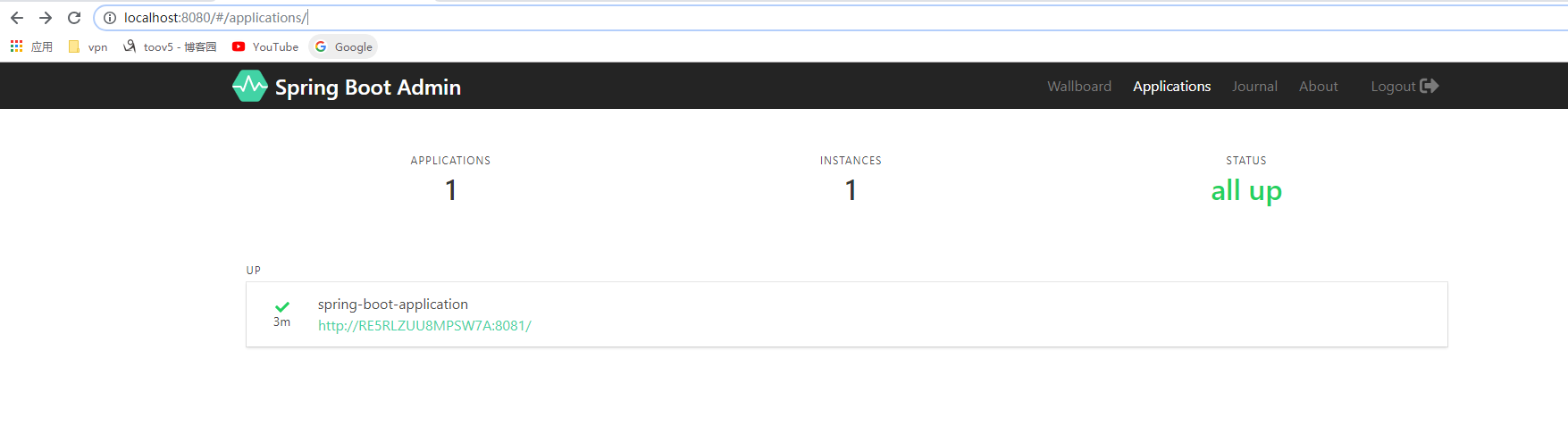
先启动server 然后 启动client
PS:jar包 maven下载不下来 看到了有些jar包是下载不下来的的确
小伙伴们自己点点 都有的各种信息 好好玩吧~~
Spring Boot2.0之Admin-UI分布式微服务监控中心的更多相关文章
- Spring Boot2.0使用Spring Security
一.Spring Secutity简介 Spring 是一个非常流行和成功的 Java 应用开发框架.Spring Security 基于 Spring 框架,提供了一套 Web 应用安全性 ...
- Spring Boot2.0 设置拦截器
所有功能完成 配置登录认证 配置拦截器 在spring boot2.0 之后 通过继承这个WebMvcConfigurer类 就可以完成拦截 新建包com.example.interceptor; 创 ...
- Spring Boot2.0 静态资源被拦截问题
在Spring Boot2.0+的版本中,只要用户自定义了拦截器,则静态资源会被拦截.但是在spring1.0+的版本中,是不会拦截静态资源的. 因此,在使用Spring Boot2.0+时,配置拦截 ...
- spring boot2.0(一 ) 基础环境搭建
1.基础配置 开发环境:window jdk版本:1.8(spring boot2.0最低要求1.8) 开发工具:eclipse 构建方式:maven3 2.POM配置文件 <project x ...
- Spring Boot2.0 整合 Kafka
Kafka 概述 Apache Kafka 是一个分布式流处理平台,用于构建实时的数据管道和流式的应用.它可以让你发布和订阅流式的记录,可以储存流式的记录,并且有较好的容错性,可以在流式记录产生时就进 ...
- Spring Boot2.0自定义配置文件使用
声明: spring boot 1.5 以后,ConfigurationProperties取消locations属性,因此采用PropertySource注解配合使用 根据Spring Boot2. ...
- Spring boot2.0 设置文件上传大小限制
今天把Spring boot版本升级到了2.0后,发现原来的文件上传大小限制设置不起作用了,原来的application.properties设置如下: spring.http.multipart.m ...
- spring boot 2.0(一)权威发布spring boot2.0
Spring Boot2.0.0.RELEASE正式发布,在发布Spring Boot2.0的时候还出现一个小插曲,将Spring Boot2.0同步到Maven仓库的时候出现了错误,然后Spring ...
- 整合SPRING CLOUD云服务架构 - 企业分布式微服务云架构构建
整合SPRING CLOUD云服务架构 - 企业分布式微服务云架构构建 1. 介绍 Commonservice-system是一个大型分布式.微服务.面向企业的JavaEE体系快速研发平台,基于模 ...
随机推荐
- 2017.2.9 开涛shiro教程-第十章-会话管理(一)
原博客地址:http://jinnianshilongnian.iteye.com/blog/2018398 根据下载的pdf学习. 第十章 会话管理(一) 10.1 会话 shiro提供的会话可以用 ...
- rsync的几则tips(渗透技巧)
转自91ri 关于rsync rsync(remote synchronize)——Linux下实现远程同步功能的软件,能同步更新两处计算机的文件及目录.在同步文件时,可以保持源文件的权限.时间.软硬 ...
- 微信小程序 - 下载图片并且显示进度
lastUpDate: 2018-8-12 请把请求地址加入到downLoadFile 提示:首先得要在公众号设置对应的downLoadFile地址. downImg : 下载图片 wxml js d ...
- 应用程序之SingleViewApplication
理论概念学习 iOS运行原理 代码结构分析 代码初步实现 一.理论学习 1⃣️.每一个应用程序都有属于自己的UIWindow,继承自UIView 2⃣️.每一个满屏的UIView都由一个UIViewC ...
- 提升Web性能的技巧
1. 采用反向代理服务器(Reverse Proxy Server)来对应用进行加速和保护 其作用主要在以下三方面: 负载平衡 – 运行在反向代理服务器上的负载平衡器会在不同的不服务器 间进行传输 ...
- SQL之相关语法及操作符
概述:UNION.SELECT INTO.INSERT INTO SELECT.SQL约束 UNION操作符 UNION操作符用于合并两个或多个SELECT语句的结果集 请注意,UNION内部的每个S ...
- 利用DataSet部分功能实现网站登录
using System; using System.Collections.Generic; using System.Linq; using System.Web; using System.We ...
- 关于cocos2d-x 和安卓之间的相互调用
近期在研究cocos2d游戏移植安卓须要调用非常多方法.所以在研究之中写下它们之间相互调用 首先,cocos2d调用安卓 在一个.h文件里加入头文件 #include <jni.h> #i ...
- 高性能HTTP加速器Varnish安装与配置(包含常见错误)
Varnish是一款高性能的开源HTTP加速器.挪威最大的在线报纸Verdens Gang使用3台Varnish取代了原来的12台Squid,性能竟然比曾经更好.Varnish 的作者Poul-Hen ...
- 链接脚本使用一例2---将二进制文件 如图片、MP3音乐、词典一类的东西作为目标文件中的一个段
参考文章: <程序员的自我修养——链接.转载与库> P68 这里介绍两种方法,实现将将一张图片作为二进制可执行程序的一个段,其中第一种方法在我之前的博客中已经有所介绍,不过,那是采用的是交 ...