
微服务(入门二):netcore通过consul注册服务
基础准备
1.创建asp.net core Web 应用程序选择Api

2.appsettings.json 配置consul服务器地址,以及本机ip和端口号信息
{

  "Logging": {

    "LogLevel": {

      "Default": "Warning"

    }

  },

  "Consul": {

    "IP": "127.0.0.1",

    "Port": ""

  },

  "Service": {

    "Name": "zyz"

  },

  "ip": "localhost",

  "port": "",

  "AllowedHosts": "*"

}
3.程序入口(program.cs)配置useurls,ip和port从配置文件(或者命令行中)读取(命令行启动方式:dotnet ConsulServer.dll --ip localhost --port 8644)
using System;

using System.Collections.Generic;

using System.IO;

using System.Linq;

using System.Threading.Tasks;

using Microsoft.AspNetCore;

using Microsoft.AspNetCore.Hosting;

using Microsoft.Extensions.Configuration;

using Microsoft.Extensions.Logging;

namespace ConsulServer

{

    public class Program

    {

        public static void Main(string[] args)

        {

            CreateWebHostBuilder(args).Build().Run();

        }

        public static IWebHostBuilder CreateWebHostBuilder(string[] args)

        {

            var config = new ConfigurationBuilder().AddCommandLine(args)

              .Build();//获取配置信息

            return WebHost.CreateDefaultBuilder(args)

                .UseUrls($"http://{ config["ip"]}:{config["port"]}")//配置ip地址和端口地址

                .UseStartup<Startup>();

        }

    }

}
4.配置基础数据,并且调用注册consul接口
using System;

using System.Collections.Generic;

using System.Linq;

using System.Threading.Tasks;

using Consul;

using ConsulServer.ConsulApi;

using ConsulServer.entity;

using Microsoft.AspNetCore.Builder;

using Microsoft.AspNetCore.Hosting;

using Microsoft.AspNetCore.Mvc;

using Microsoft.Extensions.Configuration;

using Microsoft.Extensions.DependencyInjection;

using Microsoft.Extensions.Logging;

using Microsoft.Extensions.Options;

namespace ConsulServer

{

    public class Startup

    {

        public Startup(IConfiguration configuration)

        {

            Configuration = configuration;

        }

        public IConfiguration Configuration { get; }

        // This method gets called by the runtime. Use this method to add services to the container.

        public void ConfigureServices(IServiceCollection services)

        {

            services.AddMvc().SetCompatibilityVersion(CompatibilityVersion.Version_2_1);

        }

        // This method gets called by the runtime. Use this method to configure the HTTP request pipeline.

        public void Configure(IApplicationBuilder app, IHostingEnvironment env, IApplicationLifetime lifetime)

        {

            if (env.IsDevelopment())

            {

                app.UseDeveloperExceptionPage();

            }

            ////配置信息单例

            //ConfigSingleton.setConfigSingleton(Configuration);

            app.UseMvc();

            ConsulEntity consulEntity = new ConsulEntity

            {

                ip = Configuration["ip"],

                port = int.Parse(Configuration["port"] ),

                ServiceName = "zyz",

                ConsulIP = Configuration["Consul:IP"],

                ConsulPort = Convert.ToInt32(Configuration["Consul:Port"])

            };

            app.RegisterConsul(lifetime, consulEntity);

        }

    }

}
5.配置注册信息
using Consul;

using ConsulServer.entity;

using Microsoft.AspNetCore.Builder;

using Microsoft.AspNetCore.Hosting;

using Microsoft.Extensions.Configuration;

using System;

using System.Collections.Generic;

using System.Linq;

using System.Threading.Tasks;

namespace ConsulServer.ConsulApi

{

    /// <summary>

    /// consul

    /// </summary>

    public static class AppBuilderExtensions

    {

        /// <summary>

        /// 注册consul

        /// </summary>

        /// <param name="app"></param>

        /// <param name="lifetime"></param>

        /// <param name="serviceEntity"></param>

        /// <returns></returns>

        public static IApplicationBuilder RegisterConsul(this IApplicationBuilder app, IApplicationLifetime lifetime, ConsulEntity serviceEntity)

        {

            //consul地址

            Action<ConsulClientConfiguration> configClient = (consulConfig) =>

            {

                consulConfig.Address = new Uri($"http://{serviceEntity.ConsulIP}:{ serviceEntity.ConsulPort}");

                consulConfig.Datacenter = "dc1";

            };

            //建立连接

            var consulClient = new ConsulClient(configClient);

            var httpCheck = new AgentServiceCheck()

            {

                DeregisterCriticalServiceAfter = TimeSpan.FromSeconds(),//服务启动多久后注册

                Interval = TimeSpan.FromSeconds(),//健康监测

                HTTP = string.Format($"http://{serviceEntity.ip}:{serviceEntity.port}/api/health"),//心跳检测地址

                Timeout = TimeSpan.FromSeconds()

            };

            //注册

            var registrtion = new AgentServiceRegistration()

            {

                Checks = new[] { httpCheck },

                ID = "zyzService" + Guid.NewGuid().ToString(),//服务编号不可重复

                Name = serviceEntity.ServiceName,//服务名称

                Address = serviceEntity.ip,//ip地址

                Port = serviceEntity.port//端口

            };

            //注册服务

            consulClient.Agent.ServiceRegister(registrtion);

            return app;

        }

    }

}
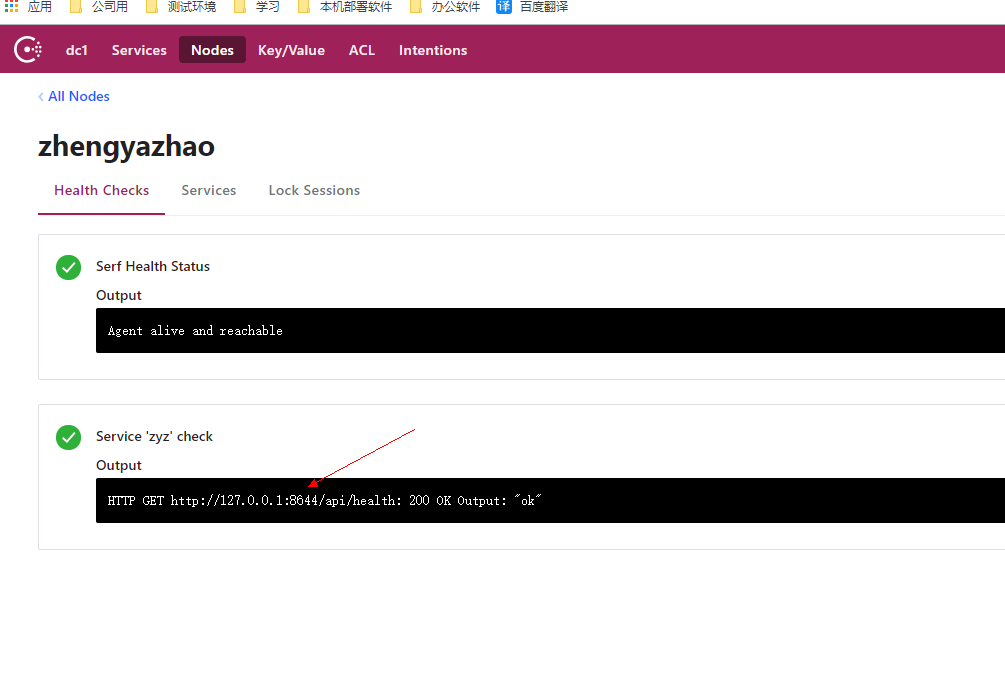
6.以命令行启动程序查看consul(dotnet ConsulServer.dll --ip localhost --port 8644)
快速入口:微服务(入门一):netcore安装部署consul
快速入口: 微服务(入门二):netcore通过consul注册服务
快速入口: 微服务(入门三):netcore ocelot api网关结合consul服务发现
快速入口:微服务(入门四):identityServer的简单使用(客户端授权)
微服务(入门二):netcore通过consul注册服务的更多相关文章
- 微服务入门二:SpringCloud(版本Hoxton SR6)
一.什么是SpringCloud 1.官方定义 1)官方定义:springcloud为开发人员提供了在分布式系统中快速构建一些通用模式的工具(例如配置管理.服务发现.断路器.智能路由.微代理.控制总线 ...
- 微服务架构 | 3.4 HashiCorp Consul 注册中心
目录 前言 1. Consul 基础知识 1.1 Consul 是什么 1.2 Consul 的特点 2. 安装并运行 Consul 服务器 2.1 下载 Consul 2.2 运行 Consul 服 ...
- Asp.net core 向Consul 注册服务
Consul服务发现的使用方法:1. 在每台电脑上都以Client Mode的方式运行一个Consul代理, 这个代理只负责与Consul Cluster高效地交换最新注册信息(不参与Leader的选 ...
- 建立eureka服务和客户端(客户端获取已经注册服务)
1. 新建sping boot eureka server 新建立spring starter project 修改pom.xml文件 在parent后追加 <dependencyManage ...
- 1、微服务--为什么有consul,consul注册,心跳检测,服务发现
一.为什么有consul? 在微服务,每1个服务都是集群式的,订单服务在10台服务器上都有,那么用户的请求到达,获取哪台服务器的订单服务呢?如果10台中的有的订单服务挂了怎么办?10台服务器扛不住了, ...
- 微服务入门三:SpringCloud Alibaba
一.什么是SpringCloud Alibaba 1.简介 1)简介 阿里云未分布式应用开发提供了一站式解决方案.它包含了开发分布式应用程序所需的所有组件,使您可以轻松地使用springcloud开发 ...
- Spring Cloud Consul 实现服务注册和发现
Spring Cloud 是一个基于 Spring Boot 实现的云应用开发工具,它为基于 JVM 的云应用开发中涉及的配置管理.服务发现.断路器.智能路由.微代理.控制总线.全局锁.决策竞选.分布 ...
- SpringBoot系列: 使用 consul 作为服务注册组件
本文基本上摘自纯洁的微笑的博客 http://www.ityouknow.com/springcloud/2018/07/20/spring-cloud-consul.html . 感谢作者的付出. ...
- 【SpringCloud】consul注册中心注册的服务为内网(局域网)IP
一.前因 最近在做公司的一个微服务项目,技术架构为spring cloud + consul + SSM. 当我写完一个功能要在本地测试时,发现服务运行成功,但是前后端联调报500错误. 当时的第一个 ...
随机推荐
- Hadoop-Yarn-框架原理及运作机制
一.YARN基本架构 YARN是Hadoop 2.0中的资源管理系统,它的基本设计思想是将MRv1中的JobTracker拆分成了两个独立的服务:一个全局的资源管理器ResourceManager和每 ...
- 计算机的Cache和Memory访问时Write-back,Write-through及write allocate的区别
计算机的存储系统采用Register,Cache,Memory和I/O的方式来构成存储系统,无疑是一个性能和经济性的妥协的产物.Cache和Memory机制是计算机硬件的基础内容,这里就不再啰嗦.下面 ...
- redux 中间件 --- applyMiddleware 源码解析 + 中间件的实战
前传 中间件的由来 redux的操作的过程,用户操作的时候,我们通过dispatch分发一个action,纯函数reducer检测到该操作,并根据action的type属性,进行相应的运算,返回st ...
- Mysql主从方案的实现
Mysql主从方案介绍 mysql主从方案主要作用: 读写分离,使数据库能支撑更大的并发.在报表中尤其重要.由于部分报表sql语句非常的慢,导致锁表,影响前台服务.如果前台使用master,报表使用s ...
- sql中having、group by用法及常用聚合函数
having是用在聚合函数的用法.当我们在用聚合函数的时候,一般都要用到GROUP BY 先进行分组,然后再进行聚合函数的运算.运算完后就要用到HAVING 的用法了,就是进行判断了. 注意:sele ...
- SSM-MyBatis-13:Mybatis中多条件查询
------------吾亦无他,唯手熟尔,谦卑若愚,好学若饥------------- 实体类 public class Book { private Integer bookID; private ...
- MVP架构在xamarin android中的简单使用
好几个月没写文章了,使用xamarin android也快接近两年,还有一个月职业生涯就到两个年了,从刚出来啥也不会了,到现在回头看这个项目,真jb操蛋(真辛苦了实施的人了,无数次吐槽怎么这么丑),怪 ...
- KVM内核文档阅读笔记
KVM在内核中有丰富的文档,位置在Documentation/virtual/kvm/. 00-INDEX:整个目录的索引及介绍文档. api.txt:KVM用户空间API,所谓的API主要是通过io ...
- LINUX PID 1和SYSTEMD 专题
Linux下有3个特殊的进程,idle进程(PID = 0), init进程(PID = 1)和kthreadd(PID = 2) idle进程其pid=0,其前身是系统创建的第一个进程,也是唯一一个 ...
- client,server,nginx 在使用keepAlive 专题
2. TCP keepalive overview In order to understand what TCP keepalive (which we will just call keepali ...