
微服务(入门二):netcore通过consul注册服务
基础准备
1.创建asp.net core Web 应用程序选择Api

2.appsettings.json 配置consul服务器地址,以及本机ip和端口号信息
{

  "Logging": {

    "LogLevel": {

      "Default": "Warning"

    }

  },

  "Consul": {

    "IP": "127.0.0.1",

    "Port": ""

  },

  "Service": {

    "Name": "zyz"

  },

  "ip": "localhost",

  "port": "",

  "AllowedHosts": "*"

}
3.程序入口(program.cs)配置useurls,ip和port从配置文件(或者命令行中)读取(命令行启动方式:dotnet ConsulServer.dll --ip localhost --port 8644)
using System;

using System.Collections.Generic;

using System.IO;

using System.Linq;

using System.Threading.Tasks;

using Microsoft.AspNetCore;

using Microsoft.AspNetCore.Hosting;

using Microsoft.Extensions.Configuration;

using Microsoft.Extensions.Logging;

namespace ConsulServer

{

    public class Program

    {

        public static void Main(string[] args)

        {

            CreateWebHostBuilder(args).Build().Run();

        }

        public static IWebHostBuilder CreateWebHostBuilder(string[] args)

        {

            var config = new ConfigurationBuilder().AddCommandLine(args)

              .Build();//获取配置信息

            return WebHost.CreateDefaultBuilder(args)

                .UseUrls($"http://{ config["ip"]}:{config["port"]}")//配置ip地址和端口地址

                .UseStartup<Startup>();

        }

    }

}
4.配置基础数据,并且调用注册consul接口
using System;

using System.Collections.Generic;

using System.Linq;

using System.Threading.Tasks;

using Consul;

using ConsulServer.ConsulApi;

using ConsulServer.entity;

using Microsoft.AspNetCore.Builder;

using Microsoft.AspNetCore.Hosting;

using Microsoft.AspNetCore.Mvc;

using Microsoft.Extensions.Configuration;

using Microsoft.Extensions.DependencyInjection;

using Microsoft.Extensions.Logging;

using Microsoft.Extensions.Options;

namespace ConsulServer

{

    public class Startup

    {

        public Startup(IConfiguration configuration)

        {

            Configuration = configuration;

        }

        public IConfiguration Configuration { get; }

        // This method gets called by the runtime. Use this method to add services to the container.

        public void ConfigureServices(IServiceCollection services)

        {

            services.AddMvc().SetCompatibilityVersion(CompatibilityVersion.Version_2_1);

        }

        // This method gets called by the runtime. Use this method to configure the HTTP request pipeline.

        public void Configure(IApplicationBuilder app, IHostingEnvironment env, IApplicationLifetime lifetime)

        {

            if (env.IsDevelopment())

            {

                app.UseDeveloperExceptionPage();

            }

            ////配置信息单例

            //ConfigSingleton.setConfigSingleton(Configuration);

            app.UseMvc();

            ConsulEntity consulEntity = new ConsulEntity

            {

                ip = Configuration["ip"],

                port = int.Parse(Configuration["port"] ),

                ServiceName = "zyz",

                ConsulIP = Configuration["Consul:IP"],

                ConsulPort = Convert.ToInt32(Configuration["Consul:Port"])

            };

            app.RegisterConsul(lifetime, consulEntity);

        }

    }

}
5.配置注册信息
using Consul;

using ConsulServer.entity;

using Microsoft.AspNetCore.Builder;

using Microsoft.AspNetCore.Hosting;

using Microsoft.Extensions.Configuration;

using System;

using System.Collections.Generic;

using System.Linq;

using System.Threading.Tasks;

namespace ConsulServer.ConsulApi

{

    /// <summary>

    /// consul

    /// </summary>

    public static class AppBuilderExtensions

    {

        /// <summary>

        /// 注册consul

        /// </summary>

        /// <param name="app"></param>

        /// <param name="lifetime"></param>

        /// <param name="serviceEntity"></param>

        /// <returns></returns>

        public static IApplicationBuilder RegisterConsul(this IApplicationBuilder app, IApplicationLifetime lifetime, ConsulEntity serviceEntity)

        {

            //consul地址

            Action<ConsulClientConfiguration> configClient = (consulConfig) =>

            {

                consulConfig.Address = new Uri($"http://{serviceEntity.ConsulIP}:{ serviceEntity.ConsulPort}");

                consulConfig.Datacenter = "dc1";

            };

            //建立连接

            var consulClient = new ConsulClient(configClient);

            var httpCheck = new AgentServiceCheck()

            {

                DeregisterCriticalServiceAfter = TimeSpan.FromSeconds(),//服务启动多久后注册

                Interval = TimeSpan.FromSeconds(),//健康监测

                HTTP = string.Format($"http://{serviceEntity.ip}:{serviceEntity.port}/api/health"),//心跳检测地址

                Timeout = TimeSpan.FromSeconds()

            };

            //注册

            var registrtion = new AgentServiceRegistration()

            {

                Checks = new[] { httpCheck },

                ID = "zyzService" + Guid.NewGuid().ToString(),//服务编号不可重复

                Name = serviceEntity.ServiceName,//服务名称

                Address = serviceEntity.ip,//ip地址

                Port = serviceEntity.port//端口

            };

            //注册服务

            consulClient.Agent.ServiceRegister(registrtion);

            return app;

        }

    }

}
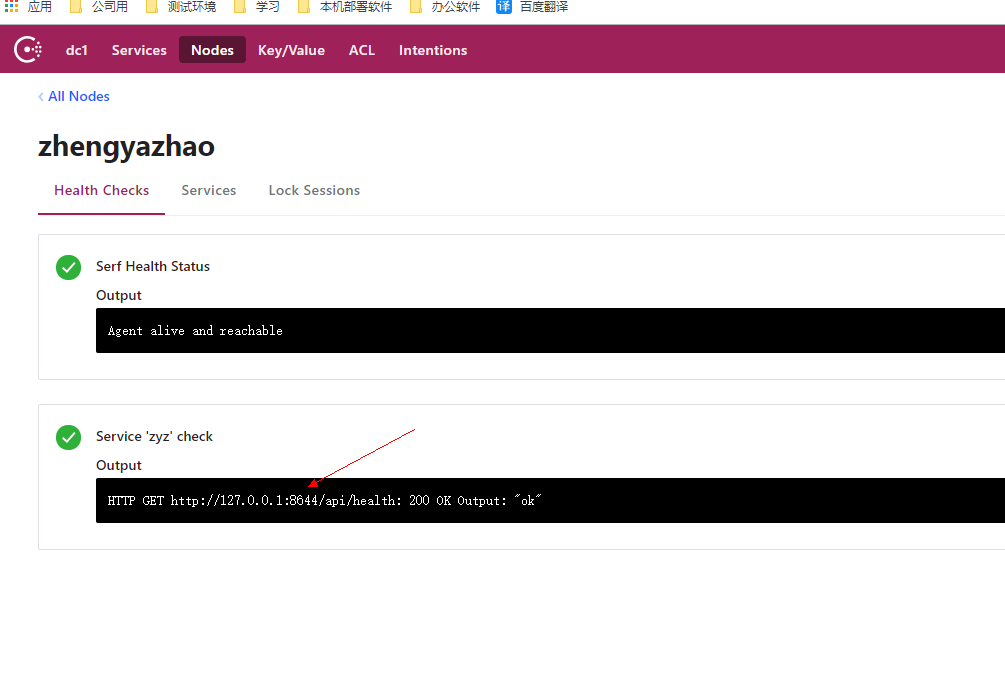
6.以命令行启动程序查看consul(dotnet ConsulServer.dll --ip localhost --port 8644)
快速入口:微服务(入门一):netcore安装部署consul
快速入口: 微服务(入门二):netcore通过consul注册服务
快速入口: 微服务(入门三):netcore ocelot api网关结合consul服务发现
快速入口:微服务(入门四):identityServer的简单使用(客户端授权)
微服务(入门二):netcore通过consul注册服务的更多相关文章
- 微服务入门二:SpringCloud(版本Hoxton SR6)
一.什么是SpringCloud 1.官方定义 1)官方定义:springcloud为开发人员提供了在分布式系统中快速构建一些通用模式的工具(例如配置管理.服务发现.断路器.智能路由.微代理.控制总线 ...
- 微服务架构 | 3.4 HashiCorp Consul 注册中心
目录 前言 1. Consul 基础知识 1.1 Consul 是什么 1.2 Consul 的特点 2. 安装并运行 Consul 服务器 2.1 下载 Consul 2.2 运行 Consul 服 ...
- Asp.net core 向Consul 注册服务
Consul服务发现的使用方法:1. 在每台电脑上都以Client Mode的方式运行一个Consul代理, 这个代理只负责与Consul Cluster高效地交换最新注册信息(不参与Leader的选 ...
- 建立eureka服务和客户端(客户端获取已经注册服务)
1. 新建sping boot eureka server 新建立spring starter project 修改pom.xml文件 在parent后追加 <dependencyManage ...
- 1、微服务--为什么有consul,consul注册,心跳检测,服务发现
一.为什么有consul? 在微服务,每1个服务都是集群式的,订单服务在10台服务器上都有,那么用户的请求到达,获取哪台服务器的订单服务呢?如果10台中的有的订单服务挂了怎么办?10台服务器扛不住了, ...
- 微服务入门三:SpringCloud Alibaba
一.什么是SpringCloud Alibaba 1.简介 1)简介 阿里云未分布式应用开发提供了一站式解决方案.它包含了开发分布式应用程序所需的所有组件,使您可以轻松地使用springcloud开发 ...
- Spring Cloud Consul 实现服务注册和发现
Spring Cloud 是一个基于 Spring Boot 实现的云应用开发工具,它为基于 JVM 的云应用开发中涉及的配置管理.服务发现.断路器.智能路由.微代理.控制总线.全局锁.决策竞选.分布 ...
- SpringBoot系列: 使用 consul 作为服务注册组件
本文基本上摘自纯洁的微笑的博客 http://www.ityouknow.com/springcloud/2018/07/20/spring-cloud-consul.html . 感谢作者的付出. ...
- 【SpringCloud】consul注册中心注册的服务为内网(局域网)IP
一.前因 最近在做公司的一个微服务项目,技术架构为spring cloud + consul + SSM. 当我写完一个功能要在本地测试时,发现服务运行成功,但是前后端联调报500错误. 当时的第一个 ...
随机推荐
- css中的行高line-height
“行高”顾名思意指一行文字的高度.具体来说是指两行文字间基线之间的距离.基线实在英文字母中用到的一个概念,我们刚学英语的时使用的那个英语本子每行有四条线,其中底部第二条线就是基线,是a,c,z,x等字 ...
- java I/O (一)
java 的I/O类基本上可以分为6大类:二进制的输入,二进制的输出,文本的输入,文本的输出,FILTER类和其他对文件操作的工具类. Java的I/O类主要在java.io的包里,其中两个主要的流为 ...
- 我的Python之旅第二天
一 .字符串操作 1单引号('').双引号("").三引号(""" """)的区别. 如果字符串中不包含单引号.双引号, ...
- vue技术分享-你可能不知道的7个秘密
前言 本文是vue源码贡献值Chris Fritz在公共场合的一场分享,觉得分享里面有不少东西值得借鉴,虽然有些内容我在工作中也是这么做的,还是把大神的ppt在这里翻译一下,希望给朋友带来一些帮助. ...
- 并发库应用之五 & ReadWriteLock场景应用
Lock比传统线程模型中的synchronized方式更加面向对象,与生活中的锁类似,锁本身也应该是一个对象.两个线程执行的代码片段要实现同步互斥的效果,它们必须用同一个Lock对象. 读写锁:分为读 ...
- Hibernate中的多表查询及抓取策略
1.Hibernate中的多表查询 1.1SQL中的多表查询 [交叉连接] select * from A,B; [内连接] 显示内连接:inner join(inner 可以省略) Select * ...
- 网络编程之套接字(udp)
Socket的英文原义是“孔”或“插座”.作为BSD UNIX的进程通信机制,取后一种意思.通常也称作"套接字",用于描述IP地址和端口,是一个通信链的句柄,可以用来实现不同虚拟机 ...
- Java 架构师眼中的 HTTP 协议
HTTP 协议的内容比较多,本文我们将分六部分来介绍. HTTP 协议的基本内容 什么是 HTTP 协议 首先我们来看协议是什么?协议是指计算机通信网络中两台计算机之间进行通信所必须共同遵守有规则的文 ...
- GMT与Etc/GMT地区信息的时区转换
GMT 地区信息的时区 在将来的版本中可能不再支持以下左面一列中的地区信息的时区.可能从 /usr/share/lib/zoneinfo 删除这些文件.左列中的地区信息的时区用右列中对等的时区来替换. ...
- WebJars
WebJarsWebJars是一个很神奇的东西,可以让大家以jar包的形式来使用前端的各种框架.组件. 什么是WebJars 什么是WebJars?WebJars是将客户端(浏览器)资源(JavaSc ...