
C#接口--C#基础
1、接口的声明
接口:描述属于任何类或者结构的一组相关功能,是一种规范、功能
组成:属性、方法、事件、索引或者这四种成员的任意组合构成
基本知识点:
1)接口默认的权限修饰符是:public,不允许加权限修饰符【如:interface IEatable{},不能是public interface IEatable{}】,成员也不能加abstract【正确是:string Name{get;set};public string Name{get;set;}是错的】
2)不能有字段:public string _name;是错的【首先修饰符不能加,默认是public,string _name违反了不能有字段】
3)接口中不能有字段,所以属性被写作自动属性,因为无法操作字段:
string Name{
get;
set;
}
4)不允许写实现方法体的函数: void Write(); 不能是:
void Write(){
..............;
}
方法的返回值不受影响。
5)实现过程必须在实现接口中的类中完成。
6)接口命名:接口一般以大写字母I开头,跟在I后面也是大写字母,结尾able 如:IFlyable
实例相关代码笔记:
Program.cs:
using System;
using System.Collections.Generic;
using System.Linq;
using System.Text;
using System.Threading.Tasks;
namespace 接口
{
//public interface IFlyable
//{
//实际不这样做
//}
class Program//类默认private
{
static void Main(string[] args)
{
}
}
}
IEatable.cs:
using System;
using System.Collections.Generic;
using System.Linq;
using System.Text;
using System.Threading.Tasks;
namespace 接口
{
interface IEAtable//接口默认是public
{
string Name//接口中不能有访问修饰符 如:public string Name错的
{
get;
set;//无字段,写成自动属性,无法操作字段
}
//接口不能有字段,所以属性经常(必须)被写作自动属性
void Write();//不能包含方法体
string Read();//返回值不受影响
//string _name;//不能有访问修饰符,不能有字段,所以不能用
//接口成员不允许添加访问修饰符默认是public不能加abstract
//实现过程必须在实现接口的类中完成
}
}
2、接口的实现和继承
1)类继承接口具有单继承,而接口继承接口是多重继承
2)接口多重继承时,派生接口名与父接口用冒号隔开,多个父接口用逗号隔开;父接口也称为该接口的显示基接口。
单一继承:
namespace 接口实现
{
interface Interface4:Interface3
{
}
}
多重继承:
namespace 接口实现
{
interface Interface3:Interface1,Interface2
{
}
}
2)不同的接口(不包含派生)中允许有同名的成员
interface Interface1
{
void read();
}
interface Interface2
{
void read();
}
3)同一接口中成员名不能重名,即使类型(一个是属性、一个是方法)名不同
namespace 接口实现
{
interface Interface2
{
void read();
string read
{
get;
set;
} //错误的
//同一接口中成员名不能重名,即使类型(一个是属性,一个是方法)不同
//不同的接口(不包含派生)中允许有同名的成员
}
}
4)如果在派生接口中对显示基接口中的成员进行重定义,需要用new 关键字解除警告。
interface Interface1
{
void read();
}
interface Interface2
{
void write();
}
interface Interface3:Interface1,Interface2
{
new void write();//void write();没有错误,但会有警告
}
5)为什么用到接口?开放封闭原则:软件实体应该可以扩展,但不可以修改。对扩展是开放的,对修改是是封闭的,封闭就是不可以操纵。
举例示例:鸵鸟、麻雀、老鹰都是鸟,鸟作为父类供子类继承
class Bird
{
public void write(){
Console.WriteLine("我是鸟类!");
}
}
class Ostrich:Bird
{
public void write()
{
Console.WriteLine("我是鸵鸟,我吃青草!");
}
}
class Eagle : Bird
{
public void Eat() {
Console.WriteLine("我是老鹰,吃小鸡");
}
}
class Sparrow : Bird
{
public void write()
{
Console.WriteLine("我是麻雀!");
}
}
如果要加实现“飞”的功能,但鸵鸟不会飞,解决方案:
1>在父类中加飞的方法,它不会飞,但鸵鸟继承了父类,方案不可选。
2>在子类中加飞的方法,谁会飞就加飞的方法,完全可以,但违背开放封闭原则。如果分别在子类中去实现飞的方法,在子类中就可以进行修改,但软件实体不能扩展,每新增一个会飞的内容就需要在子类中修改。
3>上例中如果新增一个气球、飞机,它们继承鸟(飞的方法)的父类就不合适。然而接口可以,提供了会飞的方法,麻雀需要会飞,就实现接口;鸵鸟不会就不需要继承。
6)接口的实现
IFlyable.cs:
using System;
using System.Collections.Generic;
using System.Linq;
using System.Text;
using System.Threading.Tasks;
namespace 接口实现
{
interface IFlyable
{
void Fly();
}
}
Bird.cs:
using System;
using System.Collections.Generic;
using System.Linq;
using System.Text;
using System.Threading.Tasks;
namespace 接口实现
{
abstract class Bird
{
public abstract void Eat();
//public void write(){
//Console.WriteLine("我是鸟类!");
//}
}
}
Program.cs:
using System;
using System.Collections.Generic;
using System.Linq;
using System.Text;
using System.Threading.Tasks;
namespace 接口实现
{
class Program
{
static void Main(string[] args)
{
IFlyable[] fly={new Sparrow(),new Eagle(),new Swan(),new Balloon()};//接口类型的数组
foreach(IFlyable outFly in fly)
outFly.Fly();
Console.ReadKey();
}
}
}
Ostrich.cs:
using System;
using System.Collections.Generic;
using System.Linq;
using System.Text;
using System.Threading.Tasks;
namespace 接口实现
{
class Ostrich:Bird
{
public override void Eat()
{
Console.WriteLine("我是鸵鸟,我吃青草!");
}
}
}
Eagle.cs:
using System;
using System.Collections.Generic;
using System.Linq;
using System.Text;
using System.Threading.Tasks;
namespace 接口实现
{
class Eagle : Bird,IFlyable
{
public void Fly() {
Console.WriteLine("我是老鹰,会飞");
}
public override void Eat() {
Console.WriteLine("我是老鹰,吃小鸡");
}
}
}
Sparrow.cs:
using System;
using System.Collections.Generic;
using System.Linq;
using System.Text;
using System.Threading.Tasks;
namespace 接口实现
{
class Sparrow : Bird,IFlyable
{
//接口的实现需要在实现接口的类中进行,重写下
public void Fly()
{
Console.WriteLine("我是麻雀,我会飞");
}
public override void Eat()
{
Console.WriteLine("我是麻雀!吃粮食");
}
}
}
Balloon.cs:
using System;
using System.Collections.Generic;
using System.Linq;
using System.Text;
using System.Threading.Tasks;
namespace 接口实现
{
class Balloon:IFlyable
{
public void Fly() {
Console.WriteLine("我是气球,我也会飞");
}
}
}
Swan.cs:
using System;
using System.Collections.Generic;
using System.Linq;
using System.Text;
using System.Threading.Tasks;
namespace 接口实现
{
class Swan:Bird,IFlyable
{
public override void Eat() {
Console.WriteLine("我是天鹅,我吃鱼");
}
public void Fly() {
Console.WriteLine("我是天鹅,我会飞" );
}
}
}
运行结果:
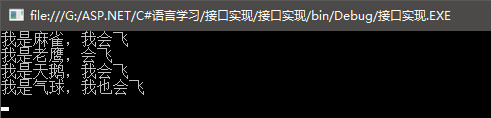
--7)显示实现接口
C#接口--C#基础的更多相关文章
- 《嵌入式系统原理与接口技术》——嵌入式系统接口应用基础
本文为我负责编写的电子工业出版社出版的<嵌入式系统原理与接口技术>一书第七章部分,这里整理的仍然是修改稿,供需要的同学参考,本书为普通高等教育"十二五"规划教材,电子信 ...
- Jmeter_接口自动化基础流程概述
这里补一篇基础的操作吧,不然总觉得没底! 1:创建一个线程组 2:添加一个cookie管理器 33333 3:设置你的信息头管理器:application/json;text/plain;ch ...
- java接口自动化基础知识(二)
二.HttpClient+testNG实现对接口的测试及校验 在上面第一篇中已经实现了基础配置和测试用例数据准备,本篇文章将以登录举例进行测试执行. 这是之前login接口的代码 @Test(grou ...
- java 接口(基础思想一)
我想,对于各位使用面向对象编程语言的程序员来说,“接口”这个名词一定不陌生,但是不知各位有没有这样的疑惑:接口有什么用途?它和抽象类有什么区别?能不能用抽象类代替接口呢?而且,作为程序员,一定经常听到 ...
- java接口自动化基础知识(一)
一.TestNG+MySQL+MyBatis实现对测试用例数据的读取 本篇文章讲解TestNG+MySQL+MyBatis+ExtentReports实现对测试用例数据的读取,下面放出所有配置文件的目 ...
- 【python3接口自动化基础】json总结
Json知识归纳: Post请求有两种方法传json参数 传json参数(自动转json了)---json=dict 传data参数(需json转换) ---data=json.dumps(dic) ...
- python之接口开发基础知识
一.开发接口的作用 1.mock 服务:在别的接口没有开发完成的时候可以模拟一些接口以便测试已经开发完成的接口,例如假的支付接口,模拟支付成功.支付失败. 2.了解接口是如何实现的:数据交互.数据返回 ...
- JMeter之Http协议接口性能测试--基础
一.不同角色眼中的接口 1.1,开发人员眼中的接口 1.2,测试人员眼中的接口 二.Http协议基本介绍 2.1,常见的接口协议 1.:2. :3. :4.:5.: 6. 2.2,Http协议栈 ...
- web接口开发基础知识-什么是web接口?
比如我们访问百度的首页,输入的url地址是:https://www.baidu.com/ 那么当我们在浏览器地址栏中输入url,敲回车后,发生了什么事情?怎么就能通过1个url地址就能看到百度的首页了 ...
随机推荐
- Netty(一):入门篇
匠心零度 转载请注明原创出处,谢谢! 说在前面 上篇文章对Netty进行了初探:Netty初探,主要介绍了下我们为什么需要学习netty.netty介绍等:本篇文章接着上篇文章的内容.本篇为了方便大家 ...
- 4.C++中的函数重载,C++调用C代码,new/delete关键字,namespace(命名空间)
本章主要内容: 1)函数重载 2)C++调用C代码 3)new/delete关键字实现动态内存分配 4)namespace命名空间 大家都知道,在生活中,动词和不同的名词搭配一起,意义都会大有不同,比 ...
- Django搭建博客网站(二)
Django搭建自己的博客网站(二) 这里主要讲构建系统数据库Model. Django搭建博客网站(一) model 目前就只提供一个文章model和一个文章分类标签model,在post/mode ...
- linux下ACE的编译与安装
1.环境变量的设置vim /etc/profile 2.然后输入export ACE_ROOT=/root/ACE/ACE_wrappers export MPC_ROOT=$ACE_ROOT/MPC ...
- Linux下LNMP启动不了的问题总结(2015.05)
[1] *****@*****-VirtualBox:~$ sudo /etc/init.d/mysql.server start Starting MySQL * Couldn't find MyS ...
- 关于ruby -gem无法切换淘宝源
ruby官网提供的 淘宝的gem源 不起作用 https://ruby.taobao.org/ taobao Gems 源已停止维护,现由 ruby-china 提供镜像服务 http://gems. ...
- object类的equals方法简介 & String类重写equals方法
object类中equals方法源码如下所示 public boolean equals(Object obj) { return this == obj; } Object中的equals方法是直接 ...
- UVALive - 3027 Corporative Network (并查集)
这题比较简单,注意路径压缩即可. AC代码 //#define LOCAL #include <stdio.h> #include <algorithm> using name ...
- HDU - 1241 dfs or bfs [kuangbin带你飞]专题一
8个方向求联通块,经典问题. AC代码 #include<cstdio> #include<cstring> #include<algorithm> #includ ...
- Frequent Pattern (FP Growth算法)
FP树构造 FP Growth算法利用了巧妙的数据结构,大大降低了Aproir挖掘算法的代价,他不需要不断得生成候选项目队列和不断得扫描整个数据库进行比对.为了达 到这样的效果,它采用了一种简洁的数据 ...