
mysql-5.7.11-winx64.zip 安装配置
1、下载
http://cdn.mysql.com//Downloads/MySQL-5.7/mysql-5.7.11-winx64.zip
2.解压缩zip包;
D:\Program Files\mysql-5.7.-winx64
3.配置环境变量,
3.1 添加path路径,
D:\Program Files\mysql-5.7.-winx64\bin
3.2.修改mysql-default.ini配置文件,
原
# These are commonly set, remove the # and set as required.

# basedir = .....

# datadir = .....

# port = .....

# server_id = .....
改为
# These are commonly set, remove the # and set as required.

 basedir = D:\Program Files\mysql-5.7.-winx64

 datadir = D:\Program Files\mysql-5.7.-winx64\Data

 port =

# server_id = .....
4.以管理员身份进入命令提示符 cmd
进入mysql的bin目录下,
Microsoft Windows [版本 6.3.9600]

(c) 2013 Microsoft Corporation。保留所有权利。

C:\Users\Administrator>cd D:

D:\

C:\Users\Administrator>cd D:\Program Files\mysql-5.7.11-winx64\bin

C:\Users\Administrator>d:

D:\Program Files\mysql-5.7.11-winx64\bin>
执行mysqld.exe --initialize 命令,
D:\Program Files\mysql-5.7.11-winx64\bin>mysqld.exe --initialize

D:\Program Files\mysql-5.7.11-winx64\bin>
创建了data目录
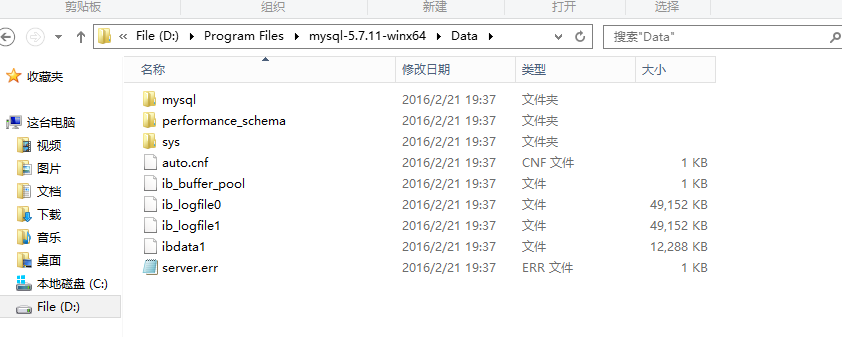
5.执行 mysqld -install命令
D:\Program Files\mysql-5.7.11-winx64\bin>mysqld -install

Service successfully installed.  //成功安装服务
6.执行mysqld.exe -nt --skip-grant-tables
注意:窗口无反应
 Microsoft Windows [版本 6.3.]

 (c)  Microsoft Corporation。保留所有权利。

 C:\Users\Administrator>cd D:

 D:\

 C:\Users\Administrator>cd D:\Program Files\mysql-5.7.-winx64\bin

 C:\Users\Administrator>d:

 D:\Program Files\mysql-5.7.-winx64\bin>mysqld.exe --initialize

 D:\Program Files\mysql-5.7.-winx64\bin>mysqld -install

 Service successfully installed.  //服务安装成功

 D:\Program Files\mysql-5.7.-winx64\bin>mysqld.exe -nt --skip-grant-tables
7.重新打开dos窗口,执行mysql -u root
进入mysql命令行,执行命令use mysql; update user set authtication_string=Password('123456') where user="root"; set password=Password('123456');
 Microsoft Windows [版本 6.3.]

 (c)  Microsoft Corporation。保留所有权利。

 C:\Users\Administrator>mysqld.exe -nt --skip-grant-tables

 C:\Users\Administrator>mysql -u root

 Welcome to the MySQL monitor.  Commands end with ; or \g.

 Your MySQL connection id is

 Server version: 5.7. MySQL Community Server (GPL)

 Copyright (c) , , Oracle and/or its affiliates. All rights reserved.

 Oracle is a registered trademark of Oracle Corporation and/or its

 affiliates. Other names may be trademarks of their respective

 owners.

 Type 'help;' or '\h' for help. Type '\c' to clear the current input statement.

 mysql> use mysql

 Database changed

 mysql> update user set authtication_string=Password('') where user="root"

     -> set password=Password('')

     ->
8.在任务管理器中终止mysqld进程,开启mysql服务。
安装完成。
mysql-5.7.11-winx64.zip 安装配置的更多相关文章
- Mysql在windows下的免安装配置步骤和重新安装的步骤
windows下mysql免安装配置 1. 下载mysql免安装压缩包 下载mysql-5.6.22-winx64.zip 解压到本地D:\mysql-5.6.22-winx64 2. 修改配置文件 ...
- MySQL Community Server 8.0.11下载与安装配置
一.下载 1.选择合适的安装包,我在这里下载的是目前最新的安装包,8.0.11,而且我选择下载的是解压版的,安装版的话,安装会比较麻烦. MySQL Community Server下载链接:http ...
- MySQL 5.7 解压版安装配置
测试环境 系统:Windows 10专业版 版本:MySQL Server 5.7.14 提纲 修改配置文件 初始化 安装服务.启动服务 修改root密码 步骤 1.解压安装包 在MySQL官 ...
- MHA+Atlas+mysql一主一从开启gtid安装配置与实验
各节点架构 (说明:生产环境有两个节点可以组成一套完整集群,我是测试环境,因此对于manager以及atlas和binlog server都是单点,如果生产环境,相应的将manager以及atlas和 ...
- hive0.11的编译/安装/配置
一.获取hive 0.11文件 1.直接在apache网站下载release版 2.自己下载源码编译.方法: git clone https://github.com/amplab/hive.git ...
- MySql-5.7.17 -winx64的安装配置
一.下载软件 1. 进入mysql官网,登陆自己的Oracle账号(没有账号的自己注册一个),下载Mysql-5.7.17,下载地址:http://dev.mysql.com/downloads/my ...
- mysql 5.1.7.17 zip安装 和 隔段时间服务不见了处理
Mysql社区版下载地址:http://dev.mysql.com/downloads/mysql/ 因为我的系统版本是64,因此这里下载x64版本.下载完之后解压至D:\Dev\Mysql(即为my ...
- nodejs zip 安装配置
1.下载 下载地址:https://nodejs.org/zh-cn/download/ 选择相应的版本下载 2.解压缩 将文件解压到要安装的位置,并新建两个目录 node-global :npm全局 ...
- window7环境MySql5.7 zip安装配置教程
1.将zip压缩包解压到一个目录下,并改名为mysql5.7 我的是放在D:\web\mysql5.7下 2.修改my-default.ini文件 下面几项是必填的,否则无法启动 basedir = ...
随机推荐
- base的应用
------------父类 public class Person { public Person(string name,int age) { this.Na ...
- C# 视频编辑
VidCoder VidCoder是一个开源免费的DVD/蓝光视频抓取和转码软件.使用HandBrake做为编码引擎.比Handbrake拥有更友好的用户界面. 可裁剪.剪切.字幕编辑.转码等. 官网 ...
- HibernateUtil.java
package com.hkwy.util; import org.hibernate.Session; import org.hibernate.SessionFactory; import org ...
- 使用do{ } while(0)的好处
经常看到好多程序,尤其是linux相关的,使用do{}while(0)的写法,很明显内部程序最多只能执行一次,这样写的原因是什么呢?个人认为主要的原因是,如果不使用do{}while(0),那么当一个 ...
- 建造者模式组装mybatis参数Example()
参考:github, https://github.com/liuxiaochen0625/MyBatis-Spring-Boot-master.git 从controller组装tk.mybat ...
- 五个典型的 JavaScript 面试题
阅读原文 在IT界,需要大量的 JavaScript 开发者.如果你的能力能够胜任这一角色,那么你将获得许多更换工作和提高薪水的机会.但是在你被公司录取之前,你需要展现你的技术实力,以便通过面试环节. ...
- wamp 服务器安装问题 及cmd常用命令 和 php mysql数据库常用cmd命令集
1 官网下载wamp软件包,根据提示安装 2 目录结构: wamp: bin/为套件目录 包括mysql apache php log 日志记录 alias 配置 apps 数据库 ...
- 网址http换成https ----js
<script type="text/javascript"> var url = window.location.href; if (url.indexOf(&quo ...
- px-rem px转换为rem的工具
将px转换为rem的工具,github地址:https://github.com/finance-sh/px-rem 将px转换为rem的工具 怎样转换静态文件 安装: npm install px- ...
- C# List 排序各种用法与比较
下面介绍各种List的sort的用法与比较 首先,我们建一个People的实体,有name.age.sex的属性,我们要排序的字段是年龄age 新建一个实体类 public class People ...