
第七篇——Struts2的接收参数
Struts2的接收参数
1、使用Action的属性接收参数
2、使用Domain Model接收参数
3、使用ModelDriven接收参数
项目实例
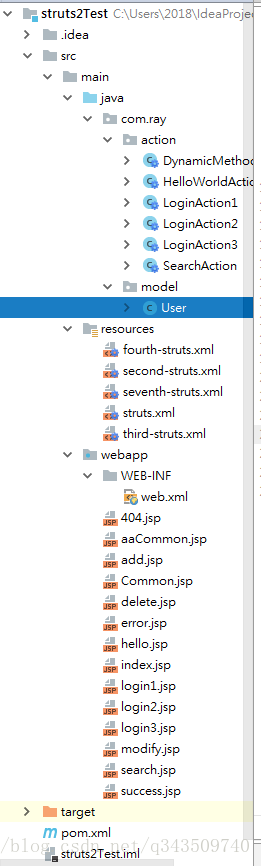
1、项目结构
2、pom.xml
<project xmlns="http://maven.apache.org/POM/4.0.0" xmlns:xsi="http://www.w3.org/2001/XMLSchema-instance"
  xsi:schemaLocation="http://maven.apache.org/POM/4.0.0 http://maven.apache.org/maven-v4_0_0.xsd">
  <modelVersion>4.0.0</modelVersion>
  <groupId>com.ray</groupId>
  <artifactId>struts2Test</artifactId>
  <packaging>war</packaging>
  <version>1.0-SNAPSHOT</version>
  <name>struts2Test Maven Webapp</name>
  <url>http://maven.apache.org</url>

  <dependencies>

    <dependency>
      <groupId>junit</groupId>
      <artifactId>junit</artifactId>
      <version>3.8.1</version>
      <scope>test</scope>
    </dependency>

    <!-- https://mvnrepository.com/artifact/org.apache.struts/struts2-core -->
    <dependency>
      <groupId>org.apache.struts</groupId>
      <artifactId>struts2-core</artifactId>
      <version>2.5.16</version>
    </dependency>

  </dependencies>

  <build>
    <finalName>struts2Test</finalName>
  </build>

</project>
3、web.xml
<web-app xmlns="http://java.sun.com/xml/ns/javaee"
         xmlns:xsi="http://www.w3.org/2001/XMLSchema-instance"
         xsi:schemaLocation="http://java.sun.com/xml/ns/javaee
                      http://java.sun.com/xml/ns/javaee/web-app_3_0.xsd"
         version="3.0" metadata-complete="true">
  <display-name>Archetype Created Web Application</display-name>

  <!-- 过滤所有请求交给Struts2处理 -->
  <filter>
    <filter-name>struts2</filter-name>
    <filter-class>
      org.apache.struts2.dispatcher.filter.StrutsPrepareAndExecuteFilter
    </filter-class>

     <!--action后缀(方法二)-->
    <!--<init-param>-->
      <!--<param-name>struts.action.extension</param-name>-->
      <!--<param-value>ray</param-value>-->
    <!--</init-param>-->
  </filter>

  <filter-mapping>
    <filter-name>struts2</filter-name>
    <url-pattern>/*</url-pattern>
  </filter-mapping>

</web-app>
4、User.java
package com.ray.model;

/**
 * Created by Ray on 2018/3/26 0026.
 **/
public class User {

    private String username;
    private String password;

    public String getUsername() {
        return username;
    }

    public void setUsername(String username) {
        this.username = username;
    }

    public String getPassword() {
        return password;
    }

    public void setPassword(String password) {
        this.password = password;
    }
}
5、LoginAction1.java
package com.ray.action;

import com.opensymphony.xwork2.ActionSupport;

/**
 * Created by Ray on 2018/3/26 0026.
 * 方式一:使用Action的属性接收参数
 **/
public class LoginAction1 extends ActionSupport {

    private String username;
    private String password;

    public String getUsername() {
        return username;
    }

    public void setUsername(String username) {
        this.username = username;
    }

    public String getPassword() {
        return password;
    }

    public void setPassword(String password) {
        this.password = password;
    }

    public String login(){
        System.out.println("username = " + username);
        System.out.println("password = " + password);

        return SUCCESS;
    }
}
6、LoginAction2.java
package com.ray.action;

import com.opensymphony.xwork2.ActionSupport;
import com.ray.model.User;

/**
 * Created by Ray on 2018/3/26 0026.
 * 方式二:使用Domain Model接收参数
 **/
public class LoginAction2 extends ActionSupport {

    private User user;

    public User getUser() {
        return user;
    }

    public void setUser(User user) {
        this.user = user;
    }

    public String login(){
        System.out.println("username = " + user.getUsername());
        System.out.println("password = " + user.getPassword());

        return SUCCESS;
    }
}
7、LoginAction3.java
package com.ray.action;

import com.opensymphony.xwork2.ActionSupport;
import com.opensymphony.xwork2.ModelDriven;
import com.ray.model.User;

/**
 * Created by Ray on 2018/3/26 0026.
 * 方式三:使用ModelDriven接收参数
 **/
public class LoginAction3 extends ActionSupport implements ModelDriven<User>{

    private User user = new User();

    public User getModel() {
        return user;
    }

    public String login(){
        System.out.println("username = " + user.getUsername());
        System.out.println("password = " + user.getPassword());

        return SUCCESS;
    }
}
8、seventh-struts.xml
<?xml version="1.0" encoding="UTF-8"?>

<!DOCTYPE struts PUBLIC
        "-//Apache Software Foundation//DTD Struts Configuration 2.5//EN"
        "http://struts.apache.org/dtds/struts-2.5.dtd">

<struts>

    <package name="login1" extends="struts-default" namespace="/">
        <action name="login1" class="com.ray.action.LoginAction1" method="login">
            <result>/success.jsp</result>
        </action>
    </package>

    <package name="login2" extends="struts-default" namespace="/">
        <action name="login2" class="com.ray.action.LoginAction2" method="login">
            <result>/success.jsp</result>
        </action>
    </package>

    <package name="login3" extends="struts-default" namespace="/">
        <action name="login3" class="com.ray.action.LoginAction3" method="login">
            <result>/success.jsp</result>
        </action>
    </package>
</struts>
9、struts.xml
<?xml version="1.0" encoding="UTF-8"?>

<!DOCTYPE struts PUBLIC
        "-//Apache Software Foundation//DTD Struts Configuration 2.5//EN"
        "http://struts.apache.org/dtds/struts-2.5.dtd">

<struts>

    <!-- action后缀(方法一) -->
    <!--<constant name="struts.action.extension" value="ra"/>-->

    <package name="default" namespace="/" extends="struts-default">
        <!-- 默认action -->
        <default-action-ref name="404"/>
        <action name="404">
            <result>/404.jsp</result>
        </action>

        <action name="helloWorld" class="com.ray.action.HelloWorldAction">
            <result name="success">/success.jsp</result>
        </action>

    </package>

    <include file="second-struts.xml"/>
    <include file="third-struts.xml"/>
    <include file="fourth-struts.xml"/>
    <include file="seventh-struts.xml"/>
</struts>
10、login1.jsp
<%@ taglib prefix="s" uri="/struts-tags" %>
<%@ page language="java" import="java.util.*" pageEncoding="UTF-8" %>
<%
    String path = request.getContextPath();
    String basePath = request.getScheme() + "://" + request.getServerName() + ":" + request.getServerPort() + path + "/";
%>

<!DOCTYPE HTML PUBLIC "-//W3C//DTD HTML 4.01 Transitional//EN">
<html>
<head>
    <base href="<%=basePath%>">

    <title>用户登录1</title>

    <meta http-equiv="pragma" content="no-cache">
    <meta http-equiv="cache-control" content="no-cache">
    <meta http-equiv="expires" content="0">
    <meta http-equiv="keywords" content="keyword1,keyword2,keyword3">
    <meta http-equiv="description" content="This is my page">
    <!--
	<link rel="stylesheet" type="text/css" href="styles.css">
	-->

</head>

<body>
    <s:form action="login1" method="POST">
        <s:textfield label="用户名:" name="username"/><br>
        <s:password label="密码:" name="password"/><br>
        <s:submit label="登录"/><s:reset label="重置"/>
    </s:form>
</body>
</html>
11、login2.jsp
<%@ taglib prefix="s" uri="/struts-tags" %>
<%@ page language="java" import="java.util.*" pageEncoding="UTF-8" %>
<%
    String path = request.getContextPath();
    String basePath = request.getScheme() + "://" + request.getServerName() + ":" + request.getServerPort() + path + "/";
%>

<!DOCTYPE HTML PUBLIC "-//W3C//DTD HTML 4.01 Transitional//EN">
<html>
<head>
    <base href="<%=basePath%>">

    <title>用户登录2</title>

    <meta http-equiv="pragma" content="no-cache">
    <meta http-equiv="cache-control" content="no-cache">
    <meta http-equiv="expires" content="0">
    <meta http-equiv="keywords" content="keyword1,keyword2,keyword3">
    <meta http-equiv="description" content="This is my page">
    <!--
	<link rel="stylesheet" type="text/css" href="styles.css">
	-->

</head>

<body>
    <s:form action="login2" method="POST">
        <s:textfield label="用户名:" name="user.username"/><br>
        <s:password label="密码:" name="user.password"/><br>
        <s:submit label="登录"/><s:reset label="重置"/>
    </s:form>
</body>
</html>
12、login3.jsp
<%@ taglib prefix="s" uri="/struts-tags" %>
<%@ page language="java" import="java.util.*" pageEncoding="UTF-8" %>
<%
    String path = request.getContextPath();
    String basePath = request.getScheme() + "://" + request.getServerName() + ":" + request.getServerPort() + path + "/";
%>

<!DOCTYPE HTML PUBLIC "-//W3C//DTD HTML 4.01 Transitional//EN">
<html>
<head>
    <base href="<%=basePath%>">

    <title>用户登录3</title>

    <meta http-equiv="pragma" content="no-cache">
    <meta http-equiv="cache-control" content="no-cache">
    <meta http-equiv="expires" content="0">
    <meta http-equiv="keywords" content="keyword1,keyword2,keyword3">
    <meta http-equiv="description" content="This is my page">
    <!--
	<link rel="stylesheet" type="text/css" href="styles.css">
	-->

</head>

<body>
    <s:form action="login3" method="POST">
        <s:textfield label="用户名:" name="username"/><br>
        <s:password label="密码:" name="password"/><br>
        <s:submit label="登录"/><s:reset label="重置"/>
    </s:form>
</body>
</html>
13、success.jsp
<%@ page language="java" import="java.util.*" pageEncoding="UTF-8" %>
<%
    String path = request.getContextPath();
    String basePath = request.getScheme() + "://" + request.getServerName() + ":" + request.getServerPort() + path + "/";
%>

<!DOCTYPE HTML PUBLIC "-//W3C//DTD HTML 4.01 Transitional//EN">
<html>
<head>
    <base href="<%=basePath%>">

    <title>success.jsp</title>

    <meta http-equiv="pragma" content="no-cache">
    <meta http-equiv="cache-control" content="no-cache">
    <meta http-equiv="expires" content="0">
    <meta http-equiv="keywords" content="keyword1,keyword2,keyword3">
    <meta http-equiv="description" content="This is my page">
    <!--
	<link rel="stylesheet" type="text/css" href="styles.css">
	-->

</head>

<body>
    Hello World~
    登录成功
</body>
</html>
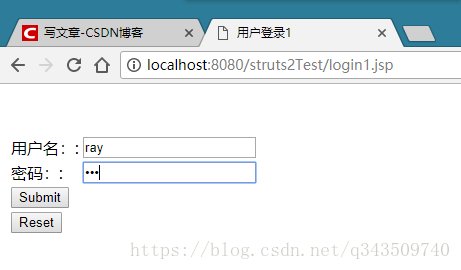
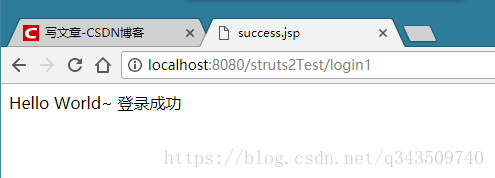
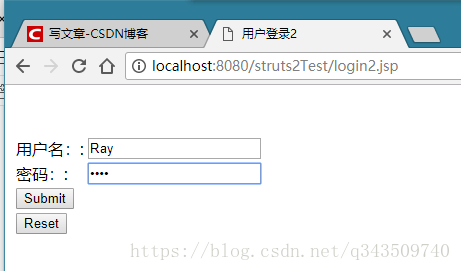
14、页面效果
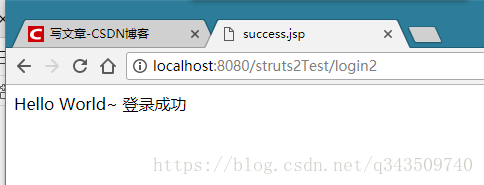
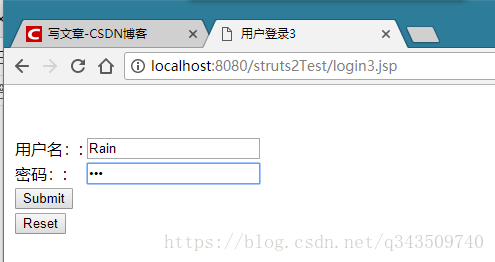
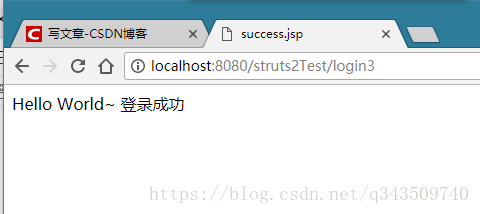
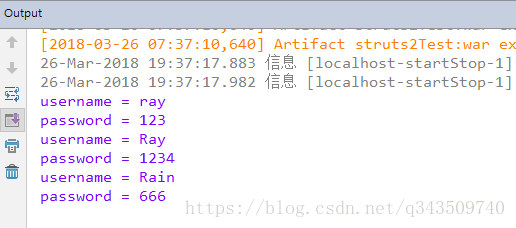
ok!
第七篇——Struts2的接收参数的更多相关文章
- 学习笔记之Struts2—浅析接收参数
最近自己通过视频与相关书籍的学习,对action里面接收参数做一些总结与自己的理解. 0.0.接收参数的(主要)方法 使用Action的属性接收参数 使用DomainModel接收参数 使用Mod ...
- struts2 Action 接收参数的三种方法
刚学Struts2 时 大家可能遇到过很多问题,这里我讲一下Action 接收参数的三种方法,我曾经在这上面摔过一回.所以要警醒一下自己..... 第一种:Action里声明属性,样例:account ...
- Request 接收参数乱码原理解析三:实例分析
通过前面两篇<Request 接收参数乱码原理解析一:服务器端解码原理>和<Request 接收参数乱码原理解析二:浏览器端编码原理>,了解了服务器和浏览器编码解码的原理,接下 ...
- Request 接收参数乱码原理解析二:浏览器端编码原理
上一篇<Request 接收参数乱码原理解析一:服务器端解码原理>,分析了服务器端解码的过程,那么浏览器是根据什么编码的呢? 1. 浏览器解码 浏览器根据服务器页面响应Header中的“C ...
- struts2接收参数——域模型、DTO
在开始介绍域模型之前我们要明白一点,为什么通过域模型我们可以把参数这么方便的在后台接收. 那是因为 通过参数拦截器(params interceptor)自动的把前台传过来的参数给域对象(domain ...
- Struts2之Action三种接收参数形式与简单的表单验证
有了前几篇的基础,相信大家对于Struts2已经有了一个很不错的认识,本篇我将为大家介绍一些关于Action接收参数的三种形式,以及简单的表单验证实现,下面进入正题,首先我们一起先来了解一下最基本的A ...
- Struts2(四)Action一接收参数
一.属性接收参数并输出 导入struts2的包,导入需要的包 和struts.xml配置文件 <?xml version="1.0" encoding="UTF-8 ...
- Struts2中Action接收参数的四种形式
1.Struts2的Action接收参数的三种形式. a. 使用Action的属性接收(直接在action中利用get方法来接收参数): login.js ...
- Struts2 DomainModel、ModelDriven接收参数
一.DomainModel(域模型) 1. 应用场景:一般我们在struts2的action中接收参数通常是如下方式 package cn.orlion.user; import com.opensy ...
随机推荐
- 21备忘录模式Memento
一.什么是备忘录模式 Memento模式也叫备忘录模式,是行为模式之 一,它的作用是保存对象的内部状态,并在需要 的时候(undo/rollback)恢复对象以前的状态. 二.备忘录模式的应用场景 如 ...
- CleanAop使用笔记
前言,本(ˇˍˇ) 想用PostSharp做case,但是破解不成功,所以在github里找了一个CleanAop 地址: https://github.com/Jarvin-Guan/CleanAO ...
- [2]朝花夕拾-JAVA注解、PHP注解?
一.Java注解概述 注解,也被称为元数据,为我们在代码中添加信息提供了一种形式化的方法,是我们可以在稍后某个时刻非常方便地使用这些数据. 注解在一定程度上是把元数据与源代码文件结合在一起,而不是保存 ...
- linux shell的here document用法(cat << EOF)
什么是Here Document?Here Document 是在Linux Shell 中的一种特殊的重定向方式,它的基本的形式如下cmd << delimiter Here Docu ...
- kotlin 语法跟 java 的不同
本文是本人的作品,转载请表明出处 1.extends 用 (冐号):代替.MainActivity extends Activity, 现在是 MaiActivity :Activity() 2. ...
- python @staticmethod和@classmethod的作用
一般来说,要使用某个类的方法,需要先实例化一个对象再调用方法. 而使用@staticmethod或@classmethod,就可以不需要实例化,直接类名.方法名()来调用. 这有利于组织代码,把某些应 ...
- deep learning 以及deep learning 常用模型和方法
首先为什么会有Deep learning,我们得到一个结论就是Deep learning需要多层来获得更抽象的特征表达. 1.Deep learning与Neural Network 深度学习是机器学 ...
- layui---事件监听
在使用layui的form表单做验证提交的时候,如果结合vue,或者是三级联动的时候,就需要做事件监听了. 具体语法: form.on('event(过滤器值)', callback); 可以用于监听 ...
- java学习(二)--- 变量类型
变量声明 type identifier [ = value][, identifier [= value] ...] ; 局部变量: 1.局部变量声明在方法.构造方法.语句块中 2.局部变量在方法. ...
- URL传值乱码问题。(已解决)
1. 问题描述 今天,我在写我的记账本的主界面,想在右上角加一个用户名提示,需要我把登陆界面的用户名传递给主界面,输入英文可以,输入汉字,发现显示在右上角的是乱码. 2. 解决办法 看这个乱码眼熟,我 ...