
1.6 selenium3+firefox环境搭建
1.6 selenium3+firefox环境搭建
有不少小伙伴在安装selenium环境后启动firefox报错,因为现在selenium升级到3.0了,跟2.0的版本还有有一点区别的。
(备注:这里不建议大家用selenium3,坑太多,如果selenium2实在用不了,那就看这篇吧)
安装环境过程中主要会遇到三个坑:
1.'geckodriver' executable needs to be in PATH
2.Expected browser binary location, but unable to find binary in default location
3.Unsupported Marionette protocol version 2, required 3
环境准备:
--python3.6
--selenium3.0
--firefox50
一、安装python
1.安装python这个简单,下载版本后傻瓜式安装就行了。
2.安装好之后,看下这个目录D:\python\Scripts,有没pip.exe和easy_install.exe(一般都有,没有的话得重新安装一次了)
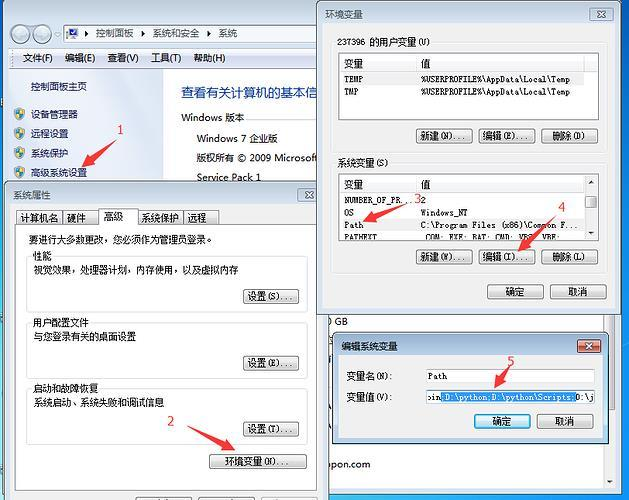
3.将D:\python和D:\python\Scripts,添加到环境变量path下
二、检查pip工具
1.打开cmd,输入:pip,出现如下图界面,说明pip环境OK.
>>pip

三、安装selenium3.0
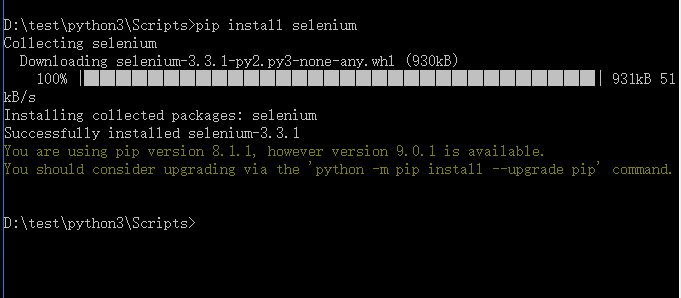
1.cmd输入:pip install selenium
>>pip install selenium
2.首次安装要看到100%完成,中途失败就重新多输入几次安装。
四、检查selenium环境
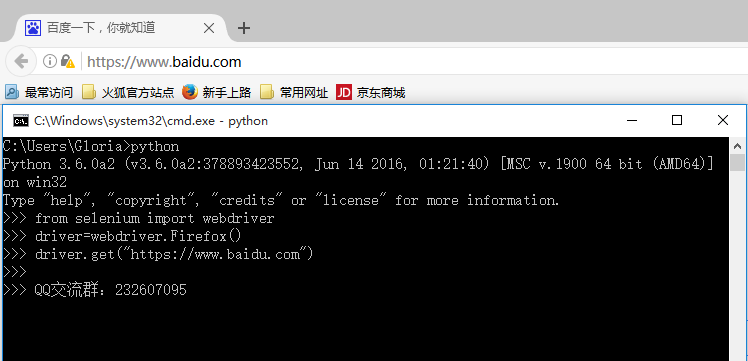
1.在cmd输入如下指令检查环境
>>python
>>from selenium import webdriver
>>driver=webdriver.Firefox()
>>driver.get("https://www.baidu.com")
2.能看到浏览器正常启动,说明环境OK,如果遇到异常就继续看下面解决方案。
五、遇到第一个坑:'geckodriver' executable needs to be in PATH
1.如果启动浏览器过程中报如下错误
Traceback (most recent call last):
File "<stdin>", line 1, in <module>
File "D:\test\python3\lib\site-packages\selenium\webdriver\firefox\webdriver.py", line 145, in __init__
self.service.start()
File "D:\test\python3\lib\site-packages\selenium\webdriver\common\service.py", line 81, in start
os.path.basename(self.path), self.start_error_message)
selenium.common.exceptions.WebDriverException: Message: 'geckodriver' executable needs to be in PATH.
2.这个是因为最新的selenium3.0启动firefox需要geckodriver.exe这个驱动文件。
3.下载之后,配置到环境变量path下(可以直接放python根目录)
六、遇到第二坑:Expected browser binary location, but unable to find binary in default location
1.如果启动浏览器过程中报如下错误:
Traceback (most recent call last):
File "<stdin>", line 1, in <module>
File "D:\test\python3\lib\site-packages\selenium\webdriver\firefox\webdriver.py", line 155, in __init__
keep_alive=True)
File "D:\test\python3\lib\site-packages\selenium\webdriver\remote\webdriver.py", line 92, in __init__
self.start_session(desired_capabilities, browser_profile)
File "D:\test\python3\lib\site-packages\selenium\webdriver\remote\webdriver.py", line 179, in start_session
response = self.execute(Command.NEW_SESSION, capabilities)
File "D:\test\python3\lib\site-packages\selenium\webdriver\remote\webdriver.py", line 238, in execute
self.error_handler.check_response(response)
File "D:\test\python3\lib\site-packages\selenium\webdriver\remote\errorhandler.py", line 193, in check_response
raise exception_class(message, screen, stacktrace)
selenium.common.exceptions.WebDriverException:
Message: Expected browser binary location, but unable to find binary in
default location,
no 'moz:firefoxOptions.binary' capability provided, and no binary flag set on the command line.
2.这个是因为firefox.exe这个文件也需要配置到环境变量path下。
3.这个路径就是安装完firefox后,找到firefox.exe这个文件的地址,加到path下。

七、遇到第三坑:Unsupported Marionette protocol version 2, required 3
1.如果启动浏览器过程中出现如下错误
Traceback (most recent call last):
File "<stdin>", line 1, in <module>
File "D:\test\python3\lib\site-packages\selenium\webdriver\firefox\webdriver.py", line 155, in __init__
keep_alive=True)
File "D:\test\python3\lib\site-packages\selenium\webdriver\remote\webdriver.py", line 92, in __init__
self.start_session(desired_capabilities, browser_profile)
File "D:\test\python3\lib\site-packages\selenium\webdriver\remote\webdriver.py", line 179, in start_session
response = self.execute(Command.NEW_SESSION, capabilities)
File "D:\test\python3\lib\site-packages\selenium\webdriver\remote\webdriver.py", line 238, in execute
self.error_handler.check_response(response)
File "D:\test\python3\lib\site-packages\selenium\webdriver\remote\errorhandler.py", line 193, in check_response
raise exception_class(message, screen, stacktrace)
selenium.common.exceptions.WebDriverException: Message: Unsupported Marionette protocol version 2, required 3
2.这个错误原因是firefox版本过低了,最新的selenium3.0版本支持firefox47以上的版本,升级版本就可以了
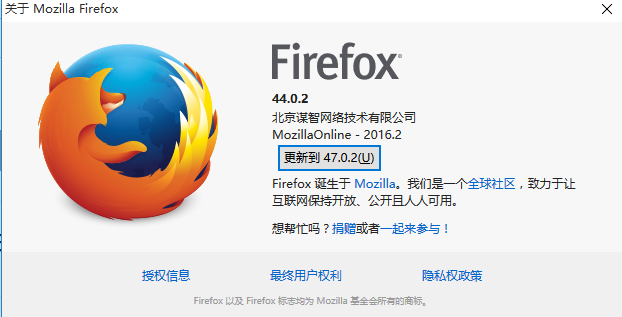
总结:整个环境的配置是python3.6+selenium3.0+firefox47以上版本,当然python用2.7版本也是可以的。
1.6 selenium3+firefox环境搭建的更多相关文章
- python3+ selenium3开发环境搭建-手把手教你安装python(详细)
环境搭建 基于python3和selenium3做自动化测试,俗话说:工欲善其事必先利其器:没有金刚钻就不揽那瓷器活,磨刀不误砍柴工,因此你必须会搭建基本的开发环境,掌握python基本的语法和一个I ...
- python3+ selenium3开发环境搭建
环境搭建 基于python3和selenium3做自动化测试,俗话说:工欲善其事必先利其器:没有金刚钻就不揽那瓷器活,磨刀不误砍柴工,因此你必须会搭建基本的开发环境,掌握python基本的语法和一个I ...
- Selenium3+Python3环境搭建
安装python 官网直接下载当前最新版的python Python官网地址:https://www.python.org/ 百度搜索Python3.6安装步骤 Python安装步骤:自行百度,暂不提 ...
- ununtu16.04+python3+selenium+firefox环境搭建
一.初始配置: 1.安装完系统并配置好地址及DNS.2.设置root密码: sudo passwd root 3.更改云源: sudo cp /etc/apt/sources.list /etc/ap ...
- python+selenium自动化软件测试(第1章):环境搭建,你也可以直接用Anaconda!
1.1 环境搭建 1.1.1 selenium简介Selenium 是用于测试 Web 应用程序用户界面 (UI) 的常用框架.它是一款用于运行端到端功能测试的超强工具.您可以使用多个编程语言编写测试 ...
- selenium3+python3+Firefox54环境搭建
之前使用的环境:selenium2.53.6+Firefox44+Python2.7,没有问题,最近想尝试一下新的环境,就搭了个selenium3的环境,过程是挺坎坷的,花费了一天的时间,各种报错,最 ...
- Web自动化测试环境搭建1(基于firefox火狐浏览器)
自动化测试是时代趋势,因此很多测试人员开始研究自动化测试,web自动化测试化测试并不难,但是很多人都是被挡在了环境搭建这一步,后面学习激情全无,这里,韬哥手把手教大家搭建火狐浏览器下的自动化测试环境( ...
- Python3+selenium3环境搭建笔记
系统:win7 64位浏览器:ie9 64位 chrome70 32位 firefox63 64位python版本:3.6.5 Windows x86 executable installersele ...
- 测试自动化:java+selenium3 UI自动化(1) - 环境搭建
1.前言 我大概是在2012年第一次正式接触到自动化测试,那个时候跟随我的团队一起,就当时项目的UI自动化尝试做出了探索. 在我离开那家公司的时候,我们的自动化测试体系仍然难言完美,但是也已经达到了非 ...
随机推荐
- flask --- 04 . 偏函数, 线程安全,栈堆,
一.偏函数(partial) ①第一种 结果为: ② 第二种 二.线程安全 将空间转换成时间 问题: 1秒钟打印所有结果 threading.current_thread().ident :线程ID ...
- 在myeclipse中使用log4j记录日志
1.从官方网站下载 jakarta-log4j-1.2.17.tar.gz http://logging.apache.org/log4j/1.2/download.html 2.在eclipse中将 ...
- ECharts上手例子
ECharts,一个使用 JavaScript 实现的开源可视化库,可以流畅的运行在 PC 和移动设备上,兼容当前绝大部分浏览器 (IE8/9/10/11,Chrome,Firefox,Safari等 ...
- Mysql中 in or exists not exists not in区别 (网络整理)
in 和or区别: 如果in和or所在列有索引或者主键的话,or和in没啥差别,执行计划和执行时间都几乎一样. 如果in和or所在列没有 索引的话,性能差别就很大了.在没有索引的情况下,随着in或者o ...
- VS工作目录,输出目录
C++项目,解决方案总文件夹下就只包含解决方案配置文件sln和一个项目总文件夹和一个Debug文件夹以及一个Release文件夹(共四个东东,其中Debug和Release文件夹中存放最终生成的结果e ...
- js中Undefined 和 Null的区别
Undefined 和 Null Undefined 这个值表示变量不含有值. 可以通过将变量的值设置为 null 来清空变量. <!DOCTYPE html> <html> ...
- Alpha阶段敏捷冲刺
博客连链接集合 第一篇:http://www.cnblogs.com/just-let-it-go/p/8875433.html 第二篇:http://www.cnblogs.com/just-let ...
- WCF发布到IIS 7.0,并以https访问
一.IIS 7.0中如何生成服务器证书,并要求网站以http访问可参考: http://www.cnblogs.com/chnking/archive/2008/10/07/1305811.html ...
- learning makefile var
- 跟随我在oracle学习php(3)
这次讲一下html中的列表和比较重要的表格 列表分为有序和无序,有序列表与无序列表都是块状元素 <ul>(父标签) 定义无序列表.复合标签(由父标签和子标签组成),不单独出现,用<l ...