
MongoDB C Driver Building on CentOS
Building on Unix
Prerequisites
OpenSSL is required for authentication or for SSL connections to MongoDB. Kerberos or LDAP support requires Cyrus SASL.
To install all optional dependencies on RedHat / Fedora:

$ sudo yum install pkg-config openssl-devel cyrus-sasl-devel

On Debian / Ubuntu:

$ sudo apt-get install pkg-config libssl-dev libsasl2-dev

On FreeBSD:

$ su -c 'pkg install pkgconf openssl cyrus-sasl'
Building from a release tarball
Unless you intend on contributing to the mongo-c-driver, you will want to build from a release tarball.
The most recent release of libmongoc is 1.8.1 and can be downloaded here. The following snippet will download and extract the driver, and configure it:
$ wget https://github.com/mongodb/mongo-c-driver/releases/download/1.8.1/mongo-c-driver-1.8.1.tar.gz

$ tar xzf mongo-c-driver-1.8.1.tar.gz

$ cd mongo-c-driver-1.8.1

$ ./configure --disable-automatic-init-and-cleanup
亲测:
https://github.com/mongodb/mongo-c-driver/releases/download/1.8.1/mongo-c-driver-1.8.1.tar.gz 这个地址下载超慢
所以还是从 git 下载源码
Building from git
To build an unreleased version of the driver from git requires additional dependencies.
RedHat / Fedora:

$ sudo yum install git gcc automake autoconf libtool

Debian / Ubuntu:

$ sudo apt-get install git gcc automake autoconf libtool

FreeBSD:

$ su -c 'pkg install git gcc automake autoconf libtool'
Once you have the dependencies installed, clone the repository and build the current master or a particular release tag:
$ git clone https://github.com/mongodb/mongo-c-driver.git

$ cd mongo-c-driver

$ git checkout x.y.z  # To build a particular release

$ ./autogen.sh --with-libbson=bundled

$ make

$ sudo make install
1.
下载 mongo-c-driver-r1.6 源码:
https://github.com/mongodb/mongo-c-driver(GitHub驱动源码,这个 src/libbson 文件夹里面是空的,要单独下载)
下载 libbson-r1.6 源码:
https://github.com/mongodb/mongo-c-driver/tree/r1.6/src
2.
解压:
unzip mongo-c-driver-r1.6.zip
unzip libbson-r1.6.zip
3.
将 libbson 源码 拷贝 至 mongo-c-driver-r1.6/src/libbson 目录
4.
sudo yum install pkg-config openssl-devel cyrus-sasl-devel
./autogen.sh --with-libbson=bundled (得先安装 libtoll ,否则会报错。sudo yum install libtool*)
make
sudo make install
安装完成的库和头文件目录:
/usr/local/lib
/usr/local/include

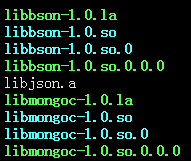
API 用法详见:http://www.cnblogs.com/SZxiaochun/p/5848455.html
注意:
使用库的时候报错:
error while loading shared libraries: libevent-1.4.so.2: cannot open shared object file: No such file or directory
原因:
程序按照默认共享库路径找不到该共享库文件。
解决方法:
详见:http://www.cnblogs.com/SZxiaochun/p/7685499.html
MongoDB C Driver Building on CentOS的更多相关文章
- MongoDB C Driver Building on Windows
一.编译mongodb c driver: 需要先安装OpenSSL:(参见:http://bbs.aircheng.com/read-2222-1) 步骤:(MongoDB步) 1.下载Active ...
- MongoDB C Driver and APIinstances linux MongoDB安装配置
<一,linux平台MongoDB安装配置>在这我们使用的Centos6 yum部署的,你想搞编译,自个干!
- MongoDB Java Driver操作指南
MongoDB为Java提供了非常丰富的API操作,相比关系型数据库,这种NoSQL本身的数据也有点面向对象的意思,所以对于Java来说,Mongo的数据结构更加友好. MongoDB在今年做了一次重 ...
- MongoDB C Driver使用教程
MongoDB C Driver使用教程 转载请注明出处http://www.cnblogs.com/oloroso/ 本指南提供简介 MongoDB C 驱动程序. 在 C API 的详细信息,请参 ...
- windows平台下安装、编译、使用mongodb C++ driver
本博客将记录在Win8.1 ,VS2013环境下编译.配置mongodb C++ driver的流程. 1.下载预备 下载Boost:http://sourceforge.net/projects/b ...
- Ignoring Extra Elements in mongoDB C# Driver
MongoDB删除字段后会报错: Element ... does not match any field or property of class Customer. 需要在实体类增加 [BsonI ...
- Install MongoDB on Red Hat Enterprise, CentOS, Fedora, or Amazon Linux
Install MongoDB on Red Hat Enterprise, CentOS, Fedora, or Amazon Linux¶ Overview Use this tutorial t ...
- mongodb .net driver
1.介绍 The official MongoDB .NET Driver provides asynchronous interaction with MongoDB. Powering the d ...
- Mongodb Java Driver 参数配置解析
要正确使用Mongodb Java Driver,MongoClientOptions参数配置对数据库访问的并发性能影响极大. connectionsPerHost:与目标数据库能够建立的最大conn ...
随机推荐
- Asp.Net文件夹没有读写权限的特殊问题
如果asp.net网站权限都配置正确,但是仍然出现某一个文件或者文件夹没有读写权限时 原来只用在Web.config里面的 <system.web>节点下增加<identity i ...
- Beginning SDL 2.0(5) 基于MFC和SDL的YuvPlayer
本文是在“Beginning SDL 2.0(4) YUV加载及渲染”(以下简称BS4)基础上做的功能完善,如果你对之间介绍的内容了解不多,麻烦先阅读之前的内容. 本文主要介绍如何完成一个基于MFC和 ...
- jsdoc注释规范工具(使用 JSDoc 3 自动生成 JavaScript API 文档)
安装和使用规范见:http://moodpo.com/archives/jsdoc3-tutorial.html 实例: /** * 模块调用方法 * * * @param {string} modu ...
- Python 连接数据库 mysql
python 连接 数据库 import pymysql db = pymysql.connect(host='127.0.0.1',port=3306,user='root',password='r ...
- maven pom scope 含义
maven pom scope 依赖范围控制哪些依赖在哪些classpath 中可用,哪些依赖包含在一个应用中.让我们详细看一下每一种范围: compile (编译范围) compile是默认的范围: ...
- linux下保护视力、定时强制锁定软件: Workrave
超负荷地工作会累坏身体的,而且效率也不高,所以工作一段时间就应该休息一下.长时间在电脑前一动不动,很容易患上“重复性劳损”,即 Repetitive Strain Injury (RSI).具体现象大 ...
- django源码解析之 BooleanField (二)
class BooleanField(Field): empty_strings_allowed = False default_error_messages = { 'invalid': _(u&q ...
- python-标识符(Identifiers)和关键字(keywords)
标识符:Identifiers 标识符必须以字母(大小写均可)或者"_"开头,接下来可以重复0到多次(字母|数字|"_") 特点: 1.没有长度限制 2.区分大 ...
- Java springboot项目的jar发布方式
做springboot的都知道,发布方式不是war发布了,是jar发布,启动jar就可以直接运行,并且环境都是集成的. 首先,先将项目打包成jar,这里假设你的eclipse已经安装了maven插件. ...
- [Linux]阿里云免费试用体验(在阿里云的ubuntu上部署个人服务)
作为一个IT界的人,一般都希望有一个独立的博客,或者一部独立的机器.所以我一直在找机会,拥有一台自己可以独立控制的机器,自己想干嘛干嘛.当然这在虚拟机或者自己的PC上面也可以实现,但是这跟一台一直开着 ...