
MongoDB C Driver Building on CentOS
Building on Unix
Prerequisites
OpenSSL is required for authentication or for SSL connections to MongoDB. Kerberos or LDAP support requires Cyrus SASL.
To install all optional dependencies on RedHat / Fedora:

$ sudo yum install pkg-config openssl-devel cyrus-sasl-devel

On Debian / Ubuntu:

$ sudo apt-get install pkg-config libssl-dev libsasl2-dev

On FreeBSD:

$ su -c 'pkg install pkgconf openssl cyrus-sasl'
Building from a release tarball
Unless you intend on contributing to the mongo-c-driver, you will want to build from a release tarball.
The most recent release of libmongoc is 1.8.1 and can be downloaded here. The following snippet will download and extract the driver, and configure it:
$ wget https://github.com/mongodb/mongo-c-driver/releases/download/1.8.1/mongo-c-driver-1.8.1.tar.gz

$ tar xzf mongo-c-driver-1.8.1.tar.gz

$ cd mongo-c-driver-1.8.1

$ ./configure --disable-automatic-init-and-cleanup
亲测:
https://github.com/mongodb/mongo-c-driver/releases/download/1.8.1/mongo-c-driver-1.8.1.tar.gz 这个地址下载超慢
所以还是从 git 下载源码
Building from git
To build an unreleased version of the driver from git requires additional dependencies.
RedHat / Fedora:

$ sudo yum install git gcc automake autoconf libtool

Debian / Ubuntu:

$ sudo apt-get install git gcc automake autoconf libtool

FreeBSD:

$ su -c 'pkg install git gcc automake autoconf libtool'
Once you have the dependencies installed, clone the repository and build the current master or a particular release tag:
$ git clone https://github.com/mongodb/mongo-c-driver.git

$ cd mongo-c-driver

$ git checkout x.y.z  # To build a particular release

$ ./autogen.sh --with-libbson=bundled

$ make

$ sudo make install
1.
下载 mongo-c-driver-r1.6 源码:
https://github.com/mongodb/mongo-c-driver(GitHub驱动源码,这个 src/libbson 文件夹里面是空的,要单独下载)
下载 libbson-r1.6 源码:
https://github.com/mongodb/mongo-c-driver/tree/r1.6/src
2.
解压:
unzip mongo-c-driver-r1.6.zip
unzip libbson-r1.6.zip
3.
将 libbson 源码 拷贝 至 mongo-c-driver-r1.6/src/libbson 目录
4.
sudo yum install pkg-config openssl-devel cyrus-sasl-devel
./autogen.sh --with-libbson=bundled (得先安装 libtoll ,否则会报错。sudo yum install libtool*)
make
sudo make install
安装完成的库和头文件目录:
/usr/local/lib
/usr/local/include

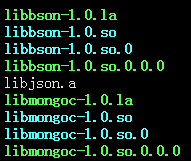
API 用法详见:http://www.cnblogs.com/SZxiaochun/p/5848455.html
注意:
使用库的时候报错:
error while loading shared libraries: libevent-1.4.so.2: cannot open shared object file: No such file or directory
原因:
程序按照默认共享库路径找不到该共享库文件。
解决方法:
详见:http://www.cnblogs.com/SZxiaochun/p/7685499.html
MongoDB C Driver Building on CentOS的更多相关文章
- MongoDB C Driver Building on Windows
一.编译mongodb c driver: 需要先安装OpenSSL:(参见:http://bbs.aircheng.com/read-2222-1) 步骤:(MongoDB步) 1.下载Active ...
- MongoDB C Driver and APIinstances linux MongoDB安装配置
<一,linux平台MongoDB安装配置>在这我们使用的Centos6 yum部署的,你想搞编译,自个干!
- MongoDB Java Driver操作指南
MongoDB为Java提供了非常丰富的API操作,相比关系型数据库,这种NoSQL本身的数据也有点面向对象的意思,所以对于Java来说,Mongo的数据结构更加友好. MongoDB在今年做了一次重 ...
- MongoDB C Driver使用教程
MongoDB C Driver使用教程 转载请注明出处http://www.cnblogs.com/oloroso/ 本指南提供简介 MongoDB C 驱动程序. 在 C API 的详细信息,请参 ...
- windows平台下安装、编译、使用mongodb C++ driver
本博客将记录在Win8.1 ,VS2013环境下编译.配置mongodb C++ driver的流程. 1.下载预备 下载Boost:http://sourceforge.net/projects/b ...
- Ignoring Extra Elements in mongoDB C# Driver
MongoDB删除字段后会报错: Element ... does not match any field or property of class Customer. 需要在实体类增加 [BsonI ...
- Install MongoDB on Red Hat Enterprise, CentOS, Fedora, or Amazon Linux
Install MongoDB on Red Hat Enterprise, CentOS, Fedora, or Amazon Linux¶ Overview Use this tutorial t ...
- mongodb .net driver
1.介绍 The official MongoDB .NET Driver provides asynchronous interaction with MongoDB. Powering the d ...
- Mongodb Java Driver 参数配置解析
要正确使用Mongodb Java Driver,MongoClientOptions参数配置对数据库访问的并发性能影响极大. connectionsPerHost:与目标数据库能够建立的最大conn ...
随机推荐
- [CoreOS]CoreOS 实战:CoreOS 及管理工具介绍
转载:http://www.infoq.com/cn/articles/what-is-coreos [编者按]CoreOS是一个基于Docker的轻量级容器化Linux发行版,专为大型数据中心而设计 ...
- RAID常见问题集锦+底部案例
磁盘阵列(Redundant Arrays of Inexpensive Disks,RAID),有“价格便宜具有冗余能力的磁盘阵列”之意.原理是利用数组方式来作磁盘组,配合数据分散排列的设计,提升数 ...
- js jquery 函数回调
JS 函数回调 $('#btn_update').click(function () { var table_id = $table.bootstrapTable('getSelections')[0 ...
- DIV+CSS网页设计规范
1.网页HTML代码最前面必须包括W3C声明,以便符合标准: 一般网页: <!DOCTYPE html PUBLIC "-//W3C//DTD XHTML 1.0 Transition ...
- 基于jQuery游戏网站焦点图轮播特效
基于jQuery的一款游戏网站焦点图轮播特效.这是一款带进度条定时切换,带缩略图切换的jQuery网站焦点图代码.效果图如下: 在线预览 源码下载 实现的代码. html代码: <cente ...
- vue-router "path" is required in a route configuration
启用了动态路由,一直提示这个错误,页面打开也是空白,后来发现原来是component参数错误. 正确的写法为: component: () => import ('@/views/own-spa ...
- How Not to Crash #6: Properties and Accessors(属性,存储器方法使问题)
How Not to Crash #6: Properties and Accessorshtml, body {overflow-x: initial !important;}html { font ...
- js+jquery检测用户浏览器型号(转)
<!DOCTYPE html PUBLIC "-//W3C//DTD XHTML 1.0 Transitional//EN" "http://www.w3.org/ ...
- 【WPF】软件更新程序的设计思路
目标:客户端程序在启动时,自动联网检查服务端是否有新的版本,有则提示用户更新客户端. 思路: 1.打开Visual Studio,在主体程序的解决方案下再新建一个叫自动更新程序的项目.主体程序的目录是 ...
- Fiddler设置抓取FireFox火狐的包
参考 http://blog.csdn.net/zhoutaohenan/article/details/8477993 亲测有效 Fiddler使用教程 http://blog.csdn.net/o ...