
Unity3D学习笔记(二):个体层次、绝对和局部坐标、V3平移旋转
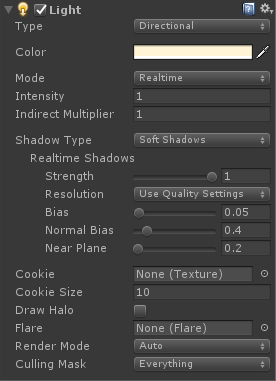
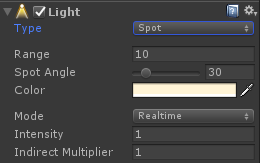
using System.Collections;

using System.Collections.Generic;

using UnityEngine;

public class MyLight : MonoBehaviour

{

    // Use this for initialization

    void Start()

    {

        Light light = GetComponent<Light>();

        light.intensity = ;

        //int[] array = new int[] { 1, 2, 3, 4, 5, 6 };

        if (light != null)

        {

            Debug.Log(light.intensity);

        }

    }

    // Update is called once per frame

    void Update()

    {

    }

}
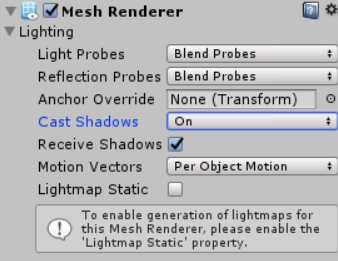
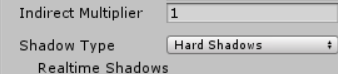
对于单个物体可以在Mesh Renderer中的Cast Shadows选择是否产生阴影,Receive Shadows中选择是否接受阴影;
对于整个地图可以在光源的inspector面板打开和关闭。

using System.Collections;

using System.Collections.Generic;

using UnityEngine;

public class Find_Parent : MonoBehaviour

{

    public GameObject sphere;

    // Use this for initialization

    void Start()

    {

        //如何在整个场景中查找游戏物体

        //查找写成静态方法,是工具,不是某一个对象的方法

        sphere = GameObject.Find("Find_Parent/Sphere");

        Debug.Log(sphere.name);

        //建立父子关系,需要关联transform

        gameObject.transform.parent = sphere.transform;

    }

    // Update is called once per frame

    void Update()

    {

        //不要在Update进行查找,GameObject.Find("Sphere");

        //要建一个全局的sphere初始化

        //移动父物体,子物体也会动

        if (sphere)

        {

            sphere.transform.Translate(new Vector3(, , 0.1f));

            //    //或者

            //    sphere.transform.Translate(Vector3.forward * 0.1f);

        }

    }

}
Unity找到父物体下的子物体
GameObject obj = GameObject.Find("Image Bg");

//首先找到父物体

GameObject zhen = obj.transform.Find("zhen").gameObject;

//然后找到父物体下的子物体
using System.Collections;

using System.Collections.Generic;

using UnityEngine;

public class GetComponent : MonoBehaviour {

       // Use this for initialization

       void Start () {

        Transform trans = GetComponent<Transform>();

        //GetComponent获取组件的方法,加()表执行

        //GetComponent获取不到组件,会返回空引用变量(空指针),在使用的时候,会报空引用异常的错误

        Transform trans = null;

        Debug.Log(trans.position);

        if (trans != null)

        {

            Debug.Log(trans.position);

        }

        //transform

        transform.position = new Vector3(, , );//不能只修改transform.position某个分量的值,需要对transform.position整体重新赋值,才会有返回值

        Debug.Log(transform.position);

    }

    // Update is called once per frame

    void Update () {

       }

}
using System.Collections;

using System.Collections.Generic;

using UnityEngine;

public class AddComponent : MonoBehaviour {

    // Use this for initialization

    void Start () {

        Light light = gameObject.AddComponent<Light>();

        light.intensity = ;

        light.type = LightType.Spot;

        light.color = Color.green;

        Destroy(light, 5.0f);

    }

    // Update is called once per frame

    void Update () {

       }

}
using System.Collections;

using System.Collections.Generic;

using UnityEngine;

public class Destroy : MonoBehaviour {

       // Use this for initialization

       void Start () {

        AudioSource audio = GetComponent<AudioSource>();

        if (audio)//audio是传进来的引用

        {

            Destroy(audio);

            //5秒后销毁audio引用

            Destroy(audio, );

            //5秒后销毁Lesson3脚本组件

            Destroy(this, );

        }

    }

    // Update is called once per frame

    void Update () {

       }

}
using System.Collections;

using System.Collections.Generic;

using UnityEngine;

public class Move : MonoBehaviour

{

    public float moveSpeed = 0.5f;

    // Use this for initialization

    void Start()

    {

        // transform.position = new Vector3(3.0f, 3.0f, 3.0f);//不要放在循环里用,调用一次就够了

    }

    // Update is called once per frame

    void Update()

    {

        if (transform.position.z < 10.0f)

        {

            transform.Translate(Vector3.forward * moveSpeed * Time.deltaTime);

        }

        else

        {

            transform.position = new Vector3(3.0f, 3.0f, 3.0f);

        }

        //每帧z轴都移动0.1f,当前坐标加上新坐标,再返回给原坐标

        transform.position += new Vector3(, , 0.1f);

        //Translate平移

        transform.Translate(new Vector3(, , 0.1f));

        //自定义myTranslate

        myTranslate(new Vector3(, , 0.1f));

    }

    void myTranslate(Vector3 translation)

    {

        transform.position += new Vector3(, , 0.1f);

    }

}
using System.Collections;

using System.Collections.Generic;

using UnityEngine;

public class MoveControl : MonoBehaviour

{

    private float moveSpeed = ;

    // Use this for initialization

    void Start()

    {

    }

    // Update is called once per frame

    void Update()

    {

        if (Input.GetKey(KeyCode.W))

        {

            this.transform.Translate(Vector3.forward * Time.deltaTime * moveSpeed);

        }

        if (Input.GetKey(KeyCode.S))

        {

            this.transform.Translate(Vector3.back * Time.deltaTime * moveSpeed);

        }

        if (Input.GetKey(KeyCode.A))

        {

            this.transform.Translate(Vector3.left * Time.deltaTime * moveSpeed);

        }

        if (Input.GetKey(KeyCode.D))

        {

            this.transform.Translate(Vector3.right * Time.deltaTime * moveSpeed);

        }

    }

}
using System.Collections;

using System.Collections.Generic;

using UnityEngine;

public class position_eulerAngles : MonoBehaviour {

       // Use this for initialization

       void Start () {

       }

       // Update is called once per frame

       void Update () {

        transform.position += Vector3.back * 0.05f;

        transform.eulerAngles += Vector3.up;

    }

}
using System.Collections;

using System.Collections.Generic;

using UnityEngine;

public class Rotate : MonoBehaviour

{

    // Use this for initialization

    void Start()

    {

    }

    // Update is called once per frame

    void Update()

    {

        //旋转

        //欧拉角

        transform.eulerAngles += new Vector3(, , 0.1f);

        transform.eulerAngles += Vector3.up;

        //旋转的API是Rotate

        transform.Rotate(Vector3.up);

    }

}
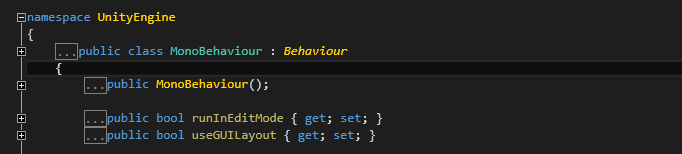
Behaviour继承于Component,Component是所有组件的基类,enabled:组件是否激活

Object是Component的基类,组件的本质是Object类

GetComponent获取不到组件,会返回空引用变量(空指针),在使用的时候,会报空引用异常的错误

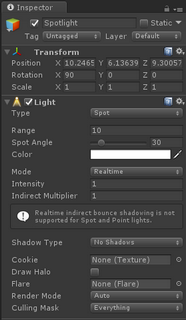
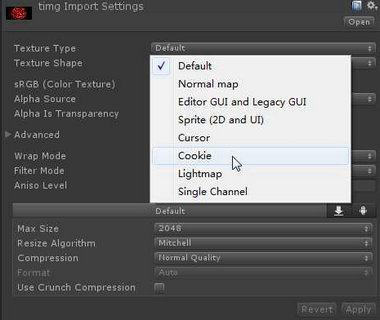
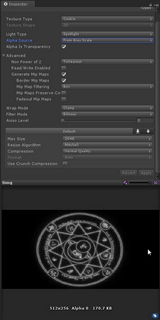
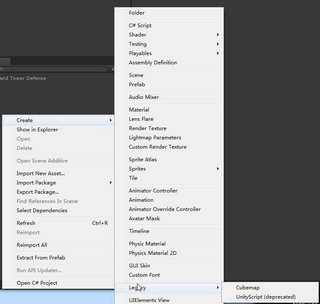
点光源,立方体贴图(六个面可以不一样),cookie
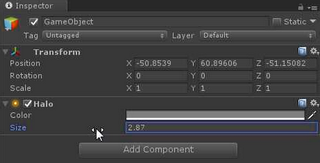
Halo光晕
Layer:给游戏物体添加层
Culing Mask遮罩剔除:光源对那些层(游戏物体)起作用

子物体从父物体拖出,会叠加上父物体的Transform,Position和Rotation做加法,Scale做乘法

F12进入定义,a是alpha通道
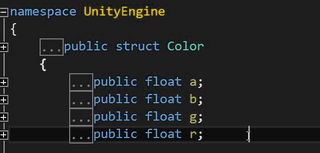
拖拽游戏物体到脚本组件,可以自动赋值
Unity3D学习笔记(二):个体层次、绝对和局部坐标、V3平移旋转的更多相关文章
- 【Qt官方例程学习笔记】Analog Clock Window Example (画笔的平移/旋转/缩放应用)
这个例子演示了如何使用QPainter的转换和缩放特性来简化绘图. 值得学习的: 定时器事件ID检查: 在定时器事件中检查定时器id是比较好的实践. QPainter抗锯齿: We call QPai ...
- 学习笔记(二)--->《Java 8编程官方参考教程(第9版).pdf》:第七章到九章学习笔记
注:本文声明事项. 本博文整理者:刘军 本博文出自于: <Java8 编程官方参考教程>一书 声明:1:转载请标注出处.本文不得作为商业活动.若有违本之,则本人不负法律责任.违法者自负一切 ...
- amazeui学习笔记二(进阶开发4)--JavaScript规范Rules
amazeui学习笔记二(进阶开发4)--JavaScript规范Rules 一.总结 1.注释规范总原则: As short as possible(如无必要,勿增注释):尽量提高代码本身的清晰性. ...
- Unity3D学习笔记12——渲染纹理
目录 1. 概述 2. 详论 3. 问题 1. 概述 在文章<Unity3D学习笔记11--后处理>中论述了后处理是帧缓存(Framebuffer)技术实现之一:而另外一个帧缓存技术实现就 ...
- WPF的Binding学习笔记(二)
原文: http://www.cnblogs.com/pasoraku/archive/2012/10/25/2738428.htmlWPF的Binding学习笔记(二) 上次学了点点Binding的 ...
- AJax 学习笔记二(onreadystatechange的作用)
AJax 学习笔记二(onreadystatechange的作用) 当发送一个请求后,客户端无法确定什么时候会完成这个请求,所以需要用事件机制来捕获请求的状态XMLHttpRequest对象提供了on ...
- [Firefly引擎][学习笔记二][已完结]卡牌游戏开发模型的设计
源地址:http://bbs.9miao.com/thread-44603-1-1.html 在此补充一下Socket的验证机制:socket登陆验证.会采用session会话超时的机制做心跳接口验证 ...
- JMX学习笔记(二)-Notification
Notification通知,也可理解为消息,有通知,必然有发送通知的广播,JMX这里采用了一种订阅的方式,类似于观察者模式,注册一个观察者到广播里,当有通知时,广播通过调用观察者,逐一通知. 这里写 ...
- java之jvm学习笔记二(类装载器的体系结构)
java的class只在需要的时候才内转载入内存,并由java虚拟机的执行引擎来执行,而执行引擎从总的来说主要的执行方式分为四种, 第一种,一次性解释代码,也就是当字节码转载到内存后,每次需要都会重新 ...
- Java IO学习笔记二
Java IO学习笔记二 流的概念 在程序中所有的数据都是以流的方式进行传输或保存的,程序需要数据的时候要使用输入流读取数据,而当程序需要将一些数据保存起来的时候,就要使用输出流完成. 程序中的输入输 ...
随机推荐
- HTML方法
HTTP 方法:GET 对比 POST 两种最常用的 HTTP 方法是:GET 和 POST. 什么是 HTTP ? 超文本传输协议(HTTP)的设计目的是保证客户端与服务器之间的通信. HTTP 的 ...
- orm之路由层
一.简单配置 1.参数 第一个参数是正则表达式(如果要精准匹配:‘^publish/$’),或者加斜杠('^publish/') 第二个参数是视图函数(不要加括号) urlpatterns = [ u ...
- Mac SVN版本从1.9降到1.8
假设系统已安装brew,在终端执行下列命令: brew update brew install subversion18 echo 'export PATH="/usr/local/opt/ ...
- [django]form不清空问题解决
https://www.cnblogs.com/OldJack/p/7118396.html 有时候提交表单后,发现某个字段写错了,但是form的其他字段竟然被清空,这个万万不能接受.所有django ...
- 【Cocos2dx 3.3】图片裁剪
从一个图片集中裁剪出需要的图片时,采用的坐标是屏幕坐标系: 示例如下: 图片:res/Images/grossini_dance_atlas.png ,每个人物大小为85* ...
- Ubuntu 16.04下deb文件的安装
pkg 是Debian Package的简写,是为Debian 专门开发的套件管理系统,方便软件的安装.更新及移除.所有源自Debian的Linux发行版都使用dpkg,例如Ubuntu.Knoppi ...
- python3.4学习笔记(十六) windows下面安装easy_install和pip教程
python3.4学习笔记(十六) windows下面安装easy_install和pip教程 easy_install和pip都是用来下载安装Python一个公共资源库PyPI的相关资源包的 首先安 ...
- [转载]C#操作符??和?:
先看如下代码: string strParam = Request.Params["param"]; if ( strParam== null ) { strParam= ...
- python如何序列化json数据
使用json模块提供的loads方法和dumps方法,可以很方便的载入和读取json数据格式.而在具体实际应用中,我们使用python数据格式是 string.list 或dict等,这类格式如何直接 ...
- python之路----线程
线程概念的引入背景 进程 程序并不能单独运行,只有将程序装载到内存中,系统为它分配资源才能运行,而这种执行的程序就称之为进程.程序和进程的区别就在于:程序是指令的集合,它是进程运行的静态描述文本:进程 ...