
在CentOS7(虚拟机)下通过源码安装Postgresql10以及基本配置
操作系统:CentOS7
安装文件:postgresql-10.0.tar.gz
系统环境:gcc、Python
1:源码安装
[postgres@localhost ~]# tar zxvf postgresql-10.0.tar.gz

[postgres@localhost ~]# mv postgresql-10.0 /usr/local/pgsql/

[postgres@localhost ~]# cd /usr/local/pgsql/

[root@localhost pgsql]# ./configure --prefix=/usr/local/pgsql --without-readline --without-zlib

[root@localhost pgsql]# make

[root@localhost pgsql]# make install
2:添加postgres用户,设置目录权限
[root@localhost ~]# adduser postgres

[root@localhost ~]# passwd postgres

[root@localhost ~]# mkdir -p /usr/local/pgsql/data

[root@localhost ~]# chown -R posgres:root /usr/local/pgsql/

[root@localhost ~]# chown -R postgres:root /usr/local/pgsql/
3:设置环境变量
[root@localhost ~]# su - postgres

[postgres@localhost ~]$ vim ~/.bash_profile

PATH=$PATH:/usr/local/pgsql/bin

[postgres@localhost ~]$ source ~/.bash_profile
4:添加启动服务
()添加启动服务

[root@localhost ~]# cp /usr/local/pgsql/contrib/start-scripts/linux /etc/init.d/postgresql

[root@localhost ~]# chmod u+x /etc/init.d/postgresql

()添加开机自启动

[root@localhost ~]# chkconfig --add postgresql

()启动服务

[root@localhost ~]# service postgresql start

Starting PostgreSQL: ok
5:切换到postgres用户,初始化数据库
[postgres@localhost data]$ /usr/local/pgsql/bin/initdb -D /usr/local/pgsql/data

The files belonging to this database system will be owned by user "postgres".

This user must also own the server process.

The database cluster will be initialized with locale "zh_CN.UTF-8".

The default database encoding has accordingly been set to "UTF8".

initdb: could not find suitable text search configuration for locale "zh_CN.UTF-8"

The default text search configuration will be set to "simple".

Data page checksums are disabled.

fixing permissions on existing directory /usr/local/pgsql/data ... ok

creating subdirectories ... ok

selecting default max_connections ...

selecting default shared_buffers ... 128MB

selecting dynamic shared memory implementation ... posix

creating configuration files ... ok

running bootstrap script ... ok

performing post-bootstrap initialization ... ok

syncing data to disk ... ok

WARNING: enabling "trust" authentication for local connections

You can change this by editing pg_hba.conf or using the option -A, or

--auth-local and --auth-host, the next time you run initdb.

Success. You can now start the database server using:

    /usr/local/pgsql/bin/pg_ctl -D /usr/local/pgsql/data -l logfile start
6:修改postgresql配置
()允许所有连接

[postgres@localhost ~]$ vi /usr/local/pgsql/data/pg_hba.conf

# IPv4 local connections:

host    all             all             0.0.0.0/            trust

()侦听所有连接

[postgres@localhost ~]$ vi /usr/local/pgsql/data/postgresql.conf

listen_addresses = '*'

logging_collector = on
7:启动数据库
[postgres@localhost data]$  /usr/local/pgsql/bin/pg_ctl -D /usr/local/pgsql/data -l logfile start

waiting for server to start.... done

server started
8:设置postgres用户的密码
[postgres@localhost ~]$ psql

psql (10.0)

Type "help" for help.

postgres=# \password

Enter new password:

Enter it again:
9:查看当前数据库列表

10:创建角色、数据库,切换数据库、用户
postgres=# create role test login password 'test';

CREATE ROLE

postgres=# create database testdb with owner=test;

CREATE DATABASE

postgres=# \c testdb;

You are now connected to database "testdb" as user "postgres".

testdb=# \c - test;

You are now connected to database "testdb" as user "test".

testdb=>
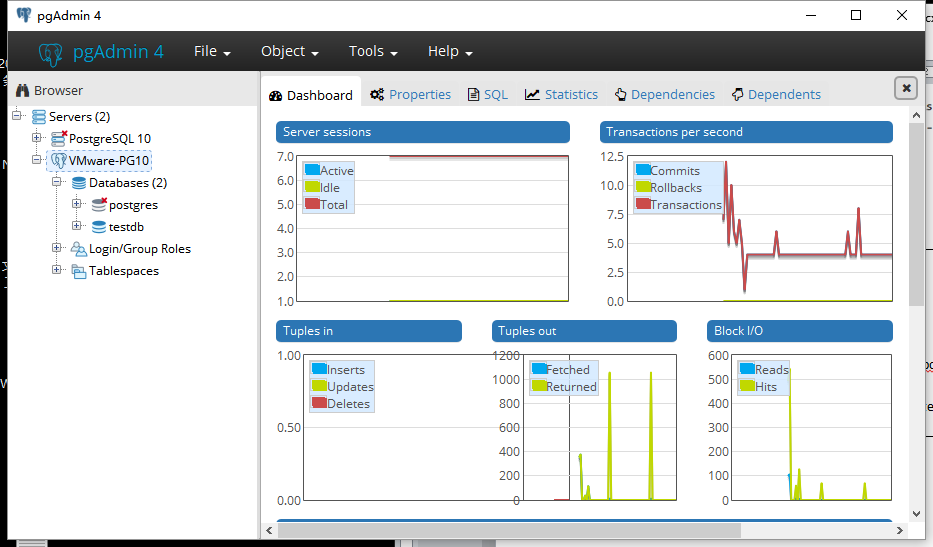
11:本地通过pgAdmin4进行连接
在CentOS7(虚拟机)下通过源码安装Postgresql10以及基本配置的更多相关文章
- Centos7 linux下通过源码安装redis以及使用
下载redis安装包 wget http://download.redis.io/releases/redis-5.0.3.tar.gz 解压压缩包 tar -zxvf redis-.tar.gz y ...
- linux下通过源码安装git
1.移除旧版本git [root@Git ~]# git --version ## 查看自带的版本git version 1.8.3.1 [root@Git ~]# yum remove git ## ...
- Linux下通过源码编译安装程序
本文简单的记录了下,在linux下如何通过源码安装程序,以及相关的知识.(大神勿喷^_^) 一.程序的组成部分 Linux下程序大都是由以下几部分组成: 二进制文件:也就是可以运行的程序文件 库文件: ...
- 通过源码安装PostgresSQL
通过源码安装PostgresSQL 1.1 下载源码包环境: Centos6.8 64位 yum -y install bison flex readline-devel zlib-devel yum ...
- 在centos6.7通过源码安装python3.6.7报错“zipimport.ZipImportError: can't decompress data; zlib not available”
在centos6.7通过源码安装python3.6.7报错: zipimport.ZipImportError: can't decompress data; zlib not available 从 ...
- Ubuntu 14.04 卸载通过源码安装的库
cd cere-solvermkdir buildcd buildcmake ..sudo makesudo make install 卸载通过以上方式源码安装的库 再次进入buildsudo mak ...
- 【Git】CentOS7 通过源码安装Git
yum源仓库里的Git版本更新不及时,最新版的Git是1.8.3,但是官方的最新版早已经更新到2.9.5.想要安装最新版本Git,只能下载源码进行安装 建议最好更新git为较新版本,便于使用 1.查看 ...
- Linux下通过源码编译安装程序(configure/make/make install的作用,然后在/etc/profile文件里修改PATH环境变量)
一.程序的组成部分 Linux下程序大都是由以下几部分组成: 二进制文件:也就是可以运行的程序文件 库文件:就是通常我们见到的lib目录下的文件 配置文件:这个不必多说,都知道 帮助文档:通常是我们在 ...
- CentOS7通过源码安装nginx
需要先安装安装环境和库: yum install gcc-c++ yum install -y pcre pcre-devel yum install -y zlib zlib-devel yum i ...
随机推荐
- C++ 继承体系中的名称覆盖
首先一个简单的样例: int x; int f() { double x; cin >> x; return x; } 在上述代码中.函数f的局部变量x掩盖了全局变量x.这得从 " ...
- java如何直接返回excel到客户端
既然是web项目首先你得拿到响应才能向外部写出,你得拿到响应对象response,1.添加如下两行代码response.setContentType("application/vnd..ms ...
- 每天一个linux命令-ls命令
查看统计当前目录下文件的个数,包括子目录里的. ls -lR| grep "^-" | wc -l[喝小酒的网摘]http://blog.hehehehehe.cn/a/12311 ...
- jquery的radio和checkbox的标签的操作集合
jquery的radio和checkbox的标签的操作集合: $("input[name='radio_name'][checked]").val(); //选择被选中Radio的 ...
- Gerrit代码审查工具
1 Gerrit简介 Gerrit,一种免费.开放源代码的代码审查软件,使用网页界面.利用网页浏览器,同一个团队的软件程序员,可以相互审阅彼此修改后的程序代码,决定是否能够提交,退回或者继续修改. 1 ...
- 开放重定向(Open Redirection)
简介 那些通过请求(如查询字符串和表单数据)指定重定向URL的Web程序可能会被篡改,而把用户重定向到外部的恶意URL.这种篡改就被称为开发重定向攻击. 场景分析 假设有一个正规网站http://ne ...
- 非常精简的Linux线程池实现(一)——使用互斥锁和条件变量
线程池的含义跟它的名字一样,就是一个由许多线程组成的池子. 有了线程池,在程序中使用多线程变得简单.我们不用再自己去操心线程的创建.撤销.管理问题,有什么要消耗大量CPU时间的任务通通直接扔到线程池里 ...
- libcurl库的http get和http post使用【转】
一.libcurl中的http get使用方法 1. 为什么要使用libcurl 1) 作为http的客户端,可以直接用socket连接服务器,然后对到的数据进行http解析,但要分析协议头,实现代理 ...
- [leetcode]Interleaving String @ Python
原题地址:https://oj.leetcode.com/problems/interleaving-string/ 题意: Given s1, s2, s3, find whether s3 is ...
- [leetcode]Gas Station @ Python
原题地址:https://oj.leetcode.com/problems/gas-station/ 题意: There are N gas stations along a circular rou ...